6 Surprising Facts About Running Llama3 8B on NVIDIA A100 PCIe 80GB

The allure of local LLM models is undeniable. Imagine having the power of generative AI at your fingertips, ready to answer questions, write creative content, or translate languages on your own device, without relying on cloud services. But the reality is, running these models locally can be challenging, especially when it comes to performance. We're going to dive deep into the world of local LLM performance, specifically focusing on the NVIDIA A100PCIe80GB and its ability to handle Llama3 8B. You may be surprised by what we uncover!
Introduction: The Quest for Local LLM Performance
LLMs (Large Language Models) are revolutionizing the way we interact with information. These powerful AI models can generate human-like text, translate languages, write different kinds of creative content, and answer your questions in an informative way.
But the sheer size of these models can be a hindrance. Running them locally requires significant computational power and memory. That's where powerful GPUs like the NVIDIA A100PCIe80GB come into play. This powerful GPU is designed to handle demanding tasks, and it makes running LLMs locally a possibility for many developers and enthusiasts.
Performance Analysis: Token Generation Speed Benchmarks
Token Generation Speed Benchmarks: Llama3 8B on A100PCIe80GB
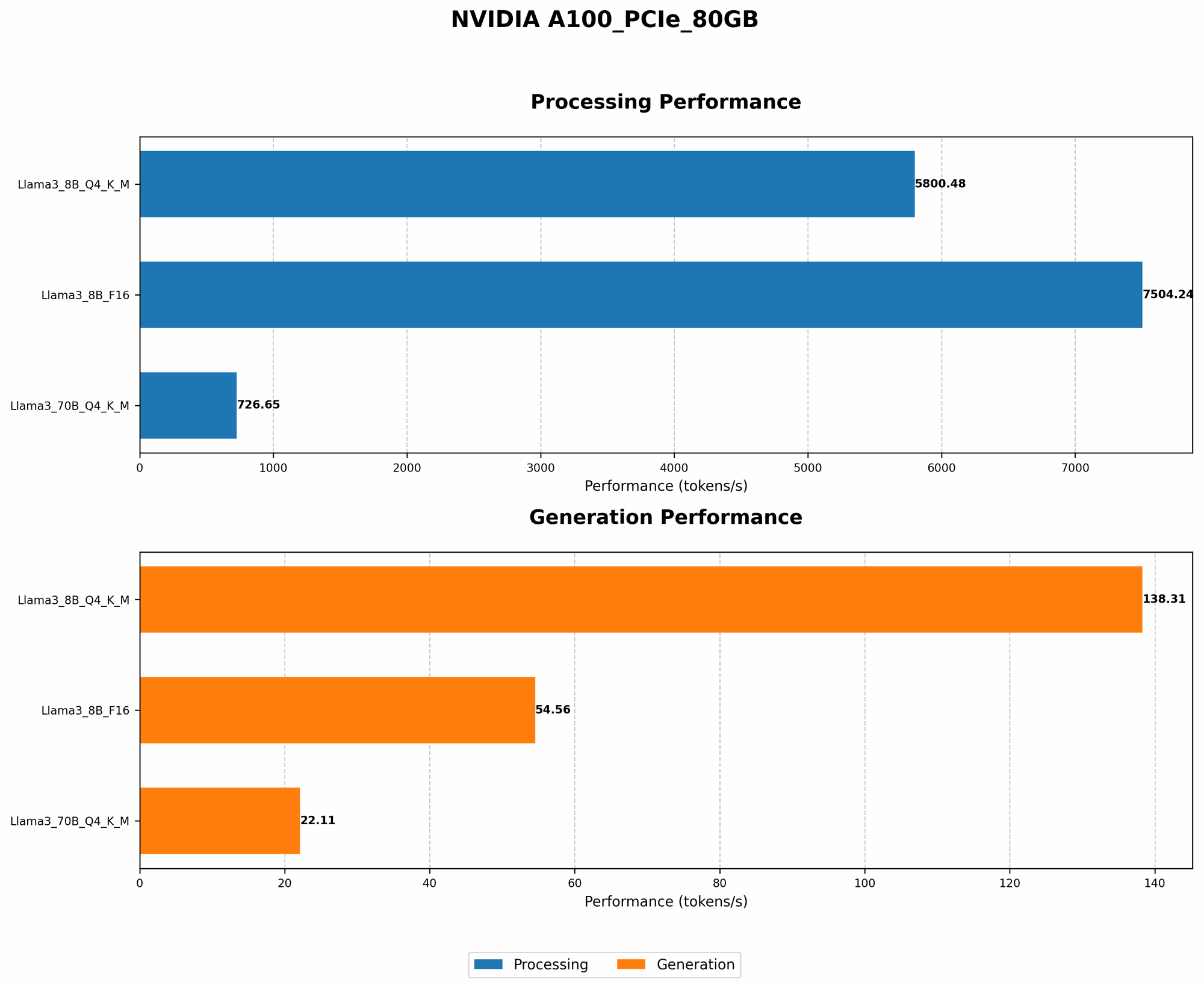
Let's delve into the raw horsepower of the A100PCIe80GB with the Llama3 8B model. We're interested in token generation speeds, a measure of how fast the model can process and generate text. These benchmarks are crucial for understanding the model's performance in real-world applications.
| Model Configuration | Token Generation Speed (tokens/second) |
|---|---|
| Llama3 8B Q4KM | 138.31 |
| Llama3 8B F16 | 54.56 |
Data Interpretation:
- Q4KM (Quantization): This configuration uses a quantization technique called 4-bit quantization. It's like compressing the model's data to save memory and improve performance. This specific configuration uses quantization with a combination of kernel and matrix multiplication.
- F16 (Floating Point): This configuration uses half-precision floating point numbers. It's a common way to represent numbers in computing, but it can impact accuracy compared to higher precision.
Key Takeaways:
- Quantization Matters: Quantization with Q4KM significantly boosts performance compared to F16. This approach helps squeeze more performance out of the GPU.
- Performance Impact of A100: The A100PCIe80GB GPU provides impressive token generation speeds for Llama3 8B, even with the quantized model. This demonstrates the GPU's power for supporting local LLM execution.
- The Power of Q4KM: Quantization can be a game-changer for achieving better performance on LLMs, especially when faced with memory constraints. Think of it like using a more efficient algorithm to solve a complex puzzle, resulting in faster solutions.
Performance Analysis: Model and Device Comparison
Model and Device Comparison: Llama3 8B and 70B
Comparing different model sizes on the same GPU gives us a clearer picture of the performance tradeoffs. Let's see how the A100PCIe80GB handles Llama3 8B and Llama3 70B in the Q4KM configuration.
| Model Configuration | Token Generation Speed (tokens/second) |
|---|---|
| Llama3 8B Q4KM | 138.31 |
| Llama3 70B Q4KM | 22.11 |
Data Interpretation:
The Llama3 70B model is significantly larger than the Llama3 8B model. This means it requires more resources to run, which impacts performance.
Key Takeaways:
- The Size Matters: When working with LLMs, the model size plays a crucial role in performance. Larger models are more complex and consume more resources, leading to slower speeds.
Scaling with A100: Even with the larger Llama3 70B model, the A100PCIe80GB still provides decent performance using Q4KM.
Practical Recommendations: Use Cases and Workarounds
Use Cases for Local LLM Deployment with A100PCIe80GB
The A100PCIe80GB, coupled with the right LLM configuration, opens up exciting possibilities for local deployment:
- Edge AI applications: If you're building real-time applications that require quick responses, like conversational interfaces, chatbots, or personalized recommendations, running smaller LLMs like Llama3 8B on A100PCIe80GB can provide the speed and agility you need.
- Research and Development: Developers and researchers can experiment with different LLM models, test new ideas, and optimize their models locally, without relying on cloud providers.
- Privacy-focused applications: In scenarios where data privacy is paramount, running LLMs locally ensures that sensitive information remains on the device and doesn't leave the user's control.
Workarounds for Performance Challenges
While the A100PCIe80GB offers excellent performance, there are times when you might face challenges:
- Model Size Limitations: If you need to run even larger LLMs, the A100PCIe80GB might not be enough. For larger models, consider exploring cloud services or utilizing GPU clusters.
- Memory Usage: Large LLMs can consume significant memory. If you're faced with memory limitations, consider using techniques like model quantization or pruning to reduce the model's footprint.
FAQs
What is quantization and how does it affect LLM performance?
Quantization is like a clever trick to make LLMs more efficient. Think of it as using smaller "building blocks" to represent the model's data. Instead of using 32-bit floating-point numbers (like storing the weight of an object with high precision), we can use smaller units like 4-bit integers. This reduces the memory footprint and allows the GPU to process data faster.
What are the benefits of running LLMs locally?
Running LLMs locally offers several advantages:
- Reduced latency: You get faster responses and improved user experience since there's no need to send data to the cloud and wait for a response.
- Increased privacy: Your data remains on your device and doesn't travel over the internet, enhancing security and privacy.
- Offline access: You can use the model even when you're offline.
What are some key considerations when running an LLM locally?
- GPU Power: You need a powerful GPU like the A100PCIe80GB to handle the computational demands of LLMs.
- Memory: LLMs require large amounts of memory. Make sure your device has enough RAM to accommodate the model size.
- Model Selection: Choose an LLM that fits your application's requirements in terms of size, performance, and capabilities.
Keywords
LLM, Local LLM, NVIDIA A100PCIe80GB, Llama3 8B, Llama3 70B, Quantization, Q4KM, F16, Token Generation Speed, Performance, GPU, AI, Generative AI, Edge AI, Deep Learning, Artificial Intelligence.