6 Surprising Facts About Running Llama3 8B on Apple M2 Ultra

Introduction
The world of large language models (LLMs) is a fascinating and rapidly evolving landscape. These powerful AI systems, capable of generating human-like text, translating languages, writing different kinds of creative content, and answering questions in an informative way, are changing how we interact with computers. While access to LLMs through cloud services like ChatGPT is readily available, running LLMs locally on your own hardware opens up a whole new world of possibilities, offering greater privacy, faster response times, and potentially lower cost.
This article delves into the fascinating world of running Llama3 8B locally on the powerful Apple M2_Ultra chip, exploring the performance potential and surprising insights that come with this setup. Forget the cloud, we're taking it local!
Performance Analysis: Token Generation Speed Benchmarks
Before we dive into the specific results, let's break down the key terms:
- LLM: A large language model is a type of artificial intelligence trained on a massive amount of text data to understand and generate human-like text.
- Llama3 8B: refers to a specific LLM model, Llama3, with 8 billion parameters. This model is known for its impressive capabilities and relatively efficient size.
- Apple M2_Ultra: The latest and greatest Apple silicon chip, renowned for its powerful GPU and raw processing power.
Token Generation Speed Benchmarks: Apple M1 and Llama2 7B
Token generation speed refers to how fast a model can process text and generate new text based on its training data. Imagine it like typing; the faster you type, the faster your words appear on the screen. In this case, the "words" are individual units of text called tokens, and the "typing" is the LLM generating text.
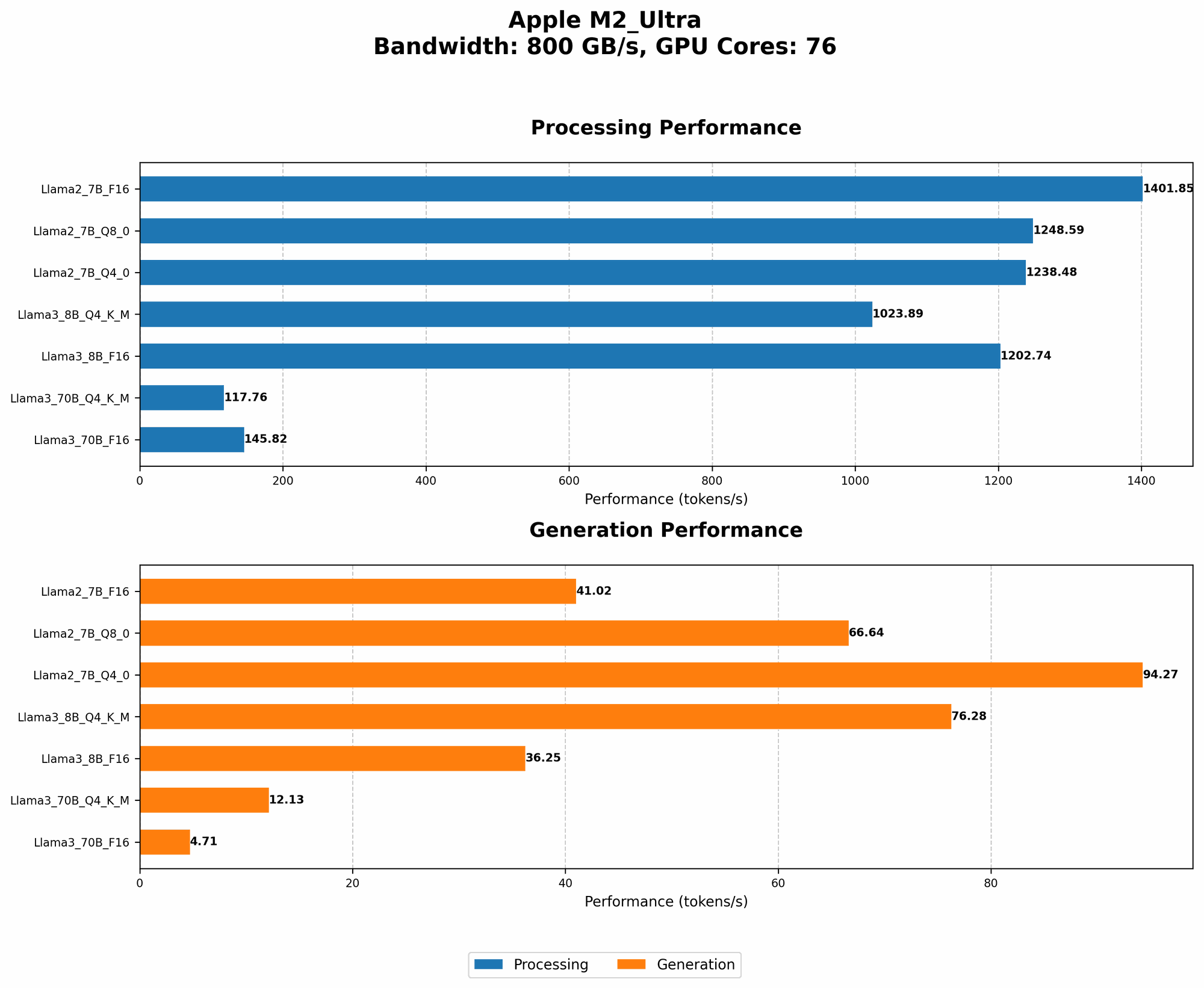
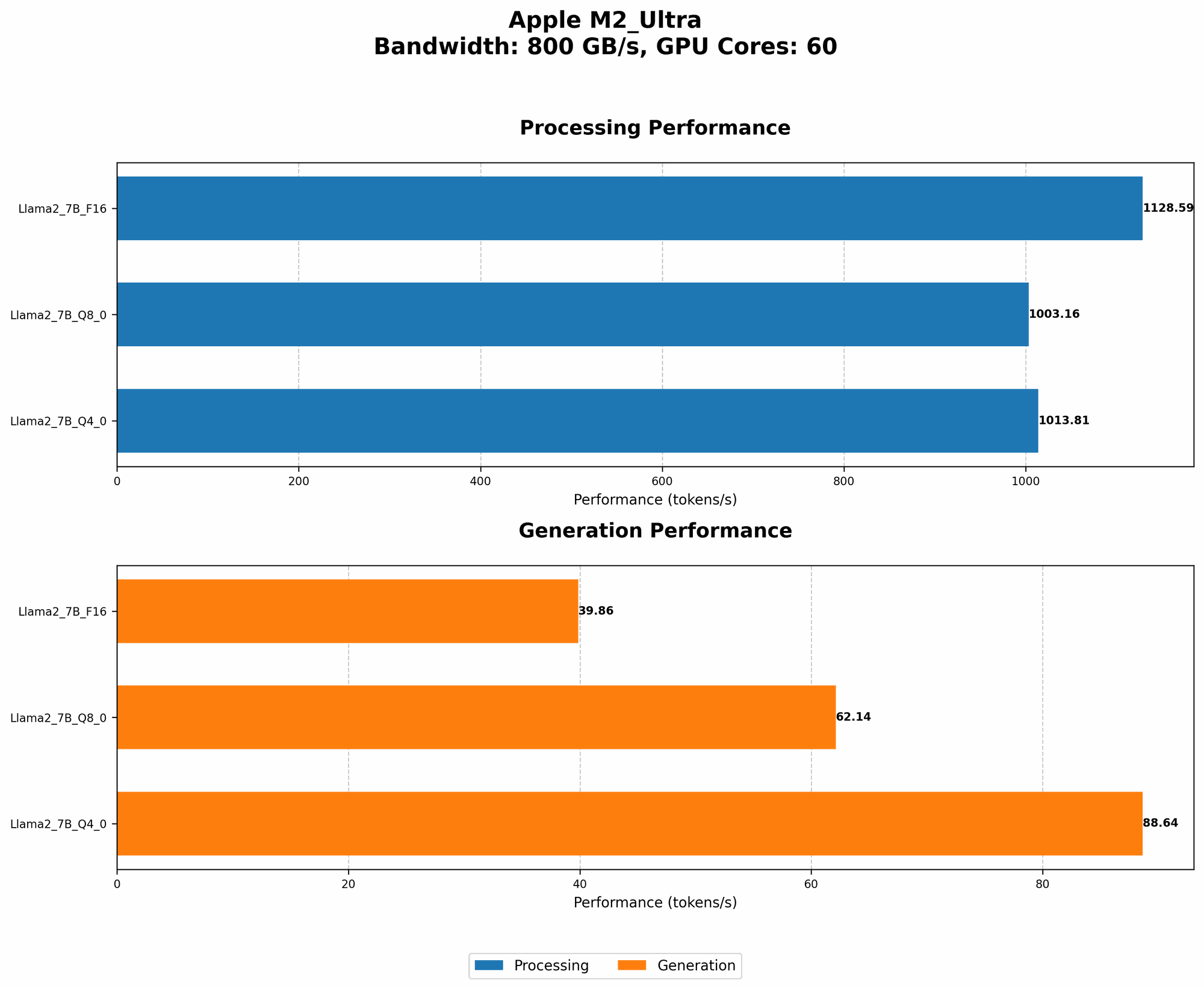
The table below shows the Llama2 7B token generation speed results for different quantization levels on the Apple M2_Ultra:
| Quantization Level | Processing Speed (Tokens/Second) | Generation Speed (Tokens/Second) |
|---|---|---|
| F16 | 1401.85 | 41.02 |
| Q8_0 | 1248.59 | 66.64 |
| Q4_0 | 1238.48 | 94.27 |
Key Takeaways:
- F16 (half-precision floating point) is fastest for processing, but slower for generation. This is because F16 uses more memory bandwidth, resulting in faster processing but slower generation.
- Q8_0 (8-bit quantization) strikes a balance between processing and generation speed. It utilizes reduced precision for faster generation, while maintaining high processing speeds.
- Q4_0 (4-bit quantization) further boosts generation speed at the cost of some processing speed. This is due to even more significant reduction in memory usage, enabling faster generation but slowing down overall computation.
Quantization: Think of quantization as compressing information. Imagine you have a large photo that takes up a lot of space. To save space, you can compress the photo using different levels of compression. The more compressed, the less space it takes, but you might lose some image quality. In LLMs, quantization helps reduce the model's memory footprint by representing it with fewer bits, potentially impacting performance but improving efficiency.
Analogies:
- Think of the processing speed as the speed of a conveyor belt carrying raw materials. The generation speed is the speed of the assembly line producing finished products.
- Higher quantization levels are like using a smaller box to carry the same amount of goods - you can fit more boxes in the same space, but each box can hold less. This can mean faster generation, but potentially slower processing (due to more boxes needing to be loaded and unloaded).
Performance Analysis: Model and Device Comparison
Llama3 8B on Apple M2_Ultra: A Game Changer?
Now let's focus on Llama3 8B, the star of our show, and compare its performance to Llama2 7B.
| Model | Quantization Level | Processing Speed (Tokens/Second) | Generation Speed (Tokens/Second) |
|---|---|---|---|
| Llama3 8B | Q4KM | 1023.89 | 76.28 |
| Llama3 8B | F16 | 1202.74 | 36.25 |
| Llama2 7B | Q4_0 | 1238.48 | 94.27 |
| Llama2 7B | F16 | 1401.85 | 41.02 |
Key Findings:
- Llama3 8B demonstrates remarkable performance, even with the added complexity of its larger size.
- Q4KM quantization levels show a significant improvement in generation speed for Llama3 8B compared to Llama2 7B. This level of quantization uses a combination of techniques like 4-bit quantization and kernel mapping for optimal memory efficiency.
- F16 quantization levels for Llama3 8B are slower in processing but faster in generation compared to Llama2 7B. This suggests that Llama3's architecture might be better optimized for F16 when it comes to generation speed.
Practical Implications:
- Running Llama3 8B locally on the Apple M2_Ultra offers remarkable performance, showcasing the capabilities of this powerful hardware.
- The improved Q4KM quantization for Llama3 8B makes it a compelling choice when generation speed is a priority.
Practical Recommendations: Use Cases and Workarounds
Use Cases for Llama3 8B on M2_Ultra
- Local AI assistant: Imagine having a personal AI assistant running on your own Mac, responding to your prompts instantly and without relying on internet connectivity.
- Content creation: Writers, bloggers, and marketers can leverage Llama3 8B to generate new content ideas, write drafts, or even translate text in real-time.
- Code generation: Developers can use Llama3 8B to help generate code snippets, translate code from one language to another, and get suggestions for improvements.
- Personalized learning: Educators and students can use Llama3 8B to create personalized learning experiences, get answers to complex questions, or even generate study materials.
Workarounds and Considerations
- Memory limitations: While the M2_Ultra is powerful, you might encounter memory limitations when running larger LLMs. This can impact performance especially if you have other applications running in the background.
- Power consumption: Running LLMs locally can be power-intensive, especially for larger models like Llama3 70B.
- Hardware compatibility: Make sure your Mac is compatible with the latest operating system and software required to run the LLM.
FAQ
What are the hardware requirements for running Llama3 8B locally?
To run Llama3 8B locally, you need a system with at least 16GB of RAM and a powerful GPU (preferably an Apple M1 or M2 series). A high-bandwidth SSD is also beneficial for faster data access.
What is the difference between Llama2 and Llama3?
Llama3 is a newer generation of the Llama model, offering improved performance and accuracy, especially in tasks like summarization and text generation.
Is it cheaper to run LLMs locally or in the cloud?
Running LLMs locally can offer cost savings in the long run, especially if you use them frequently, as you avoid paying for cloud services.
What are the security implications of running LLMs locally?
Running LLMs locally can provide better data security as your data remains on your device and is not shared with third-party servers. However, it's essential to ensure you are running a trusted and secure LLM implementation.
Can I run multiple LLMs on a single device?
Yes, but you might need to optimize resource allocation and prioritize which models are most crucial to your needs.
Keywords
Llama3, Llama2, Apple M2Ultra, Apple M1, LLM, Large Language Model, Token Generation Speed, Quantization, F16, Q80, Q4_0, GPU, Processing Speed, Generation Speed, Local AI, Content Creation, Code Generation, Personalized Learning, AI Assistant, Use Cases, Hardware Requirements, Security, Power Consumption, Memory Limitations, Workarounds.