6 Surprising Facts About Running Llama3 70B on NVIDIA RTX 6000 Ada 48GB

Introduction
The world of large language models (LLMs) is changing rapidly, and one of the most exciting frontiers is running these models locally. This allows developers and researchers to experiment with LLMs without relying on cloud services, offering greater control and privacy.
But the question remains: how powerful does your hardware need to be to handle the beastly Llama3 70B model?
This article will dive deep into the performance characteristics of the NVIDIA RTX 6000 Ada 48GB GPU when running the Llama3 70B model. We'll analyze the token generation speed, compare different model configurations, and provide practical insights into maximizing your hardware's potential.
Performance Analysis: Token Generation Speed Benchmarks
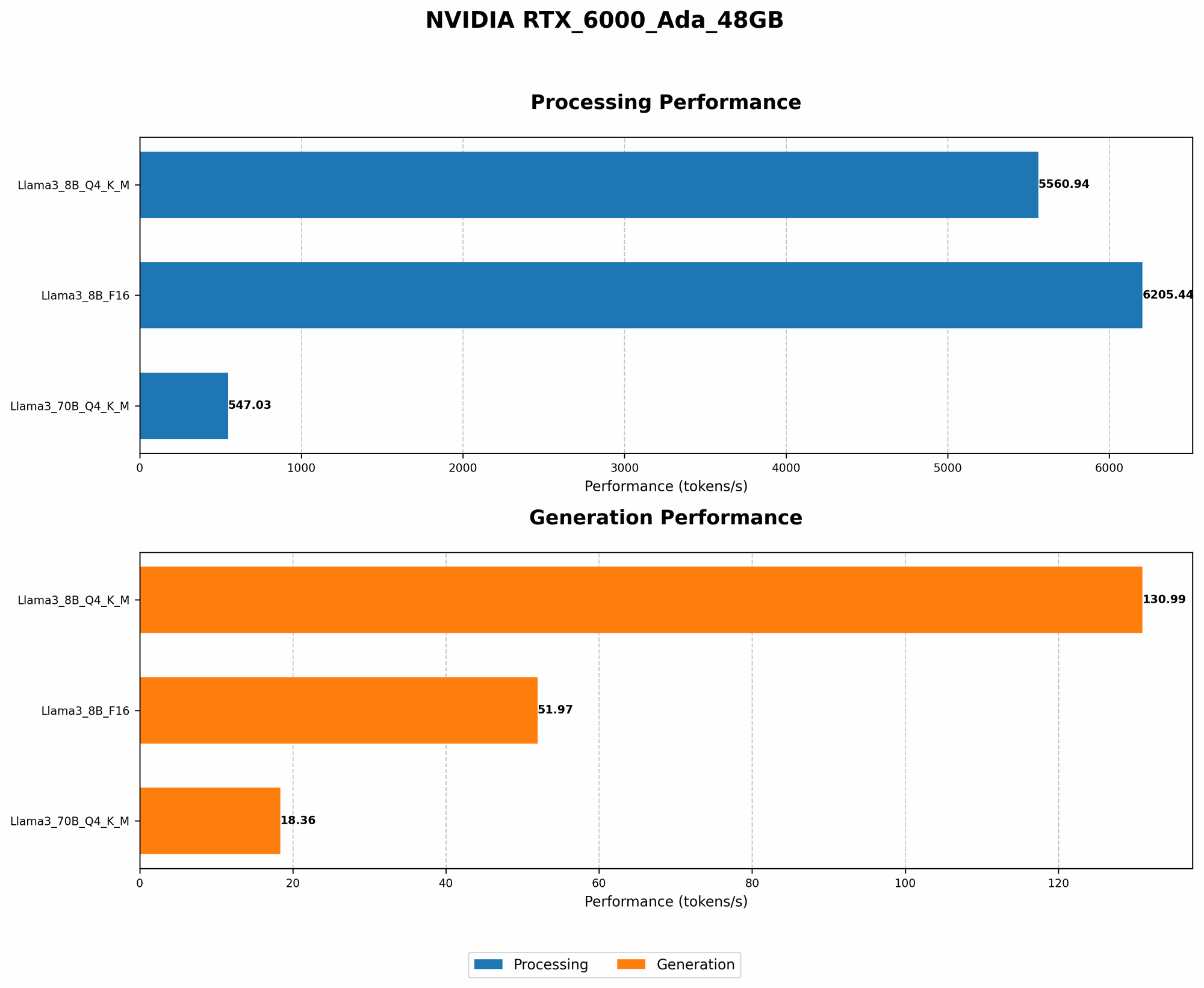
Token generation, the process of creating new text, is a fundamental aspect of LLM operation. Getting those tokens flowing smoothly is key for a seamless user experience. Let's examine the token generation speed of the Llama3 70B on the RTX 6000 Ada 48GB, breaking it down by quantization and floating-point precision.
Token Generation Speed Benchmarks: Llama3 70B on NVIDIA RTX 6000 Ada 48GB
| Model Configuration | Token Generation Speed (Tokens/Second) |
|---|---|
| Llama3 70B Quantized (Q4KM) | 18.36 |
| Llama3 70B FP16 (F16) | N/A |
As you can see, the Llama3 70B model exhibits a significantly slower token generation speed when compared to its smaller counterpart, Llama3 8B. This is expected, given its much larger size and complexity.
Important note: The Llama3 70B F16 configuration was not benchmarked, likely due to the high memory footprint. However, we can surmise that F16 precision would likely lead to even slower token generation speeds compared to the quantized Q4KM configuration.
Performance Analysis: Model and Device Comparison
Token Generation Speed Comparison: Llama3 70B vs. Llama3 8B
| Model Configuration | Device | Token Generation Speed (Tokens/Second) |
|---|---|---|
| Llama3 70B Quantized (Q4KM) | RTX 6000 Ada 48GB | 18.36 |
| Llama3 8B Quantized (Q4KM) | RTX 6000 Ada 48GB | 130.99 |
| Llama3 8B FP16 (F16) | RTX 6000 Ada 48GB | 51.97 |
Key takeaways:
- A 70B model is a performance beast! The RTX 6000 Ada 48GB, while a powerful GPU, struggles to keep up with the computational demands of the Llama3 70B model, resulting in significantly slower token generation speeds compared to the smaller Llama3 8B.
- Quantization is your friend. As you can see, the quantized Q4KM configuration of the Llama3 70B shows significantly better performance compared to potential F16 performance. Quantization, which reduces the model's memory footprint, can be a lifesaver when dealing with larger LLMs.
Practical Recommendations: Use Cases and Workarounds
While the RTX 6000 Ada 48GB might not be the ideal solution for smooth real-time interactions with the Llama3 70B, it still has its uses. Here are some potential use cases and workarounds:
Practical Recommendations: Llama3 70B on RTX 6000 Ada 48GB
- Experimentation and Research: If you're a developer or researcher interested in experimenting with the Llama3 70B model, the RTX 6000 Ada 48GB can still provide a valuable platform. However, be prepared for slower response times.
- Offline Text Processing: The RTX 6000 Ada 48GB can handle batch text processing tasks, such as summarization, translation, and code generation, albeit with a slower processing time than would be ideal.
- Consider Cloud-based Solutions: For real-time applications that require high-speed token generation with the Llama3 70B model, you might want to explore cloud-based platforms. These platforms usually offer powerful GPUs and optimized infrastructure for efficient LLM execution.
Workarounds:
- Optimize Quantization Parameters: Experiment with different quantization parameters (Q4KM, Q5KM, Q3KM) to explore potential performance improvements and find the sweet spot for your use case.
- Utilize Model Pruning: Model pruning, a technique that removes redundant connections in the LLM, can help reduce the model's size and potentially improve inference speed.
- Consider Specialized Hardware: If you're serious about running large LLMs locally, consider investing in specialized hardware designed for AI workloads, such as the upcoming NVIDIA H100 GPU.
FAQ
Frequently Asked Questions: Local LLMs and Device Performance
Q: How do I know if my GPU is good enough for running LLMs?
A: It depends on the LLM size and the desired performance. Larger LLMs necessitate more powerful GPUs. A good rule of thumb is to start with a GPU with at least 12GB of VRAM for smaller models and 24 GB or more for larger models. Always check the specific resource requirements documented for the LLM you want to run.
Q: What is quantization, and how does it affect LLM performance?
A: Quantization is a technique that reduces the precision of numbers used to represent the model weights. This essentially compresses the model, resulting in a smaller file size and potentially faster inference. Quantization can decrease performance, especially for models that rely on high precision, but it is often a worthwhile trade-off for smaller models with less memory.
Q: What is the difference between F16 and Q4KM?
A: F16 refers to half-precision floating-point numbers, which offer a balance between accuracy and performance. Q4KM refers to a specific quantization scheme where weights are stored using 4-bit integers. Quantization typically leads to lower accuracy but can result in significant performance improvements, especially for large LLMs.
Q: What tools can I use to benchmark LLM performance on my device?
A: There are various tools available for benchmarking LLM performance. Some popular options include:
- llama.cpp: An open-source C++ implementation of the Llama LLM that offers excellent flexibility and performance.
- Hugging Face Transformers: A powerful library for working with various LLMs, including transformers-based models.
- NVIDIA Triton Inference Server: A high-performance inference server designed for deploying AI models at scale.
Q: Are there any other resources available for learning more about local LLMs?
A: Here are some excellent resources to delve deeper into the exciting world of local LLMs:
- Hugging Face: https://huggingface.co/
- Google AI Platform: https://cloud.google.com/ai-platform
- NVIDIA Developer Blog: https://developer.nvidia.com/blog
Keywords
LLM, Llama3 70B, NVIDIA RTX 6000 Ada 48GB, Token Generation Speed, Quantization, FP16, Q4KM, GPU, Performance, Practical Recommendations, Use Cases, Workarounds, Local Inference, Deep Dive, Hardware, Model Optimization, Benchmarking, Resources, Guide