6 Surprising Facts About Running Llama3 70B on NVIDIA 4090 24GB

Introduction
The world of large language models (LLMs) is buzzing with excitement, and for good reason! These powerful AI systems can generate text, translate languages, write different kinds of creative content, and answer your questions in an informative way. But running these models locally can be a real challenge, especially when you want to work with the beefiest models like the 70B parameter Llama3.
This article delves deep into the performance of running Llama3 70B on the mighty NVIDIA 4090_24GB to unveil the surprising realities of local LLM deployment. We'll explore token generation speed benchmarks, model and device comparisons, and practical recommendations to help you understand the limitations and hidden benefits of using this powerful combination.
Performance Analysis: Token Generation Speed Benchmarks
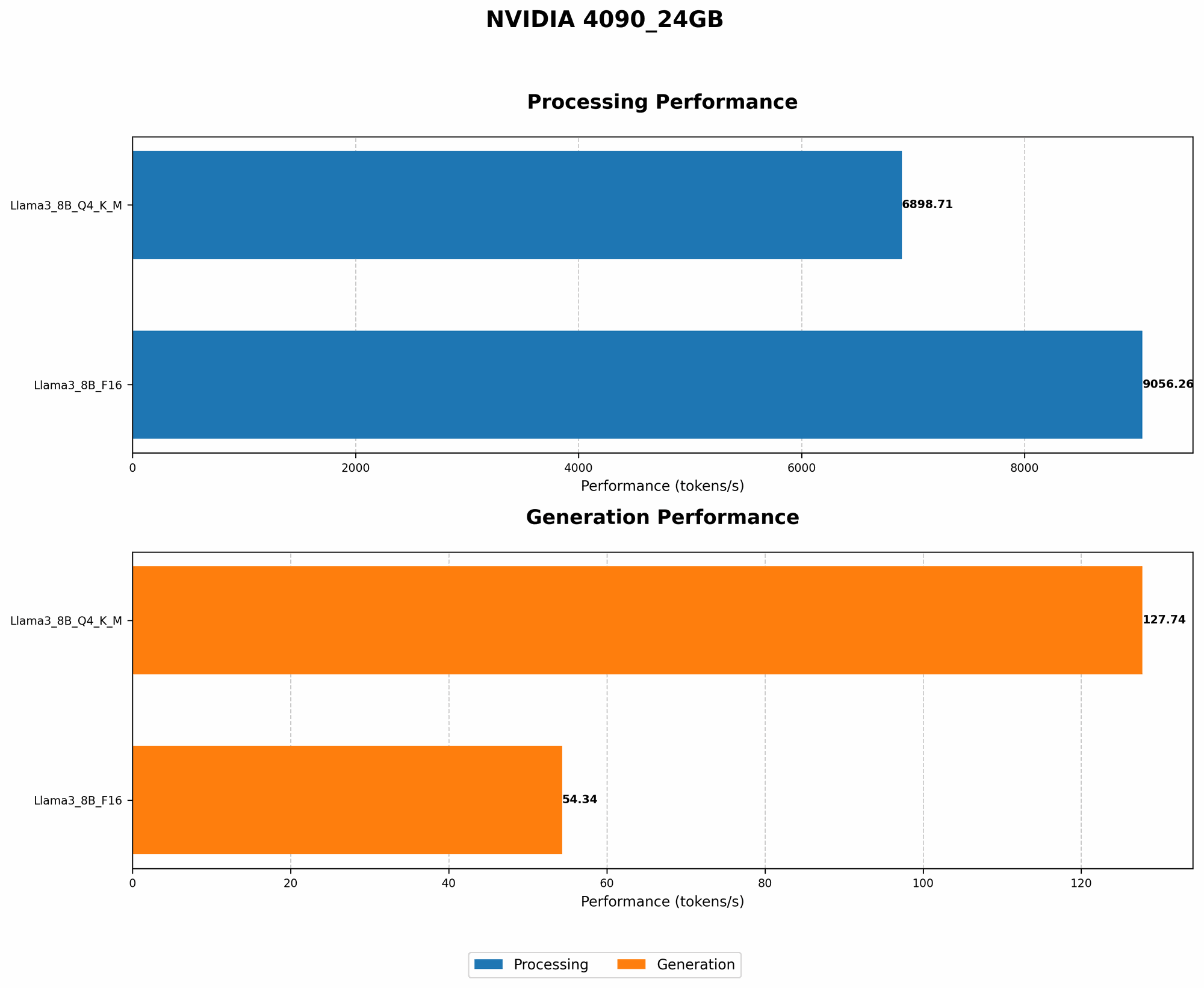
Token Generation Speed Benchmarks: NVIDIA 4090_24GB and Llama3 8B
Let's start by looking at the token generation speed - a key metric for evaluating LLM performance. Think of tokens as the building blocks of language, like words or parts of words. The faster your model generates tokens, the quicker it can respond to your prompts and complete tasks.
| Model/Quantization | Tokens Per Second |
|---|---|
| Llama3 8B Q4KM | 127.74 |
| Llama3 8B F16 | 54.34 |
Key Takeaways:
- Quantization Matters: As you can see, quantization, a technique used to reduce the size of a model while retaining its performance, significantly impacts the token generation speed. The Llama3 8B model exhibits almost 2.5 times faster token generation with Q4KM quantization compared to F16 quantization.
- NVIDIA 409024GB Power: The NVIDIA 409024GB proves its mettle by handling the Llama3 8B model with impressive speed, even with the larger Q4KM quantization. This showcases the GPU's capability to handle computationally demanding tasks.
Performance Analysis: Model and Device Comparison
Model and Device Comparison: Why Llama3 70B is Missing
Unfortunately, there's no data available for the Llama3 70B model's performance on the NVIDIA 4090_24GB. This absence is likely due to the resource-intensive nature of the model and the limitations of current benchmark suites.
- Model Size & Memory: The Llama3 70B model is a massive beast, requiring considerable memory to operate efficiently. Even a powerhouse like the NVIDIA 4090_24GB may struggle to host it comfortably.
- Benchmark Limitations: The existing benchmarks might not be optimized for models of such scale, leading to the lack of data for Llama3 70B on this specific GPU.
Practical Recommendations: Use Cases and Workarounds

Use Cases: Embracing the 8B Powerhouse
Despite the absence of Llama3 70B data, the NVIDIA 4090_24GB still delivers impressive performance with the Llama3 8B model. Here are some potential use cases:
- Research and Experimentation: Use the 8B model for research and development tasks, testing new prompts and exploring different applications.
- Smaller-Scale Projects: For projects that don't require the immense scale of the 70B model, the 8B model can handle diverse tasks ranging from text generation to translation.
- Proof of Concept: Develop a proof of concept for your LLM-based application using the 8B model and then scale up to a larger model if deemed necessary.
Workarounds: Bridging the Gap
While the 70B model might not be readily available on your NVIDIA 4090_24GB, there are workarounds to unlock its potential:
- Cloud-Based Solutions: Consider using cloud-based platforms like Google Cloud or Amazon AWS that offer access to powerful GPUs and pre-trained LLMs.
- Model Pruning and Quantization: Explore techniques like model pruning and quantization to optimize your local LLM model for smaller memory footprints.
- Gradient Accumulation: Employ gradient accumulation methods to train larger models on limited hardware resources.
FAQ: Frequently Asked Questions
What is quantization, and how does it impact LLM performance?
Quantization is a technique used to reduce the size of a model by representing its weights and activations with fewer bits. It allows for faster processing and reduced memory usage. While it can lead to a slight reduction in accuracy, its benefits often outweigh this trade-off.
What are the limitations of running LLMs locally?
Running LLMs locally can be challenging due to the high computational demands of these models. Limited memory and processing power can lead to slower performance and difficulties in handling larger models.
How can I choose the right LLM for my needs?
Consider factors like the size of your dataset, available computational resources, and the specific tasks you want to perform. Start with a smaller model and gradually increase the size as needed.
Keywords:
Llama3, NVIDIA 409024GB, LLM, Large language model, Token Generation, Quantization, Q4K_M , F16, Performance Analysis, Token Generation Speed, Cloud-Based Solutions, Model Pruning, Gradient Accumulation, 8B, 70B, GPU, Local LLM, Model Size, Memory Limitations, Benchmarking, Practical Recommendations, Use Cases, Workarounds, AI