6 RAM Optimization Techniques for LLMs on Apple M1 Pro

Introduction: The Power of LLMs on Your Mac
Large Language Models (LLMs) are revolutionizing the way we interact with computers. From generating creative text to translating languages, these powerful AI models are changing the world. But running these models locally can be demanding, especially on resource-constrained devices like Macs. This article will focus on the Apple M1 Pro chip, a popular choice for developers and enthusiasts, and provide practical RAM optimization techniques to maximize the performance of your LLMs.
Think of RAM as a short-term memory for your computer. Imagine you're trying to solve a complicated puzzle. You need to constantly refer to the pieces you've already assembled, right? RAM is like your workspace where you keep all those pieces readily available. The larger and faster your RAM, the more pieces you can hold at once, leading to a smoother and quicker puzzle-solving experience.
Understanding RAM Consumption and LLM Efficiency
LLMs require significant memory to store their massive parameters, which are essentially the model's knowledge base. The size of the model directly impacts the amount of RAM needed.
Consider this:
- A 7 billion parameter LLM (like the Llama 7B model) is like keeping a dictionary with 7 billion entries handy.
- A 13 billion parameter LLM is like having two dictionaries, each with 6.5 billion entries.
This means that running larger models will require more RAM, and it becomes crucial to optimize how your computer manages memory.
Quantization for Beginners: Like Making Mini Dictionaries
Imagine condensing a massive dictionary into a smaller, more manageable version – that's the essence of quantization. By representing the numbers in the model's parameters with fewer bits, you can reduce the memory footprint without sacrificing too much accuracy.
Imagine you have a dictionary with words written out in full. But you decide to use abbreviations instead. This makes the dictionary smaller, but you still understand the words.
Quantization Techniques: F16, Q80, Q40
- F16: Like a dictionary with words written in short-hand using 16-bit floating-point precision.
- Q8_0: Similar to using 8-bit integers, but with a little sacrifice in accuracy.
- Q4_0: Think of it like using 4-bit integers – a very compact representation, but with more accuracy loss.
Apple M1 Pro: RAM Optimization on Your Mac
Now, let's dive into how to optimize RAM usage for LLMs on the Apple M1 Pro chip. We'll look at some popular Llama 2 models and explore how different quantization techniques affect performance.
Apple M1 Pro: Performance and RAM Consumption
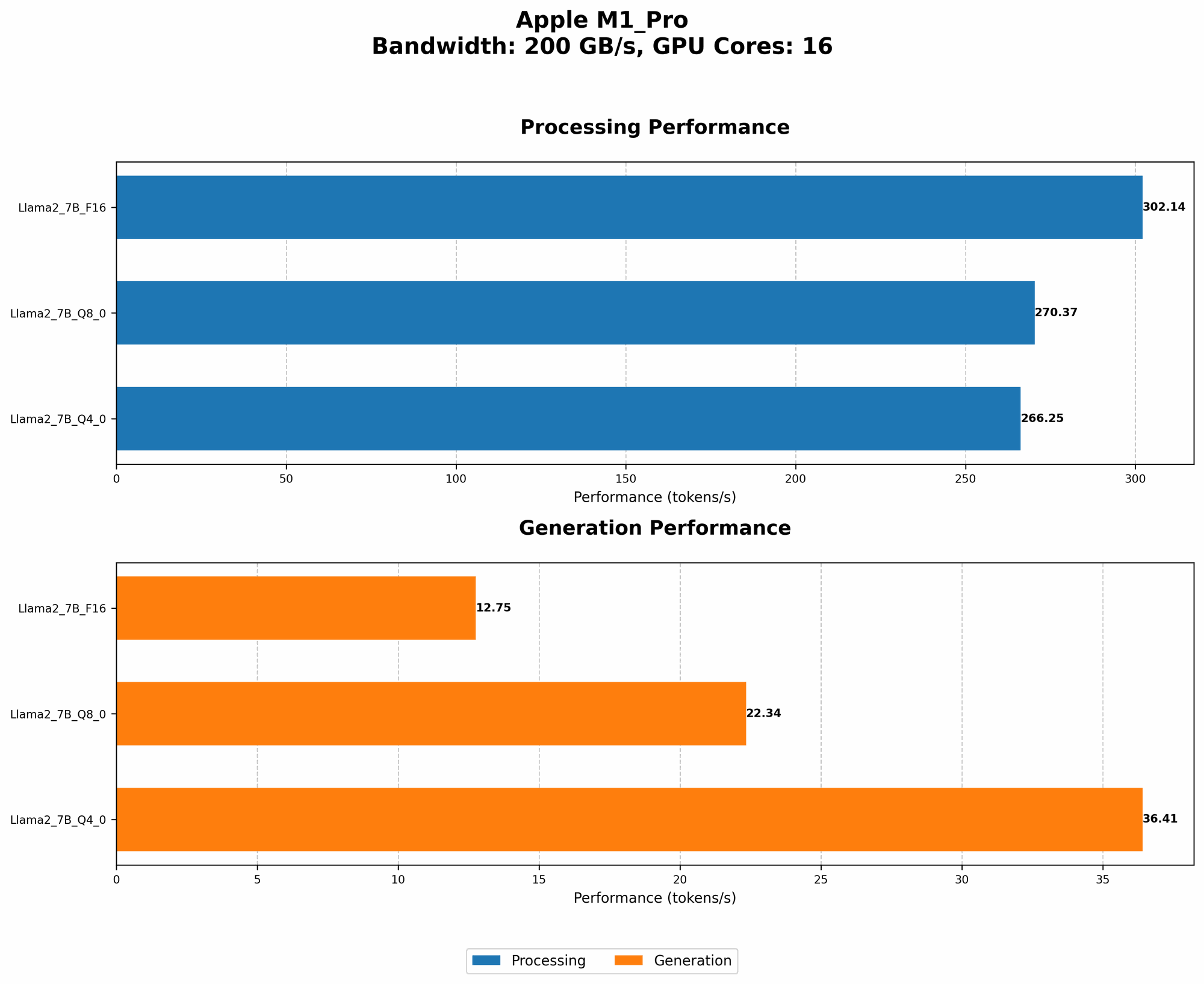
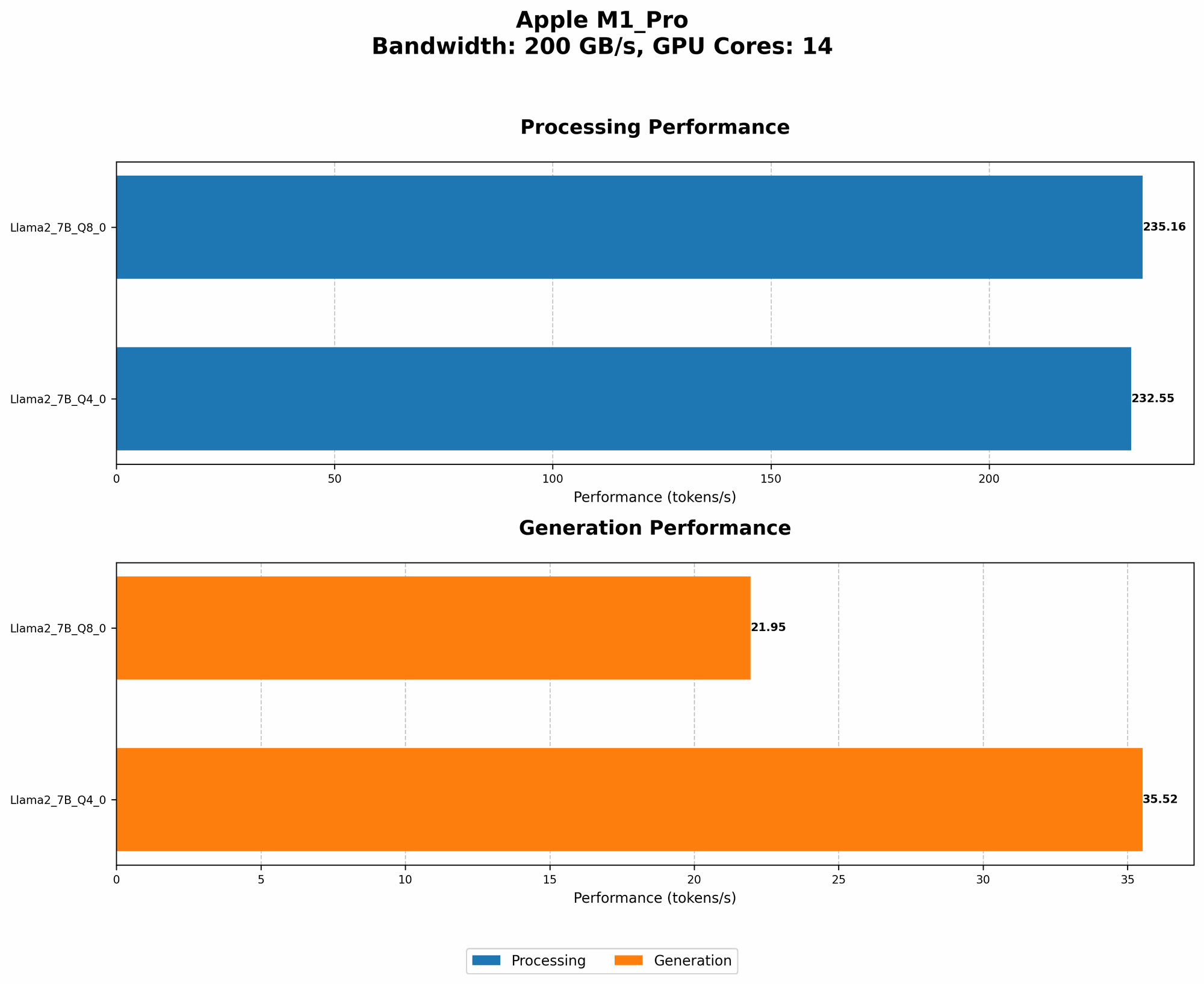
| Model | BW (GB/s) | GPUCores | Llama2 7B F16 Processing (Tokens/s) | Llama2 7B F16 Generation (Tokens/s) | Llama2 7B Q8_0 Processing (Tokens/s) | Llama2 7B Q8_0 Generation (Tokens/s) | Llama2 7B Q4_0 Processing (Tokens/s) | Llama2 7B Q4_0 Generation (Tokens/s) |
|---|---|---|---|---|---|---|---|---|
| M1 Pro (14 Cores) | 200 | 14 | N/A | N/A | 235.16 | 21.95 | 232.55 | 35.52 |
| M1 Pro (16 Cores) | 200 | 16 | 302.14 | 12.75 | 270.37 | 22.34 | 266.25 | 36.41 |
Note: The M1 Pro with 14 cores doesn't support the Llama 2 7B model with F16 quantization.
Observation: The M1 Pro with 16 cores delivers better performance in all quantized versions compared to the 14-core version, thanks to the enhanced parallelism capability. This is expected as the 16 core version has more GPU core to utilize.
RAM Optimization Techniques: A Practical Guide
Here are six techniques to help you optimize your RAM usage for LLMs on Apple M1 Pro:
1. Choose the Right Quantization Technique
F16 vs. Q80 vs. Q40: F16 strikes a good balance between accuracy and memory usage. Q80 reduces the memory footprint further, but might impact accuracy. Q40 offers the smallest memory footprint, but sacrifices accuracy the most.
Experiment: Start with F16 if accuracy is paramount. If RAM is a constraint, consider Q80 or Q40, but be prepared to fine-tune the model to mitigate accuracy loss.
2. Use Lower Precision Models (Smaller Dictionary)
Reduce Model Size: Instead of a full 7B model, try a smaller version if possible. This can significantly reduce memory requirements without sacrificing too much functionality.
Think Smaller: Imagine using a concise encyclopedia instead of a full-length dictionary. You might have less information, but it's still useful and takes up less space.
3. Utilize Model Pruning:
Remove Redundant Knowledge: Just like removing unnecessary words or phrases from a dictionary, model pruning removes redundant connections within the LLM. This leads to a smaller, more efficient model.
Think Efficient: Pruning is like being a librarian, weeding out unnecessary books to make the library more efficient.
4. Optimize System Settings:
- Close Unnecessary Apps: Free up RAM by closing any apps you aren't using.
- Adjust Virtual Memory: Ensure sufficient virtual memory is allocated to your LLM application for smoother operation.
- Disable RAM-Intensive Features: Temporarily disable features like background apps or automatic updates that might consume RAM.
5. Optimize Your Code:
- Efficient Data Structures: Employ efficient data structures (like dictionaries or arrays) to store and access information efficiently.
- Cache Frequently Accessed Data: Store commonly used data in the cache to reduce the need to access RAM frequently.
6. Consider Cloud-Based Solutions:
Offload Processing: For memory-intensive LLM tasks or when running larger models, use cloud-based services like Google Cloud or Amazon Web Services. This allows you to leverage their ample computational resources.
Think Cloud: Just as you might use a library's massive collection instead of your home library, cloud services provide vast computing resources for demanding tasks.
FAQ: Common Concerns and Questions
What are the memory requirements for different LLM models?
The memory requirements vary depending on the model size and quantization technique used. For example, a Llama 2 7B model in F16 format might require around 28GB of RAM while the same model in Q4_0 format might require around 14GB.
Can I run LLMs on my Macbook Air or other Macs?
The Macbook Air might not have enough RAM or GPU power to run larger LLMs efficiently. However, you can explore smaller models or cloud-based solutions. Check the memory specifications of your specific Mac model.
Why is RAM important for LLM inference?
RAM is crucial for storing and accessing the model's parameters and intermediate calculations. Faster RAM allows quicker access to the model's knowledge, improving performance. It's like having a speedy librarian who can find information instantly.
What are some alternatives to the Apple M1 Pro for running LLMs?
Other powerful chips like the Intel Core i9, the M1 Max, or M2 Pro can also handle LLMs effectively.
How can I monitor RAM usage on my Mac?
Use the Activity Monitor app to track RAM usage and identify any memory-intensive processes.
Keywords:
Apple M1 Pro, RAM Optimization, LLM, LLMs, Large Language Model, Llama 2, Quantization, F16, Q80, Q40, Token Speed, Apple M1, Apple M1 Max, Apple M2 Pro, Macbook Air, Machine Learning, AI, Inference, Model Pruning, Virtual Memory, Cloud-Based Solutions, Google Cloud, Amazon Web Services, RAM Usage, Activity Monitor, Data Structures.