6 Power Saving Tips for 24 7 AI Operations on NVIDIA 4080 16GB

Introduction
Imagine running your own ChatGPT-like chatbot, generating creative text, translating languages, or even writing code, all from the comfort of your own home. With the rise of Large Language Models (LLMs) and powerful GPUs like the NVIDIA 4080_16GB, this dream is becoming a reality for many developers and enthusiasts. But running these AI models 24/7 can be a power-hungry affair, leading to hefty electricity bills and an eco-unfriendly footprint.
This guide will equip you with the essential knowledge and practical tips to keep your LLM operations running smoothly on the NVIDIA 4080_16GB while minimizing your energy consumption. We'll delve into strategies like model quantization, efficient inference techniques, and configuration tweaks that can make a significant difference in your power bill and carbon footprint.
Understanding the Power Consumption Problem
Before we dive into power-saving strategies, let's understand why running LLMs on powerful GPUs like the NVIDIA 4080_16GB can be a drain on our energy resources.
- The Size of LLMs: These models are massive, containing billions of parameters that need to be processed for every request. This computation demands a significant amount of processing power.
- GPU Performance: The NVIDIA 4080_16GB is a high-performance beast, designed for demanding tasks like gaming and AI. While its power is essential for achieving impressive performance, it also comes with a hefty energy price tag.
Power-Saving Strategies: 6 Steps to Efficiency
1. Embrace Model Quantization: Shrinking the Model Footprint
Imagine trying to carry a giant suitcase full of books everywhere you go. Quantization is like replacing those heavy books with lighter, condensed versions. The same information is there, but it takes up less space and requires less energy to carry around.
In the world of LLMs, quantization involves reducing the precision of the model's parameters. This might sound like a compromise, but the impact on performance is often negligible, especially for tasks like text generation.
Here's how it works:
Full Precision (FP32): Each parameter is represented with 32 bits of information. Think of it as a hefty tome with all the details.
Reduced Precision (Q4KM): By using specialized techniques like quantization-aware training, we can represent parameters with only 4 bits. This is like condensing the information into a concise summary, but without losing too much of the original meaning.
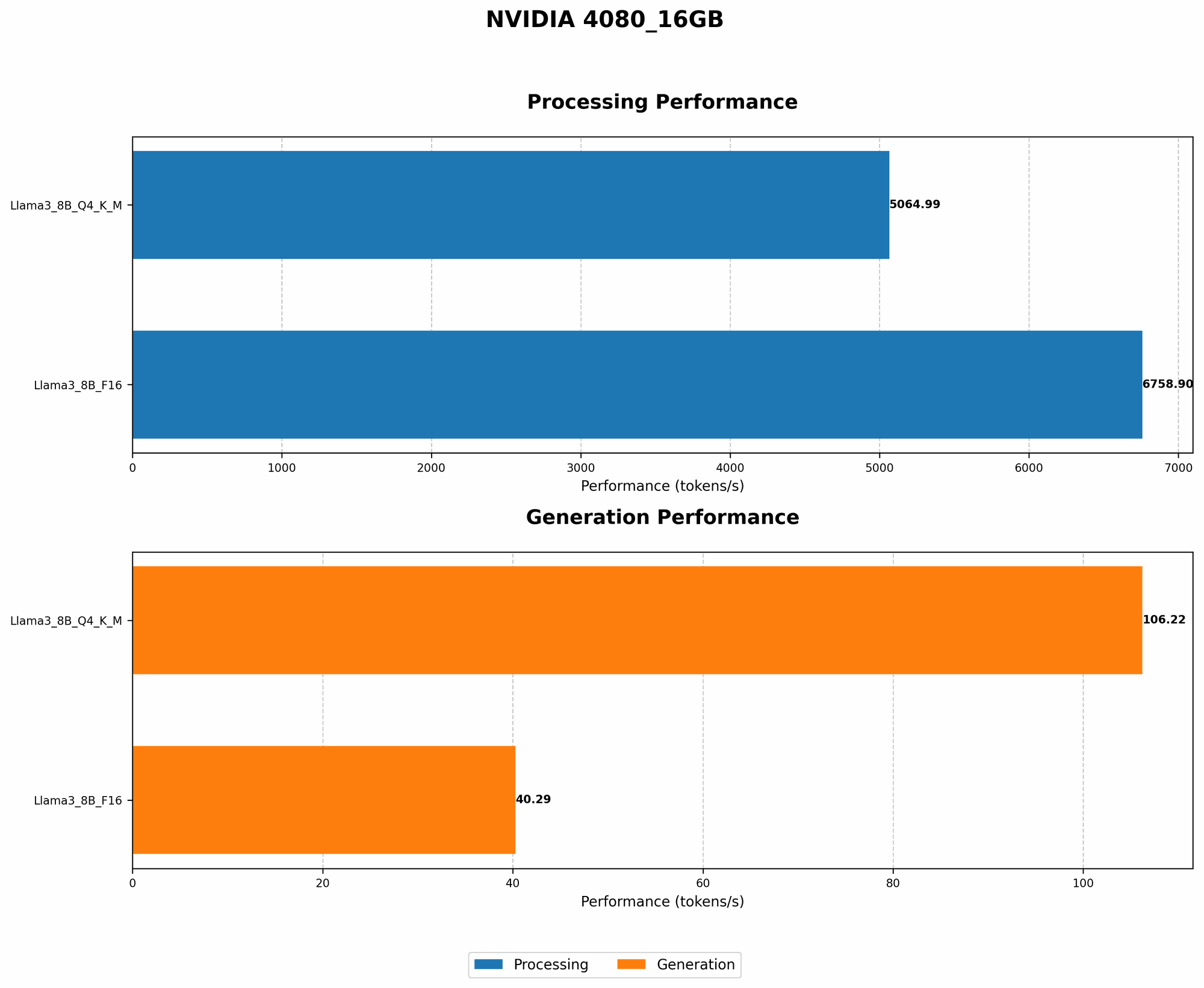
This technique can significantly reduce the memory footprint of the model, leading to faster loading times and less energy consumption. Let's take a look at the difference in token speed generation for the Llama38B model on the NVIDIA 408016GB:
| Model | Token Speed (Tokens/second) |
|---|---|
| Llama38BQ4KM_Generation | 106.22 |
| Llama38BF16_Generation | 40.29 |
As you can see, the Q4KM quantization scheme achieves significantly higher token speed, demonstrating its effectiveness in minimizing energy consumption.
2. Fine-Tuning for Specific Tasks: Tailor the Model for Efficiency
Just like having a specialized tool for a specific job, fine-tuning your LLM for the tasks you need to perform can significantly improve efficiency. Instead of using a generic model that can do a little bit of everything, a fine-tuned model becomes a master of a particular skill.
For instance, if you're building a chatbot for customer service, you can fine-tune a pre-trained LLM on a dataset of customer conversations. This process will make the model excel in understanding and responding to specific queries, improving accuracy and requiring less computational effort.
The key here is to identify the tasks your model needs to perform and tailor it to that specific domain. This targeted approach reduces the unnecessary processing of irrelevant information, leading to reduced energy consumption and faster response times.
3. Leverage GPU Memory Optimization: Making the Most of Available Resources
Imagine trying to fit all your clothes into a small suitcase. If you pack strategically, you can maximize the space and fit everything in. The same principle applies to GPU memory optimization for LLMs.
Memory Allocation: Efficiently allocating the right amount of GPU memory to your model is crucial for optimal performance. Too little memory can result in slowdowns, while too much can be wasteful.
Batching: Instead of processing one request at a time, you can group multiple requests together (like packing multiple items in the same box) and process them simultaneously. This technique allows for efficient use of the GPU's computational resources, leading to faster processing and reduced energy consumption.
Optimized Data Loading: How you load and process data can also have a significant impact on energy efficiency. Using techniques like pre-fetching and data augmentation can ensure that the GPU always has a steady stream of data ready for processing, reducing idle time and improving overall efficiency.
4. Explore Efficient Inference Techniques: Less Energy for the Same Output
Think of inference as the process of "asking questions" to the LLM. Efficient inference techniques involve finding smarter ways to ask these questions, minimizing the computational effort required to get the same answer.
Gradient Accumulation: Instead of updating the model's parameters after every single request, you can accumulate the gradients (the changes needed to improve the model) over multiple requests. This technique can reduce the number of backpropagation steps, leading to significantly lower energy consumption.
Pruning and Sparsity: Pruning and sparsity techniques involve removing redundant connections within the LLM, simplifying the network and reducing the energy required for processing. This is like removing unnecessary words from a sentence, making it more concise and efficient.
Dynamic Batching: Instead of using a fixed batch size for all requests, dynamic batching allows for adjusting the batch size based on the complexity of the request. This technique ensures that the GPU isn't burdened with unnecessary computational work, leading to optimized energy consumption.
5. Configuration Tweaking: Fine-Tuning for Maximum Power Savings
Just like optimizing a car's engine for fuel efficiency, fine-tuning the configuration settings of your LLM and GPU can make a significant difference in energy consumption:
1. GPU Clocks: Adjusting the GPU's clock speeds can be a simple yet powerful way to save energy. For tasks that don't require maximum performance, lowering the clock speed can reduce the amount of power used.
2. CUDA Cores: The CUDA cores are the processing units within the GPU. You can adjust the number of CUDA cores used for specific tasks, potentially reducing energy consumption for simpler requests.
3. Power Limit: The power limit setting on the GPU determines the maximum amount of power it can draw. Lowering this limit can reduce energy consumption, although it might also affect performance.
6. Consider Cloud Solutions: Offloading Computational Demands
Sometimes, the most energy-efficient solution is to offload the computational burden to the cloud. Cloud providers are equipped with massive infrastructure and have optimized their systems for energy efficiency. They can handle the intense demands of running LLMs, while you can focus on building your applications.
Benefits of cloud solutions:
Scalability: The cloud can handle sudden spikes in demand, ensuring your applications are always available.
Cost-effectiveness: Large cloud providers often offer competitive pricing plans, making it a cost-effective option, especially for intermittent or variable workloads.
Sustainability: Cloud providers are increasingly committed to sustainability and are investing in renewable energy sources, contributing to a greener future.
FAQ: Addressing Common Concerns
Q1: Can I use an alternative device for running LLMs instead of the NVIDIA 4080_16GB?
While the NVIDIA 408016GB offers excellent performance, other GPUs like the RTX 4090 can provide even more computational power. However, the NVIDIA 408016GB strikes a balance between performance and affordability.
Q2: What about CPU-based options for running LLMs?
CPUs are generally less powerful than dedicated GPUs for running LLMs. However, for smaller models or tasks that don't require significant computational power, CPUs can be a viable alternative, offering better energy efficiency per unit of performance.
Q3: Is it possible to combine these power-saving strategies?
Absolutely! Combining these strategies can lead to significant energy savings. For example, using quantization, fine-tuning, and GPU memory optimization together can result in a substantial reduction in power consumption.
Q4: Are there any resources available to help me optimize my LLM setup for energy efficiency?
Many resources are available to help you optimize your LLM setup for energy efficiency. Here are a few examples:
The Hugging Face Transformers Library: This library provides a wealth of tools for training, fine-tuning, and deploying LLMs.
The NVIDIA Developer Portal: NVIDIA's website offers extensive documentation and tutorials on optimizing GPU usage for AI tasks.
Research Papers and Blogs: Many researchers and developers share their insights and best practices for energy-efficient LLM deployment.
Keywords:
LLM, Large Language Model, NVIDIA 408016GB, GPU, Power Consumption, Energy Efficiency, Quantization, Fine-tuning, Inference Techniques, GPU Memory Optimization, Configuration Tweaking, Cloud Solutions, Token Generation Speed, Llama38B, Llama370B, Tokens/second, Q4K_M, F16, GPT, ChatGPT, Bard, AI, Machine Learning, Deep Learning, Natural Language Processing, NLP