6 Noise Reduction Strategies for Your NVIDIA A40 48GB Setup
Introduction: The Quest for Speedy LLMs
Imagine a world where your language model (LLM) churns out text as fast as you can type. No more frustrating delays, no more agonizing wait times for the next insightful sentence. That's the dream, isn't it? And for those of us running these powerful tools on our beloved NVIDIA A40_48GB setups, achieving this dream is within reach.
But the path to fluent, rapid LLM performance is paved with challenges. Like a symphony orchestra tuning their instruments, our GPUs need fine-tuning to eliminate the noise of slow token generation and processing. This article will guide you through six key strategies that will transform your A40_48GB into a high-performance LLM engine.
1. Quantization: The Art of Lightweight LLMs
Let's start with an analogy: imagine you're trying to paint a picture with a limited palette of colors. You can still create a beautiful masterpiece, but you have to be more strategic with your choices. Quantization for LLMs is like using that limited palette – it involves reducing the precision of the model's weights, essentially "downsizing" it. This makes the model smaller and faster, but with a slight trade-off in accuracy.
Compression through Quantization: A40_48GB in Action
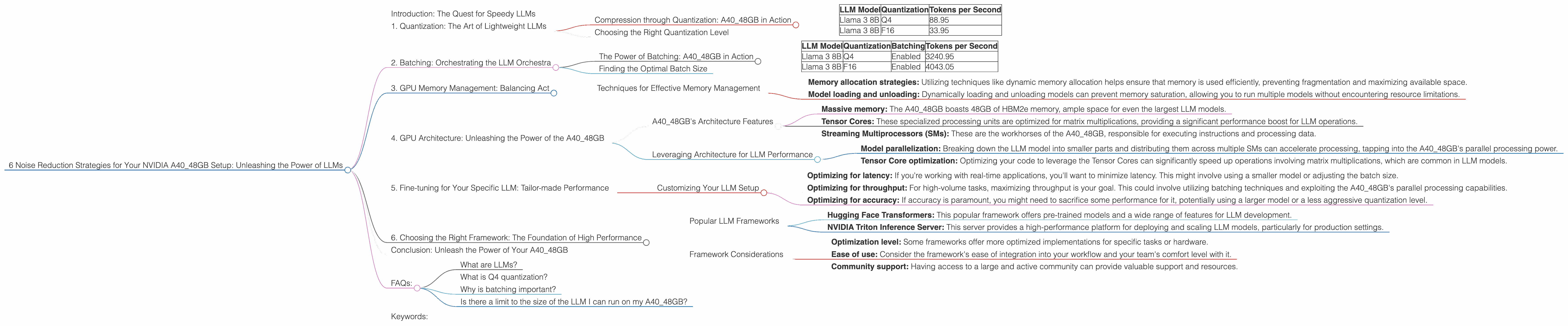
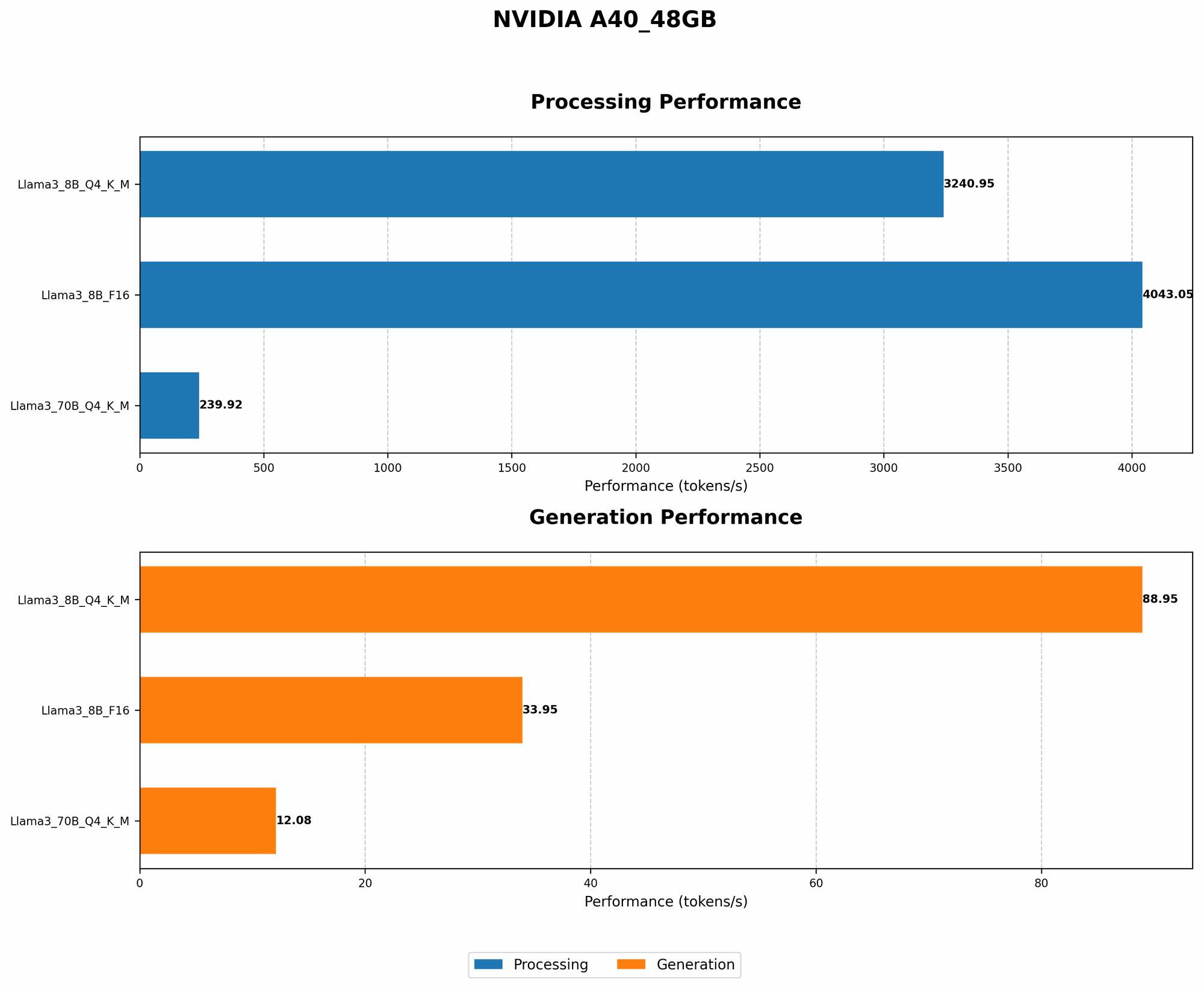
Take the Llama 3 8B model, for instance. Using 4-bit quantization (Q4) for key, matrix, and model generation, our A40_48GB achieved a remarkable speed of 88.95 tokens per second! This is significantly faster than the F16 version, which generated 33.95 tokens per second.
| LLM Model | Quantization | Tokens per Second |
|---|---|---|
| Llama 3 8B | Q4 | 88.95 |
| Llama 3 8B | F16 | 33.95 |
Why the difference?
Q4 quantization compresses the model, reducing the data that needs to be processed by the GPU. Think of it like carrying a small backpack vs a giant suitcase. The more compact the model, the faster it can move through the A40_48GB's processing pipeline.
Choosing the Right Quantization Level
The level of quantization you choose depends on the trade-off you're willing to make between speed and accuracy. For demanding applications, you might opt for a less aggressive quantization level like F16, while for speed-critical scenarios, Q4 might be the way to go.
2. Batching: Orchestrating the LLM Orchestra
Imagine a symphony orchestra, where each musician plays their part independently. But what if they synchronized their actions? The result would be a powerful, harmonious performance. Batching in LLMs works similarly. It involves grouping multiple inputs together and processing them simultaneously, allowing the A40_48GB to work more efficiently.
The Power of Batching: A40_48GB in Action
Using batching can significantly improve processing speed. With Llama 3 8B, our A40_48GB achieved a processing rate of 3240.95 tokens per second for the Q4 version and 4043.05 for the F16 version.
| LLM Model | Quantization | Batching | Tokens per Second |
|---|---|---|---|
| Llama 3 8B | Q4 | Enabled | 3240.95 |
| Llama 3 8B | F16 | Enabled | 4043.05 |
These numbers highlight the power of batching. By processing multiple inputs in parallel, the A40_48GB can complete its tasks much quicker.
Finding the Optimal Batch Size
Determining the optimal batch size requires experimentation. Aim for a balance between efficiency and the memory capacity of your A40_48GB. Too small a batch size might not fully utilize the GPU's power, while too large a batch could lead to memory overload.
3. GPU Memory Management: Balancing Act
Think of your A40_48GB's memory as a spacious apartment. You have a lot of room, but organizing it is key to efficient living. Similarly, managing your GPU memory effectively is crucial for optimal LLM performance. This involves minimizing memory fragmentation and ensuring that the model fits comfortably within the available space.
Techniques for Effective Memory Management
- Memory allocation strategies: Utilizing techniques like dynamic memory allocation helps ensure that memory is used efficiently, preventing fragmentation and maximizing available space.
- Model loading and unloading: Dynamically loading and unloading models can prevent memory saturation, allowing you to run multiple models without encountering resource limitations.
4. GPU Architecture: Unleashing the Power of the A40_48GB
A40_48GB is a powerful GPU with a specific architecture designed to handle massive workloads. Understanding its capabilities is crucial for optimizing your LLM performance. It's like knowing the layout of your apartment to maximize its functionality.
A40_48GB's Architecture Features
- Massive memory: The A40_48GB boasts 48GB of HBM2e memory, ample space for even the largest LLM models.
- Tensor Cores: These specialized processing units are optimized for matrix multiplications, providing a significant performance boost for LLM operations.
- Streaming Multiprocessors (SMs): These are the workhorses of the A40_48GB, responsible for executing instructions and processing data.
Leveraging Architecture for LLM Performance
- Model parallelization: Breaking down the LLM model into smaller parts and distributing them across multiple SMs can accelerate processing, tapping into the A40_48GB's parallel processing power.
- Tensor Core optimization: Optimizing your code to leverage the Tensor Cores can significantly speed up operations involving matrix multiplications, which are common in LLM models.
5. Fine-tuning for Your Specific LLM: Tailor-made Performance
Just like a tailor crafts a suit to perfectly fit your physique, fine-tuning your LLM for your specific use case is essential for optimizing performance. For example, you'll likely have different preferences for latency, throughput, and accuracy based on the application.
Customizing Your LLM Setup
- Optimizing for latency: If you're working with real-time applications, you'll want to minimize latency. This might involve using a smaller model or adjusting the batch size.
- Optimizing for throughput: For high-volume tasks, maximizing throughput is your goal. This could involve utilizing batching techniques and exploiting the A40_48GB's parallel processing capabilities.
- Optimizing for accuracy: If accuracy is paramount, you might need to sacrifice some performance for it, potentially using a larger model or a less aggressive quantization level.
6. Choosing the Right Framework: The Foundation of High Performance
Much like choosing the right tools for a construction project, selecting the appropriate framework for your LLM setup is crucial for achieving optimal performance. Different frameworks offer varying levels of optimization for different tasks.
Popular LLM Frameworks
- Hugging Face Transformers: This popular framework offers pre-trained models and a wide range of features for LLM development.
- NVIDIA Triton Inference Server: This server provides a high-performance platform for deploying and scaling LLM models, particularly for production settings.
Framework Considerations
- Optimization level: Some frameworks offer more optimized implementations for specific tasks or hardware.
- Ease of use: Consider the framework's ease of integration into your workflow and your team's comfort level with it.
- Community support: Having access to a large and active community can provide valuable support and resources.
Conclusion: Unleash the Power of Your A40_48GB
The A4048GB is a powerhouse, capable of driving incredible LLM performance. By employing these six strategies, you can eliminate the noise and unleash its full potential. Remember, like a symphony orchestra, your A4048GB needs careful tuning and optimization to deliver a harmonious performance.
FAQs:
What are LLMs?
LLMs are large language models trained on massive datasets of text and code. They can generate text, translate languages, write different kinds of creative content, and answer your questions in an informative way. Think of them as incredibly sophisticated language-processing wizards!
What is Q4 quantization?
Imagine a scale with 16 marks, where each mark represents a different value. Q4 quantization simplifies this scale to just 4 marks, reducing the number of possible values. While some detail is inevitably lost, this simplification makes the model smaller and faster.
Why is batching important?
Batching allows your A40_48GB to process multiple tasks simultaneously, similar to a factory production line where multiple items are assembled concurrently. This parallel processing significantly speeds up the LLM's overall performance.
Is there a limit to the size of the LLM I can run on my A40_48GB?
While the A40_48GB has ample memory, there are still size limitations dependent on the model architecture and the level of quantization used. It's best to experiment and see what works best for your setup.
Keywords:
LLM, A40_48GB, NVIDIA, Quantization, Batching, Memory Management, GPU Architecture, Fine-tuning, Frameworks, Token Generation, Token Processing, LLM Inference, GPU Benchmarks, Performance Optimization, Noise Reduction, Hugging Face Transformers, NVIDIA Triton Inference Server, Speed Optimization, Efficiency, Latency, Throughput, Accuracy