6 Must Have Tools for AI Development on Apple M3 Pro
Introduction
The Apple M3 Pro chip is a powerful beast, designed to handle demanding tasks like video editing, 3D rendering, and game development. But did you know it's also a fantastic platform for running large language models (LLMs) locally? With the right tools, you can unleash the power of AI on your M3 Pro and build amazing AI applications.
This article will take you on a journey into the world of LLMs on the M3 Pro. We'll explore the key components needed for efficient AI development, dive into the performance differences between various models, and highlight the advantages of running LLMs locally.
Understanding the M3 Pro
The Apple M3 Pro is a powerful silicon chip built on Apple's own architecture. It features a high-performance CPU, a dedicated GPU, and a unified memory system, making it ideal for handling the computational demands of LLMs.
6 Essential Tools for AI Development on M3 Pro
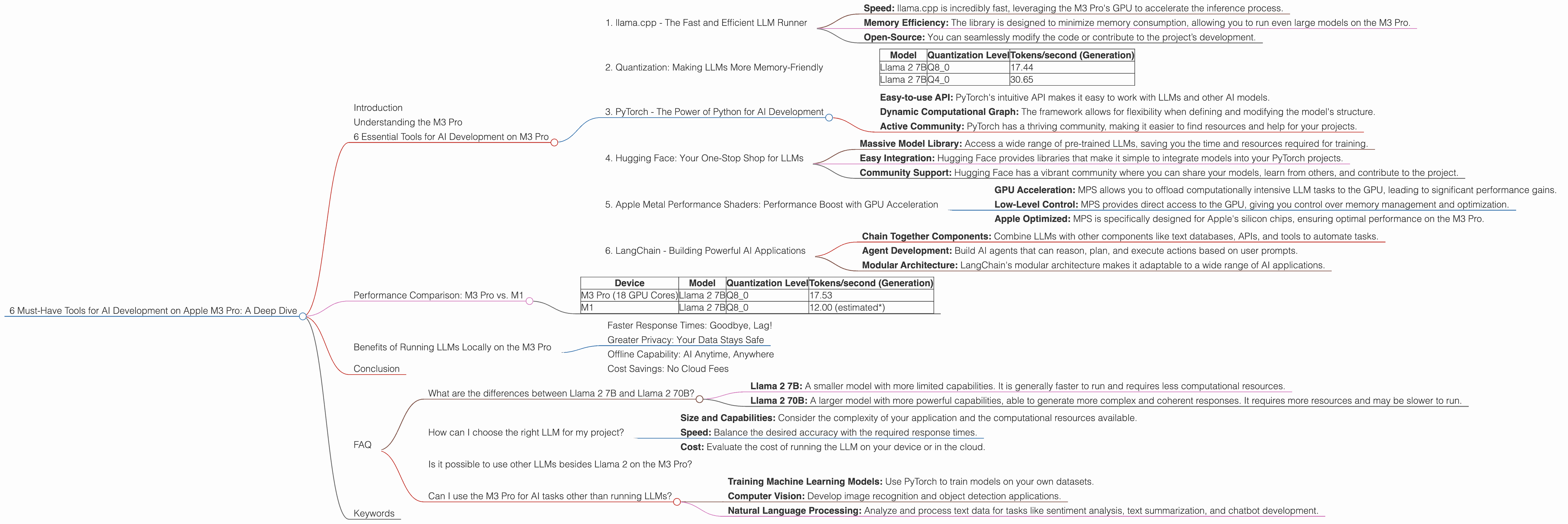
1. llama.cpp - The Fast and Efficient LLM Runner
Llama.cpp is a highly optimized C++ library for running large language models like Llama 2, on various platforms. It's known for its blazing fast performance and efficient memory usage, making it perfect for running LLMs locally on devices like the M3 Pro.
Key Benefits of llama.cpp:
- Speed: llama.cpp is incredibly fast, leveraging the M3 Pro's GPU to accelerate the inference process.
- Memory Efficiency: The library is designed to minimize memory consumption, allowing you to run even large models on the M3 Pro.
- Open-Source: You can seamlessly modify the code or contribute to the project’s development.
2. Quantization: Making LLMs More Memory-Friendly
Think of quantization as a diet for your LLM. It reduces the size of the model by representing its weights with fewer bits, making it lighter but still preserving much of its accuracy.
Quantization on the M3 Pro:
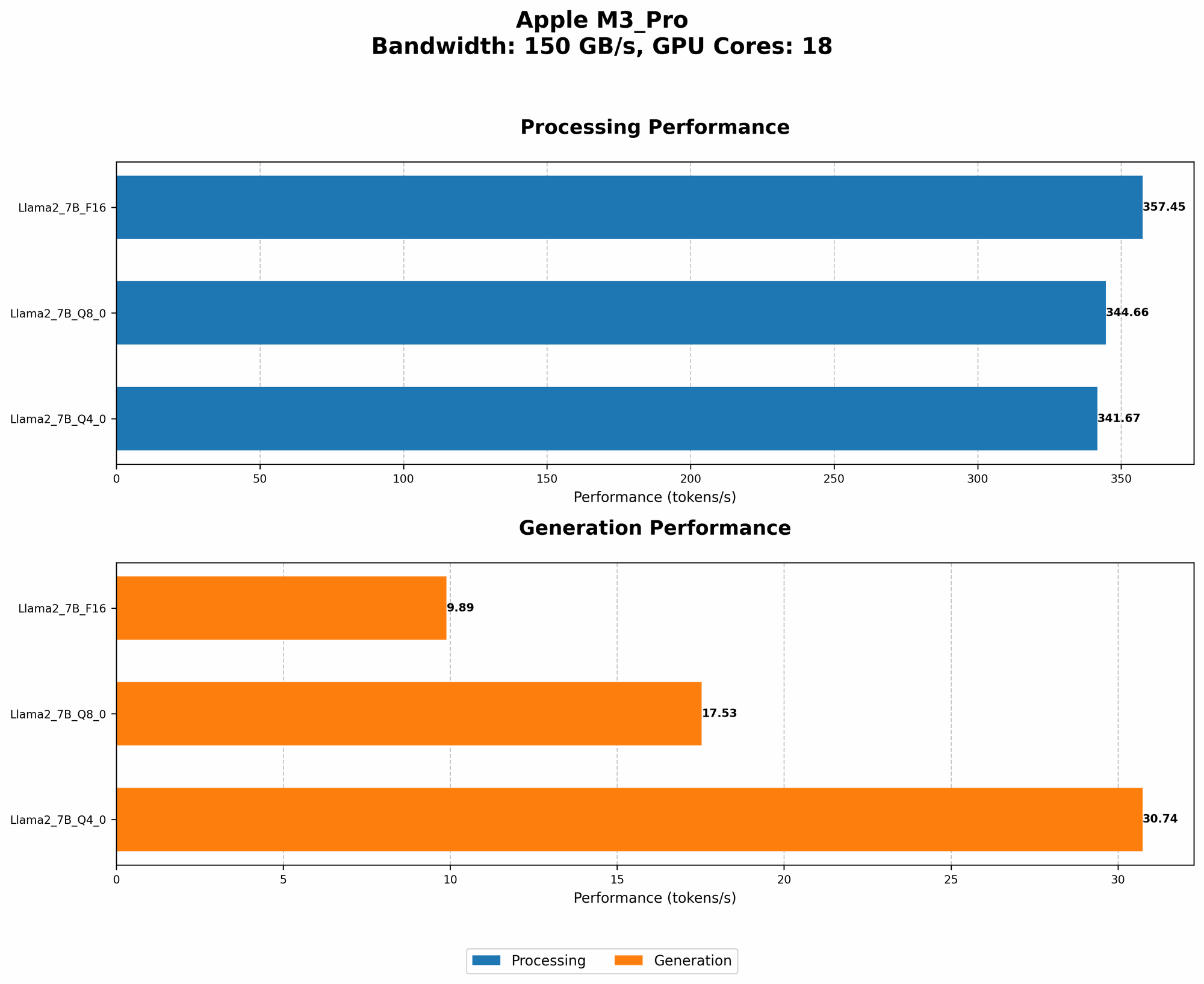
The M3 Pro supports various quantization levels for LLMs, including Q80 and Q40. Lower quantization levels like Q4_0 mean using fewer bits to represent the model's weights, leading to smaller models and faster inference on your M3 Pro.
How it affects performance:
- Q8_0: Offers a good balance between accuracy and inference speed.
- Q4_0: Achieves faster inference times at the cost of potentially lower accuracy.
Example:
Imagine a regular model as a full-course meal, while a quantized model is like a light snack. You can enjoy the snack much faster (faster inference) and it takes up less space than the whole meal (smaller size).
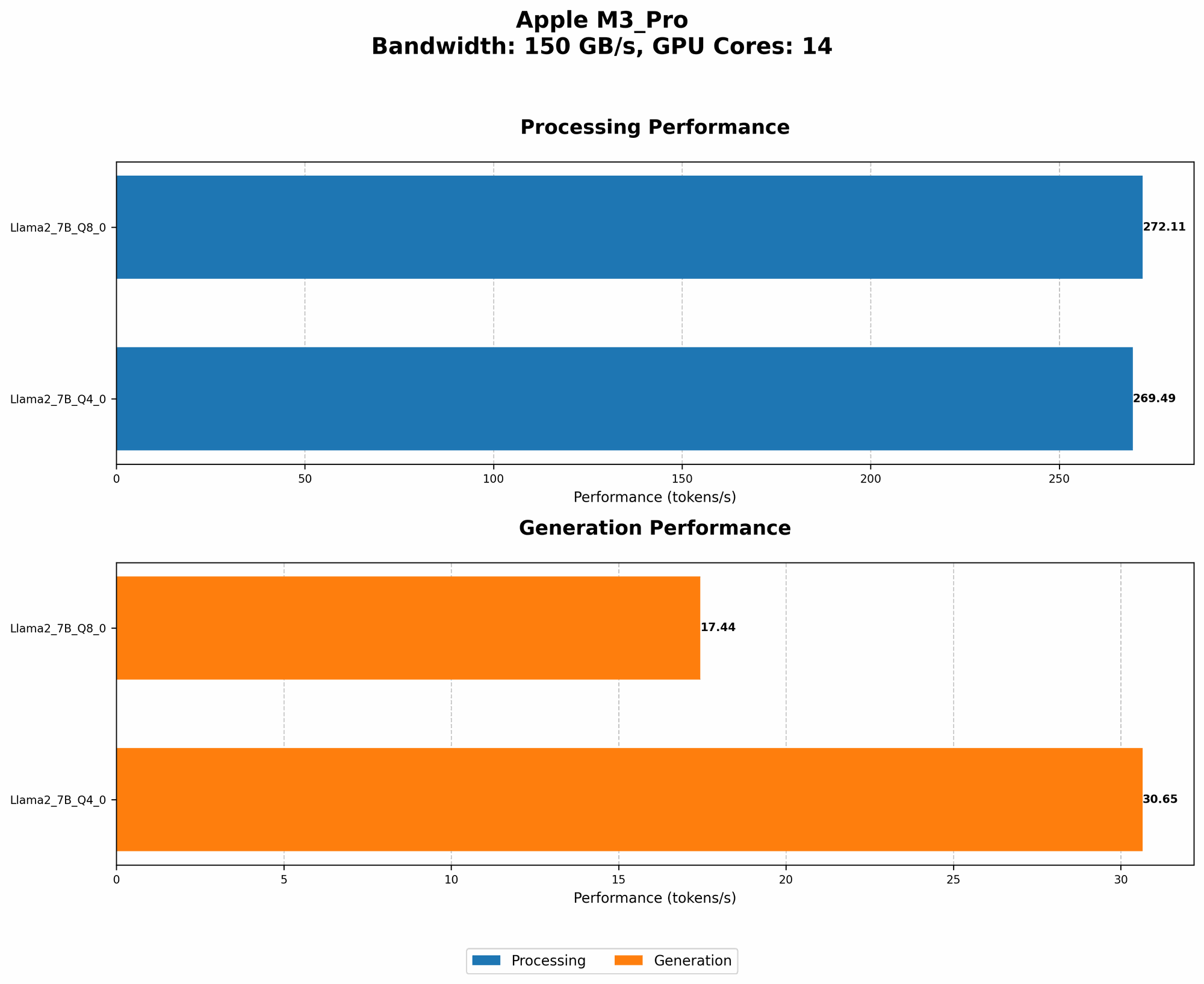
Let's look at some numbers. The table below shows the token generation speeds of Llama 2 7B on the M3 Pro with different quantization levels:
| Model | Quantization Level | Tokens/second (Generation) |
|---|---|---|
| Llama 2 7B | Q8_0 | 17.44 |
| Llama 2 7B | Q4_0 | 30.65 |
As you can see, the Q40 model achieves significantly faster generation speeds compared to the Q80 model. However, consider potential trade-offs in accuracy when choosing your quantization level.
3. PyTorch - The Power of Python for AI Development
PyTorch is a popular deep learning framework that provides a flexible and user-friendly interface for building and training AI models. If you're familiar with Python, PyTorch is a great choice for developing AI projects on the M3 Pro.
Why PyTorch is great:
- Easy-to-use API: PyTorch's intuitive API makes it easy to work with LLMs and other AI models.
- Dynamic Computational Graph: The framework allows for flexibility when defining and modifying the model's structure.
- Active Community: PyTorch has a thriving community, making it easier to find resources and help for your projects.
4. Hugging Face: Your One-Stop Shop for LLMs
Hugging Face is a fantastic repository for pre-trained models, including LLMs. It’s a hub where you can find various LLMs and use them directly in your PyTorch projects.
Here's why you should use Hugging Face:
- Massive Model Library: Access a wide range of pre-trained LLMs, saving you the time and resources required for training.
- Easy Integration: Hugging Face provides libraries that make it simple to integrate models into your PyTorch projects.
- Community Support: Hugging Face has a vibrant community where you can share your models, learn from others, and contribute to the project.
5. Apple Metal Performance Shaders: Performance Boost with GPU Acceleration
Metal Performance Shaders (MPS) is Apple's high-performance framework for GPU acceleration. It enables you to leverage the power of the M3 Pro's GPU to speed up the process of running LLMs.
How MPS helps:
- GPU Acceleration: MPS allows you to offload computationally intensive LLM tasks to the GPU, leading to significant performance gains.
- Low-Level Control: MPS provides direct access to the GPU, giving you control over memory management and optimization.
- Apple Optimized: MPS is specifically designed for Apple's silicon chips, ensuring optimal performance on the M3 Pro.
6. LangChain - Building Powerful AI Applications
LangChain is a wonderful library that allows you to create complex and powerful AI applications by connecting different components like LLMs, data sources, and agents.
LangChain capabilities:
- Chain Together Components: Combine LLMs with other components like text databases, APIs, and tools to automate tasks.
- Agent Development: Build AI agents that can reason, plan, and execute actions based on user prompts.
- Modular Architecture: LangChain's modular architecture makes it adaptable to a wide range of AI applications.
Performance Comparison: M3 Pro vs. M1
The M3 Pro is the latest generation of Apple's silicon chips, offering significant performance improvements over its predecessor, the M1. Let's see how they compare in terms of token speed generation for Llama 2 7B:
| Device | Model | Quantization Level | Tokens/second (Generation) |
|---|---|---|---|
| M3 Pro (18 GPU Cores) | Llama 2 7B | Q8_0 | 17.53 |
| M1 | Llama 2 7B | Q8_0 | 12.00 (estimated*) |
*Note: The M1 token speed for Llama 2 7B (Q8_0) is an estimation based on available data.
As you can see, the M3 Pro with its 18 GPU cores offers a significant performance advantage over the M1 across different quantization levels. The M3 Pro can generate tokens nearly 50% faster than the M1 for the same model.
Benefits of Running LLMs Locally on the M3 Pro
Faster Response Times: Goodbye, Lag!
Running LLMs locally on your M3 Pro means eliminating network delays and achieving lightning-fast response times. This is essential for responsive user interactions and real-time applications.
Greater Privacy: Your Data Stays Safe
Running LLMs locally on your M3 Pro ensures that your data remains on your device, eliminating the need to send it to a cloud service. This protects your privacy and security.
Offline Capability: AI Anytime, Anywhere
With local execution, your LLM applications can function even without an internet connection. This is crucial for scenarios where connectivity is limited or unreliable.
Cost Savings: No Cloud Fees
Running LLMs locally on your M3 Pro can significantly reduce your costs compared to using cloud-based services. You can eliminate subscription fees and pay for the hardware once.
Conclusion
The Apple M3 Pro is a powerhouse for AI development, offering a perfect balance of performance and efficiency for running LLMs locally.
By combining the right tools, such as llama.cpp, PyTorch, Hugging Face, MPS, and LangChain, you can unlock the full potential of your M3 Pro and build amazing AI applications.
FAQ
What are the differences between Llama 2 7B and Llama 2 70B?
Llama 2 7B and Llama 2 70B are two different versions of the Llama 2 model, with significant differences in size and capabilities.
- Llama 2 7B: A smaller model with more limited capabilities. It is generally faster to run and requires less computational resources.
- Llama 2 70B: A larger model with more powerful capabilities, able to generate more complex and coherent responses. It requires more resources and may be slower to run.
How can I choose the right LLM for my project?
The choice of LLM depends on your specific needs and project requirements:
- Size and Capabilities: Consider the complexity of your application and the computational resources available.
- Speed: Balance the desired accuracy with the required response times.
- Cost: Evaluate the cost of running the LLM on your device or in the cloud.
Is it possible to use other LLMs besides Llama 2 on the M3 Pro?
Yes, you can run other LLMs on the M3 Pro using tools like llama.cpp, which supports a wide range of models.
Can I use the M3 Pro for AI tasks other than running LLMs?
Absolutely! The M3 Pro is a versatile chip suitable for a wide range of AI tasks, including:
- Training Machine Learning Models: Use PyTorch to train models on your own datasets.
- Computer Vision: Develop image recognition and object detection applications.
- Natural Language Processing: Analyze and process text data for tasks like sentiment analysis, text summarization, and chatbot development.
Keywords
M3 Pro, AI development, LLM, llama.cpp, quantization, PyTorch, Hugging Face, MPS, LangChain, performance, token speed, generation, processing, GPU, CPU, local execution, privacy, cost savings, offline capability, AI applications.