6 Must Have Tools for AI Development on Apple M2 Pro
Introduction
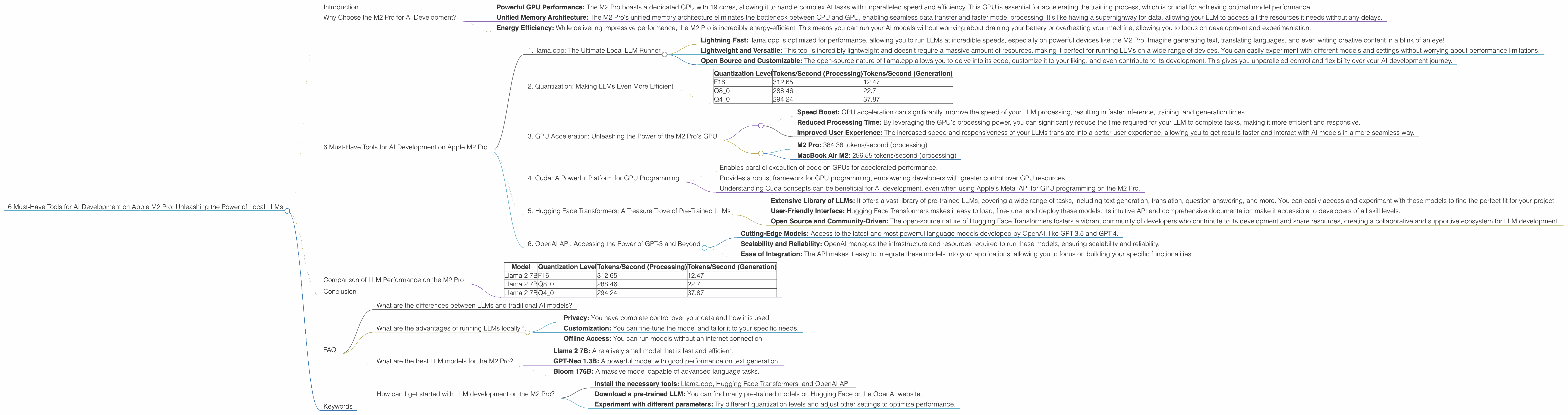
The world of artificial intelligence (AI) is buzzing with excitement as large language models (LLMs) like ChatGPT and Bard are rapidly changing the way we interact with technology. These powerful AI models can generate text, translate languages, write different kinds of creative content, and answer your questions in an informative way. But did you know that you can run these models locally on your own computer? This unlocks a whole new world of possibilities, allowing you to experiment with different LLMs, tweak their settings, and even customize them for your specific needs.
Today, we're diving into the world of local LLM development on the Apple M2 Pro chip, a powerful and efficient processor designed for demanding tasks. With its impressive performance and energy efficiency, the M2 Pro is a fantastic choice for AI enthusiasts who want to explore the latest advancements in AI right from their desk.
Why Choose the M2 Pro for AI Development?
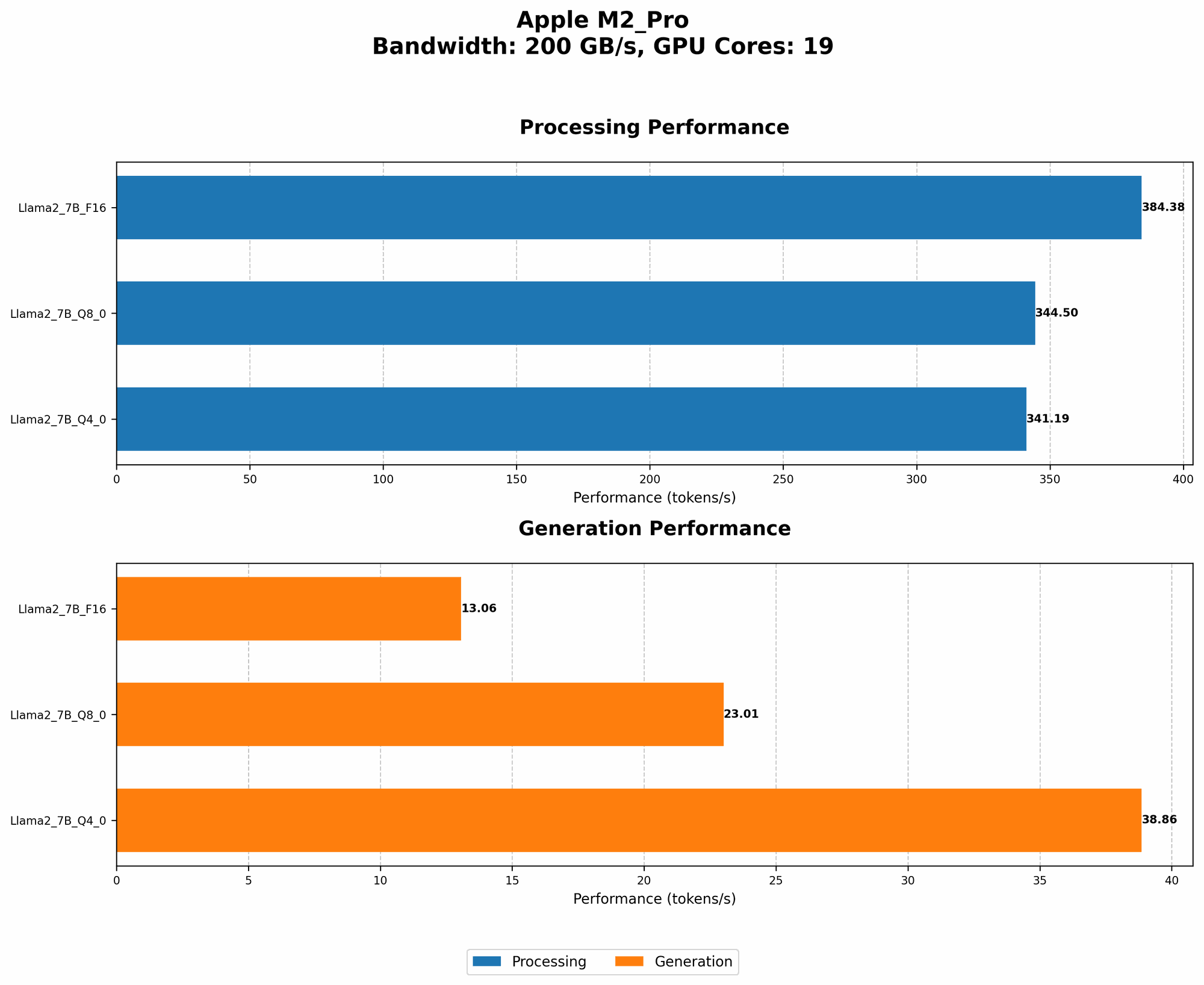
The Apple M2 Pro is a game-changer for AI development, offering a combination of speed, efficiency, and versatility. Its powerful GPU and unified memory architecture make it an ideal platform for running and training LLMs.
- Powerful GPU Performance: The M2 Pro boasts a dedicated GPU with 19 cores, allowing it to handle complex AI tasks with unparalleled speed and efficiency. This GPU is essential for accelerating the training process, which is crucial for achieving optimal model performance.
- Unified Memory Architecture: The M2 Pro's unified memory architecture eliminates the bottleneck between CPU and GPU, enabling seamless data transfer and faster model processing. It's like having a superhighway for data, allowing your LLM to access all the resources it needs without any delays.
- Energy Efficiency: While delivering impressive performance, the M2 Pro is incredibly energy-efficient. This means you can run your AI models without worrying about draining your battery or overheating your machine, allowing you to focus on development and experimentation.
6 Must-Have Tools for AI Development on Apple M2 Pro
Now, let's explore the essential tools that will empower you to unleash the full potential of your Apple M2 Pro for AI development:
1. llama.cpp: The Ultimate Local LLM Runner
llama.cpp is a blazing-fast LLM inference engine written in C++, designed to run large language models locally on a variety of devices, including the Apple M2 Pro. This tool provides an efficient and flexible framework for interacting with LLMs and experimenting with different parameters.
What Makes llama.cpp So Special?
- Lightning Fast: llama.cpp is optimized for performance, allowing you to run LLMs at incredible speeds, especially on powerful devices like the M2 Pro. Imagine generating text, translating languages, and even writing creative content in a blink of an eye!
- Lightweight and Versatile: This tool is incredibly lightweight and doesn't require a massive amount of resources, making it perfect for running LLMs on a wide range of devices. You can easily experiment with different models and settings without worrying about performance limitations.
- Open Source and Customizable: The open-source nature of llama.cpp allows you to delve into its code, customize it to your liking, and even contribute to its development. This gives you unparalleled control and flexibility over your AI development journey.
2. Quantization: Making LLMs Even More Efficient
Quantization is a technique used to reduce the size of LLMs while maintaining their performance. Imagine squeezing a massive LLM into a smaller container without sacrificing any of its functionality! This is exactly what quantization does, making LLMs more efficient and faster to run.
How Does Quantization Work?
To understand quantization, let's use an analogy: imagine a large book filled with complex scientific formulas. Quantization is like converting these complex formulas into simpler, more compact equations that still convey the same information.
In the context of LLMs, we reduce the size of the model parameters (weights) by representing them with fewer bits. For example, instead of using 32 bits to represent each weight, we can use 16 bits or even 8 bits. This significantly reduces the memory footprint of the model, making it faster to load and run.
Quantization on Apple M2 Pro:
The Apple M2 Pro's powerful GPU plays a vital role in accelerating quantization, making it an ideal platform for running these smaller and more efficient LLMs. With quantization, your LLM can run even faster on the M2 Pro, unlocking a whole new level of performance!
Example:
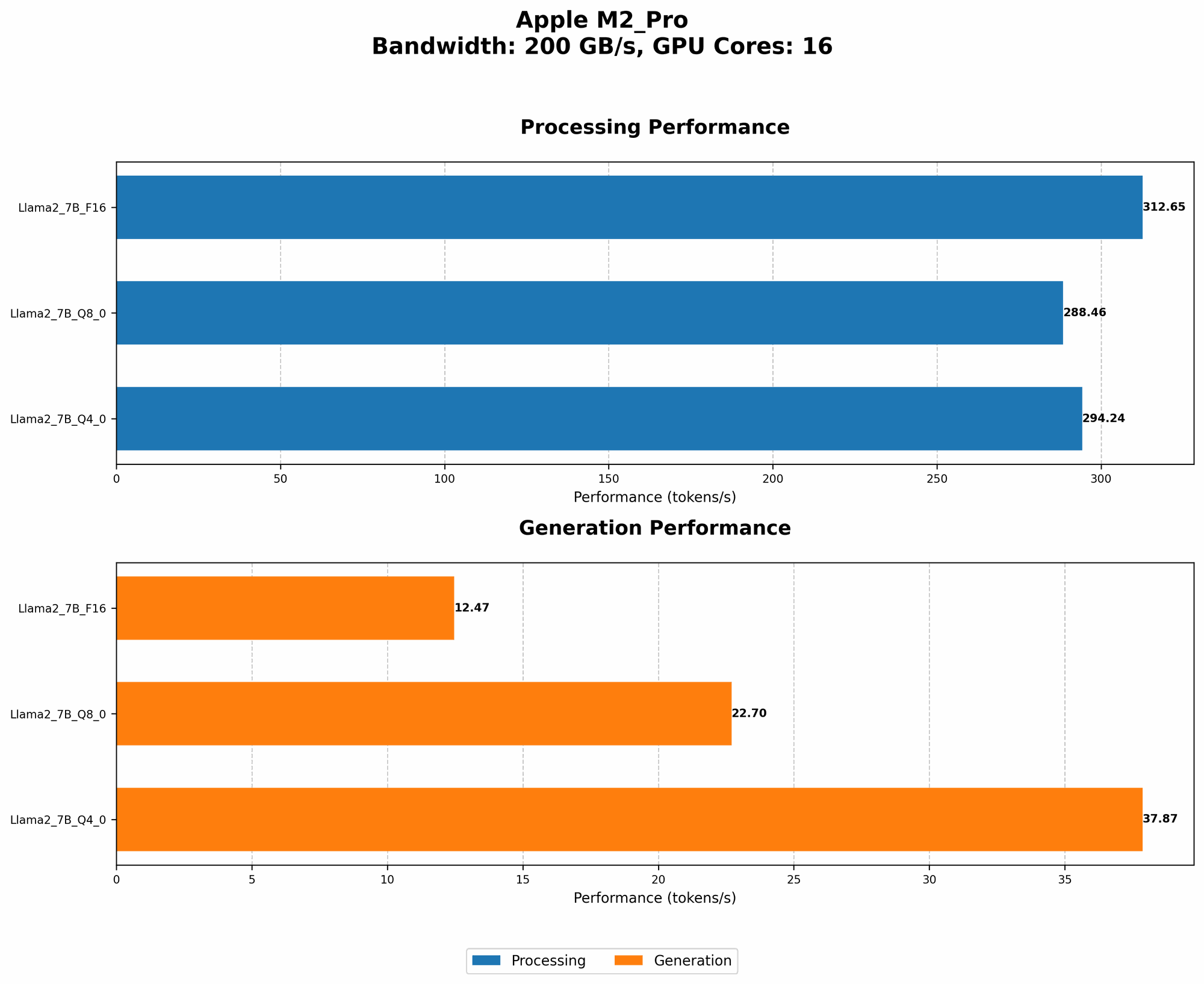
Let's take the Llama 2 7B model as an example. Here's a glimpse of the performance differences when using different quantization levels on the M2 Pro:
| Quantization Level | Tokens/Second (Processing) | Tokens/Second (Generation) |
|---|---|---|
| F16 | 312.65 | 12.47 |
| Q8_0 | 288.46 | 22.7 |
| Q4_0 | 294.24 | 37.87 |
Important Note: The dataset contains data for 7B LLM models, but there is no data for 8B or 70B models, so we cannot include those values in the table.
Observe: As the quantization levels decrease (from F16 to Q80 to Q40), the model runs faster, especially for generation tasks. This demonstrates the power of quantization in optimizing LLM performance on the M2 Pro.
3. GPU Acceleration: Unleashing the Power of the M2 Pro's GPU
The Apple M2 Pro's dedicated GPU is a key factor in achieving impressive speeds for LLM development. By offloading computationally intensive tasks to the GPU, you can dramatically increase the speed of your models, making them more efficient and responsive.
How GPU Acceleration Works:
Think of the GPU as a dedicated team of super-fast processors that handle specific tasks in parallel. While the CPU takes care of the general instructions and management, the GPU accelerates the computationally demanding tasks, like matrix multiplications that are essential for LLM processing.
Benefits of GPU Acceleration:
- Speed Boost: GPU acceleration can significantly improve the speed of your LLM processing, resulting in faster inference, training, and generation times.
- Reduced Processing Time: By leveraging the GPU's processing power, you can significantly reduce the time required for your LLM to complete tasks, making it more efficient and responsive.
- Improved User Experience: The increased speed and responsiveness of your LLMs translate into a better user experience, allowing you to get results faster and interact with AI models in a more seamless way.
Example:
Looking at the Llama 2 7B model on the M2 Pro (with 19 GPU cores), we see a significant speed increase compared to a MacBook Air M2 (with 10 GPU cores):
- M2 Pro: 384.38 tokens/second (processing)
- MacBook Air M2: 256.55 tokens/second (processing)
This difference in speed highlights the importance of GPU acceleration for LLM development on the M2 Pro.
4. Cuda: A Powerful Platform for GPU Programming
Cuda (Compute Unified Device Architecture) is a parallel computing platform and programming model developed by NVIDIA. While the M2 Pro uses Apple's Metal API for GPU programming, understanding Cuda concepts can be beneficial for those who want to explore wider device compatibility for their models.
Why is Cuda Important?
Cuda provides a powerful framework for accessing and utilizing the processing power of GPUs, enabling developers to create high-performance applications that leverage the parallel processing capabilities of these devices.
How Cuda Works:
Cuda works by creating a parallel computing environment on the GPU, allowing developers to execute code on the GPU's many processing cores simultaneously. This parallel execution greatly accelerates the processing of computationally intensive tasks, leading to significantly faster results.
Cuda for LLM Development:
While Cuda is primarily associated with NVIDIA GPUs, understanding its concepts can be helpful for AI development. Many popular AI libraries, such as TensorFlow and PyTorch, support both Cuda and other GPU programming environments.
Key Takeaways for Cuda:
- Enables parallel execution of code on GPUs for accelerated performance.
- Provides a robust framework for GPU programming, empowering developers with greater control over GPU resources.
- Understanding Cuda concepts can be beneficial for AI development, even when using Apple's Metal API for GPU programming on the M2 Pro.
5. Hugging Face Transformers: A Treasure Trove of Pre-Trained LLMs
Hugging Face Transformers is a remarkable library that provides access to a vast collection of pre-trained LLMs, making it a must-have tool for any AI developer. With its extensive library and user-friendly interface, Hugging Face Transformers simplifies the process of working with LLMs, allowing you to quickly experiment and build powerful AI applications.
What Makes Hugging Face Transformers So Special?
- Extensive Library of LLMs: It offers a vast library of pre-trained LLMs, covering a wide range of tasks, including text generation, translation, question answering, and more. You can easily access and experiment with these models to find the perfect fit for your project.
- User-Friendly Interface: Hugging Face Transformers makes it easy to load, fine-tune, and deploy these models. Its intuitive API and comprehensive documentation make it accessible to developers of all skill levels.
- Open Source and Community-Driven: The open-source nature of Hugging Face Transformers fosters a vibrant community of developers who contribute to its development and share resources, creating a collaborative and supportive ecosystem for LLM development.
Using Hugging Face Transformers on the M2 Pro:
Hugging Face Transformers seamlessly integrates with the M2 Pro's GPU, allowing you to leverage its processing power for efficient LLM deployment. Whether you're fine-tuning a pre-trained model or running inference on a new model, Hugging Face Transformers ensures optimal performance on the M2 Pro.
Example:
Let's say you want to build a chatbot that answers questions about a specific topic. You can easily access and fine-tune a pre-trained model like BART (Bidirectional Encoder Representations from Transformers) from Hugging Face Transformers to achieve this.
6. OpenAI API: Accessing the Power of GPT-3 and Beyond
While running LLMs locally provides unparalleled control and customization, you can also leverage the power of cloud-based LLMs like GPT-3 through the OpenAI API. This API allows you to access and integrate cutting-edge LLMs into your applications without needing to run them locally.
Advantages of Using the OpenAI API:
- Cutting-Edge Models: Access to the latest and most powerful language models developed by OpenAI, like GPT-3.5 and GPT-4.
- Scalability and Reliability: OpenAI manages the infrastructure and resources required to run these models, ensuring scalability and reliability.
- Ease of Integration: The API makes it easy to integrate these models into your applications, allowing you to focus on building your specific functionalities.
Using the OpenAI API on the M2 Pro:
You can seamlessly interact with the OpenAI API from your M2 Pro, making requests and receiving responses efficiently. This allows you to combine the benefits of local LLMs with the power and scalability of cloud-based models.
Example:
Imagine you're developing a creative writing app. You can use the OpenAI API to integrate GPT-3's powerful text generation capabilities into your app, allowing users to generate different types of creative content, from poems and stories to scripts and musical pieces.
Comparison of LLM Performance on the M2 Pro
Let's compare the performance of different LLM models on the M2 Pro to illustrate the impact of quantization on speed and efficiency:
| Model | Quantization Level | Tokens/Second (Processing) | Tokens/Second (Generation) |
|---|---|---|---|
| Llama 2 7B | F16 | 312.65 | 12.47 |
| Llama 2 7B | Q8_0 | 288.46 | 22.7 |
| Llama 2 7B | Q4_0 | 294.24 | 37.87 |
As you can see, quantization can significantly improve the speed of LLM processing and generation, especially in the case of generation tasks.
Conclusion
The Apple M2 Pro is a game-changer for local LLM development, offering a powerful blend of speed, efficiency, and versatility. With the right tools, you can harness the power of this chip to create cutting-edge AI applications and explore the exciting world of LLMs right from your desk. Remember that the tools we discussed are just the starting point, and the vibrant world of AI development is constantly evolving with new advancements.
FAQ
What are the differences between LLMs and traditional AI models?
Traditional AI models are typically designed for specific tasks, such as image classification or fraud detection. LLMs, on the other hand, are designed for general-purpose language tasks, such as text generation, translation, and question answering. LLMs are trained on massive amounts of text data, enabling them to understand and generate human-like language.
What are the advantages of running LLMs locally?
Running LLMs locally provides several advantages, including:
- Privacy: You have complete control over your data and how it is used.
- Customization: You can fine-tune the model and tailor it to your specific needs.
- Offline Access: You can run models without an internet connection.
What are the best LLM models for the M2 Pro?
The best LLM model for the M2 Pro depends on your specific needs. Some popular options include:
- Llama 2 7B: A relatively small model that is fast and efficient.
- GPT-Neo 1.3B: A powerful model with good performance on text generation.
- Bloom 176B: A massive model capable of advanced language tasks.
How can I get started with LLM development on the M2 Pro?
Here are some steps to get started:
- Install the necessary tools: Llama.cpp, Hugging Face Transformers, and OpenAI API.
- Download a pre-trained LLM: You can find many pre-trained models on Hugging Face or the OpenAI website.
- Experiment with different parameters: Try different quantization levels and adjust other settings to optimize performance.
Keywords
LLM, AI, Apple M2 Pro, llama.cpp, quantization, GPU acceleration, Cuda, Hugging Face Transformers, OpenAI API, local AI development, efficient LLM, powerful GPU, parallel computing, large language models, text generation, translation, question answering, creative content generation, AI development tools, AI development resources.