6 Limitations of Apple M1 Max for AI (and How to Overcome Them)
Introduction
The world of AI is abuzz with excitement about Large Language Models (LLMs), which are capable of understanding and generating human-like text. These models are revolutionizing the way we interact with technology, offering a glimpse into a future where machines can understand our thoughts and respond in a way that feels natural.
But running these powerful models on a device like the Apple M1 Max, a popular choice for developers, comes with its own set of challenges. While the Apple M1 Max offers impressive performance for many tasks, it might not be a perfect match for every AI workload.
In this article, we’ll deep dive into the limitations of the Apple M1 Max, specifically when it comes to running LLMs, and explore how to overcome them.
Apple M1 Max Token Speed Generation: A Bit of a Bottleneck
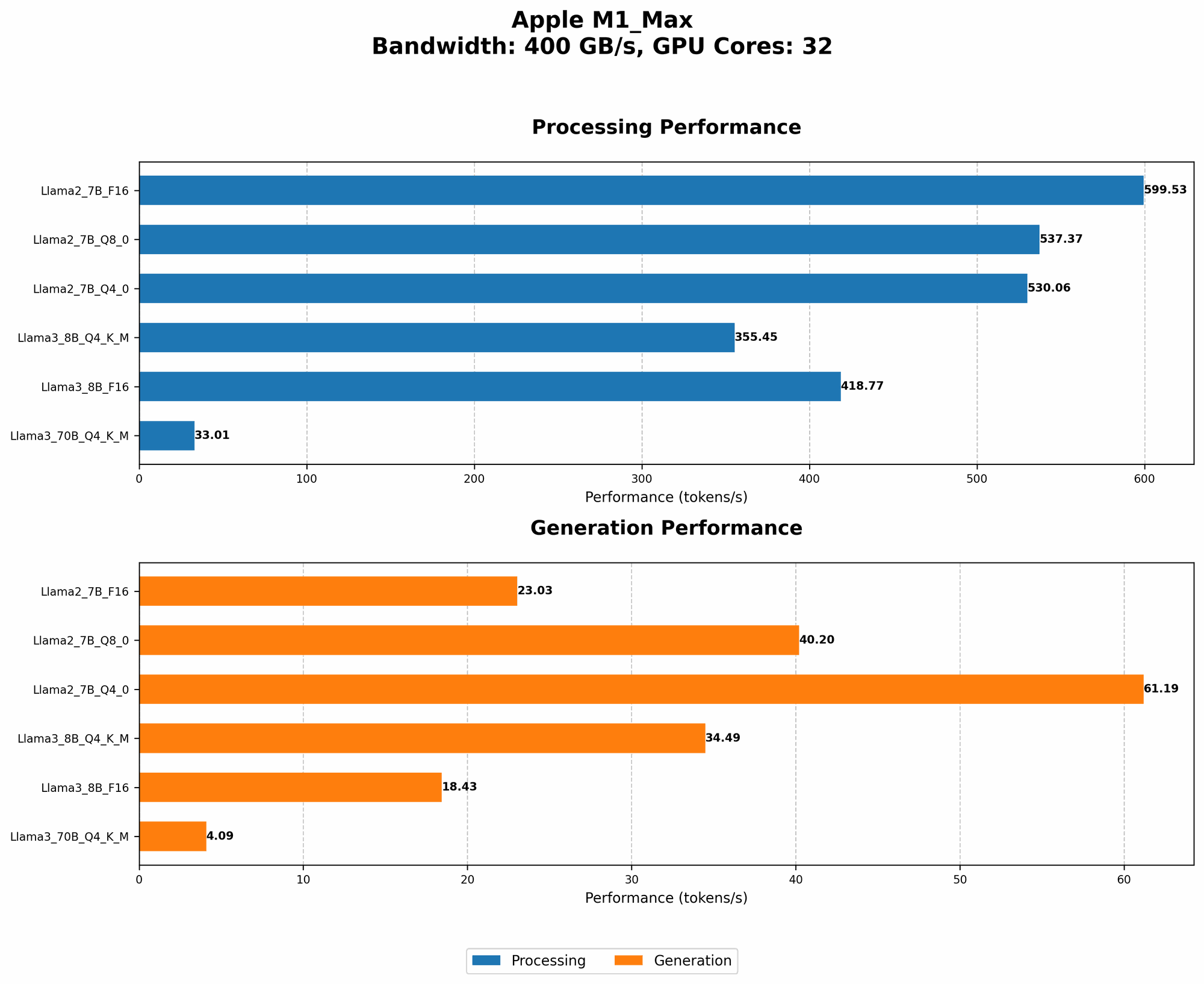
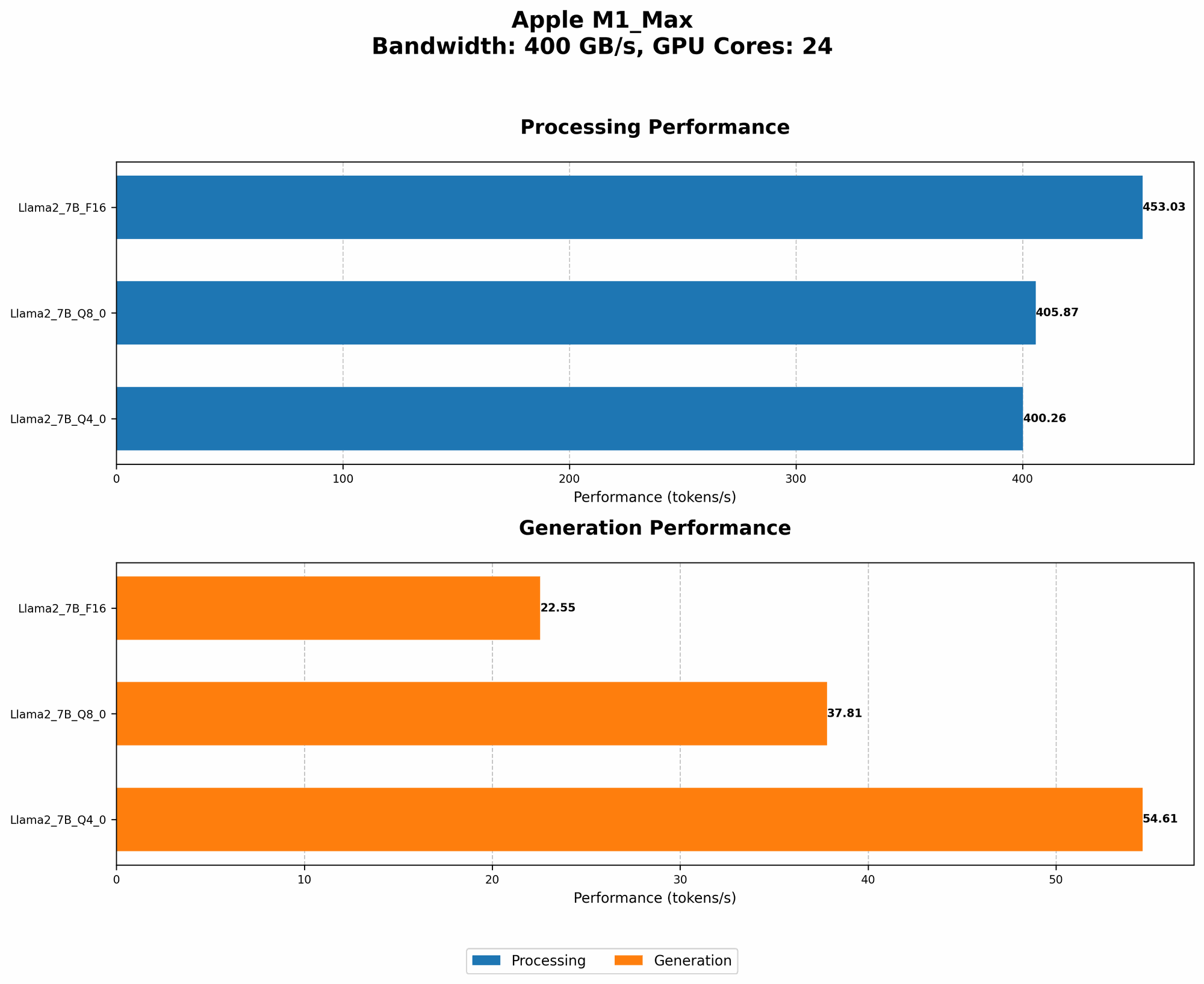
The Apple M1 Max is equipped with a powerful GPU capable of delivering impressive performance for many tasks, including graphics-intensive applications and gaming. However, when it comes to LLMs, the speed at which the M1 Max can generate tokens (the basic units of language) can be a bottleneck, depending on the model size and the chosen quantization scheme.
Let's look at the numbers:
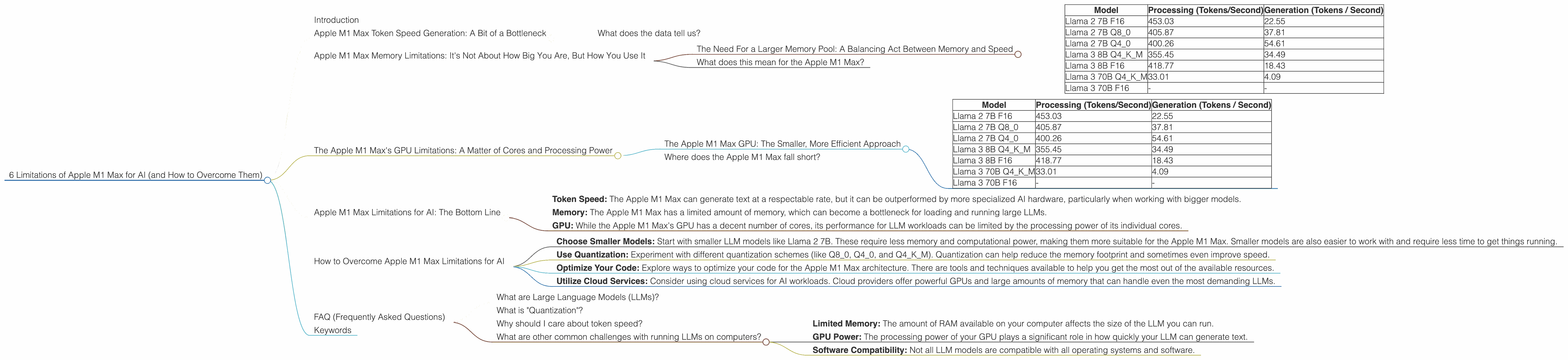
| Model | Processing (Tokens/Second) | Generation (Tokens / Second) |
|---|---|---|
| Llama 2 7B F16 | 453.03 | 22.55 |
| Llama 2 7B Q8_0 | 405.87 | 37.81 |
| Llama 2 7B Q4_0 | 400.26 | 54.61 |
| Llama 3 8B Q4KM | 355.45 | 34.49 |
| Llama 3 8B F16 | 418.77 | 18.43 |
| Llama 3 70B Q4KM | 33.01 | 4.09 |
| Llama 3 70B F16 | - | - |
F16 vs. Quantization: F16 refers to the use of 16-bit floating-point numbers to represent weights and activations, while Quantization, like Q80, Q40 and Q4KM, reduces the precision to 8-bit and 4-bit integers, respectively. This quantization can help reduce memory requirements and potentially increase speed, but at the cost of some accuracy.
Llama 3 vs. Llama 2: The Llama 3 models are newer and larger and even require access to a larger memory pool. This makes them even more demanding on the Apple M1 Max.
- Generation vs. Processing: The time taken to process and generate tokens is different. The generation time is especially important in interactive applications where users need to get results quickly.
What does the data tell us?
The Apple M1 Max seems to struggle with the larger Llama 3 70B model. The data suggests that it can't even handle the F16 format.
The generation speed also shows that while the M1 Max is capable of processing tokens at a decent rate, it falls behind when it comes to generating text. The generation speed is significantly slower than the processing speed. This is especially evident in the larger model (Llama 3 70B).
In essence, the Apple M1 Max can quickly process information, but when it comes to creating text, its speed slows down considerably, especially when dealing with large model sizes.
Apple M1 Max Memory Limitations: It's Not About How Big You Are, But How You Use It
The Apple M1 Max comes equipped with a respectable amount of RAM, but when it comes to running LLMs, memory becomes a major constraint. The reason? Large LLMs often require a large amount of memory - think of it as the space they need to store everything they've learned.
Imagine you have a giant library filled with every book ever written. That's kind of like what an LLM needs in terms of memory.
The Need For a Larger Memory Pool: A Balancing Act Between Memory and Speed
The Apple M1 Max, however, has a smaller library. Let's look at the data again:
| Model | Processing (Tokens/Second) | Generation (Tokens / Second) |
|---|---|---|
| Llama 2 7B F16 | 453.03 | 22.55 |
| Llama 2 7B Q8_0 | 405.87 | 37.81 |
| Llama 2 7B Q4_0 | 400.26 | 54.61 |
| Llama 3 8B Q4KM | 355.45 | 34.49 |
| Llama 3 8B F16 | 418.77 | 18.43 |
| Llama 3 70B Q4KM | 33.01 | 4.09 |
| Llama 3 70B F16 | - | - |
Remember:
- F16 vs. Quantization: The move to quantization, particularly Q40 and Q4KM, is a clever dodge to conserve memory. Think of Q40 as a smaller library that keeps only the essential information, while Q4KM uses advanced techniques to store data even more efficiently.
- 7B, 8B, and 70B: Models like Llama 2 7B and Llama 3 8B are relatively small, fitting comfortably inside the memory of the M1 Max. However, models like Llama 3 70B are massive, requiring a larger, more spacious library.
What does this mean for the Apple M1 Max?
The Apple M1 Max can handle smaller models like Llama 2 7B and Llama 3 8B. But when you venture into the territory of massive models like Llama 3 70B, the M1 Max's memory starts to get cramped. The device struggles to load the complete model and run it effectively, leading to performance issues and even crashes.
The Apple M1 Max's GPU Limitations: A Matter of Cores and Processing Power
The Apple M1 Max boasts 32 GPU cores, a substantial number for a mobile device. However, when it comes to running LLMs, it's not just about the number of cores but also the processing power each core can deliver.
The Apple M1 Max GPU: The Smaller, More Efficient Approach
Imagine your GPU cores as workers in a factory. They're building the words and sentences for your LLM, and each one has a certain speed and capability. The Apple M1 Max has a lot of workers, but they're focused on efficiency, and their individual processing power can be outmatched by a GPU designed specifically for AI tasks.
Let's take a look at the numbers again:
| Model | Processing (Tokens/Second) | Generation (Tokens / Second) |
|---|---|---|
| Llama 2 7B F16 | 453.03 | 22.55 |
| Llama 2 7B Q8_0 | 405.87 | 37.81 |
| Llama 2 7B Q4_0 | 400.26 | 54.61 |
| Llama 3 8B Q4KM | 355.45 | 34.49 |
| Llama 3 8B F16 | 418.77 | 18.43 |
| Llama 3 70B Q4KM | 33.01 | 4.09 |
| Llama 3 70B F16 | - | - |
Things to note:
- The Apple M1 Max GPU can handle smaller models like Llama 2 7B and Llama 3 8B, but with decreasing efficiency as the model size grows. It is clear that the Apple M1 Max struggles to keep up with larger models like Llama 3 70B.
- GPU Cores: The Apple M1 Max has a decent number of GPU cores, but its performance is still hampered by the limitations of its individual cores.
Where does the Apple M1 Max fall short?
While the Apple M1 Max GPU is a powerful component, its architecture is designed for a wide range of tasks, not specifically for the demands of LLMs. In essence, it's a general-purpose GPU, while LLMs often require specialized, high-performance GPUs.
Apple M1 Max Limitations for AI: The Bottom Line
The Apple M1 Max is a powerful chip, but it has its limitations when it comes to AI, particularly for running large language models (LLMs).
Here's a summary of the key challenges:
- Token Speed: The Apple M1 Max can generate text at a respectable rate, but it can be outperformed by more specialized AI hardware, particularly when working with bigger models.
- Memory: The Apple M1 Max has a limited amount of memory, which can become a bottleneck for loading and running large LLMs.
- GPU: While the Apple M1 Max's GPU has a decent number of cores, its performance for LLM workloads can be limited by the processing power of its individual cores.
How to Overcome Apple M1 Max Limitations for AI
While the Apple M1 Max has some limitations for AI, these are workarounds that can help you get the most out of the device:
- Choose Smaller Models: Start with smaller LLM models like Llama 2 7B. These require less memory and computational power, making them more suitable for the Apple M1 Max. Smaller models are also easier to work with and require less time to get things running.
- Use Quantization: Experiment with different quantization schemes (like Q80, Q40, and Q4KM). Quantization can help reduce the memory footprint and sometimes even improve speed.
- Optimize Your Code: Explore ways to optimize your code for the Apple M1 Max architecture. There are tools and techniques available to help you get the most out of the available resources.
- Utilize Cloud Services: Consider using cloud services for AI workloads. Cloud providers offer powerful GPUs and large amounts of memory that can handle even the most demanding LLMs.
FAQ (Frequently Asked Questions)
What are Large Language Models (LLMs)?
LLMs are incredibly powerful AI models that can understand and generate human-like text. Think of them as super-intelligent chatbots that can write stories, translate languages, and answer your questions in a natural and insightful way.
What is "Quantization"?
Quantization is a technique used to reduce the size of LLM models. It involves representing numbers (weights and activations) using lower-precision formats, like 8-bit or 4-bit integers. This reduces the memory requirements but might affect the model's accuracy.
Why should I care about token speed?
Token speed is a crucial factor in how quickly your LLM can generate text. A faster token speed means you get your results faster, which is especially important for interactive applications where you need quick responses.
What are other common challenges with running LLMs on computers?
Besides the limitations of the Apple M1 Max, other common challenges include:
- Limited Memory: The amount of RAM available on your computer affects the size of the LLM you can run.
- GPU Power: The processing power of your GPU plays a significant role in how quickly your LLM can generate text.
- Software Compatibility: Not all LLM models are compatible with all operating systems and software.
Keywords
Apple M1 Max, AI, Large Language Models, LLM, Token Speed, Memory, GPU, Quantization, Llama 2, Llama 3, Cloud Services, Performance, Limitations, Workarounds, Optimization,