6 Key Factors to Consider When Choosing Between NVIDIA RTX A6000 48GB and NVIDIA A40 48GB for AI

Introduction
Running large language models (LLMs) locally can be a game-changer, enabling you to play with these powerful AI models without relying on cloud services. But choosing the right hardware for this endeavor can be a daunting task, especially with the plethora of options available. Two popular contenders for running LLMs locally are the NVIDIA RTX A6000 48GB and NVIDIA A40 48GB GPUs.
This article will delve into a detailed comparison of these two GPUs, highlighting crucial factors for developers and AI enthusiasts looking to optimize their LLM performance. We'll analyze their strengths and weaknesses, helping you make an informed decision about which GPU best suits your needs and budget.
Comparing NVIDIA RTX A6000 48GB vs. NVIDIA A40 48GB for LLM Performance
Choosing between the RTX A6000 and A40 for running LLMs can feel like picking between two incredibly powerful, but distinct, AI beasts. Both are high-end GPUs designed for professional workloads, but their strengths and weaknesses differ, impacting your LLM performance.
1. Token Generation Speed: Speed Demons in Text Generation
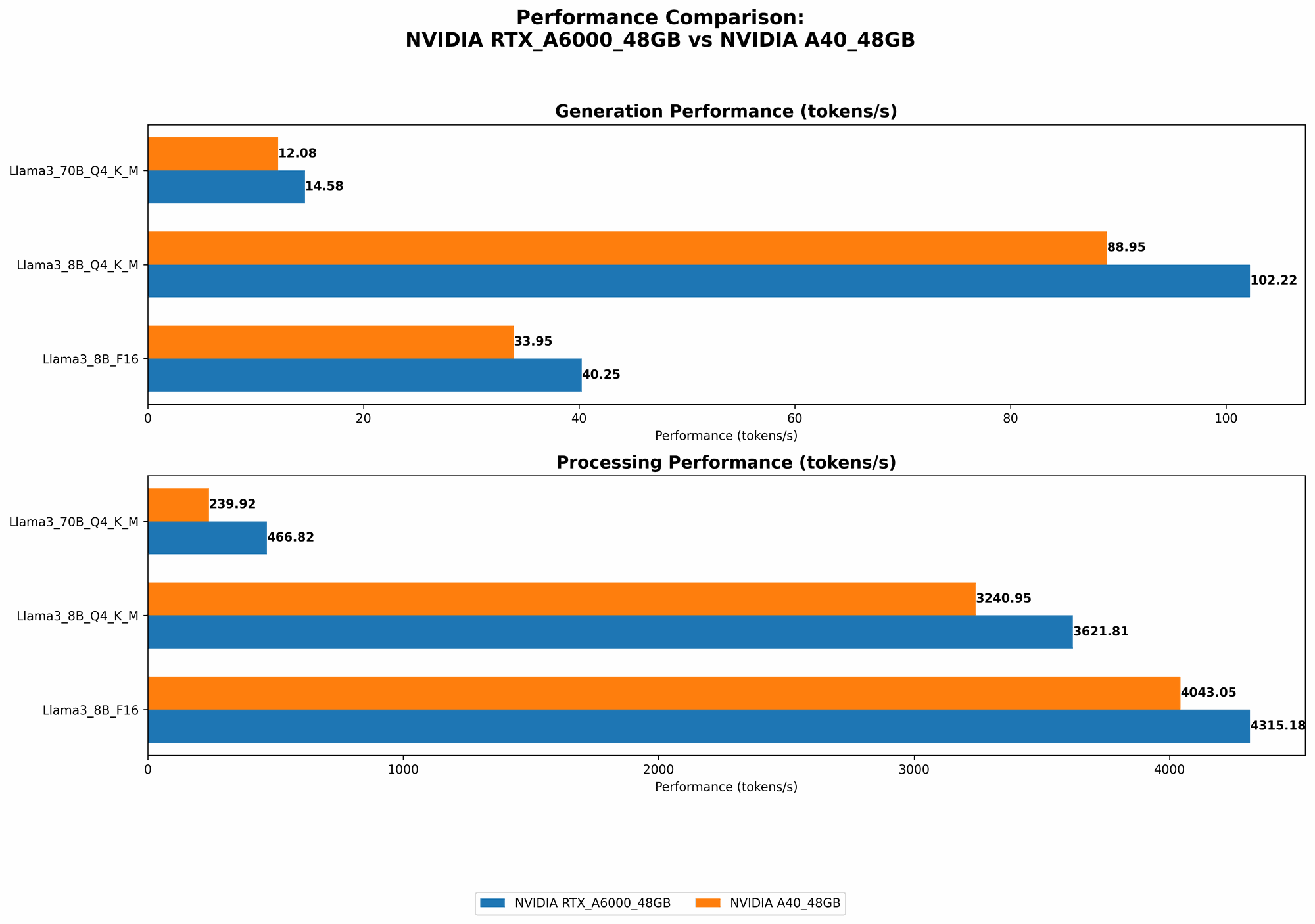
When it comes to generating text, the RTX A6000 48GB emerges as the champion. This GPU boasts a faster token generation speed for both the 8B and 70B Llama 3 models, especially when using the Q4KM quantization scheme.
Here's how each GPU performs with Llama 3:
| GPU | Llama 3 Model | Token Generation Speed (Tokens/second) |
|---|---|---|
| RTX A6000 48GB | Llama 3 8B Q4KM | 102.22 |
| A40 48GB | Llama 3 8B Q4KM | 88.95 |
| RTX A6000 48GB | Llama 3 70B Q4KM | 14.58 |
| A40 48GB | Llama 3 70B Q4KM | 12.08 |
Why does the RTX A6000 triumph? It likely benefits from its higher memory bandwidth, providing quicker access to the model's parameters during token generation. Imagine trying to build a Lego model with a limited number of hands; the RTX A6000's high memory bandwidth essentially gives it more hands to grab and manipulate those Lego pieces (model parameters) quickly.
2. Model Processing Speed: Processing Powerhouse
When it comes to processing the model, both GPUs demonstrate impressive speeds, but the A40 shines a bit brighter. This GPU takes the lead in processing speed for the Llama 3 8B model, regardless of the quantization scheme. However, for the 70B model, the A40 only presents a slight advantage for Q4KM quantization.
Let's break down their processing prowess:
| GPU | Llama 3 Model | Processing Speed (Tokens/second) |
|---|---|---|
| RTX A6000 48GB | Llama 3 8B Q4KM | 3621.81 |
| A40 48GB | Llama 3 8B Q4KM | 3240.95 |
| RTX A6000 48GB | Llama 3 8B F16 | 4315.18 |
| A40 48GB | Llama 8B F16 | 4043.05 |
| RTX A6000 48GB | Llama 3 70B Q4KM | 466.82 |
| A40 48GB | Llama 3 70B Q4KM | 239.92 |
Why does the A40 excel? The A40 edges out the RTX A6000 in terms of raw processing power. Think of it like having a more powerful engine for your AI car. It crunches through data faster, leading to faster processing speeds.
3. Quantization: Shrinking Models for Smaller Devices
Quantization, a technique to compress model sizes, plays a crucial role in adapting LLMs for devices with limited memory. Both GPUs support Q4KM quantization, which significantly reduces the model's size, enabling smoother operation on devices with less memory.
For instance:
- The Llama 3 70B model can be shrunk to about 12GB using Q4KM quantization. This is a remarkable feat, considering the original model's size, allowing you to run even the largest LLMs on devices with limited RAM.
Why does quantization matter? Think of it like using a suitcase with expandable compartments. You can pack more clothes (model parameters) into the same suitcase by shrinking each item (quantization) before packing.
However, quantization comes with a tradeoff. It often leads to a slight decline in accuracy, so choose a quantization level that balances size reduction with performance.
4. Memory Capacity: Ample Space for Large Models
Both the RTX A6000 and A40 boast a generous 48GB of memory, providing ample space to load large language models. This hefty memory capacity allows you to explore and experiment with even the most demanding LLMs without encountering memory limitations.
For instance:
- The Llama 3 70B model, with a 12GB footprint after Q4KM quantization, fits comfortably within the 48GB memory capacity of both GPUs. This gives you ample room to load additional resources or run other applications alongside your LLM.
5. Power Consumption: Balancing Performance and Efficiency
Power consumption is a crucial factor, especially when running resource-intensive tasks like LLM inference. While not as critical as for cloud deployments, understanding power consumption is essential for ensuring your setup is sustainable and cost-effective.
The A40 has an edge in power efficiency. This GPU delivers impressive performance while consuming less power compared to the RTX A6000.
Why does the A40 win? Imagine two cars with the same horsepower but different fuel efficiencies. The A40 is like a hybrid car, achieving high performance while burning less gas (power).
6. Pricing and Availability: Balancing Budget and Value
The A40 generally has a slightly lower price point than the RTX A6000, making it a more budget-friendly alternative for users seeking high performance without breaking the bank. However, the pricing differences can vary depending on the retailer and current market conditions.
Consider these factors:
- Budget: If your budget is tight, the A40 may be the more appealing option.
- Availability: Both GPUs are generally in high demand, so availability might be a factor to consider.
Choosing the Right GPU for Your LLM Needs
So, which GPU takes the crown? It depends on your priorities.
- For those prioritizing token generation speed, the RTX A6000 48GB is a strong contender. Its high memory bandwidth enables faster text generation, especially for larger models like the Llama 3 70B.
- If raw processing power and efficiency are your primary concerns, the A40 48GB might be your best bet. This GPU offers impressive processing speed and better power efficiency, making it a solid choice for computationally demanding tasks.
Here's a quick cheat sheet to help you decide:
| If you need... | Go for the... |
|---|---|
| Faster token generation speed | RTX A6000 48GB |
| Faster processing speed and better power efficiency | A40 48GB |
| Lower price point | A40 48GB |
| High memory capacity for large models | Both RTX A6000 48GB and A40 48GB |
Remember: These recommendations are based on the current data and might change with future developments in LLM technology and GPU architecture.
FAQ: Addressing Common Questions
What are the main differences between LLMs like Llama 3 and GPT-3?
LLMs like Llama 3 and GPT-3 are both powerful language models but differ in architecture, training data, and strengths. Llama 3 focuses on conversational AI and factual accuracy, while GPT-3 excels in creative text generation, translation, and code writing.
How much RAM is necessary for running LLMs locally?
The amount of RAM required depends on the model size and quantization level. For instance, the Llama 3 70B model can be shrunk to around 12GB with Q4KM quantization, making it feasible for devices with at least 16GB of RAM.
Can I run LLMs on my consumer-grade GPU?
While consumer-grade GPUs can handle smaller LLMs, their performance and memory capacity might not be sufficient for large models like Llama 3 70B.
Is it better to use a dedicated GPU or CPU for LLMs?
GPUs, with their parallel processing capabilities, are generally far better suited for running LLMs compared to CPUs. However, for tasks like tokenization, CPUs can still be beneficial.
What are the best practices for optimizing LLM performance?
- Utilize quantization to reduce model size.
- Optimize code for efficient GPU utilization.
- Implement memory management techniques to prevent bottlenecks.
Keywords
LLMs, large language models, GPU, NVIDIA, RTX A6000, A40, token generation, processing speed, quantization, memory capacity, power consumption, AI, machine learning, deep learning, inference, llama.cpp, Llama 3, GPT-3