6 Key Factors to Consider When Choosing Between NVIDIA RTX 4000 Ada 20GB and NVIDIA RTX 6000 Ada 48GB for AI

Introduction
The world of AI is buzzing with excitement about Large Language Models (LLMs) like Llama 3. These powerful models can generate text, translate languages, write different kinds of creative content, and answer your questions in an informative way. But to utilize these models effectively, you need the right hardware. Choosing the right graphics card (GPU) can be crucial for running LLMs without a hitch.
This article dives deep into the battle of the titans: NVIDIA RTX 4000 Ada 20GB vs. NVIDIA RTX 6000 Ada 48GB. We'll explore key factors like memory capacity, performance, cost, and the impact of different precision levels to help you make an informed decision.
Performance Analysis: RTX 4000 Ada 20GB vs. RTX 6000 Ada 48GB
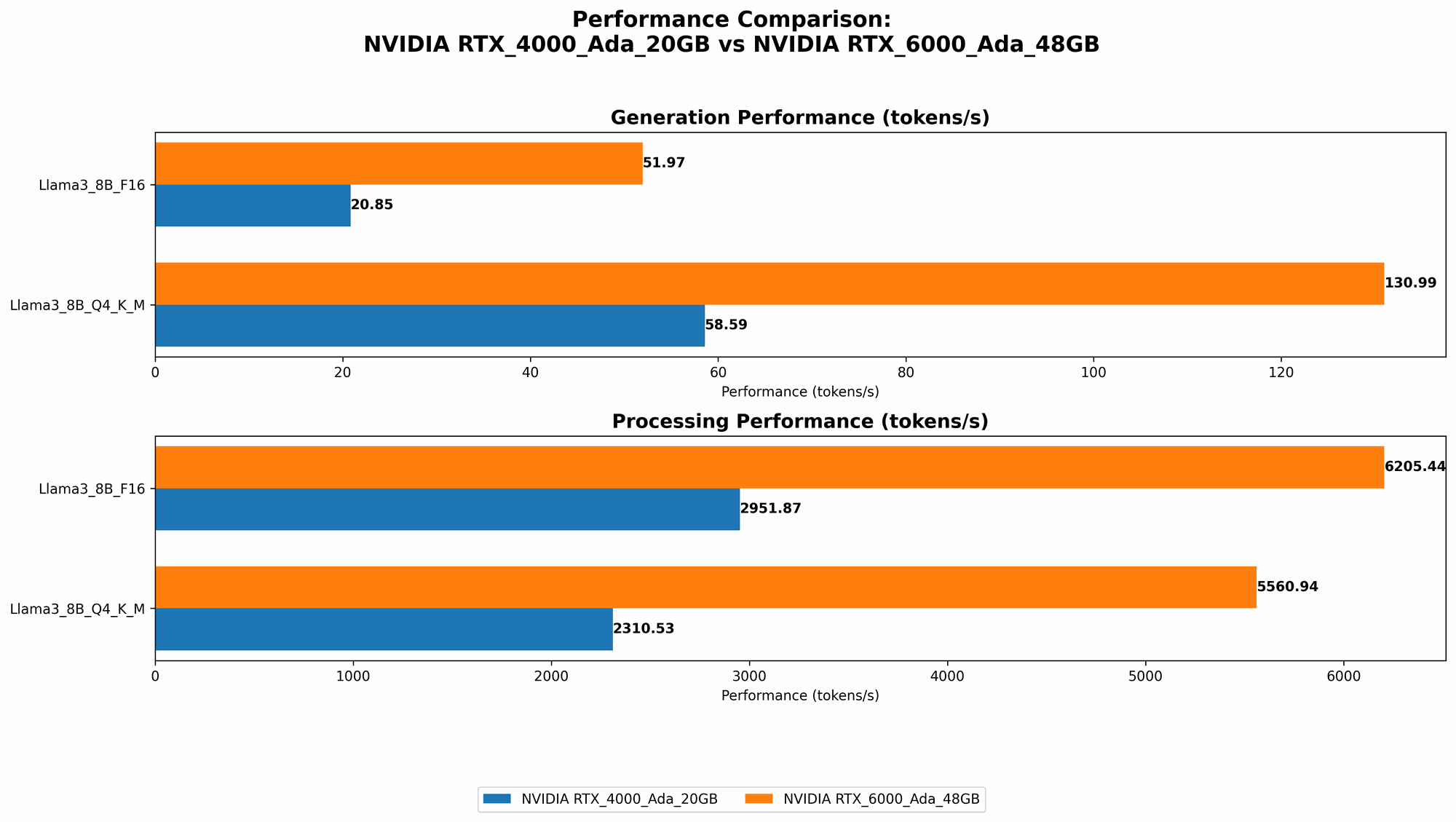
This section delves into the performance differences between the RTX 4000 Ada 20GB and the RTX 6000 Ada 48GB, breaking down the results and providing practical recommendations for different use cases.
Token Speed: A Tale of Two GPUs
Let's get down to the nitty-gritty: token speed. This metric measures how many tokens (the building blocks of language) a GPU can process per second. The higher the token speed, the faster your LLM can generate text.
The RTX 6000 Ada 48GB reigns supreme in token speed, especially for the larger 70B Llama 3 model. Here's a table summarizing token speeds for different configurations:
| Model | Precision | RTX 4000 Ada 20GB (Tokens/Second) | RTX 6000 Ada 48GB (Tokens/Second) |
|---|---|---|---|
| Llama 3 8B | Q4KM | 58.59 | 130.99 |
| Llama 3 8B | F16 | 20.85 | 51.97 |
| Llama 3 70B | Q4KM | No data | 18.36 |
| Llama 3 70B | F16 | No data | No data |
- Q4KM: This refers to a specific quantization setting used to optimize the model for memory and speed. It involves using 4-bit precision for weights and activations.
- F16: Here, the model uses 16-bit floating-point precision, which offers slightly higher accuracy than Q4KM but consumes more memory.
Key Takeaways:
- The RTX 6000 Ada 48GB consistently outperforms the RTX 4000 Ada 20GB in terms of token speed for both 8B and 70B Llama 3 models. This is likely due to the RTX 6000 Ada 48GB's larger memory capacity and higher processing power.
- For smaller models like Llama 3 8B, the difference in token speed is significant, making the RTX 6000 Ada 48GB the clear choice if speed is your priority.
- For larger models like Llama 3 70B, the RTX 6000 Ada 48GB is the only viable option due to its ability to handle the larger model size and memory requirements.
- The data highlights that the RTX 4000 Ada 20GB might not have enough memory for larger models or higher precision settings, leading to potential out-of-memory errors during inference.
Processing Power: A Closer Look
Token speed is only one side of the coin. The RTX 6000 Ada 48GB also boasts an edge when it comes to processing power. This is crucial for tasks like vector embedding and sequence generation.
| Model | Precision | RTX 4000 Ada 20GB (Tokens/Second) | RTX 6000 Ada 48GB (Tokens/Second) |
|---|---|---|---|
| Llama 3 8B | Q4KM | 2310.53 | 5560.94 |
| Llama 3 8B | F16 | 2951.87 | 6205.44 |
| Llama 3 70B | Q4KM | No data | 547.03 |
| Llama 3 70B | F16 | No data | No data |
Key Takeaways:
- The RTX 6000 Ada 48GB consistently delivers higher processing power for both 8B and 70B Llama 3 models, regardless of precision settings. This translates to faster inference times for more complex tasks.
- The RTX 4000 Ada 20GB struggles to keep up with the RTX 6000 Ada 48GB's processing power, especially for the 70B model. This could lead to slower inference times and affect user experience for demanding applications.
Memory Capacity: The Game Changer
Memory capacity is a crucial factor for running large LLMs. The RTX 6000 Ada 48GB's 48GB of GDDR6 memory gives it a clear advantage over the RTX 4000 Ada 20GB with its 20GB.
Think of memory like a storage space for the LLM model. The larger the model, the more memory it requires. If you're working with large models like Llama 3 70B, the RTX 4000 Ada 20GB might not be able to handle the model's size.
Here's the breakdown:
- RTX 4000 Ada 20GB: This card can handle Llama 3 8B with Q4KM or F16 precision comfortably, but may struggle with larger models or higher precision settings.
- RTX 6000 Ada 48GB: This card effortlessly handles both Llama 3 8B and Llama 3 70B with Q4KM precision. It also offers the flexibility for running even larger models in the future.
Precision Levels: Choosing the Right Balance
Precision levels refer to the level of detail used in numerical computations.
- Lower precision: This leads to faster inference times and reduced memory consumption.
- Higher precision: This provides more accuracy but sacrifices speed and memory efficiency.
The table above shows that both GPUs can handle Llama 3 8B with Q4KM and F16 settings effectively. However, your choice of precision can significantly impact performance. Lower precision settings like Q4KM can be a better fit for real-time applications or resource-constrained environments. Higher precision settings like F16 might be better for tasks demanding a higher level of accuracy.
Cost Considerations: Think Long-Term
The RTX 6000 Ada 48GB is a significant investment, and the RTX 4000 Ada 20GB is more budget-friendly. But, remember that cost should be considered in the context of your long-term needs.
- If you're working with large models and need optimal speed and performance, the RTX 6000 Ada 48GB will be a worthwhile investment. It can handle current and future models
- If you're starting with smaller models and budget is a concern, the RTX 4000 Ada 20GB can be a good starting point. However, you might need to upgrade later if your needs evolve.
Cooling and Power Consumption: Not to Be Overlooked
The RTX 6000 Ada 48GB draws more power than the RTX 4000 Ada 20GB, requiring a more robust power supply and a cooling solution capable of handling the heat. If you're building a compact system or working with limited power resources, the RTX 4000 Ada 20GB might be a better choice.
Choosing the Right GPU for Your Needs
So, how do you decide between the RTX 4000 Ada 20GB and the RTX 6000 Ada 48GB?
- Need to run large LLM models with high precision? Go with the RTX 6000 Ada 48GB. Its larger memory and processing power will ensure smooth operation and fast inference times. This is ideal for research, development, or production environments where performance is paramount.
- Working with smaller models or focusing on cost-effectiveness? The RTX 4000 Ada 20GB can be a good option. It offers decent performance for smaller LLMs and can be a good starting point for beginners.
- Have limited power budget or a small system? The RTX 4000 Ada 20GB is a more suitable option.
Quantization: Breaking Down the Barriers
Quantization is a technique used to reduce the memory footprint and computational requirements of LLMs. It involves converting the model's weights and activations from high-precision floating-point values to lower-precision representations.
Think of it like this: Imagine you have a detailed image of a city. Quantization is like reducing the image's resolution to a smaller version. The smaller image takes up less space but still conveys the essential information about the city.
Quantization can significantly boost performance and reduce memory requirements, allowing you to run larger models on less powerful GPUs.
The RTX 6000 Ada 48GB can handle the larger Llama 3 70B using Q4KM, a testament to the power of quantization. It allows you to work with larger models while still maintaining a decent inference speed.
FAQ - Frequently Asked Questions
What's the difference between an LLM and a GPT?
GPT (Generative Pre-trained Transformer) is a specific type of large language model developed by OpenAI. While GPT is a popular example of an LLM, LLMs include various other models developed by different organizations.
What does "Q4KM" stand for?
Q4KM refers to a quantization setting where the model's weights are quantized to 4-bit precision, and the key, value, and memory components are also quantized to 4-bit precision.
Is it worth upgrading from the RTX 4000 Ada 20GB to the RTX 6000 Ada 48GB?
If you're planning to work with larger LLMs like Llama 3 70B or are expecting your needs to evolve in the future, the upgrade can be worthwhile. It provides the headroom for future expansion and ensures smoother performance for demanding tasks.
Keywords
LLM, Llama 3, GPT, RTX 4000 Ada 20GB, RTX 6000 Ada 48GB, GPU, AI, machine learning, deep learning, token speed, inference, processing power, memory capacity, precision, quantization, Q4KM, F16, cost, power consumption, cooling, performance, benchmark, comparison.