6 Key Factors to Consider When Choosing Between Apple M3 Pro 150gb 14cores and NVIDIA RTX 5000 Ada 32GB for AI
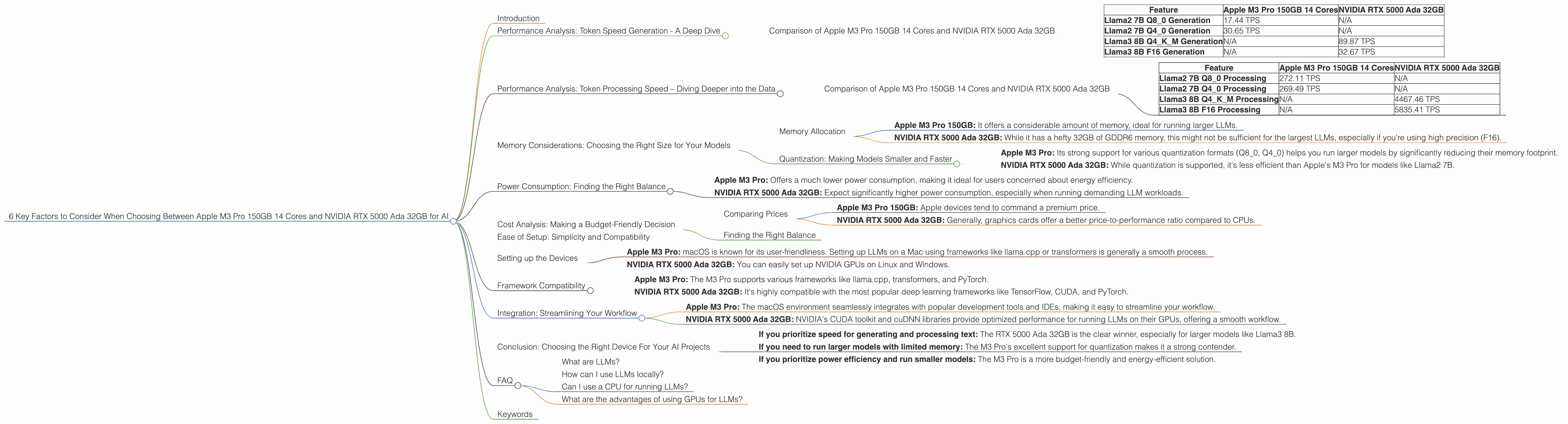
Introduction
The world of Artificial Intelligence (AI) is rapidly evolving, with large language models (LLMs) becoming increasingly powerful and versatile. These LLMs, like GPT-3 and Llama 2, can generate human-quality text, translate languages, write different kinds of creative content, and answer your questions in an informative way. However, running these models locally on your computer requires powerful hardware.
This article compares the performance of two popular devices: Apple's M3 Pro 150GB 14 core processor and NVIDIA's RTX 5000 Ada 32GB graphics card, focusing on their suitability for running LLMs. We'll discuss the most important factors to consider: speed, memory, power consumption, cost, ease of setup, and integration with different frameworks, to help you decide which device is the best fit for your AI projects.
Performance Analysis: Token Speed Generation - A Deep Dive
The key metric we'll focus on is tokens per second (TPS). Think of tokens as the "words" that LLMs process. The higher the TPS, the faster your model can generate text, translate languages, or answer your questions.
Comparison of Apple M3 Pro 150GB 14 Cores and NVIDIA RTX 5000 Ada 32GB
| Feature | Apple M3 Pro 150GB 14 Cores | NVIDIA RTX 5000 Ada 32GB |
|---|---|---|
| Llama2 7B Q8_0 Generation | 17.44 TPS | N/A |
| Llama2 7B Q4_0 Generation | 30.65 TPS | N/A |
| Llama3 8B Q4KM Generation | N/A | 89.87 TPS |
| Llama3 8B F16 Generation | N/A | 32.67 TPS |
Key Takeaways:
- NVIDIA RTX 5000 Ada 32GB outperforms Apple M3 Pro in generation tasks for Llama3 8B. The RTX 5000 Ada 32GB achieves a significantly higher TPS, especially when using quantized models (Q4KM).
- Apple M3 Pro shows strong performance with Llama2 7B models, especially for Q4_0 (quantization).
- The RTX 5000 Ada 32GB doesn't have data available for Llama2 7B models. It's possible that this GPU might not be as efficient for smaller models.
Performance Analysis: Token Processing Speed – Diving Deeper into the Data
Let's examine the processing speed, which determines how fast your model can process input before generating output.
Comparison of Apple M3 Pro 150GB 14 Cores and NVIDIA RTX 5000 Ada 32GB
| Feature | Apple M3 Pro 150GB 14 Cores | NVIDIA RTX 5000 Ada 32GB |
|---|---|---|
| Llama2 7B Q8_0 Processing | 272.11 TPS | N/A |
| Llama2 7B Q4_0 Processing | 269.49 TPS | N/A |
| Llama3 8B Q4KM Processing | N/A | 4467.46 TPS |
| Llama3 8B F16 Processing | N/A | 5835.41 TPS |
Key Takeaways:
- NVIDIA RTX 5000 Ada 32GB significantly outperforms Apple M3 Pro in processing tasks for Llama3 8B, especially using F16 precision. The RTX 5000 Ada 32GB provides a massive performance boost due to its dedicated tensor cores designed for rapid matrix computations.
- Apple M3 Pro shows strong performance for Llama2 7B using quantized models, both Q80 and Q40.
- The RTX 5000 Ada 32GB doesn't have data available for Llama2 7B models. This suggests that the RTX 5000 Ada 32GB might not be as effective for smaller models as Apple's M3 Pro.
Memory Considerations: Choosing the Right Size for Your Models
Memory Allocation
LLMs require substantial memory to store their parameters and process data. The size of the model you want to run directly impacts your memory requirements. Let's compare our devices:
- Apple M3 Pro 150GB: It offers a considerable amount of memory, ideal for running larger LLMs.
- NVIDIA RTX 5000 Ada 32GB: While it has a hefty 32GB of GDDR6 memory, this might not be sufficient for the largest LLMs, especially if you're using high precision (F16).
Quantization: Making Models Smaller and Faster
Quantization is a technique used to reduce the memory footprint of LLMs. It involves reducing the size of numbers used to represent model parameters.
Think of it like compressing a high-resolution image. You lose some detail, but the file size becomes smaller. We can do this with LLMs, too, making them require less memory without sacrificing too much performance.
- Apple M3 Pro: Its strong support for various quantization formats (Q80, Q40) helps you run larger models by significantly reducing their memory footprint.
- NVIDIA RTX 5000 Ada 32GB: While quantization is supported, it's less efficient than Apple's M3 Pro for models like Llama2 7B.
Power Consumption: Finding the Right Balance
The energy consumption of these devices is a factor to consider, especially if you're running models for extended periods. The RTX 5000 Ada 32GB, with its high performance, draws more power than the M3 Pro.
- Apple M3 Pro: Offers a much lower power consumption, making it ideal for users concerned about energy efficiency.
- NVIDIA RTX 5000 Ada 32GB: Expect significantly higher power consumption, especially when running demanding LLM workloads.
Cost Analysis: Making a Budget-Friendly Decision
Comparing Prices
- Apple M3 Pro 150GB: Apple devices tend to command a premium price.
- NVIDIA RTX 5000 Ada 32GB: Generally, graphics cards offer a better price-to-performance ratio compared to CPUs.
Finding the Right Balance
When choosing between the M3 Pro 150GB and RTX 5000 Ada 32GB, consider your budget and your workload. If you're running smaller models, the RTX 5000 Ada 32GB might be a good option, but if you need to run larger models or are on a tighter budget, Apple M3 Pro could be a better choice.
Ease of Setup: Simplicity and Compatibility
Setting up the Devices
Apple M3 Pro: macOS is known for its user-friendliness. Setting up LLMs on a Mac using frameworks like llama.cpp or transformers is generally a smooth process.
NVIDIA RTX 5000 Ada 32GB: You can easily set up NVIDIA GPUs on Linux and Windows.
Framework Compatibility
- Apple M3 Pro: The M3 Pro supports various frameworks like llama.cpp, transformers, and PyTorch.
- NVIDIA RTX 5000 Ada 32GB: It's highly compatible with the most popular deep learning frameworks like TensorFlow, CUDA, and PyTorch.
Integration: Streamlining Your Workflow
Both devices offer excellent integration with various tools and software for working with LLMs.
Apple M3 Pro: The macOS environment seamlessly integrates with popular development tools and IDEs, making it easy to streamline your workflow.
NVIDIA RTX 5000 Ada 32GB: NVIDIA's CUDA toolkit and cuDNN libraries provide optimized performance for running LLMs on their GPUs, offering a smooth workflow.
Conclusion: Choosing the Right Device For Your AI Projects
The choice between Apple M3 Pro 150GB 14 cores and NVIDIA RTX 5000 Ada 32GB largely depends on your specific needs and priorities. Here's a simplified guide:
If you prioritize speed for generating and processing text: The RTX 5000 Ada 32GB is the clear winner, especially for larger models like Llama3 8B.
If you need to run larger models with limited memory: The M3 Pro's excellent support for quantization makes it a strong contender.
If you prioritize power efficiency and run smaller models: The M3 Pro is a more budget-friendly and energy-efficient solution.
Remember: The best device for you depends on your specific needs. Carefully consider the factors we've discussed, and choose the option that best aligns with your AI projects.
FAQ
What are LLMs?
LLMs stand for Large Language Models. They are powerful AI systems trained on massive datasets of text and code to understand and generate human-like language.
How can I use LLMs locally?
You can use LLMs locally by installing them on your computer along with the necessary software and libraries. This allows you to interact with the model and generate responses without relying on cloud services.
Can I use a CPU for running LLMs?
Yes, but CPUs aren't as efficient as GPUs, especially for large models. They might be suitable for smaller models.
What are the advantages of using GPUs for LLMs?
GPUs offer significantly faster processing speeds and better memory bandwidth compared to CPUs, making them ideal for running demanding LLMs.
Keywords
Apple M3 Pro, NVIDIA RTX 5000 Ada, LLM, Llama2, Llama3, Token Speed, Generation, Processing, Memory, Quantization, Power Consumption, Cost, Ease of Setup, Framework Compatibility, Integration, AI, Deep Learning, Developers, Geeky, Funny, Token per Second, TPS, GPU, CPU, Framework, CUDA, cuDNN, transformers, llama.cpp