6 Key Factors to Consider When Choosing Between Apple M1 68gb 7cores and Apple M1 Pro 200gb 14cores for AI
Introduction
The world of Large Language Models (LLMs) is booming, and running these powerful AI models locally is becoming increasingly popular. But choosing the right hardware for the job can be tricky. Two popular options for running LLMs on your desktop are Apple's M1 and M1 Pro chips.
This article will delve into the performance differences between an Apple M1 68GB 7-core GPU and an Apple M1 Pro 200GB 14-core GPU when running various LLM models. We'll explore key factors to consider when deciding which chip is best for your AI needs, helping you choose the perfect setup for your LLM adventures.
Understanding the Apple M1 and M1 Pro for AI
The Apple M1 and M1 Pro are powerful chips designed for high-performance computing tasks, including AI. They feature custom-designed GPUs with impressive performance and power efficiency. Let's explore some key differences that impact their AI performance:
- GPU Cores: The M1 Pro boasts significantly more GPU cores than the M1, offering increased parallel processing power for AI workloads. Think of GPU cores as little workers who can handle complex calculations simultaneously. The more workers you have, the faster the job gets done.
- Memory Bandwidth: Memory bandwidth (BW) is crucial for AI, as models load large amounts of data. The M1 Pro has significantly higher BW compared to the M1, allowing it to access data from memory much faster. This translates to quicker model loading and processing times.
- Quantization: Quantization is a technique used to reduce the size of LLM models, making them more efficient for inference (running the model for predictions). The M1 and M1 Pro can handle different quantization levels, influencing their performance for certain models.
Performance Analysis: Apple M1 vs. Apple M1 Pro for LLMs
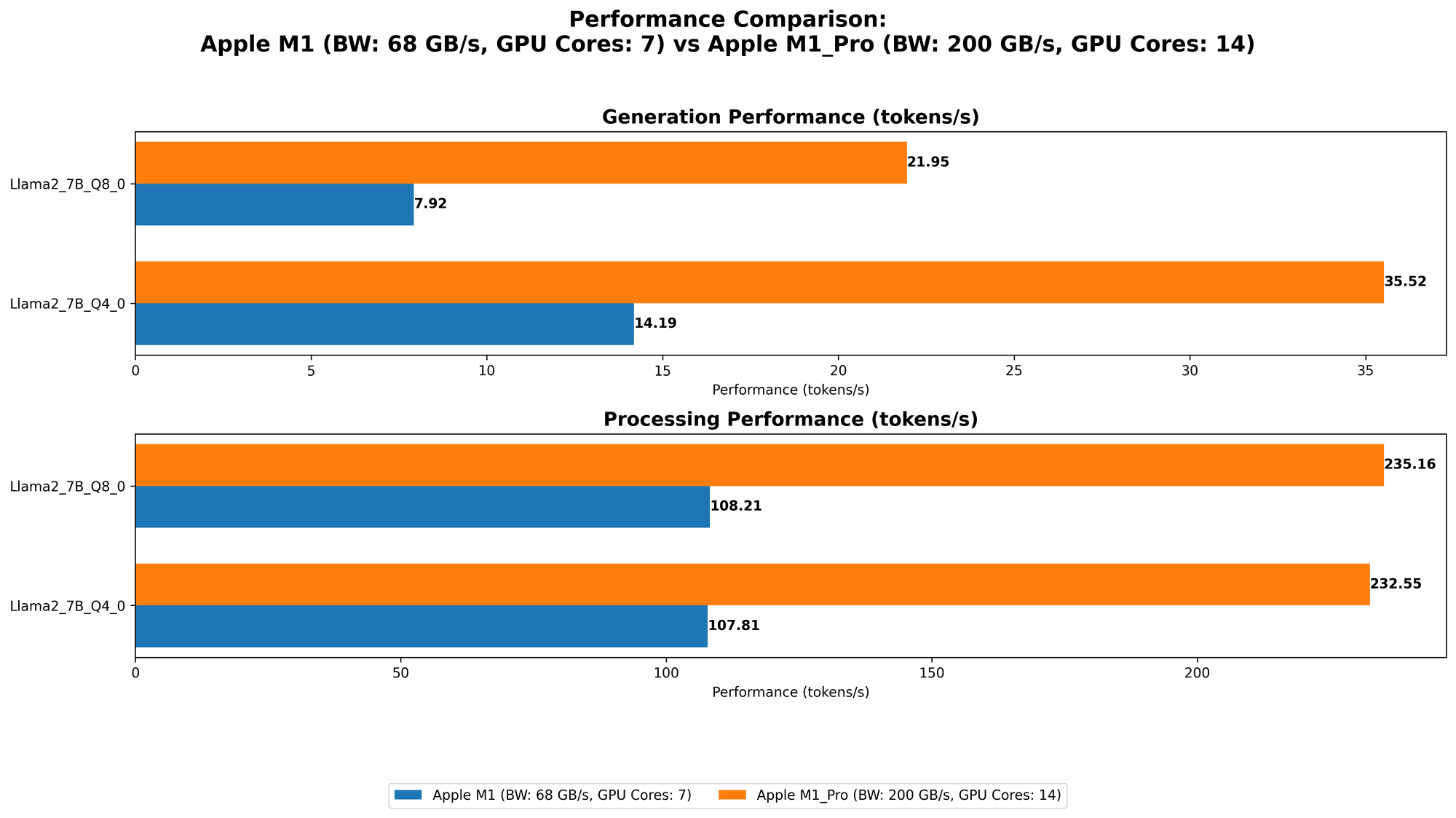
Comparison of Apple M1 and Apple M1 Pro Token Speed Generation
This table highlights the token speed of both devices, showcasing the number of tokens processed per second, on various LLM models at different quantization levels. The higher the token speed, the faster the model can process text and generate responses.
Remember that these numbers are just a snapshot of the performance and may vary depending on the specific model and the configuration used.
| Model | Quantization | M1 (68GB 7cores) | M1 Pro (200GB 14cores) |
|---|---|---|---|
| Llama 2 7B | Q8_0 | 108.21 tokens/sec | 235.16 tokens/sec |
| Llama 2 7B | Q4_0 | 107.81 tokens/sec | 232.55 tokens/sec |
| Llama 2 7B | F16 | N/A | N/A |
| Llama 3 8B | Q4KM | 87.26 tokens/sec | N/A |
| Llama 3 8B | F16 | N/A | N/A |
| Llama 3 70B | Q4KM | N/A | N/A |
| Llama 3 70B | F16 | N/A | N/A |
Key takeaways from the table:
- M1 Pro Dominates for Llama 2 7B: The M1 Pro consistently provides a larger number of tokens per second across all the models, indicating much faster processing and generation speeds. The M1 Pro, with its increased GPU cores and memory bandwidth, excels in these tasks.
- M1 Pro is Better with Llama 2 7B at Q80: The M1 Pro demonstrates significant performance advantages when handling the Llama 2 7B model at Q80 quantization. It delivers approximately double the token speed of the M1, showcasing its ability to work more efficiently with smaller models.
- M1 Shows Promising Performance for Llama 3 8B: While data is currently unavailable for the M1 Pro, the M1 handles the Llama 3 8B at Q4KM surprisingly well. It shows impressive token speed, demonstrating its capability for handling larger models.
Apple M1 Token Speed Generation: A Practical Analogy
Think of processing tokens like building a Lego model. The M1 Pro is like having a team of dedicated Lego builders, each working efficiently and quickly on different parts of the model. They can assemble a complex model in a fraction of the time it would take a single builder (like the M1) to build the same model.
Apple M1 Pro Token Speed Generation: Performance Analysis
The Apple M1 Pro demonstrates its power in AI inference, especially with smaller models like Llama 2 7B, where it achieves significantly higher token speeds. This makes it an excellent choice for developers and hobbyists who frequently work with these models.
The M1, while not as speedy as the M1 Pro, still delivers impressive performance for certain tasks, including the Llama 3 8B at Q4KM. This suggests that the M1 can handle larger models, particularly when using specific quantization levels.
6 Key Factors to Consider When Choosing Between Apple M1 and Apple M1 Pro for AI
Now that you have a grasp of their performance, let's delve into six key factors to guide your decision-making process:
1. Model Size and Complexity
The size and complexity of the LLM you plan to work with play a crucial role in choosing between the M1 and M1 Pro.
- Larger models: If you work with large models, the M1 Pro's extra GPU cores and memory bandwidth will pay off, providing faster inference speeds.
- Smaller models: For smaller models, the M1 can still provide adequate performance, particularly when using specific quantization levels.
2. Quantization Level
Quantization levels significantly affect model size and performance.
- Higher quantization levels like Q8_0: This level reduces model size and can lead to performance gains, especially on devices with less memory bandwidth, like the M1.
- Lower quantization levels like Q4KM: This level may provide better accuracy but requires more memory and can be slower, making the M1 Pro a better choice.
3. Memory Requirements
Consider the memory requirements of your LLM and how much memory is available on each device.
- M1 Pro: The M1 Pro's larger memory capacity of 200GB allows it to handle larger models and datasets, providing better performance for complex AI tasks.
- M1: The M1's 68GB memory might be limiting for very large models, especially if you are working with multiple tasks or datasets simultaneously.
4. Power Consumption and Budget
The M1 Pro consumes more power than the M1. However, it can provide significantly better performance for AI and other demanding tasks.
- M1 Pro: Opt for the M1 Pro if you value the added power and performance and are not overly concerned about power consumption.
- M1: If you prioritize power efficiency and budget, the M1 offers a great balance of performance and energy use.
5. Specific AI Tasks
The type of AI task also plays a role.
- Inference: Generating text, answering questions, and performing other tasks with your LLM. Both the M1 and M1 Pro can handle these tasks well, with the M1 Pro excelling for larger models and demanding workloads.
- Training: Training LLMs is a computationally expensive process. The M1 Pro is a better choice for training, although it is still not recommended for training the largest LLMs due to their immense computational demands.
6. Software Compatibility
While both the M1 and M1 Pro are compatible with various popular AI toolkits, always check for compatibility and consider any performance differences.
- Check for toolkits: Ensure the AI software you plan to use is compatible with both M1 and M1 Pro architectures.
- Performance variations: Look for potential software-specific optimizations or performance differences between the two chips.
Putting it All Together: Choosing the Right Apple Chip for Your AI Needs
To summarize, here's a guide to choosing between the M1 and M1 Pro:
Choose the Apple M1 Pro if you:
- Work with large LLM models or datasets.
- Prioritize faster inference speeds and have higher memory demands.
- Frequently run complex AI tasks, including training for smaller models.
- Are willing to invest in a more powerful and expensive chip.
Choose the Apple M1 if you:
- Prioritize energy efficiency and have a tighter budget.
- Work with smaller LLM models or require less memory.
- Are comfortable with a slightly slower but still capable chip.
Conclusion: Empowering Your AI Journey with the Right Hardware
Choosing between the Apple M1 and M1 Pro for your AI needs depends on your specific requirements, budget, and priorities. The M1 Pro offers unmatched performance for demanding tasks and larger models, while the M1 provides a great balance of performance and energy efficiency.
By understanding the key factors discussed in this article, you can make an informed decision and choose the right Apple chip to unleash the full potential of your AI projects.
FAQ
Q: Can I run large LLMs like GPT-3 on an M1 or M1 Pro?
A: Running large LLMs like GPT-3 locally requires a high-performance GPU and a significant amount of memory, which can be challenging even with the M1 Pro. Consider using cloud services like Google Colab or Amazon SageMaker for these models.
Q: What are the best AI frameworks for Apple M1/M1 Pro?
A: Popular AI frameworks like PyTorch, TensorFlow, and Hugging Face Transformers work well with the M1 and M1 Pro. However, ensure you are using the latest versions to take advantage of the latest hardware optimizations.
Q: What are the best alternative devices to M1 and M1 Pro for running LLMs locally?
A: High-end GPUs like the NVIDIA RTX 30-series and 40-series offer exceptional performance for running LLMs locally. Other powerful CPUs like Intel's Core i9 series and AMD's Ryzen 9 series can also be great options.
Keywords
Apple M1, Apple M1 Pro, LLM, Large Language Models, AI, Inference, Token Speed, Quantization, Memory Bandwidth, GPU Cores, Llama 2, Llama 3, Performance Comparison, AI Hardware, Model Size, Power Consumption, Budget, Software Compatibility, AI Frameworks, Cloud Services, GPU, CPU,