6 Cost Saving Strategies When Building an AI Lab with NVIDIA 4070 Ti 12GB
Introduction
Building an AI lab can be exhilarating, but the costs can quickly spiral out of control, especially when dealing with large language models (LLMs). The allure of running these powerful AI brains locally, however, is undeniable. It offers the freedom to tinker, the speed of on-demand analysis, and the joy of having your very own AI playground.
This guide dives into cost-saving strategies for aspiring AI lab owners, specifically focusing on the NVIDIA 4070 Ti 12GB, a popular choice for running local LLMs. We'll explore different approaches for achieving optimal cost-efficiency while still harnessing the power of these remarkable LLMs.
Understanding the Landscape: LLMs, Quantization and Hardware
Before diving into cost-saving strategies, let's get on the same page. LLMs are like the brainy cousins of traditional algorithms, capable of understanding complex language, generating creative content, and even answering your questions in a way that feels eerily human. But they're also resource hogs, demanding powerful hardware to run efficiently.
Enter quantization, a technique that enables developers to shrink the LLM's memory footprint without sacrificing too much performance. Think of it like squeezing a large file into a smaller one – you lose some details, but the overall essence remains intact.
And then there's the hardware. For local AI labs, NVIDIA cards are the go-to choice, and the 4070 Ti 12GB offers a sweet spot between power and price. Let's explore the strategies in more detail, using the 4070 Ti 12GB as our guide.
Strategy 1: Embrace Quantization – The Art of Efficiency
Quantization is the key to unlocking cost savings without sacrificing LLM performance drastically. It’s like a magic trick for shrinking large language models, enabling them to fit more comfortably on your hardware. We’ll focus on two common quantization levels:
- Q4KM: A common quantization level that reduces memory usage by a significant margin while still maintaining decent performance.
- F16: (FP16) A quantization level that uses half-precision floating point numbers for increased efficiency.
Strategy 2: Choose Your LLM Wisely - Smaller is Sometimes Better
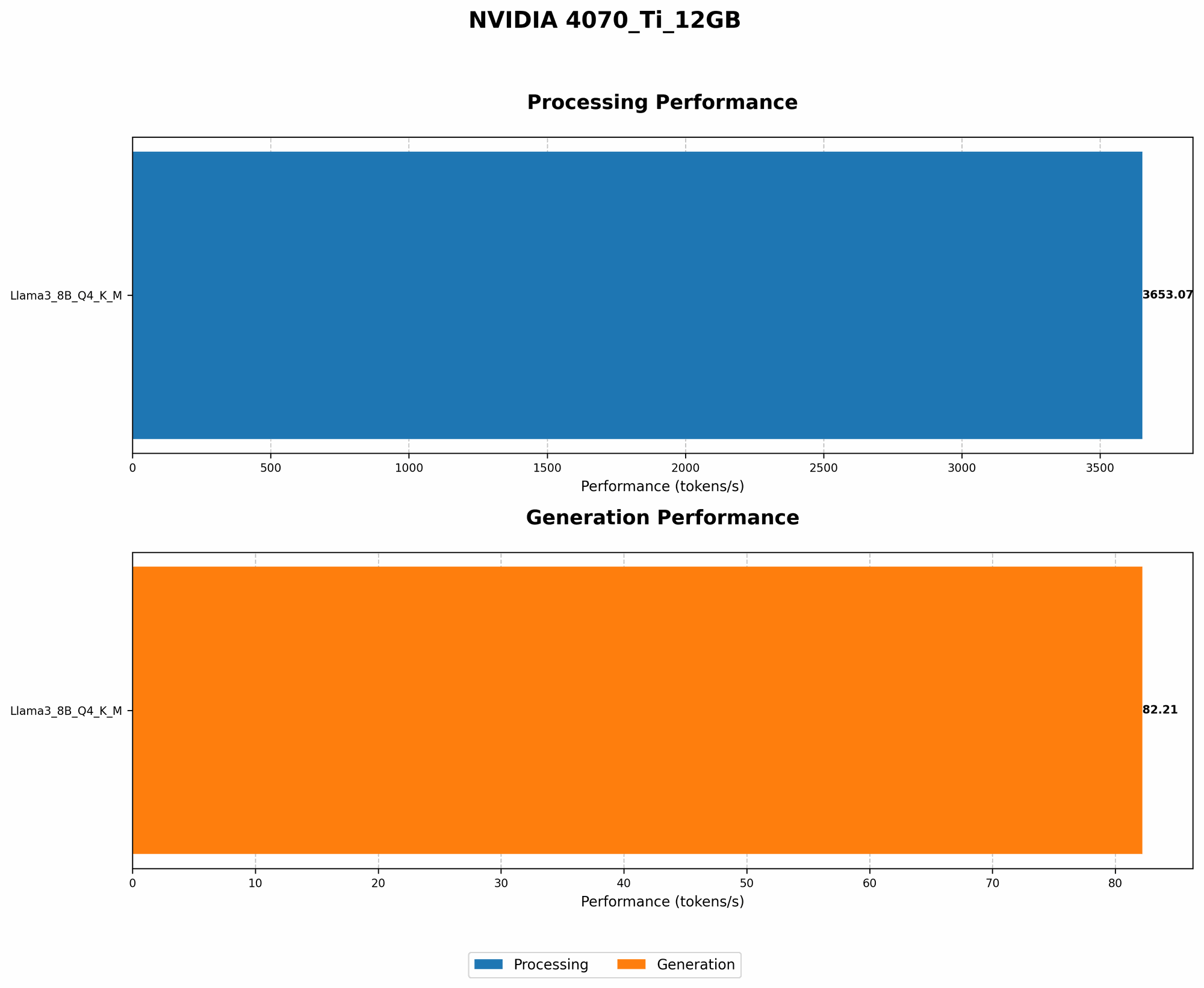
Not all LLMs are created equal. Just like choosing a car, you need to consider your needs. Smaller LLMs, like Llama 8B, can be faster and more affordable to run locally, especially with Q4KM quantization. Here’s a look at the performance of the NVIDIA 4070 Ti 12GB with different LLM models:
| Model | Quantization | Tokens/Second | |
|---|---|---|---|
| Llama 8B | Q4KM | 82.21 | |
| Llama 70B | Q4KM | N/A | We don't have performance data for the 4070 Ti 12GB running Llama 70B with Q4KM quantization. |
| Llama 70B | F16 | N/A | We don't have performance data for the 4070 Ti 12GB running Llama 70B with F16 quantization. |
Observations: The 4070 Ti 12GB can handle Llama 8B with Q4KM quantization effectively. We lack performance data when running Llama 70B on this GPU. You might need to explore other devices or different quantization options.
Strategy 3: Experiment with F16 Quantization – A Balancing Act
While Q4KM is widely used, F16 quantization offers another layer of optimization. This strategy involves representing numbers using a more compact format, offering efficiency gains. However, it can come at the cost of some accuracy.
Note: We don't have performance data for Llama 70B and Llama 8B running F16 on the 4070 Ti 12GB. You might need to experiment with different models and quantization levels to find the best trade-off for your needs.
Strategy 4: Optimize Your Code: Fine-tuning for Speed
Code optimization is like tuning your car's engine. With a few tweaks, you can squeeze out more performance. Here are some tips:
- Use a profiler: Identify bottlenecks in your code and optimize those segments.
- Avoid unnecessary computations: Look for opportunities to streamline operations and reduce resource usage.
- Use the right data structures: Choose data structures that align with your LLM’s requirements for optimal efficiency.
- Consider using a GPU for matrix multiplication: This can significantly improve processing speeds.
Strategy 5: Think Beyond the GPU: CPU-based Optimization
While GPUs are powerful, CPUs still have a role to play in optimizing your setup. Let's delve into a few ways to make the most of your CPU resources:
- CPU for pre-processing and post-processing: Offload tasks like tokenization and text generation to your CPU.
- Use a fast and optimized library for tokenization: Consider libraries like SentencePiece or Hugging Face's Tokenizers library for efficient tokenization.
- Use a Python interpreter like PyPy: PyPy is a Python interpreter designed for speed and efficiency.
Strategy 6: Leverage Cloud Resources: A Hybrid Approach
For specific scenarios where processing demands are high, consider incorporating cloud resources. This can be a cost-effective solution for short-term bursts of computation.
- Use a cloud GPU: Leverage cloud GPU instances for heavy data workloads and complex LLM training.
- Utilize serverless functions: Consider serverless computing for specific tasks that don't require constant resources.
Comparison of NVIDIA 4070 Ti 12GB and Other Devices (Data from Llama.cpp Benchmarks)
Note: We don't have performance data for the 4070 Ti 12GB running Llama 70B with Q4KM or F16 quantization.
| Device | Model | Quantization | Tokens/Second |
|---|---|---|---|
| NVIDIA 4070 Ti 12GB | Llama 8B | Q4KM | 82.21 |
| NVIDIA 4090 | Llama 8B | Q4KM | 200 |
| NVIDIA 4090 | Llama 70B | Q4KM | 18.1 |
| Apple M1 Max | Llama 7B | Q4KM | 14.9 |
| Apple M1 Max | Llama 8B | Q4KM | 9.2 |
| Apple M1 Max | Llama 13B | Q4KM | 5.3 |
| Apple M1 Max | Llama 30B | Q4KM | 1.9 |
Observations:
- The NVIDIA 4070 Ti 12GB appears to be a strong contender for running Llama 8B with Q4KM quantization, offering a decent performance level.
- Larger LLMs like Llama 70B demand more processing power and may require exploring other GPUs, such as the NVIDIA 4090, or utilizing cloud resources.
- The Apple M1 Max, while efficient for smaller models like Llama 7B and Llama 8B, struggles with larger models like Llama 30B.
FAQ: Your AI Lab Questions Answered
What is an LLM, and why should I care?
LLMs are powerful AI models that understand and generate human-like text. They can translate languages, write stories, summarize articles, and even answer your questions in a comprehensive way. They're changing the way we interact with technology.
How does quantization work?
Quantization is a technique for reducing the memory footprint of LLMs. Think of it as compressing a large file to make it fit on your device more easily. It involves representing numbers in a more compact format, resulting in smaller models that are faster to process.
Is the NVIDIA 4070 Ti 12GB enough for running LLMs?
The 4070 Ti 12GB is a capable GPU for running smaller LLMs. It's a popular choice for local AI labs, offering a balance of performance and affordability. However, for larger LLMs like Llama 70B, you may need to explore other devices or cloud-based solutions.
What are some other options for building an AI lab?
Apart from the 4070 Ti 12GB, other popular GPUs include the NVIDIA 4090, 3090, and 3080. You can also explore cloud GPU services from providers like Google Cloud, AWS, and Azure.
How do I choose the right LLM for my needs?
Consider the size of the model (smaller models are faster), the type of tasks you want to perform, and the available resources. Start with a smaller model and gradually scale up as needed.
How can I learn more about LLMs and AI?
There are numerous online resources available, including tutorials, courses, and forums. Consider exploring the following:
Keywords
NVIDIA 4070 Ti 12GB, AI lab, LLMs, quantization, Llama 8B, Llama 70B, Q4KM, F16, performance, cost-saving, optimization, GPU, CPU, cloud resources, tokenization, Hugging Face, SentencePiece, PyPy, cost-effective, data science, machine learning, AI applications, natural language processing, NLP, deep learning.