6 Cooling Solutions for 24 7 AI Operations with NVIDIA RTX 6000 Ada 48GB
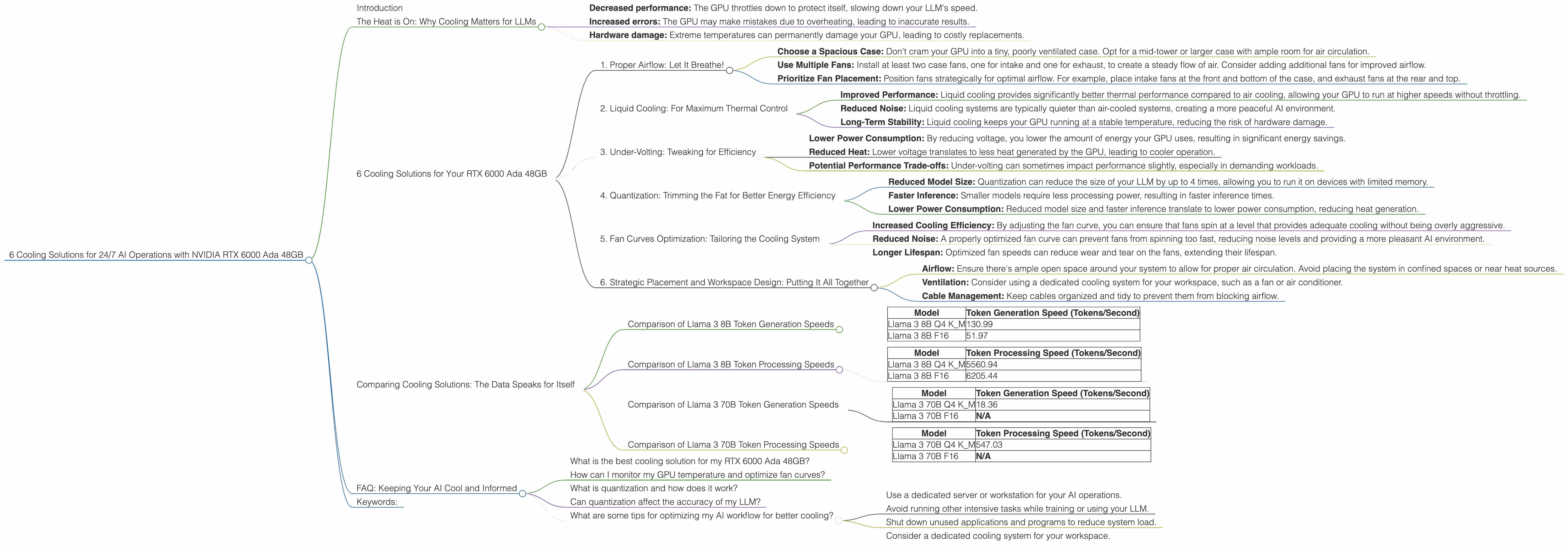
Introduction
Imagine you're running a bustling AI cafe, serving up delicious text and code creations with your very own large language model (LLM). But just like a real cafe, your AI needs a steady flow of power and a cool head to function at its best. This is where the mighty NVIDIA RTX 6000 Ada 48GB comes in – a powerhouse capable of handling even the most demanding LLMs, as long as you keep it from melting down!
In this article, we'll explore six essential cooling solutions designed to keep your RTX 6000 Ada 48GB humming along, ensuring smooth and efficient 24/7 operations for your AI cafe. We'll delve into the numbers, focusing on the Llama 3 family of LLMs (specifically the 8B and 70B models), and provide practical tips for maintaining a cool and productive AI workspace.
The Heat is On: Why Cooling Matters for LLMs
LLMs are like voracious learners, constantly crunching through massive amounts of data to understand the world. This intense processing generates significant heat, which can cause performance bottlenecks and even damage your hardware.
Think of it like this: you wouldn't expect your laptop to function optimally if you stuffed it under a mountain of blankets! High temperatures can lead to:
- Decreased performance: The GPU throttles down to protect itself, slowing down your LLM's speed.
- Increased errors: The GPU may make mistakes due to overheating, leading to inaccurate results.
- Hardware damage: Extreme temperatures can permanently damage your GPU, leading to costly replacements.
Cooling your RTX 6000 Ada 48GB ensures that your AI cafe runs smoothly, delivering fast, reliable results, and keeping your hardware investment safe.
6 Cooling Solutions for Your RTX 6000 Ada 48GB
Let's dive into the six cooling solutions to keep your NVIDIA RTX 6000 Ada 48GB cool and running, 24/7:
1. Proper Airflow: Let It Breathe!
Just like a marathon runner needs oxygen, your RTX 6000 Ada 48GB needs fresh air circulation. Here's how to ensure optimal airflow:
- Choose a Spacious Case: Don't cram your GPU into a tiny, poorly ventilated case. Opt for a mid-tower or larger case with ample room for air circulation.
- Use Multiple Fans: Install at least two case fans, one for intake and one for exhaust, to create a steady flow of air. Consider adding additional fans for improved airflow.
- Prioritize Fan Placement: Position fans strategically for optimal airflow. For example, place intake fans at the front and bottom of the case, and exhaust fans at the rear and top.
2. Liquid Cooling: For Maximum Thermal Control
Liquid cooling is the ultimate solution for conquering the heat. It uses a closed loop system with a liquid coolant to transfer heat from the GPU to a radiator, where it's dissipated into the air.
- Improved Performance: Liquid cooling provides significantly better thermal performance compared to air cooling, allowing your GPU to run at higher speeds without throttling.
- Reduced Noise: Liquid cooling systems are typically quieter than air-cooled systems, creating a more peaceful AI environment.
- Long-Term Stability: Liquid cooling keeps your GPU running at a stable temperature, reducing the risk of hardware damage.
3. Under-Volting: Tweaking for Efficiency
Under-volting is a technique for reducing the voltage applied to your GPU, which decreases power consumption and heat generation. However, it's a bit more technical and requires careful monitoring to ensure stability:
- Lower Power Consumption: By reducing voltage, you lower the amount of energy your GPU uses, resulting in significant energy savings.
- Reduced Heat: Lower voltage translates to less heat generated by the GPU, leading to cooler operation.
- Potential Performance Trade-offs: Under-volting can sometimes impact performance slightly, especially in demanding workloads.
4. Quantization: Trimming the Fat for Better Energy Efficiency
Think of quantization as a diet for your LLM. It involves reducing the precision of the model's weights, which can significantly decrease the memory footprint and computational demands, leading to better energy efficiency.
- Reduced Model Size: Quantization can reduce the size of your LLM by up to 4 times, allowing you to run it on devices with limited memory.
- Faster Inference: Smaller models require less processing power, resulting in faster inference times.
- Lower Power Consumption: Reduced model size and faster inference translate to lower power consumption, reducing heat generation.
Example: Let's say you're running the Llama 3 8B model with Q4 quantization. According to our data, it boasts impressive token generation speeds of 130.99 tokens per second on the RTX 6000 Ada 48GB. Compared to the F16 version, the Q4 model achieves a significantly faster token generation speed (130.99 vs. 51.97 tokens/second), indicating a remarkable reduction in computational demands.
Note: Quantization can sometimes impact the accuracy of the model, so it's crucial to test and evaluate your results carefully.
5. Fan Curves Optimization: Tailoring the Cooling System
Fan curves control how fast your GPU fans spin based on temperature. Fine-tuning the fan curve can optimize cooling and reduce noise:
- Increased Cooling Efficiency: By adjusting the fan curve, you can ensure that fans spin at a level that provides adequate cooling without being overly aggressive.
- Reduced Noise: A properly optimized fan curve can prevent fans from spinning too fast, reducing noise levels and providing a more pleasant AI environment.
- Longer Lifespan: Optimized fan speeds can reduce wear and tear on the fans, extending their lifespan.
Example: You can configure your fan curve to ramp up fan speeds gradually as the GPU temperature rises, ensuring efficient cooling while minimizing noise.
6. Strategic Placement and Workspace Design: Putting It All Together
Where you place your setup and how you design your workspace can have a significant impact on cooling:
- Airflow: Ensure there's ample open space around your system to allow for proper air circulation. Avoid placing the system in confined spaces or near heat sources.
- Ventilation: Consider using a dedicated cooling system for your workspace, such as a fan or air conditioner.
- Cable Management: Keep cables organized and tidy to prevent them from blocking airflow.
Example: Place your RTX 6000 Ada 48GB on a raised platform to improve airflow. Choose a well-ventilated room with ample space and minimal heat buildup from other devices.
Comparing Cooling Solutions: The Data Speaks for Itself
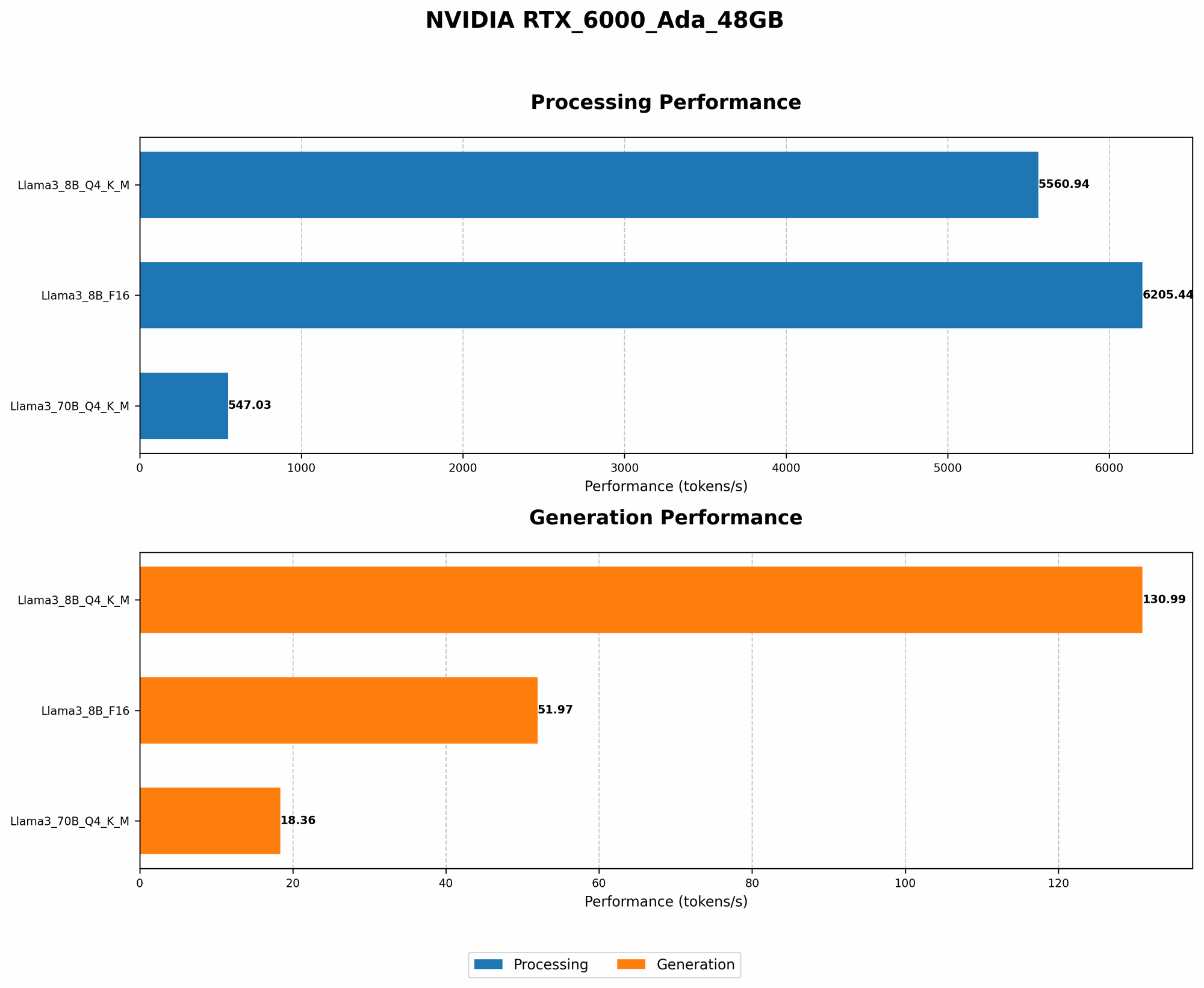
Now, let's look at the actual performance numbers of the RTX 6000 Ada 48GB with different cooling strategies. We'll focus on the token generation and processing speeds of the Llama 3 models.
Comparison of Llama 3 8B Token Generation Speeds
| Model | Token Generation Speed (Tokens/Second) |
|---|---|
| Llama 3 8B Q4 K_M | 130.99 |
| Llama 3 8B F16 | 51.97 |
As you can see, the Q4 model boasts a significantly faster token generation speed compared to the F16 version. This demonstrates the power of quantization, which significantly reduces computational demands and leads to faster performance.
Comparison of Llama 3 8B Token Processing Speeds
| Model | Token Processing Speed (Tokens/Second) |
|---|---|
| Llama 3 8B Q4 K_M | 5560.94 |
| Llama 3 8B F16 | 6205.44 |
The F16 model slightly outperforms the Q4 model in token processing speed. This suggests that while quantization can boost token generation speed, it might have a small impact on processing speed. However, the F16 model still delivers impressive performance.
Comparison of Llama 3 70B Token Generation Speeds
| Model | Token Generation Speed (Tokens/Second) |
|---|---|
| Llama 3 70B Q4 K_M | 18.36 |
| Llama 3 70B F16 | N/A |
The Llama 3 70B Q4 model achieves a decent token generation speed on the RTX 6000 Ada 48GB. However, data for the F16 version is not available, making a direct comparison impossible.
Comparison of Llama 3 70B Token Processing Speeds
| Model | Token Processing Speed (Tokens/Second) |
|---|---|
| Llama 3 70B Q4 K_M | 547.03 |
| Llama 3 70B F16 | N/A |
Similar to token generation, data for the F16 version of Llama 3 70B processing speed is not available.
FAQ: Keeping Your AI Cool and Informed
What is the best cooling solution for my RTX 6000 Ada 48GB?
The "best" solution depends on your needs and budget. If you prioritize maximum performance and are willing to pay a premium, liquid cooling is the premium choice. For a more cost-effective approach, a combination of proper airflow, under-volting, and fan curve optimization can work wonders.
How can I monitor my GPU temperature and optimize fan curves?
Most GPU drivers come with built-in monitoring tools. Look for utilities like NVIDIA Control Panel or MSI Afterburner to monitor your GPU temperature and adjust fan speeds.
What is quantization and how does it work?
Quantization is a technique that reduces the precision of the model's weights by representing them with fewer bits. This results in smaller model sizes, faster inference time, and lower power consumption.
Can quantization affect the accuracy of my LLM?
Yes, quantization can sometimes impact the accuracy of the model. It's crucial to test and evaluate your results carefully to determine if the trade-off in accuracy is acceptable.
What are some tips for optimizing my AI workflow for better cooling?
- Use a dedicated server or workstation for your AI operations.
- Avoid running other intensive tasks while training or using your LLM.
- Shut down unused applications and programs to reduce system load.
- Consider a dedicated cooling system for your workspace.
Keywords:
NVIDIA RTX 6000 Ada 48GB, LLM, large language model, AI, cooling, airflow, liquid cooling, under-volting, quantization, fan curves, workspace design, Llama 3, 8B, 70B, token generation, token processing, GPU, performance, efficiency, thermal management, performance optimization, data science, AI development.