6 Advanced Techniques to Squeeze Every Ounce of Performance from NVIDIA RTX 4000 Ada 20GB x4
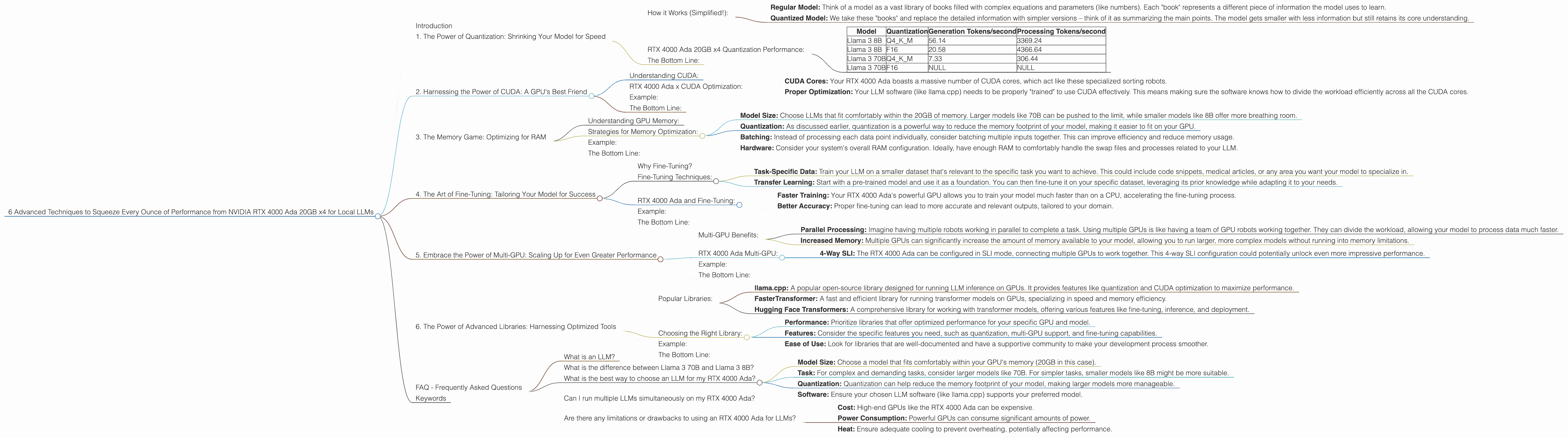
Introduction
The world of Large Language Models (LLMs) is rapidly evolving. These powerful AI models are powering a new generation of applications, from chatbots to creative writing tools. But to truly harness the potential of LLMs, you need the right hardware. Enter the NVIDIA RTX 4000 Ada 20GB x4, a powerhouse designed to handle the demanding computations required for local LLM deployments.
This article dives deep into six advanced techniques for unlocking the maximum performance from your RTX 4000 Ada 20GB x4, allowing you to run even the most sophisticated LLMs locally. Each technique explores specific configurations and their impact on your AI's speed, revealing how to choose the right balance for your needs. We'll be using real-world data from Llama.cpp and other benchmarks to illustrate these techniques.
1. The Power of Quantization: Shrinking Your Model for Speed
Imagine cramming the entire Library of Congress into a compact, easily transportable briefcase. That's essentially what quantization does for your LLMs. It's a technique that reduces the size of your model while surprisingly maintaining its performance.
How it Works (Simplified!):
- Regular Model: Think of a model as a vast library of books filled with complex equations and parameters (like numbers). Each "book" represents a different piece of information the model uses to learn.
- Quantized Model: We take these "books" and replace the detailed information with simpler versions – think of it as summarizing the main points. The model gets smaller with less information but still retains its core understanding.
RTX 4000 Ada 20GB x4 Quantization Performance:
We'll focus on the Llama 3 model, a popular choice for local deployments. Here's how the RTX 4000 Ada handles Llama 3 in different quantization formats:
| Model | Quantization | Generation Tokens/second | Processing Tokens/second |
|---|---|---|---|
| Llama 3 8B | Q4KM | 56.14 | 3369.24 |
| Llama 3 8B | F16 | 20.58 | 4366.64 |
| Llama 3 70B | Q4KM | 7.33 | 306.44 |
| Llama 3 70B | F16 | NULL | NULL |
Key Takeaways:
- Q4KM: For the 8B Llama 3 model, Q4KM quantization delivers a significant performance boost, both in token generation and processing speed.
- F16: While F16 offers decent acceleration, it doesn't quite match the performance of Q4KM.
- 70B Model: We don't have data for F16 quantization. The 70B model requires much more memory; Q4KM helps keep it manageable for the RTX 4000 Ada, but F16 might push the card's limits.
The Bottom Line:
Quantization is your secret weapon for boosting LLM performance on the RTX 4000 Ada. Q4KM often offers the best balance of speed and accuracy, making it ideal for most use cases.
2. Harnessing the Power of CUDA: A GPU's Best Friend
CUDA, short for "Compute Unified Device Architecture," is NVIDIA's language for talking to GPUs. Think of it as a special code that lets your GPU handle the complex calculations needed for running LLMs.
Understanding CUDA:
Imagine you have a massive sorting job (like arranging millions of books in a library). You could do it manually, but it would take forever! CUDA is like hiring a team of super-efficient robots to do the sorting for you. They can process the books much faster, allowing you to finish the task in a fraction of the time.
RTX 4000 Ada x CUDA Optimization:
- CUDA Cores: Your RTX 4000 Ada boasts a massive number of CUDA cores, which act like these specialized sorting robots.
- Proper Optimization: Your LLM software (like llama.cpp) needs to be properly "trained" to use CUDA effectively. This means making sure the software knows how to divide the workload efficiently across all the CUDA cores.
Example:
Imagine running a chat application with a 70B LLM. You might need to process the chat messages, generate text, and analyze the results. Proper CUDA optimization can distribute these tasks across the CUDA cores, making the entire process run significantly faster.
The Bottom Line:
CUDA is the key to unleashing the raw power of the RTX 4000 Ada. Ensure your LLM software uses CUDA effectively to maximize your GPU's potential.
3. The Memory Game: Optimizing for RAM

Having enough memory is crucial for running large LLMs locally. While the RTX 4000 Ada packs a whopping 20GB of dedicated GPU memory, it's still important to use it wisely.
Understanding GPU Memory:
Think of GPU memory as a massive workspace, where your model can store the information it needs to work. If the workspace is too small, the model will constantly need to swap data in and out, slowing it down.
Strategies for Memory Optimization:
- Model Size: Choose LLMs that fit comfortably within the 20GB of memory. Larger models like 70B can be pushed to the limit, while smaller models like 8B offer more breathing room.
- Quantization: As discussed earlier, quantization is a powerful way to reduce the memory footprint of your model, making it easier to fit on your GPU.
- Batching: Instead of processing each data point individually, consider batching multiple inputs together. This can improve efficiency and reduce memory usage.
- Hardware: Consider your system's overall RAM configuration. Ideally, have enough RAM to comfortably handle the swap files and processes related to your LLM.
Example:
The Llama 3 70B model, when quantized with Q4KM, still takes up a considerable chunk of memory. You might need to use a smaller batch size or find ways to optimize your system RAM to handle it effectively.
The Bottom Line:
Ensure your model's memory requirements align with the capabilities of your RTX 4000 Ada. Optimize your setup through quantization and batching to avoid memory bottlenecks.
4. The Art of Fine-Tuning: Tailoring Your Model for Success
Fine-tuning is like giving your LLM a specialized training program. It allows you to enhance its performance for specific tasks or domains.
Why Fine-Tuning?
Imagine you have a general-purpose language model trained on a massive dataset. However, you want it to excel in a specific field, such as writing code or translating medical texts. That's where fine-tuning comes into play.
Fine-Tuning Techniques:
- Task-Specific Data: Train your LLM on a smaller dataset that's relevant to the specific task you want to achieve. This could include code snippets, medical articles, or any area you want your model to specialize in.
- Transfer Learning: Start with a pre-trained model and use it as a foundation. You can then fine-tune it on your specific dataset, leveraging its prior knowledge while adapting it to your needs.
RTX 4000 Ada and Fine-Tuning:
- Faster Training: Your RTX 4000 Ada's powerful GPU allows you to train your model much faster than on a CPU, accelerating the fine-tuning process.
- Better Accuracy: Proper fine-tuning can lead to more accurate and relevant outputs, tailored to your domain.
Example:
You fine-tune a Llama 3 model on a dataset of Python code. This customization can make it significantly better at generating and understanding code, leading to more effective and relevant outputs.
The Bottom Line:
Fine-tuning is a game-changer if you're looking to enhance the performance of your LLM for specialized applications. The RTX 4000 Ada provides the computational power to facilitate this process effectively.
5. Embrace the Power of Multi-GPU: Scaling Up for Even Greater Performance
If you can't get enough power from a single RTX 4000 Ada, you can go for the ultimate power move – multi-GPU setup.
Multi-GPU Benefits:
- Parallel Processing: Imagine having multiple robots working in parallel to complete a task. Using multiple GPUs is like having a team of GPU robots working together. They can divide the workload, allowing your model to process data much faster.
- Increased Memory: Multiple GPUs can significantly increase the amount of memory available to your model, allowing you to run larger, more complex models without running into memory limitations.
RTX 4000 Ada Multi-GPU:
- 4-Way SLI: The RTX 4000 Ada can be configured in SLI mode, connecting multiple GPUs to work together. This 4-way SLI configuration could potentially unlock even more impressive performance.
Example:
Training a massive LLM model like a 137B parameter model might require the combined power of multiple RTX 4000 Ada GPUs. This lets you train the model efficiently and generate results faster.
The Bottom Line:
Multi-GPU configurations allow you to push the boundaries of LLM deployments, making it possible to run the largest and most demanding models locally.
6. The Power of Advanced Libraries: Harnessing Optimized Tools
The world of LLM deployment tools is constantly evolving, offering optimized libraries that help you squeeze every ounce of performance from your RTX 4000 Ada.
Popular Libraries:
- llama.cpp: A popular open-source library designed for running LLM inference on GPUs. It provides features like quantization and CUDA optimization to maximize performance.
- FasterTransformer: A fast and efficient library for running transformer models on GPUs, specializing in speed and memory efficiency.
- Hugging Face Transformers: A comprehensive library for working with transformer models, offering various features like fine-tuning, inference, and deployment.
Choosing the Right Library:
- Performance: Prioritize libraries that offer optimized performance for your specific GPU and model.
- Features: Consider the specific features you need, such as quantization, multi-GPU support, and fine-tuning capabilities.
- Ease of Use: Look for libraries that are well-documented and have a supportive community to make your development process smoother.
Example:
llama.cpp is known for its exceptional performance on NVIDIA GPUs, making it an excellent choice for running LLMs like Llama 3 on your RTX 4000 Ada.
The Bottom Line:
Leveraging advanced libraries can significantly streamline your development process and unlock impressive performance gains, allowing you to utilize the full capabilities of your RTX 4000 Ada for local LLM deployments.
FAQ - Frequently Asked Questions
What is an LLM?
LLMs, or Large Language Models, are powerful AI models trained on massive datasets of text and code. They can understand and generate human-like text, making them useful for tasks like chatbots, text summarization, and creative writing.
What is the difference between Llama 3 70B and Llama 3 8B?
The key difference lies in the size. Llama 3 70B is significantly larger, with 70 billion parameters, making it more capable of complex tasks but requiring more resources. Llama 3 8B is smaller and more resource-efficient, suitable for simpler tasks and less demanding environments.
What is the best way to choose an LLM for my RTX 4000 Ada?
Consider the following factors:
- Model Size: Choose a model that fits comfortably within your GPU's memory (20GB in this case).
- Task: For complex and demanding tasks, consider larger models like 70B. For simpler tasks, smaller models like 8B might be more suitable.
- Quantization: Quantization can help reduce the memory footprint of your model, making larger models more manageable.
- Software: Ensure your chosen LLM software (like llama.cpp) supports your preferred model.
Can I run multiple LLMs simultaneously on my RTX 4000 Ada?
Technically, yes, but it depends on the models' resource requirements. If you have enough available memory and the models aren't too demanding, it's possible. However, performance might be affected if you try to run multiple models simultaneously, particularly if they are large.
Are there any limitations or drawbacks to using an RTX 4000 Ada for LLMs?
- Cost: High-end GPUs like the RTX 4000 Ada can be expensive.
- Power Consumption: Powerful GPUs can consume significant amounts of power.
- Heat: Ensure adequate cooling to prevent overheating, potentially affecting performance.
Keywords
LLM, Large Language Model, NVIDIA RTX 4000 Ada, GPU, CUDA, Quantization, Fine-tuning, Multi-GPU, Memory Optimization, llama.cpp, FasterTransformer, Hugging Face Transformers, Token Generation, Processing Speed, Performance Optimization, Local Deployment