6 Advanced Techniques to Squeeze Every Ounce of Performance from NVIDIA A100 SXM 80GB
Introduction
The world of Large Language Models (LLMs) is exploding, and with it, the need for powerful hardware to run them locally. If you're looking to unleash the full potential of your NVIDIA A100SXM80GB GPU, you've come to the right place. This article will delve into six advanced techniques that can dramatically increase your LLM inference speed, turning your GPU into a blazing-fast language processing powerhouse.
Think of your GPU as a high-performance engine, and your LLM as a race car. Just like tuning your car to maximize its performance, these techniques will help you get the most out of your GPU for faster and more efficient LLM inference.
1. Quantization: Shrinking the Model for Speed
Quantization is like putting your LLM on a diet. It reduces the size of the model by significantly shrinking the number of bits used to represent each value. This leads to several advantages:
- Reduced Memory Footprint: Imagine storing a high-resolution image – it takes up a lot of space. Quantization is like converting that image to a lower resolution, saving space without sacrificing too much detail. This is especially crucial for large LLMs that can take up gigabytes of memory.
- Faster Inference: With smaller model sizes, your GPU can access and process information quicker, resulting in faster inference times.
How Does Quantization Work?
Imagine representing a number using a 32-bit system – that's like having 32 switches that can be either on or off. Quantization reduces this to 4 or even 2 bits, meaning fewer switches are needed. This simplification makes processing much faster.
Quantization Levels for A100SXM80GB
For the A100SXM80GB, you can achieve significant performance gains by using quantization levels like Q4KM. This means using 4 bits for the "K" (key) and "M" (value) matrices of the model.
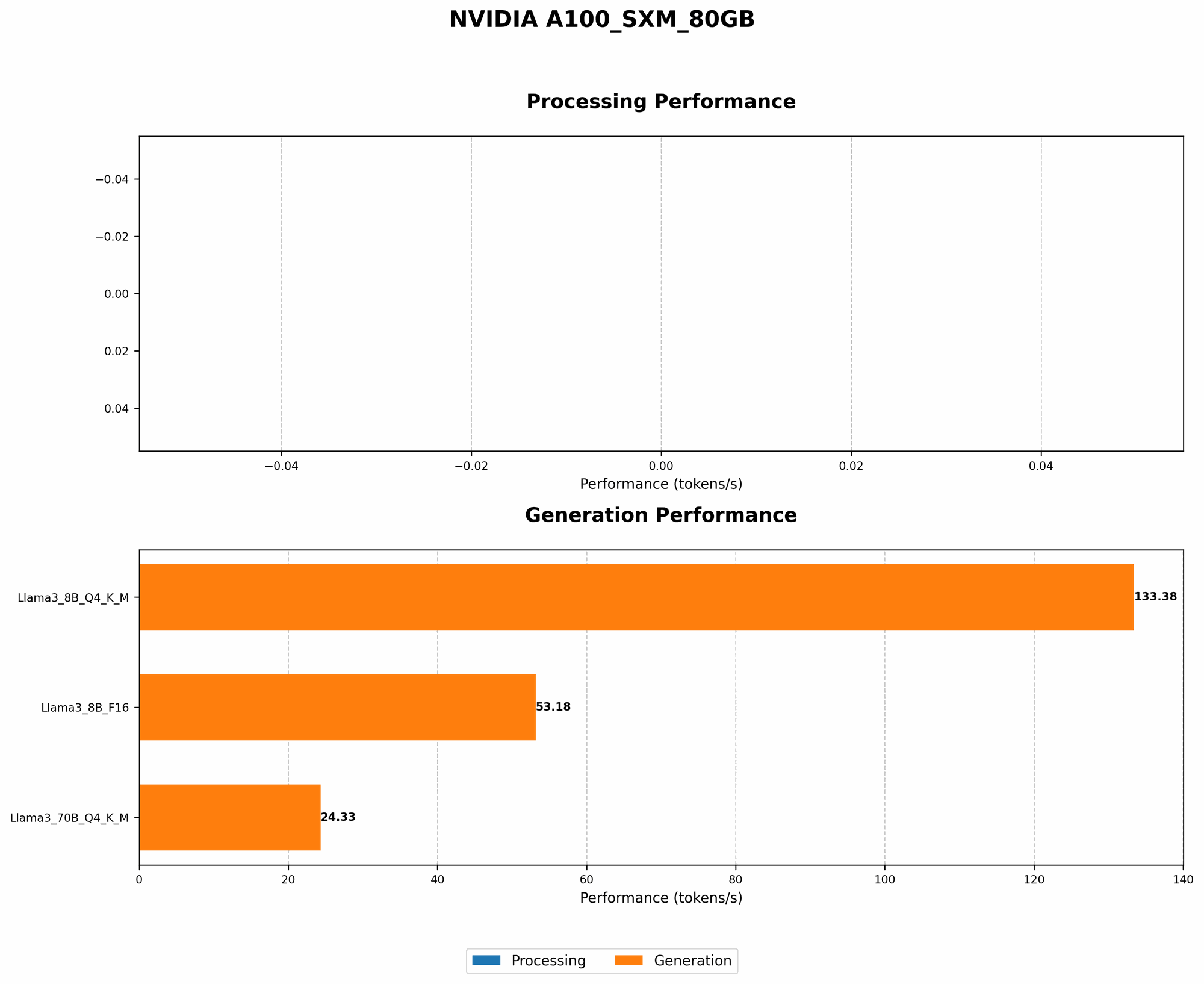
Results: A100SXM80GB Performance with Different LLMs
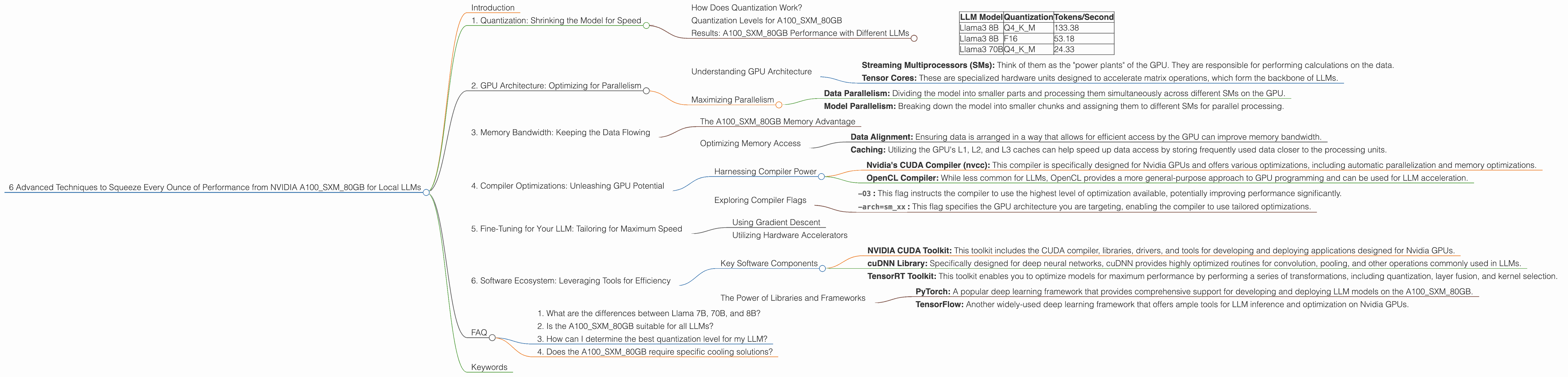
| LLM Model | Quantization | Tokens/Second |
|---|---|---|
| Llama3 8B | Q4KM | 133.38 |
| Llama3 8B | F16 | 53.18 |
| Llama3 70B | Q4KM | 24.33 |
Note: F16 represents a quantization level using 16 bits. As you can see, Q4KM significantly outperforms F16 for the Llama3 8B model.
2. GPU Architecture: Optimizing for Parallelism
Modern GPUs like the A100SXM80GB are designed for parallel processing. This means they can handle numerous computations simultaneously, making them ideal for LLM inference. However, you need to understand the GPU architecture to optimize your LLM for maximum performance.
Understanding GPU Architecture
The A100SXM80GB has a unique architecture consisting of:
- Streaming Multiprocessors (SMs): Think of them as the "power plants" of the GPU. They are responsible for performing calculations on the data.
- Tensor Cores: These are specialized hardware units designed to accelerate matrix operations, which form the backbone of LLMs.
Maximizing Parallelism
To fully utilize the A100SXM80GB, you need to ensure your LLM is optimized to take advantage of its parallel architecture. This includes:
- Data Parallelism: Dividing the model into smaller parts and processing them simultaneously across different SMs on the GPU.
- Model Parallelism: Breaking down the model into smaller chunks and assigning them to different SMs for parallel processing.
3. Memory Bandwidth: Keeping the Data Flowing
Imagine your GPU as a high-performance engine, but with a tiny fuel tank. If the fuel isn't delivered fast enough, the engine won't run smoothly. Similarly, memory bandwidth is crucial for LLM inference. It determines how quickly data can be accessed and processed.
The A100SXM80GB Memory Advantage
The A100SXM80GB boasts a massive 80GB of HBM2e memory. This provides a significant advantage in terms of memory bandwidth, allowing for faster data transfer between the GPU and the memory.
Optimizing Memory Access
- Data Alignment: Ensuring data is arranged in a way that allows for efficient access by the GPU can improve memory bandwidth.
- Caching: Utilizing the GPU's L1, L2, and L3 caches can help speed up data access by storing frequently used data closer to the processing units.
4. Compiler Optimizations: Unleashing GPU Potential
Compilers act as translators, converting your LLM code into machine-readable instructions. But some compilers are more efficient than others at optimizing for specific hardware like the A100SXM80GB.
Harnessing Compiler Power
- Nvidia's CUDA Compiler (nvcc): This compiler is specifically designed for Nvidia GPUs and offers various optimizations, including automatic parallelization and memory optimizations.
- OpenCL Compiler: While less common for LLMs, OpenCL provides a more general-purpose approach to GPU programming and can be used for LLM acceleration.
Exploring Compiler Flags
By setting specific flags in your compiler, you can fine-tune the optimization process:
-O3: This flag instructs the compiler to use the highest level of optimization available, potentially improving performance significantly.-arch=sm_xx: This flag specifies the GPU architecture you are targeting, enabling the compiler to use tailored optimizations.
5. Fine-Tuning for Your LLM: Tailoring for Maximum Speed
Just like a race car needs its engine tuned for optimal performance, your LLM also benefits from fine-tuning. This involves adjusting the model's parameters to improve its performance for your specific task.
Using Gradient Descent
Fine-tuning typically involves using gradient descent, an optimization technique that iteratively adjusts model parameters to minimize its error. This process can be computationally intensive, but it pays off by improving both speed and accuracy.
Utilizing Hardware Accelerators
Fine-tuning LLM models on powerful hardware like the A100SXM80GB can significantly speed up the process. Utilizing the GPU's Tensor Cores can accelerate computations involved in gradient descent, allowing you to reach optimal parameters more quickly.
6. Software Ecosystem: Leveraging Tools for Efficiency
A thriving software ecosystem provides developers with valuable tools that can further optimize LLM inference on the A100SXM80GB.
Key Software Components
- NVIDIA CUDA Toolkit: This toolkit includes the CUDA compiler, libraries, drivers, and tools for developing and deploying applications designed for Nvidia GPUs.
- cuDNN Library: Specifically designed for deep neural networks, cuDNN provides highly optimized routines for convolution, pooling, and other operations commonly used in LLMs.
- TensorRT Toolkit: This toolkit enables you to optimize models for maximum performance by performing a series of transformations, including quantization, layer fusion, and kernel selection.
The Power of Libraries and Frameworks
- PyTorch: A popular deep learning framework that provides comprehensive support for developing and deploying LLM models on the A100SXM80GB.
- TensorFlow: Another widely-used deep learning framework that offers ample tools for LLM inference and optimization on Nvidia GPUs.
FAQ
1. What are the differences between Llama 7B, 70B, and 8B?
The numbers represent the model's size, measured in billions of parameters. A larger model (like 70B) generally has more knowledge and can generate more complex and detailed responses. However, it requires more computational resources and memory.
2. Is the A100SXM80GB suitable for all LLMs?
While the A100SXM80GB is powerful enough for many LLMs, some very large models may exceed its memory capacity. It's crucial to consider the model's size and resource requirements before running it on the A100SXM80GB.
3. How can I determine the best quantization level for my LLM?
It's advisable to experiment with different quantization levels to find the optimal balance between speed and accuracy for your LLM. Consider factors like the model's size, the task at hand, and acceptable levels of performance degradation.
4. Does the A100SXM80GB require specific cooling solutions?
Yes, the A100SXM80GB is a high-power GPU and requires a robust cooling system to prevent overheating. Ensure your system or server has adequate cooling capabilities to handle the GPU's heat output.
Keywords
NVIDIA A100SXM80GB, LLM, Large Language Model, Inference Speed, Quantization, GPU Architecture, Memory Bandwidth, Compiler Optimizations, Fine-Tuning, Software Ecosystem, CUDA, cuDNN, TensorRT, PyTorch, TensorFlow, llama.cpp, Tokens/Second, Q4KM, F16, GPUCores, BW, Llama3, Gradient Descent, Parallel Processing, Streaming Multiprocessors (SMs), Tensor Cores, HBM2e, Memory Bandwidth, Data Alignment, Caching, nvcc.