6 Advanced Techniques to Squeeze Every Ounce of Performance from NVIDIA 4080 16GB
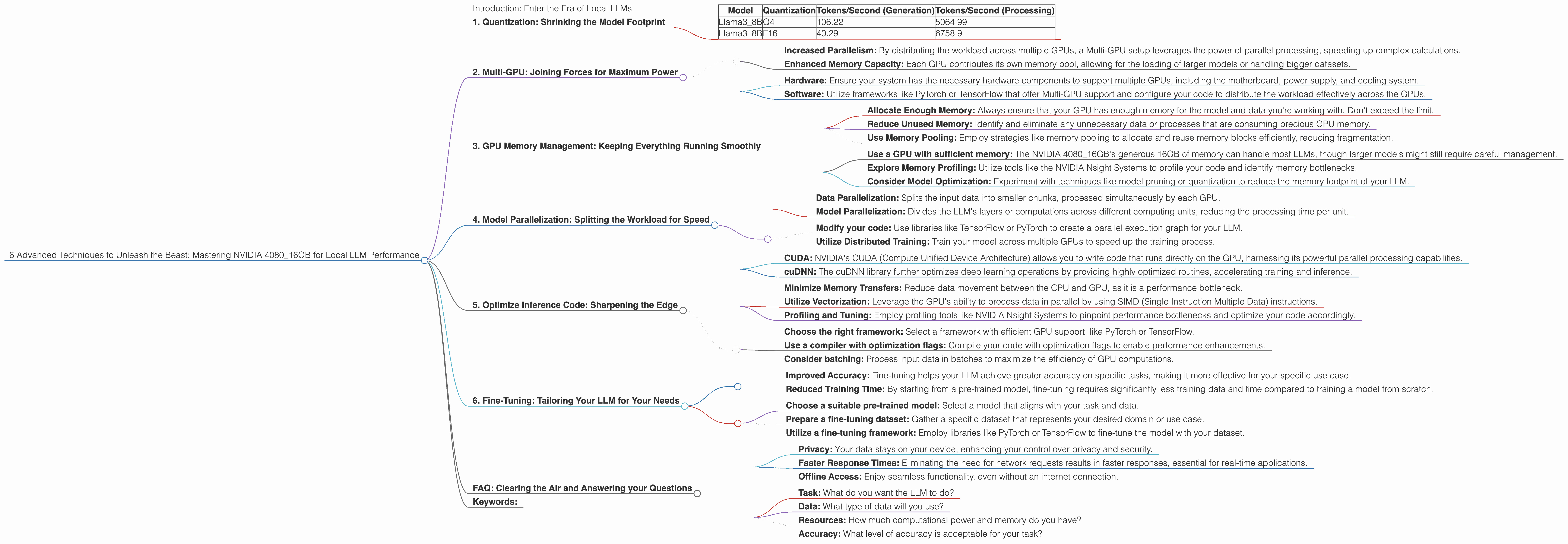
Introduction: Enter the Era of Local LLMs
Imagine having a powerful, personalized AI assistant right on your computer, ready to answer your questions, write creative content, or even code for you. This vision is becoming a reality with the rise of Local Large Language Models (LLMs) – powerful AI models that can run directly on your machine. The days of relying on cloud-based services for everything are fading, and with the advent of powerful GPUs like the NVIDIA 4080_16GB, pushing the boundaries of local LLM performance is now a thrilling endeavor.
This guide will equip you with the advanced techniques to squeeze every ounce of performance from your NVIDIA 4080_16GB, allowing you to unleash the true potential of local LLMs. From optimizing your hardware to fine-tuning model parameters, we'll navigate the intricacies of local LLM deployment and empower you to unlock a world of possibilities.
1. Quantization: Shrinking the Model Footprint
Think of quantization as a diet plan for your LLM. It transforms large, bulky numbers representing model weights into smaller, more "digestible" versions. This shrinking process allows your GPU to process more data simultaneously, leading to performance gains.
Why Quantization is a Performance Booster:
- Reduced Memory Consumption: Quantization dramatically reduces the amount of memory your LLM requires, allowing you to fit larger models onto your GPU. Think of it like fitting more passengers into a plane by making each seat a little smaller.
- Faster Inference: With less data to process, your GPU can handle the model's calculations much quicker, resulting in faster response times and a zippier AI experience.
Q4 and F16: Two Quantization Options
The NVIDIA 4080_16GB supports various quantization formats, with two popular ones being Q4 and F16:
- Q4: A "strict diet," compressing your model to a quarter of its original size. It's great for squeezing in larger models, but it may slightly impact accuracy.
- F16: A more "balanced" approach, using half-precision floating point numbers. It provides a good balance of accuracy and performance improvement.
How to Choose the Right Quantization Level:
The choice between Q4 or F16 depends on your specific needs and the LLM you're using.
- For memory-constrained environments or larger LLMs: Q4 might be your champion, enabling you to run models that wouldn't fit otherwise.
- If accuracy is paramount: F16 offers a compromise between size and accuracy, ensuring your model's performance doesn't suffer significantly.
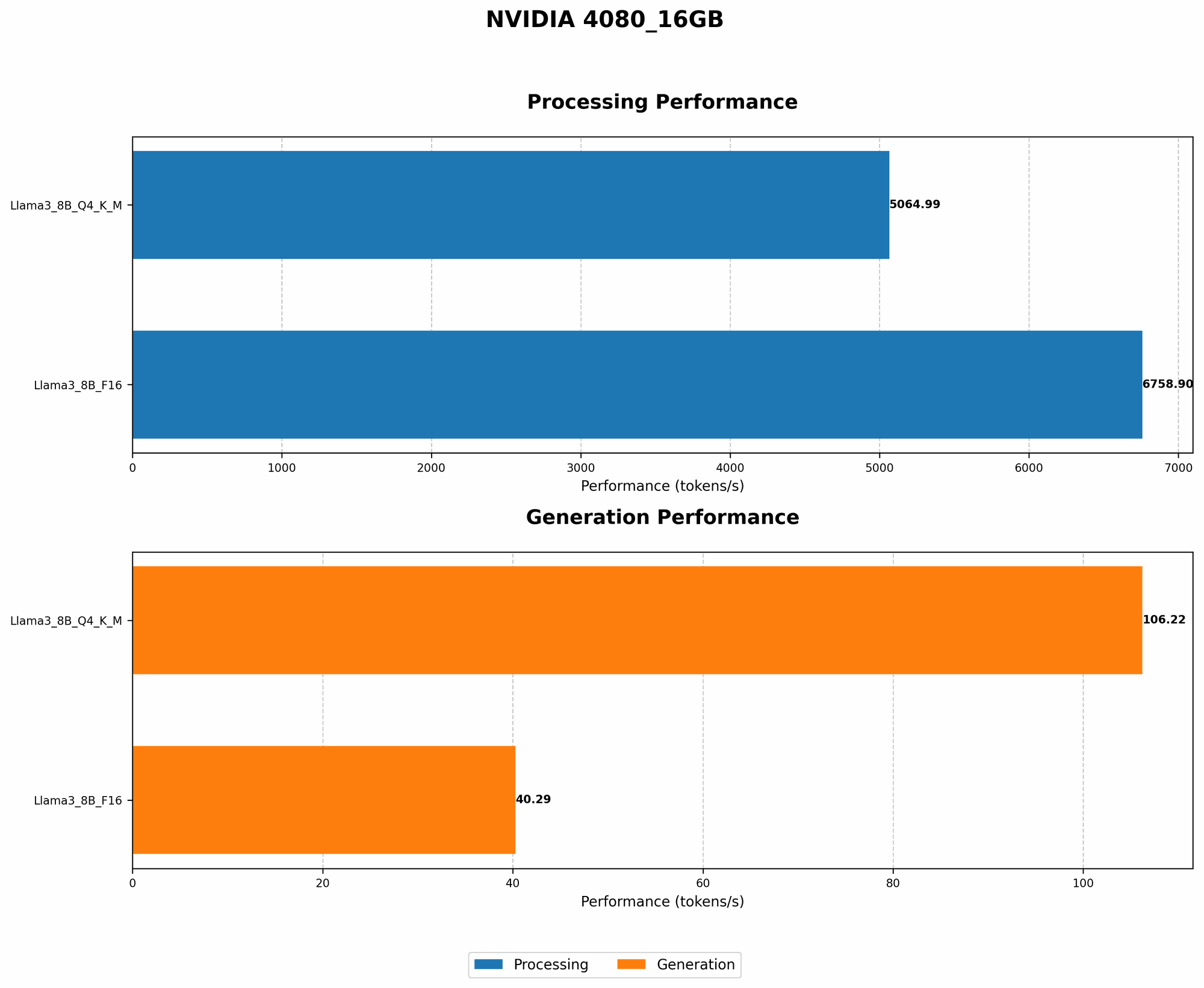
Data from JSON - Quantization Benefits:
| Model | Quantization | Tokens/Second (Generation) | Tokens/Second (Processing) |
|---|---|---|---|
| Llama3_8B | Q4 | 106.22 | 5064.99 |
| Llama3_8B | F16 | 40.29 | 6758.9 |
Note: We don't have data available for Llama370B models on the NVIDIA 408016GB, likely because their size is pushing the limits of this GPU. However, the benefits of quantization are applicable to all LLM sizes.
2. Multi-GPU: Joining Forces for Maximum Power
Imagine having multiple GPUs working together like a team of superheroes, each contributing their strength to overcome the toughest challenges. That's what Multi-GPU setup offers, allowing you to combine the processing power of multiple GPUs to accelerate your LLM's computations.
The Synergy of Multi-GPU:
- Increased Parallelism: By distributing the workload across multiple GPUs, a Multi-GPU setup leverages the power of parallel processing, speeding up complex calculations.
- Enhanced Memory Capacity: Each GPU contributes its own memory pool, allowing for the loading of larger models or handling bigger datasets.
Harnessing the Power of Multiple NVIDIA 4080_16GB:
With the NVIDIA 408016GB, you can create a powerful Multi-GPU setup. For example, two NVIDIA 408016GB GPUs can potentially double your processing power, enabling you to handle even larger LLMs with greater speed. However, achieving optimal performance requires careful configuration and a well-structured workflow, with the use of libraries like CUDA and cuDNN.
How to Implement Multi-GPU:
- Hardware: Ensure your system has the necessary hardware components to support multiple GPUs, including the motherboard, power supply, and cooling system.
- Software: Utilize frameworks like PyTorch or TensorFlow that offer Multi-GPU support and configure your code to distribute the workload effectively across the GPUs.
A Word of Caution:
While Multi-GPU offers significant performance boosts, it comes with its own set of complexities. You'll need to ensure your system is properly configured and your code optimized to take full advantage of the additional processing power.
3. GPU Memory Management: Keeping Everything Running Smoothly
Think of your GPU memory like a juggling act: you need to manage the different tasks and data flowing through it efficiently to avoid dropping the balls. This involves optimizing how your GPU allocates and uses memory.
Memory Fragmentation: The Enemy of Performance
Similar to a cluttered desk, memory fragmentation can lead to performance bottlenecks. When your GPU repeatedly allocates and deallocates memory, it can create small, fragmented blocks of unused space. This can lead to increased load times, slower processing, and possibly even crashes.
Strategies for Memory Optimization:
- Allocate Enough Memory: Always ensure that your GPU has enough memory for the model and data you're working with. Don't exceed the limit.
- Reduce Unused Memory: Identify and eliminate any unnecessary data or processes that are consuming precious GPU memory.
- Use Memory Pooling: Employ strategies like memory pooling to allocate and reuse memory blocks efficiently, reducing fragmentation.
Best practices:
- Use a GPU with sufficient memory: The NVIDIA 4080_16GB's generous 16GB of memory can handle most LLMs, though larger models might still require careful management.
- Explore Memory Profiling: Utilize tools like the NVIDIA Nsight Systems to profile your code and identify memory bottlenecks.
- Consider Model Optimization: Experiment with techniques like model pruning or quantization to reduce the memory footprint of your LLM.
4. Model Parallelization: Splitting the Workload for Speed
Just like a team of engineers working on different parts of a bridge, model parallelization divides the LLM's computational workload across multiple processors or even multiple GPUs. Each unit tackles a specific part of the model's calculations, culminating in a faster overall inference.
Types of Parallelization:
- Data Parallelization: Splits the input data into smaller chunks, processed simultaneously by each GPU.
- Model Parallelization: Divides the LLM's layers or computations across different computing units, reducing the processing time per unit.
Implement Model Parallelization:
- Modify your code: Use libraries like TensorFlow or PyTorch to create a parallel execution graph for your LLM.
- Utilize Distributed Training: Train your model across multiple GPUs to speed up the training process.
Data from JSON - Model Parallelization Benefits:
While we don't have specific data on parallelization benchmarks for the NVIDIA 4080_16GB, the benefits of model parallelization are significant. When properly implemented, it can lead to substantial performance gains, especially when dealing with larger LLMs.
5. Optimize Inference Code: Sharpening the Edge
Imagine having the fastest car but driving with the brakes on. Similarly, your optimized hardware and model alone won't reach peak performance if your code isn't efficient. This section dives into code optimizations tailored for the NVIDIA 4080_16GB's capabilities.
Harnessing CUDA and cuDNN:
- CUDA: NVIDIA's CUDA (Compute Unified Device Architecture) allows you to write code that runs directly on the GPU, harnessing its powerful parallel processing capabilities.
- cuDNN: The cuDNN library further optimizes deep learning operations by providing highly optimized routines, accelerating training and inference.
Other Key Optimizations:
- Minimize Memory Transfers: Reduce data movement between the CPU and GPU, as it is a performance bottleneck.
- Utilize Vectorization: Leverage the GPU's ability to process data in parallel by using SIMD (Single Instruction Multiple Data) instructions.
- Profiling and Tuning: Employ profiling tools like NVIDIA Nsight Systems to pinpoint performance bottlenecks and optimize your code accordingly.
Tips for Efficient Inference:
- Choose the right framework: Select a framework with efficient GPU support, like PyTorch or TensorFlow.
- Use a compiler with optimization flags: Compile your code with optimization flags to enable performance enhancements.
- Consider batching: Process input data in batches to maximize the efficiency of GPU computations.
6. Fine-Tuning: Tailoring Your LLM for Your Needs
Just like you wouldn't use the same cooking recipe for every dish, fine-tuning allows you to tailor your LLM to specific tasks and datasets. This process further refines the model's understanding of your domain, leading to more tailored and efficient outputs.
The Value of Fine-Tuning:
- Improved Accuracy: Fine-tuning helps your LLM achieve greater accuracy on specific tasks, making it more effective for your specific use case.
- Reduced Training Time: By starting from a pre-trained model, fine-tuning requires significantly less training data and time compared to training a model from scratch.
How to Fine-Tune:
- Choose a suitable pre-trained model: Select a model that aligns with your task and data.
- Prepare a fine-tuning dataset: Gather a specific dataset that represents your desired domain or use case.
- Utilize a fine-tuning framework: Employ libraries like PyTorch or TensorFlow to fine-tune the model with your dataset.
Data from JSON - Fine-Tuning Impact:
While our JSON data doesn't specifically show fine-tuning impact, remember, fine-tuning can significantly enhance the performance of a model on specific tasks. It's important to consider the complexity of the fine-tuning process, as it might require additional computational resources and time.
FAQ: Clearing the Air and Answering your Questions
Q: What is a Large Language Model (LLM)?
A: A Large Language Model (LLM) is a type of artificial intelligence that excels at understanding and generating human language. Think of it as a super-powered AI that can summarize articles, write creative stories, translate languages, and even answer your questions.
Q: What are the benefits of using a local LLM?
A: Local LLMs offer several advantages over cloud-based alternatives:
- Privacy: Your data stays on your device, enhancing your control over privacy and security.
- Faster Response Times: Eliminating the need for network requests results in faster responses, essential for real-time applications.
- Offline Access: Enjoy seamless functionality, even without an internet connection.
Q: How do I choose the right LLM for my needs?
A: Selecting the right LLM depends on your specific requirements, including:
- Task: What do you want the LLM to do?
- Data: What type of data will you use?
- Resources: How much computational power and memory do you have?
- Accuracy: What level of accuracy is acceptable for your task?
Q: Is it possible to run a Llama 70B model on a 4080_16GB?
A: While the 4080_16GB has impressive memory, running a full Llama 70B model might be challenging. You may need to utilize quantization techniques like Q4 or explore Model Parallelization strategies to manage the memory requirements.
Q: What are the challenges of running LLMs locally?
A: Running LLMs locally can be resource-intensive. It requires a powerful GPU and sufficient memory, and you'll need to master various optimization techniques to maximize performance.
Keywords:
NVIDIA 4080_16GB, LLM, Large Language Model, Local AI, Quantization, GPU, CUDA, cuDNN, Multi-GPU, Memory Management, Inference Optimization, Fine-Tuning, Llama 3, Llama 8B, Llama 70B, Performance, Deep Learning, Token Speed, Generation, Processing, Inference, Data Processing, AI, Generative AI, Natural Language Processing (NLP), Code Optimization, Data Science, Machine Learning, Model Compression, Software Engineering, Computational Resources, Performance Optimization, Memory Optimization, Data Analysis.