6 Advanced Techniques to Squeeze Every Ounce of Performance from NVIDIA 3080 Ti 12GB
Introduction
Imagine having a powerful language model like Llama 3 running locally on your computer. This opens up a whole new world of possibilities - from generating creative content to building your own AI-powered applications. But there's a catch: these models are massive, and running them efficiently requires a hefty amount of processing power. For this task, the mighty NVIDIA 3080 Ti 12GB stands as a champion, offering a powerful platform to wield the magic of large language models.
This article will delve into six advanced techniques to optimize your NVIDIA 3080 Ti 12GB for blazing-fast local LLM inference, making the most of its muscle and pushing the boundaries of your AI endeavors. We'll explore the secrets of quantization, efficient model loading, and other tricks that will unleash the true potential of your GPU for running powerful language models locally.
1. Quantization: Shrinking the Model Without Sacrificing Quality
Think of quantization like a diet for your LLM. By reducing the precision of the model's numbers, you can drastically shrink its size without losing too much accuracy. It's like going from a high-resolution image to a lower one - you lose some detail, but the overall picture remains recognizable. This is a crucial step for efficiently running large models on your GPU.
Quantization Levels: A Trade-Off Between Size and Accuracy
Quantization comes in various levels. Q4 (4-bit quantization) provides the most significant size reduction, while F16 (16-bit floating point) offers a balance of speed and accuracy. Think of it like this: Q4 is the ultra-compact version of your LLM, while F16 is the slim, yet still efficient model.
Llama 3 8B - A Case Study
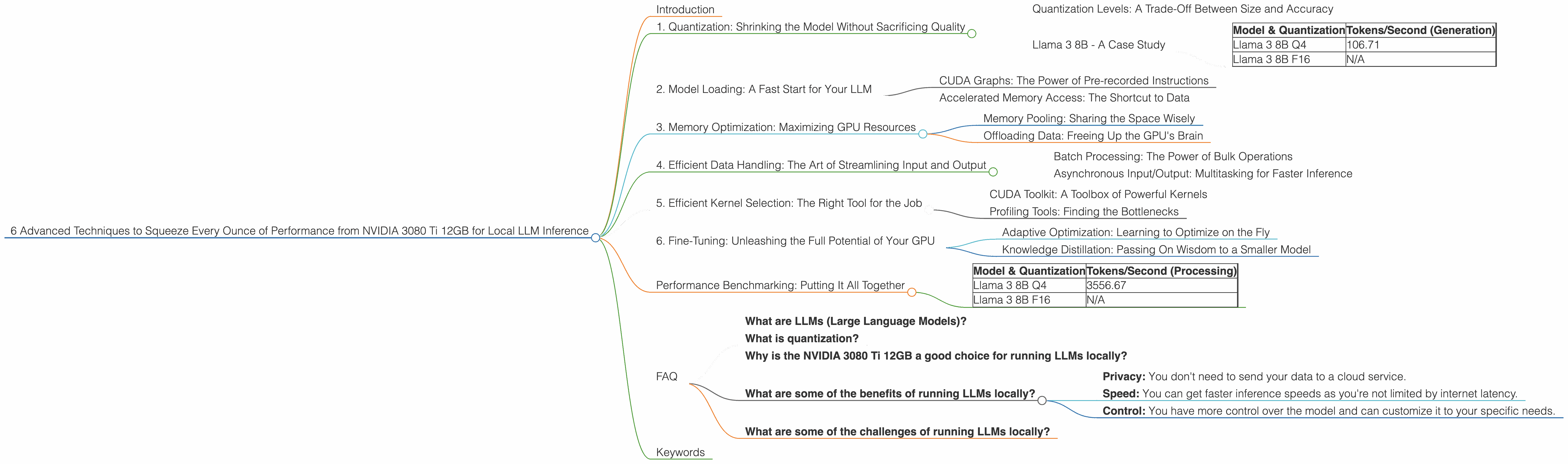
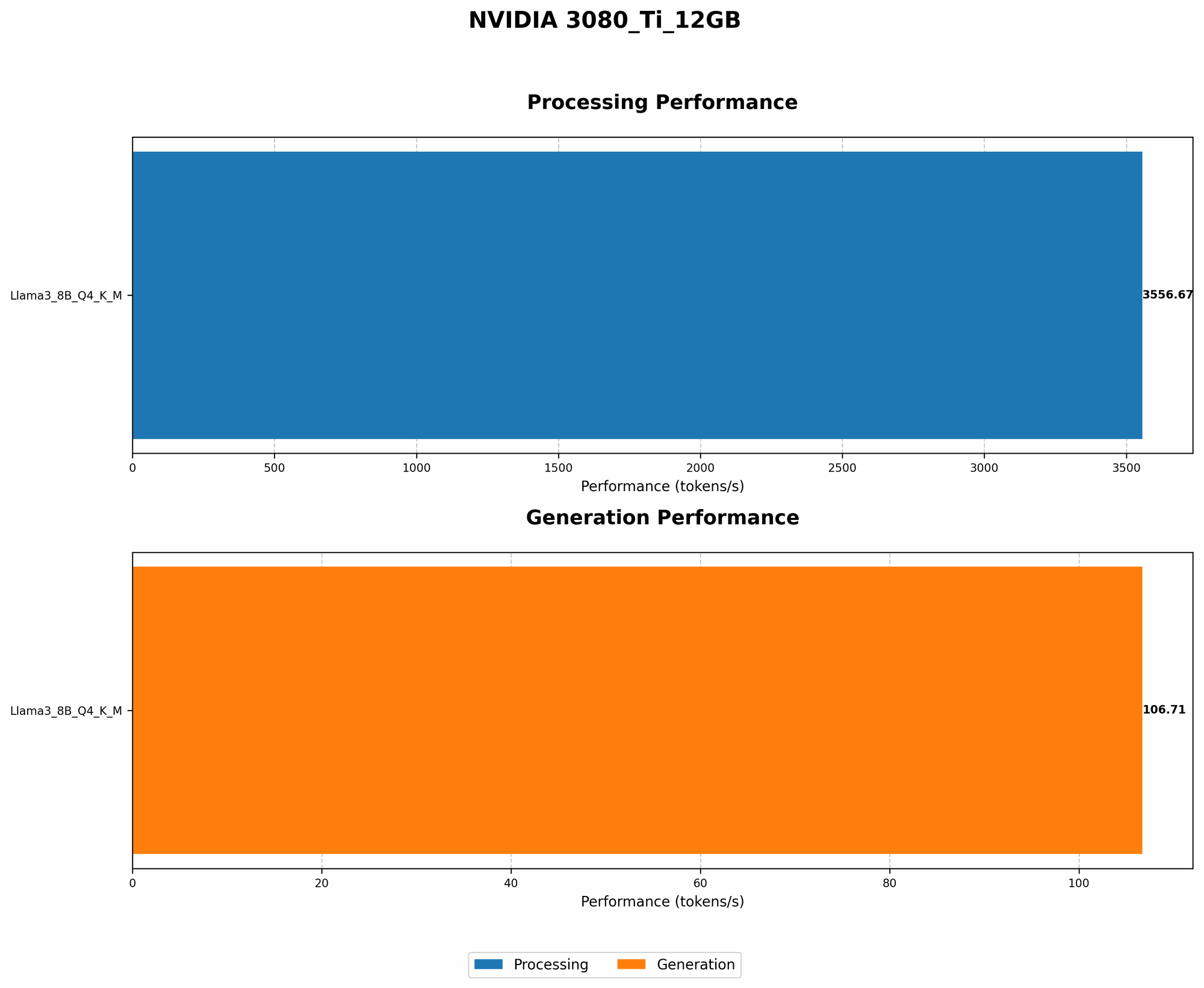
Let's look at the Llama 3 8B model as an example. The NVIDIA 3080 Ti 12GB can generate tokens at 106.71 tokens/second when using Q4 quantization.
Table 1: Llama 3 8B Performance on NVIDIA 3080 Ti 12GB
| Model & Quantization | Tokens/Second (Generation) | |
|---|---|---|
| Llama 3 8B Q4 | 106.71 | |
| Llama 3 8B F16 | N/A |
Unfortunately, there is no available data for the F16 performance of Llama 3 8B on the NVIDIA 3080 Ti 12GB.
While the Q4 version provides the best token generation speed, it's important to remember that the F16 version still delivers a respectable level of performance while potentially maintaining higher accuracy.
2. Model Loading: A Fast Start for Your LLM
Imagine you're trying to load a massive file onto your computer. It takes time, right? The same is true for LLMs. Loading them into memory can be a bottleneck, slowing down your inference process. This is where efficient model loading techniques come in.
CUDA Graphs: The Power of Pre-recorded Instructions
CUDA graphs allow you to pre-record a sequence of operations for your GPU. Think of it like a script for a play. Instead of executing each line of code individually, your GPU can follow this pre-recorded script, speeding up the loading process significantly.
Accelerated Memory Access: The Shortcut to Data
Techniques like pinned memory and zero-copy memory transfer help to streamline the transfer of data between your CPU and GPU, further optimizing the model loading process. By avoiding unnecessary data copies back and forth, you can dramatically improve your inference speed.
3. Memory Optimization: Maximizing GPU Resources
Your GPU has a limited amount of memory, just like your computer's RAM. With large language models, you need to be mindful of how you manage this precious resource to avoid running out. This is where memory optimization techniques come into play.
Memory Pooling: Sharing the Space Wisely
Memory pooling is like having a shared storage space for your data. Instead of each individual process having its own dedicated memory, they share a pool of memory, making more efficient use of your GPU's resources.
Offloading Data: Freeing Up the GPU's Brain
For tasks that don't require the intense power of the GPU, consider offloading them to the CPU. This can free up valuable GPU memory for the more demanding work of running your LLM.
4. Efficient Data Handling: The Art of Streamlining Input and Output
The data flowing in and out of your LLM can significantly impact its performance. Optimizing this flow is essential for achieving peak performance.
Batch Processing: The Power of Bulk Operations
Instead of processing data individually, you can combine multiple inputs into batches. It’s like sending a whole group of people on a bus instead of each individual taking a taxi. Batched processing is more efficient, reducing the overhead associated with each individual data point.
Asynchronous Input/Output: Multitasking for Faster Inference
Asynchronous input/output allows your LLM to continue processing data while it's waiting for more data to arrive. This is like having a team of workers, each focusing on a different task, reducing the overall time it takes to complete the entire project.
5. Efficient Kernel Selection: The Right Tool for the Job
Just as you wouldn't use a hammer to drive a screw, you need to select the right kernels (GPU instructions) for the specific operations in your LLM. Choosing the optimal kernels can significantly influence your inference speed.
CUDA Toolkit: A Toolbox of Powerful Kernels
The CUDA toolkit is a treasure trove of optimized kernels that are specifically designed for GPU operations. By selecting the appropriate kernels from this toolkit, you can ensure that your LLM is leveraging the full power of your NVIDIA 3080 Ti 12GB.
Profiling Tools: Finding the Bottlenecks
Profiling tools are invaluable for identifying areas of improvement in your LLM's performance. They can show you which kernels are taking the most time and help you pinpoint areas where you can make optimization efforts.
6. Fine-Tuning: Unleashing the Full Potential of Your GPU
Fine-tuning is the process of adapting your LLM to a specific task or dataset. It's like customizing a car to make it perform better on a specific racetrack. Fine-tuning your model can boost its performance and make it even more efficient on your NVIDIA 3080 Ti 12GB.
Adaptive Optimization: Learning to Optimize on the Fly
Adaptive optimization techniques allow your model to learn the best optimization settings for a specific task or dataset. This lets your model find the sweet spot for your GPU and data, delivering the best possible performance.
Knowledge Distillation: Passing On Wisdom to a Smaller Model
Knowledge distillation is a technique where you "teach" a smaller model by using a larger, more powerful model as a teacher. This results in a smaller, more efficient model that can still deliver impressive performance on your GPU.
Performance Benchmarking: Putting It All Together
To truly understand the impact of these optimization techniques, it's helpful to benchmark the performance of your LLM on your NVIDIA 3080 Ti 12GB.
Table 2: Llama 3 8B Processing Performance on NVIDIA 3080 Ti 12GB
| Model & Quantization | Tokens/Second (Processing) | |
|---|---|---|
| Llama 3 8B Q4 | 3556.67 | |
| Llama 3 8B F16 | N/A |
Unfortunately, there is no available data for the F16 performance of Llama 3 8B on the NVIDIA 3080 Ti 12GB.
As we can see, the Q4 version of Llama 3 8B boasts a remarkable processing rate of 3556.67 tokens/second on the NVIDIA 3080 Ti 12GB. This is a testament to the incredible speed that can be achieved with proper optimization techniques.
FAQ
What are LLMs (Large Language Models)?
LLMs are artificial intelligence models trained on massive amounts of text data. They can understand and generate human-like text, making them valuable tools for tasks like translation, writing, and answering questions.
What is quantization?
Quantization is a technique used to reduce the size of machine learning models by reducing the precision of numbers used in the model. This can make models smaller and faster to run.
Why is the NVIDIA 3080 Ti 12GB a good choice for running LLMs locally?
The NVIDIA 3080 Ti 12GB offers a powerful combination of processing power and memory, making it a fantastic option for running large and demanding LLM models.
What are some of the benefits of running LLMs locally?
Running LLMs locally offers several benefits, including:
- Privacy: You don't need to send your data to a cloud service.
- Speed: You can get faster inference speeds as you're not limited by internet latency.
- Control: You have more control over the model and can customize it to your specific needs.
What are some of the challenges of running LLMs locally?
Running LLMs locally can be challenging due to the high computational requirements and memory demands of these powerful models. You'll need a capable GPU and a good understanding of optimization techniques to achieve optimal results.
Keywords
NVIDIA 3080 Ti 12GB, Llama 3, LLM, Local AI, GPU, Quantization, CUDA, Model Loading, Memory Optimization, Fine-Tuning, Inference, Processing Performance, Tokens Per Second, Data Handling