5 Ways to Prevent Overheating on Apple M3 During AI Workloads

Introduction
You've got your hands on a shiny new Apple M3 chip, ready to unleash the power of large language models (LLMs) for all your AI projects. You're dreaming of generating creative text, translating languages in a flash, and even building your own AI-powered applications. But there’s a catch: heat. Just as with high-performance gaming rigs, pushing your M3 to its limits can lead to overheating, which can cause performance throttling and even damage your hardware.
This article will guide you through five proven strategies to keep your M3 cool and running smoothly, even when tackling demanding AI workloads. We'll delve into the hottest topics like quantized models and optimized software configurations. Get ready to dive deep into the world of LLM optimization!
Understanding the Challenges of Running LLMs on Apple M3
Imagine a bustling city, where thousands of people constantly interact and move around. That's what happens inside your M3 chip when you run an LLM. The chip's internal pathways are flooded with data, constantly being processed and exchanged. This activity generates heat, just like the bustling city generates heat from all the activity.
While M3 chips are designed to handle these intense workloads, pushing them to their limits can lead to temperature spikes. This can cause performance degradation, hindering the smooth operation of your LLM model.
Preventing Overheating: 5 Proven Strategies
Here are five effective strategies to prevent overheating and ensure smooth operation of your Apple M3 chip when running LLMs:
1. Harnessing the Power of Quantization
Think of quantization like compressing a large file. By reducing the precision of the data, we can significantly shrink the file size without losing too much information. This process also reduces the computational workload, leading to a cooler and more efficient LLM experience.
Here's how it works:
- Standard Weights: LLMs usually store numbers using 32 bits, allowing for a wide range of values. This high precision is great for accuracy, but it also demands more resources.
- Quantized Weights: Quantization reduces the number of bits used to represent each number, typically to 8 bits or 4 bits. This significantly reduces the memory footprint and computational demands of the model.
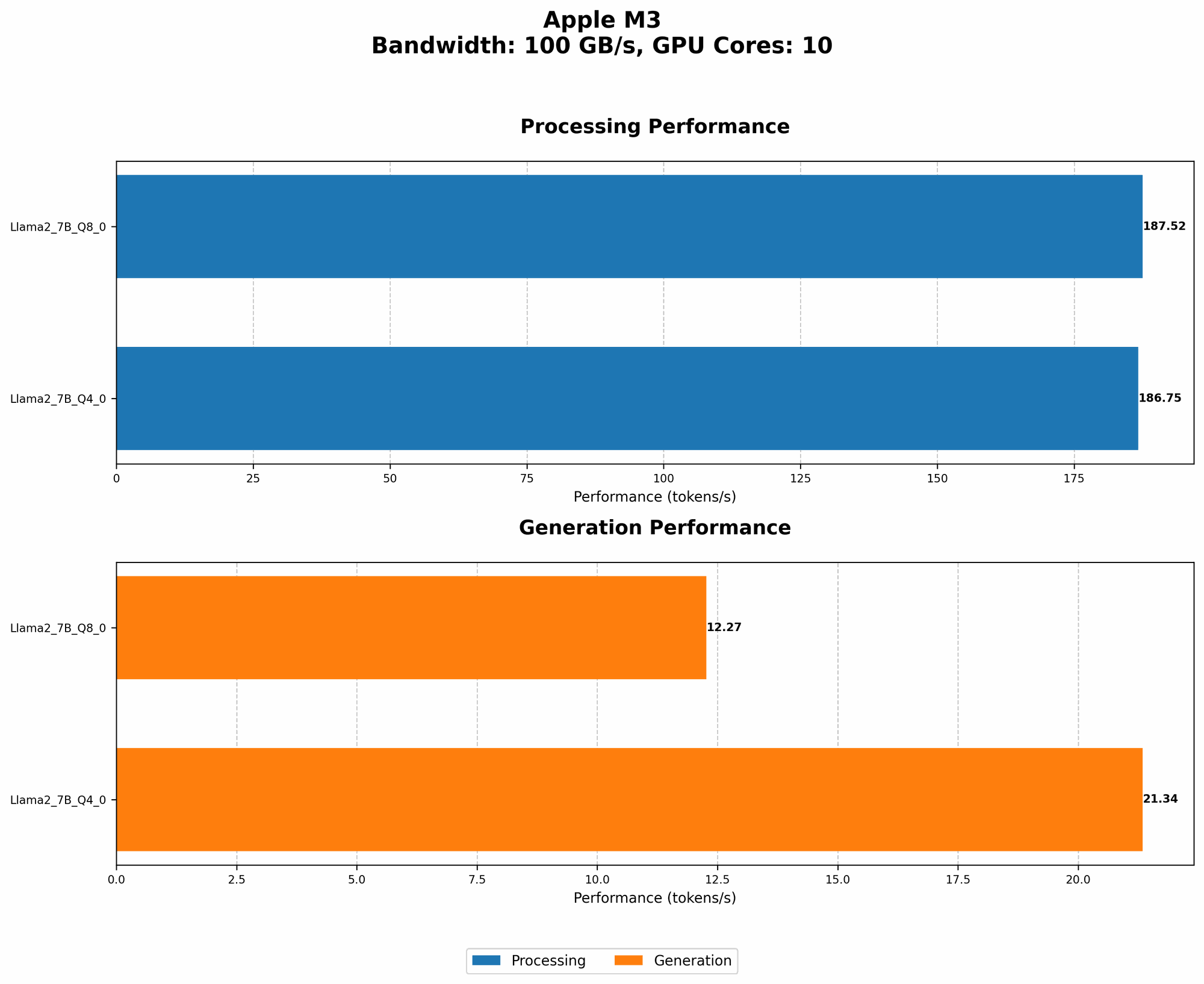
Here's how quantization impacts performance on the Apple M3:
| Model | Quantization | Processing Speed | Generation Speed |
|---|---|---|---|
| Llama 2 7B | F16 | Null | Null |
| Llama 2 7B | Q4_0 | 186.75 tokens/second | 21.34 tokens/second |
| Llama 2 7B | Q8_0 | 187.52 tokens/second | 12.27 tokens/second |
Note: We do not have data for F16 quantization for Llama 2 7B on the Apple M3.
As you can see, moving from F16 to Q4_0 or Q8_0 leads to substantial performance improvements due to reduced memory usage and computational requirements. This translates to faster processing and generation times, ultimately reducing the heat generated.
2. Optimize Your Software Setup: Embrace the Right Tools
The software you use to run your LLM plays a critical role in managing your M3’s temperature. Here’s what to keep in mind:
- llama.cpp: This open-source library is a favorite among developers running LLMs locally because of its efficiency and flexibility. It offers a range of options for optimizing performance, including different quantization levels.
- GPU Acceleration: If you're using a GPU-enabled M3, make sure your software leverages the power of the GPU for faster processing. Many LLM frameworks, like PyTorch and TensorFlow, have GPU support built in.
3. Embrace the Fine Art of Cooling: Master Your Environment
Just as you need a well-ventilated room to stay cool, your M3 chip needs proper airflow. Here's how to create a comfortable environment for your LLM:
- Open Airflow: Ensure good ventilation around your Mac. Avoid placing it in cramped spaces or on surfaces that obstruct airflow. Adding a cooling pad can also help.
- Regular Cleaning: Dust buildup can trap heat and hinder airflow. Regularly clean the vents and fans on your Mac to maintain optimal cooling.
4. The Art of Fine-Tuning: Don't Overwork Your Model
Just like a marathon runner needs to pace themselves, your LLM needs to be trained effectively. Here are a few key considerations:
- Smaller Batch Sizes: Using smaller batch sizes during training can reduce the computational load, leading to less heat generated.
- Optimized Training Parameters: Experiment with different training parameters, such as learning rate and optimizer settings, to find the best combination for your model and hardware.
5. Embrace the Power of Power Management: Prioritize Efficiency
Your Mac's power management settings can have a significant impact on the temperature of your M3 chip. Here's how to keep your power consumption in check:
- Lower Power Mode: If you're not running a demanding workload, consider switching your Mac to a lower power mode. This reduces power consumption and can help to keep things cool.
- Software Power Settings: Explore the power management settings in your software applications. Some applications have settings that allow you to adjust power consumption for specific tasks.
FAQs: Addressing Common Concerns
Q: How do I know my M3 chip is overheating?
A: You can monitor the temperature of your M3 chip through the Activity Monitor application, which is available by default in your Mac's Utilities folder. If you see the temperature consistently exceeding 95°C, your M3 chip might be overheating.
Q: What are the long-term consequences of overheating?
A: Overheating can lead to performance degradation and, in extreme cases, hardware damage. Therefore, it's crucial to take steps to prevent overheating and ensure the long-term life of your M3 chip.
Q: Can I utilize the same strategies for an M1 or M2 chip?
A: Yes, most of the strategies discussed in this article apply to M1 and M2 chips as well. However, the specific performance and temperature figures might vary depending on the chip generation.
Keywords
Apple M3, LLM, large language model, overheating, quantization, llama.cpp, GPU acceleration, power management, cooling, performance, temperature, efficiency, software setup, training parameters, batch size.