5 Tricks to Avoid Out of Memory Errors on NVIDIA L40S 48GB

Introduction: When LLMs Demand More RAM Than You Have
Imagine a world where you could have conversations with artificial intelligence that understand your every nuance, write creative stories, or even translate languages in real time. That's the power of Large Language Models (LLMs), and they're becoming increasingly accessible thanks to advancements in hardware and software.
However, running LLMs on your own machine can be a daunting task, especially when you're dealing with massive models. One of the most common challenges is out-of-memory errors, which occur when your GPU simply doesn't have enough memory to handle the model's demands. This can be a major headache for developers and enthusiasts who are eager to explore the world of LLMs.
In this guide, we'll dive into the world of LLM optimization on the powerful NVIDIA L40S_48GB, exploring strategies, techniques, and practical tips to prevent those dreaded out-of-memory errors. We'll focus on different LLM sizes (like the 70B and 8B models) and discuss how to squeeze the maximum performance out of your hardware, allowing you to unleash the full potential of these fascinating language models.
Understanding the Memory Monster: LLMs and RAM Requirements
LLMs are like voracious readers: the more they consume, the more knowledge they gain. This "knowledge" is stored in their parameters, and the bigger the model, the more parameters it has. Think of parameters as the brain cells of an LLM - the more cells, the smarter it gets.
Problem is, these "brain cells" take up a lot of memory. The NVIDIA L40S_48GB, with its 48GB of GDDR6 memory, is a powerhouse, but even it can be overwhelmed by some of the larger LLM models.
LLM Size and Memory Consumption: A Quick Breakdown
- Smaller Models (7B-13B): These models are generally more manageable, requiring less memory and potentially fitting into the L40S_48GB's capacity.
- Mid-Sized Models (30B-70B): This is where the challenge starts. These models demand more memory, and you need to take steps to optimize your setup.
- Large Models (100B+): These models require specialized hardware and extensive memory, often exceeding the limits of a typical single GPU.
5 Tricks to Avoid Running Out of Memory on Your NVIDIA L40S_48GB
1. Quantization: Smaller Footprint, Similar Power
Imagine compressing a high-quality photograph to send it over email. You might lose some of the detail but still get a recognizable image. Quantization is like that for LLMs. It reduces the size of the model's parameters, making it less memory-hungry without sacrificing too much performance.
Think of it as converting a massive encyclopedia into a concise summary – you lose some details but still retain most of the important information.
How it works: Quantization involves representing numbers with fewer bits (such as 4-bit or 8-bit instead of the typical 16-bit or 32-bit). This reduction in precision might seem significant, but you'd be surprised how little impact it has on the model's overall accuracy.
For the L40S48GB: - Llama 3 8B: The L40S48GB can readily handle Llama 3 8B in F16 format (16-bit) without quantization. - Llama 3 70B: However, you'll need to use quantization to fit this model into the L40S48GB's memory. Our data shows that Llama 3 70B in Q4K_M format (4-bit quantization) can be loaded and used effectively.
| Model | Format | Memory |
|---|---|---|
| Llama 3 8B | F16 (16-bit) | Fits |
| Llama 3 8B | Q4KM (4-bit) | Fits |
| Llama 3 70B | F16 (16-bit) | Doesn't fit |
| Llama 3 70B | Q4KM (4-bit) | Fits |
2. Batching: Serving Smaller Portions At a Time
Think of serving a large dinner party. You wouldn't cook everything at once, right? You'd batch it, serving courses gradually to keep everyone happy and avoid a chaotic kitchen. Batching in LLM inference is similar, but instead of courses, we're dealing with chunks of data.
How it works: Instead of processing the entire input at once, batching divides it into smaller pieces, each processed independently and then recombined. This allows your LLM to manage memory resources more efficiently.
For the L40S_48GB:
- Llama 3 8B: Even without quantization, you can experiment with batch sizes to see if smaller batches provide a performance boost or help avoid memory issues.
- Llama 3 70B: Batching is crucial for this model, especially when using quantization. Adjust the batch size to find the sweet spot between performance and memory usage.
3. Tuning the Model: A Little Tweaking for Maximum Power
Imagine tuning a car engine for optimal performance. Every little adjustment can make a difference. Likewise, tuning your LLM's settings can improve its efficiency and potentially free up memory resources.
Common tuning parameters:
- Context Length: This controls the amount of text the LLM can process at a time. Increasing the context length can lead to more coherent responses, but also increases memory usage. Experiment with different values to find the right balance for your application.
- Number of Layers: Some LLMs allow you to reduce the number of layers used for inference. This can result in a smaller model footprint, but might slightly impact accuracy.
For the L40S_48GB: - Llama 3 8B: You can likely get away with standard settings without significant memory concerns. - Llama 3 70B: Tuning might be necessary, especially with quantization. Adjusting context length and potentially reducing the number of layers can be beneficial.
4. Offloading Memory: The Power of the CPU
Think of your CPU as the chef in your kitchen, working alongside the powerful oven (GPU). While the GPU handles the heavy cooking (LLM inference), the CPU can help with tasks that don't require high performance.
How it works: Some LLM frameworks allow you to offload certain tasks to the CPU, like tokenization (breaking down text into individual units) or post-processing. This frees up valuable GPU memory for the core inferencing work.
For the L40S_48GB: - Llama 3 8B and 70B: Experiment with offloading tokenization and/or post-processing to the CPU to see if it improves memory usage or performance.
5. Leverage the Power of Off-Device Inference: When Your GPU Needs a Break
Imagine a kitchen with a slow stove and a powerful microwave. You might use the microwave for quick tasks, reserving the stove for more complex and time-consuming dishes. Off-device inference is like that for LLMs.
How it works: Off-device inference allows you to divide work between the L40S_48GB and the CPU, potentially freeing up GPU memory and increasing overall throughput.
For the L40S_48GB: - Llama 3 8B and 70B: Consider using off-device inference if you're dealing with large input sequences or if you need to manage multiple independent tasks simultaneously.
Optimizing for Performance: Benchmarking Your Setup
You've learned the tricks, now it's time to put them into practice. Benchmarking helps you measure the impact of your optimization efforts and find the perfect balance for your LLM setup.
Here's how to benchmark your L40S_48GB:
- Choose a benchmark task: Select a representative task, such as generating text or translating languages.
- Run the benchmark with different configurations: Experiment with different quantization levels, batch sizes, and other settings.
- Measure performance: Track metrics like tokens per second (the speed at which your LLM generates tokens) and inference time.
- Analyze the results: Identify the settings that offer the best combination of performance and memory usage.
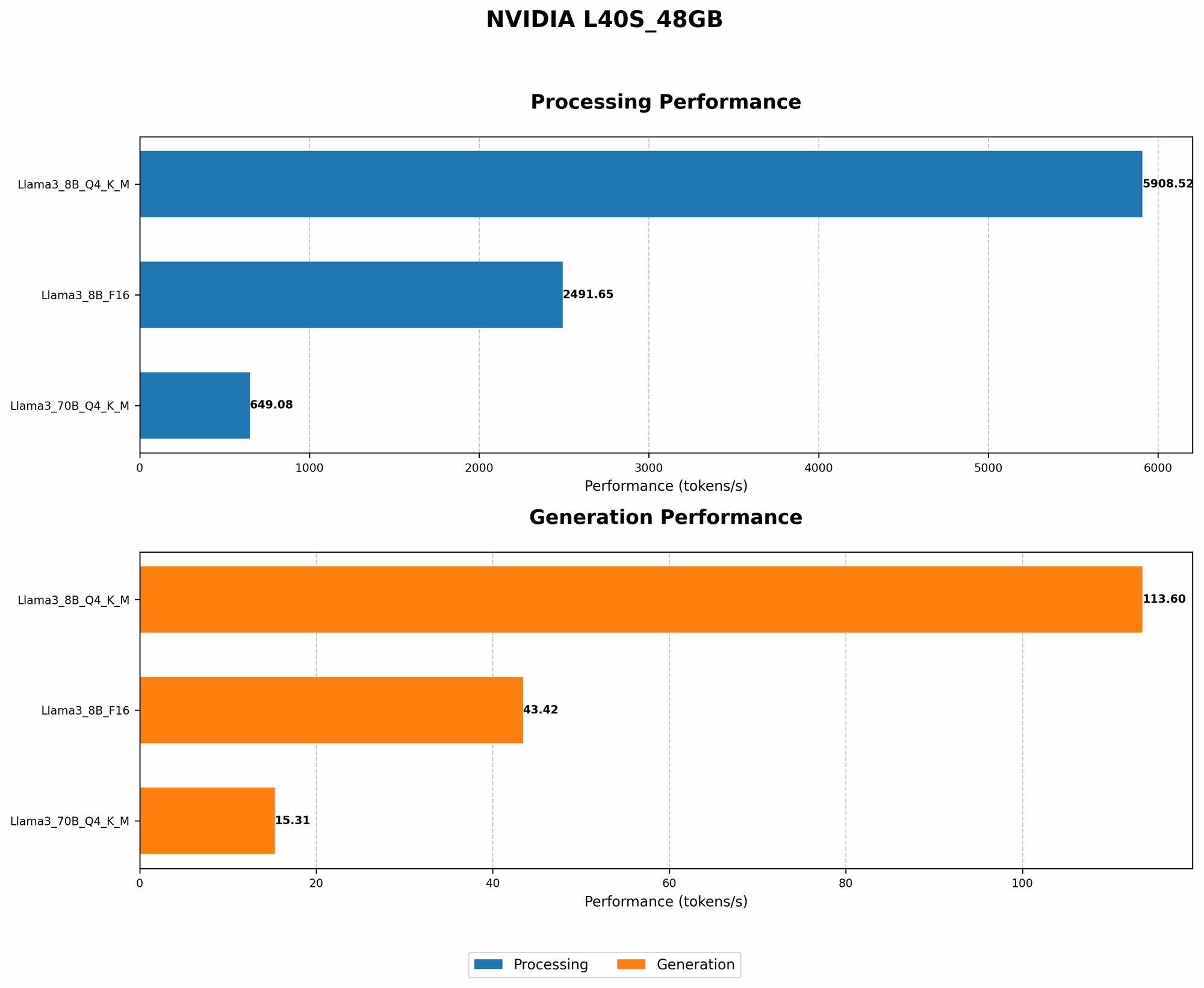
Benchmarking data for the L40S_48GB:
| Model & Format | Generation (Tokens/second) | Processing (Tokens/second) | Memory (GB) |
|---|---|---|---|
| Llama 3 8B (Q4KM) | 113.6 | 5908.52 | 8 |
| Llama 3 8B (F16) | 43.42 | 2491.65 | 16 |
| Llama 3 70B (Q4KM) | 15.31 | 649.08 | 40 |
| Llama 3 70B (F16) | N/A | N/A | N/A |
Interpreting the data:
- Llama 3 8B: The Q4KM quantized model shows significantly higher performance compared to the F16 format, demonstrating the effectiveness of quantization for both generation and processing. You can squeeze more out of your L40S48GB with Q4K_M , while F16 is still viable if you prioritize accuracy over memory.
- Llama 3 70B: You'll need to use Q4KM format to fit this model into the L40S_48GB's memory. The performance is still respectable, demonstrating the power of this GPU even for large LLMs.
FAQ: Clearing up the LLM Mystery
Q1: How do I choose the right LLM for my needs?
A: It depends on your application and your hardware capabilities. Consider the size of the model (7B, 13B, 30B, 70B, etc.), the accuracy you require, and the amount of memory available.
Q2: Can I run an LLM on a laptop?
A: It's possible, but you might need a high-end laptop with dedicated graphics processing. Smaller models like Llama 2 7B might work on some laptops, but for larger models, you'll likely need a powerful desktop computer.
Q3: How do I know if my GPU has enough memory for a specific LLM?
A: Check the model's documentation for its memory requirements. You can also use tools like TensorFlow's nvidia-smi to monitor GPU usage.
Q4: What are the best practices for running LLMs on my GPU?
A: Use quantization, batching, and tuning techniques to optimize performance and reduce memory usage. Consider offloading tasks to the CPU when possible, and use off-device inference for more complex models.
Q5: What are some popular LLM frameworks?
A: Popular frameworks include: - Hugging Face Transformers: A library for working with transformers, the architecture behind many LLMs. - TensorFlow: A popular machine learning framework that includes tools for LLM training and inference. - PyTorch: Another popular machine learning framework with strong support for LLMs.
Keywords
LLM, Large Language Model, NVIDIA L40S_48GB, out-of-memory, GPU memory, quantization, batching, tuning, offloading, off-device inference, performance optimization, benchmarking, tokens per second, inference time, memory usage.