5 Tricks to Avoid Out of Memory Errors on NVIDIA A100 PCIe 80GB

Introduction
Running large language models (LLMs) locally can be a thrilling experience, but it also comes with its fair share of challenges. One of the most common hurdles you'll likely encounter is the dreaded "Out-of-Memory" error. This happens when your model, which in essence is a giant program, needs more memory than your device can provide. Think of it like trying to squeeze a giant elephant into a tiny closet – it just won't fit.
In this article, we'll focus on the NVIDIA A100PCIe80GB, a high-performance GPU commonly used in AI development. This beast of a card packs a massive 80GB of memory, which is a big plus for running those humongous LLMs. Despite its impressive specs, even the A100PCIe80GB can feel cramped when dealing with the gargantuan sizes of some LLMs.
We'll dive into the common concerns of running LLMs on the A100PCIe80GB and discuss practical tricks to maximize your chances of success. We'll also explore the trade-offs involved in making your models fit within the A100's memory constraints.
Understanding the Challenge: LLMs and Memory
LLMs are like super-powered language wizards, capable of understanding and generating human-like text, translating languages, writing different kinds of creative content, and answering your questions in an informative way. But their magic comes with a price: they require massive amounts of memory to operate. Think of it like a giant library with endless shelves full of books, each representing a different piece of knowledge.
For instance, the Llama 3 model, which takes the language world by storm, comes in various sizes. You have Llama 3 7B, a relatively smaller model (7 billion parameters), and Llama 3 70B, a much larger model (70 billion parameters), that can hold a much wider range of knowledge. These numbers give you an idea of the complexity of the model, but they also directly translate to memory requirements.
5 Tricks to Avoid Out-of-Memory Errors on NVIDIA A100PCIe80GB
1. Smaller Model, Smaller Footprint: The Power of Quantization
Imagine you're trying to fit a huge box of Legos into your backpack. You could try to cram every single Lego in, but it would be much easier to separate some of the Legos into smaller containers before putting them in the backpack. Quantization works in a similar way. It reduces the memory footprint of your LLM by essentially representing those massive numbers (parameters) in a more compact form.
Think of it like switching from high-definition TV to a lower resolution. You lose some detail but save significant space. In our LLM context, quantization can reduce the memory footprint by a factor of 4 or even 8, making it easier to fit the model into your A100PCIe80GB's memory.
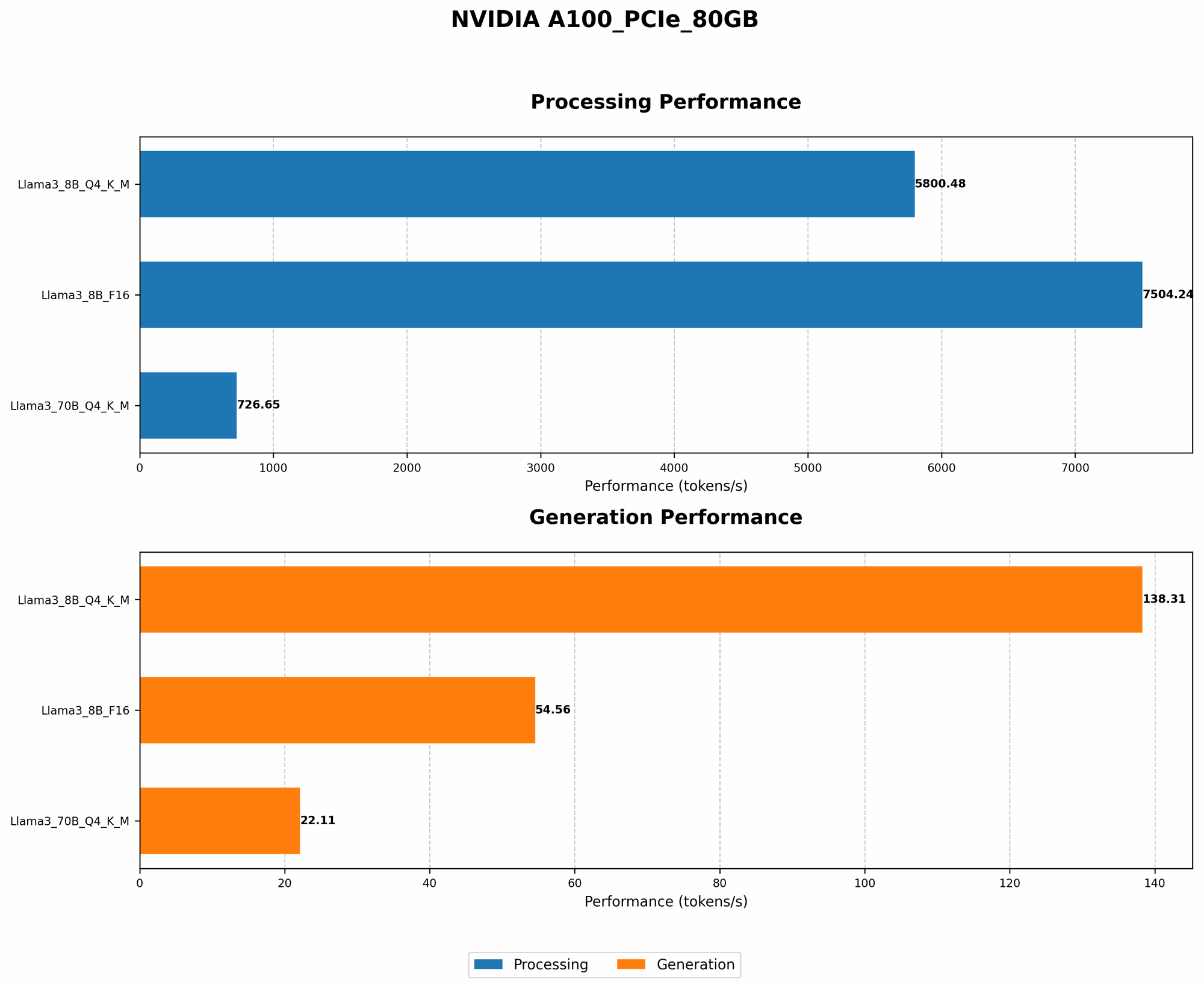
Example: Consider the Llama 3 8B model. The full F16 version (16-bit precision) requires a good amount of your precious memory. However, using Q4KM (4-bit quantization) significantly reduces the memory requirement, enabling you to run the same model without running into memory issues. As you can see in the table below, it's a noticeable improvement!
| Model | Memory Requirement | Token/Second |
|---|---|---|
| Llama 3 8B F16 | High | 54.56 |
| Llama 3 8B Q4KM | Lower | 138.31 |
2. The More, The Merrier (But Not Always): Parallelism and Batch Size
Imagine trying to build a sandcastle with a single friend. It might take a long time, and you might run into difficulties. But if you have a group of friends, you can divide the task into smaller parts, building faster and more efficiently. This is essentially what parallelism does for LLMs.
Parallelism means splitting the work into smaller chunks and processing them simultaneously. The A100PCIe80GB can handle multiple tasks at once, and you can leverage this to process larger chunks of text (batch size), leading to faster overall performance. However, increasing the batch size can also put pressure on your memory. It is a fine balancing act.
3. The Art of the Compromise: Context Window and Sequence Length
Imagine you're writing a story, but you only have a limited space on your paper. You need to carefully choose your words to convey the story within that limited space. Similarly, LLMs have a context window, which limits the amount of text they can "remember" at any given time.
The context window determines the maximum length of text your model can analyze and generate. For large models like Llama 3, the context window can be massive. However, if you need to process particularly long texts, you might need to reduce the sequence length, essentially "chopping" the text into smaller pieces to fit within the context window. This can lead to a degradation in performance, especially if your text has a lot of intricate dependencies between different parts.
4. The Wisdom of the Ancients: Older Models and Reduced Memory Demands
Remember those classic toys that were simple but still provided hours of fun? Well, in the world of LLMs, there are older, smaller models that can be surprisingly capable and use much less memory.
The smaller models, like Llama 7B, often offer a good compromise between performance and memory usage. It may not have the same advanced capabilities as the bigger, newer models, but it's a great option If you prioritize performance and want to avoid memory issues.
Example: Comparing the Llama 3 8B model to the older Llama 7B model, you can see how the older model performs with significantly less memory consumption, especially when comparing the Q4KM quantization:
| Model | Token/Second |
|---|---|
| Llama 3 8B Q4KM | 138.31 |
| Llama 7B Q4KM | 198.33 |
5. The Power of Optimization: Use Libraries and Tools
Think of your LLM like a high-performance car. It's designed to unleash its full potential, but it needs the right tools and techniques to make the most of its capabilities.
The same principle applies to LLMs. There are libraries and tools specifically designed to optimize LLM performance on the A100PCIe80GB, allowing you to squeeze every drop of performance while minimizing memory usage.
For example, the "llama.cpp" library offers highly optimized implementations for running LLMs on different devices, including the A100PCIe80GB. It allows you to tweak various parameters to fine-tune your model's performance and memory usage.
Comparison of Llama 3 8B and Llama 3 70B on A100PCIe80GB
| Model | Quantization | Token/Second - Generation | Token/Second - Processing |
|---|---|---|---|
| Llama 3 8B | F16 | 54.56 | 7504.24 |
| Llama 3 8B | Q4KM | 138.31 | 5800.48 |
| Llama 3 70B | Q4KM | 22.11 | 726.65 |
Conclusion
Running LLMs on the NVIDIA A100PCIe80GB can be a rewarding experience, but it comes with its own set of challenges. By understanding your options and using the right tricks, you can successfully run even the largest LLMs locally.
Remember: It's all about finding the sweet spot between performance and memory consumption. Experiment with different techniques, adjust your settings, and enjoy the fascinating world of LLMs on the A100PCIe80GB!
FAQ
1. What are the best ways to handle Out-of-Memory (OOM) errors when running LLMs?
- Quantization: Reduce the memory footprint of your LLM by using techniques like 4-bit quantization (Q4KM).
- Parallelism: Leverage the parallel processing capabilities of the A100PCIe80GB by using a larger batch size and parallelizing operations.
- Model Selection: Choose a smaller model, like Llama 7B, which requires less memory.
- Optimization Tools: Use tools like the "llama.cpp" library to streamline your LLM's performance and minimize memory consumption.
2. What are the limitations of using the A100PCIe80GB for running LLMs?
Even with its 80GB of memory, the A100PCIe80GB might still struggle with running the largest LLMs, like the 13B or 175B models without using advanced techniques like quantization. You might still encounter memory issues if you use a large context window or a very large batch size, further pushing the memory limits.
3. How can I choose the right LLM for my needs and resources?
- Model Size: Start with smaller models (e.g., Llama 7B) and gradually work your way up to larger models if your A100PCIe80GB can handle it without OOM errors.
- Task Complexity: For complex tasks, you might need a larger model with more parameters.
- Memory Constraints: Take your GPU's memory capacity into account and use techniques like quantization to minimize your model's footprint.
4. Can I use multiple GPUs to run LLMs?
Yes! You can use multiple GPUs to distribute the workload and achieve better performance. This technique, known as "multi-GPU training," can significantly boost your LLM's capabilities.
Keywords
LLM, Large Language Model, NVIDIA A100PCIe80GB, Out-of-Memory, Memory Management, Quantization, Parallelism, Batch Size, Context Window, Sequence Length, Llama 3, Llama 7B, GPU, llama.cpp, Deep Learning, AI, Machine Learning, Token/Second, Processing, Generation