5 Tricks to Avoid Out of Memory Errors on NVIDIA 4080 16GB

Introduction
The world of large language models (LLMs) is exploding, offering incredible possibilities for creative writing, code generation, and more. But for many users, the excitement quickly hits a wall: out-of-memory (OOM) errors. These frustrating messages appear when your GPU simply can't handle the sheer size of the models you're trying to run.
If you're using a powerful NVIDIA 4080 16GB GPU, you're likely keen to push the limits. This article will equip you with five essential tricks to avoid dreaded OOM errors and maximize your LLM performance.
Understanding the Memory Conundrum
Think of your GPU's memory as a gigantic warehouse. It holds all the information your LLM needs to operate, including the model's parameters (its knowledge base) and the text it's processing. However, these LLMs are getting huge, like a warehouse trying to manage the entire stock of Amazon.
For example, the Llama 3 70B model is so large it could easily fill your entire warehouse, leaving no space for anything else. That's why some models don't even work on a 16GB card, like the Llama 3 70B on a 4080 16GB.
Trick #1: Quantization - Shrinking the Model
Imagine you have a huge, detailed blueprint for a building. If you only need the basic layout, you could simplify the blueprint by using less precise measurements and details. That's exactly what quantization does for LLMs.
Quantization is like shrinking your warehouse by using smaller, less-detailed storage units. This allows you to fit much more data into the same space. The Llama 3 8B model in Q4/K/M format (quantization) takes up much less space than the F16 version, allowing you to run it on a 4080 16GB.
Impact on Performance
Quantization typically reduces accuracy slightly, but the performance difference is small and often negligible. This slight decrease in accuracy is a worthwhile tradeoff for being able to run larger models.
Example:
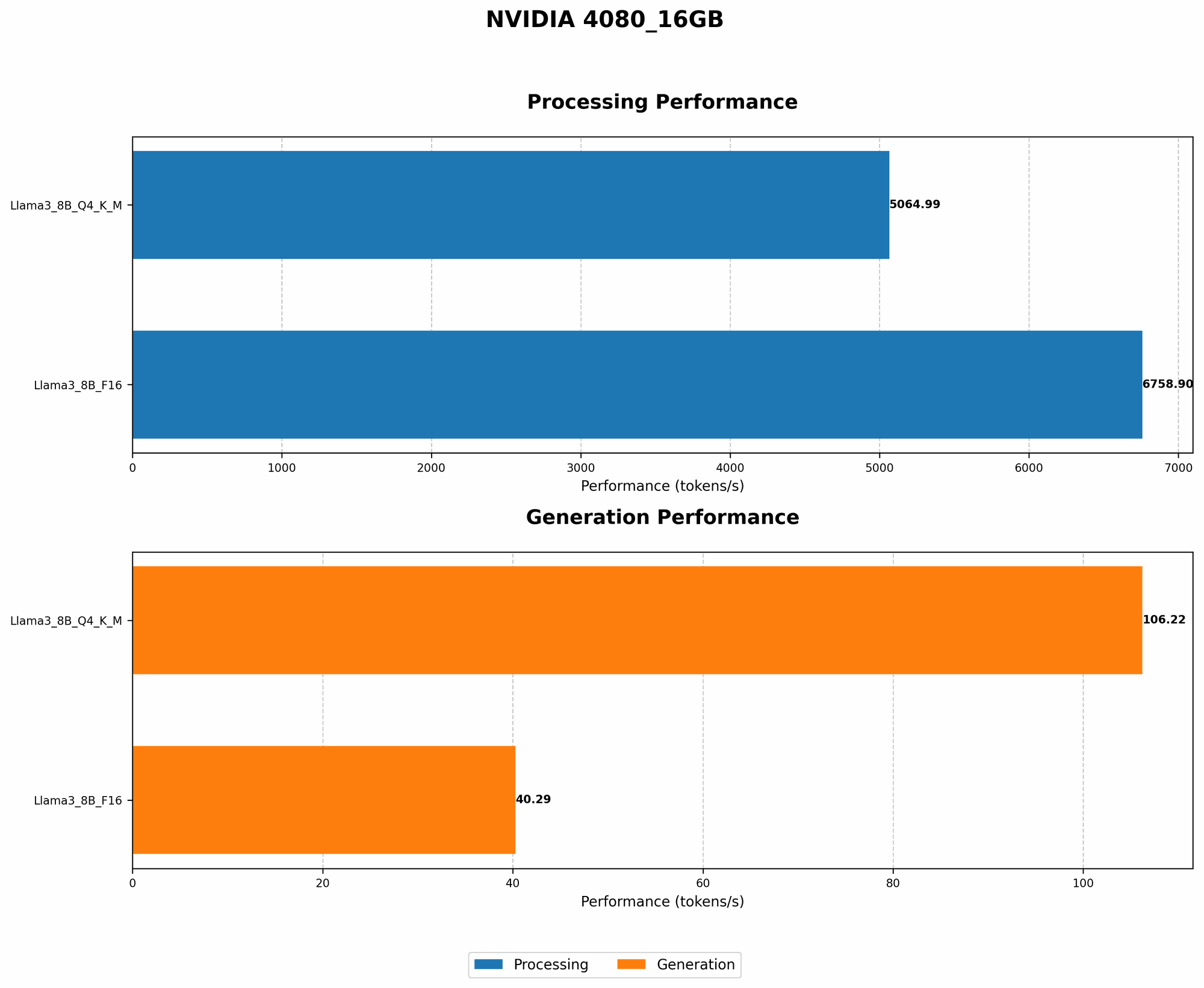
| Model | Quantization | Tokens/Second (Generation) |
|---|---|---|
| Llama 3 8B | Q4/K/M | 106.22 |
| Llama 3 8B | F16 | 40.29 |
- Note: The numbers represent the model's generation speed (tokens per second) on a NVIDIA 4080 16GB.
Quantization allows you to run the Llama 3 8B model in Q4/K/M format on your 4080 16GB, achieving significantly faster token generation speeds compared to the F16 version.
Trick #2: Optimize Context Length
Imagine you're trying to fit a long, winding string into a small box. The more you try to force it in, the more it gets tangled and jammed. LLMs are similar - they have a limit on the amount of context they can process simultaneously.
Impact on Performance
Longer contexts require more memory. When you reduce the context length, you are essentially making the box bigger, allowing for more space and avoiding frustrating OOM errors.
Example:
- If you're running a model to translate a long piece of text, you can break it into smaller chunks. This allows the model to focus on smaller sections, improving speed and reducing memory consumption.
By adjusting the context length, you can often handle larger input sequences without running into OOM errors. However, be mindful that excessive shortening can negatively impact the model's ability to understand the entire context.
Trick #3: Leverage GPU Memory Management
Imagine you're trying to organize your warehouse. Instead of haphazardly filling every shelf, you strategically place items to maximize space. Smart GPU memory management operates similarly.
Impact on Performance
By carefully managing the GPU's memory, you can improve performance by preventing unnecessary memory allocations and reducing fragmentation, leading to smoother and more efficient LLM operations.
Example:
- Use libraries like
torch.cuda.empty_cache()to release unused memory. - Consider using techniques like memory pinning to ensure data is readily available to the GPU, minimizing data transfer overhead.
Trick #4: Take Advantage of Multi-GPU Systems
If you have multiple GPUs or want to utilize both your CPU and GPU, you can take advantage of these resources to run even larger LLMs.
Impact on Performance
Depending on the type of GPUs and system configuration, you can achieve significant performance gains by using multi-GPU setups.
Example:
- You can split the LLM across multiple GPUs, allowing each GPU to handle a portion of the workload.
- With a combination of CPU and GPU, you can offload some tasks to the CPU, freeing up more GPU memory.
Trick #5: Reduce Model Size (When Possible)
Sometimes the biggest change comes from simply choosing a smaller model.
Impact on Performance
If you don't need the full power of a massive LLM, a smaller model will use less memory and improve performance.
Example:
- Instead of using a 70B LLM, consider if a 13B or 7B model could meet your needs.
- Explore smaller models with similar capabilities.
Comparison of NVIDIA 4080 16GB and Other Devices
While this article focuses on the 4080 16GB, it's worth noting that other devices may offer different memory capacities and performance characteristics.
- A100: The A100 GPU boasts 40GB of memory, making it a suitable choice for larger models.
- RTX 4090: This GPU comes with 24GB of memory, offering a decent middle ground between the 4080 16GB and the A100.
However, it's important to remember that these are just generalizations, and specific model performance can vary. Always refer to benchmarks and test results for a more accurate picture.
FAQ: Common Concerns about LLMs and GPUs
What are the best LLM models for my NVIDIA 4080 16GB?
This depends on the specific model and its quantization level. As a general guideline, the Llama 3 8B model in Q4/K/M format is a good choice for the 4080 16GB. However, you can also experiment with smaller models, such as the Llama 2 7B, which are known to be more efficient.
Can I run larger models on a 4080 16GB with these tricks?
While these tricks help optimize memory usage, they might not be enough for the largest models. You may still need to consider other options like using multiple GPUs or a device with more memory.
What if I encounter OOM errors even after trying these tricks?
If you're still facing OOM errors, consider reducing the batch size, model size, or context length. You can also try different quantization levels or experiment with other memory-efficient techniques.
How can I improve LLM performance on my GPU?
In addition to the tricks mentioned above, consider using optimized libraries, such as llama.cpp or transformers, which offer efficient GPU implementations. Regularly update your drivers and software to take advantage of the latest performance optimizations.
Where can I find more information about LLMs and GPUs?
Several online communities and resources can help you learn more about LLMs and GPUs. Websites like the NVIDIA Developer website, the Hugging Face forum, and the GitHub repositories of various LLM implementations offer valuable information and discussions.
Keywords
LLM, large language models, NVIDIA 4080 16GB, out-of-memory errors, OOM, quantization, Q4/K/M, F16, context length, GPU memory management, multi-GPU, model size, performance, token generation, speed, efficiency, benchmarks, Hugging Face, transformers, llama.cpp, NVIDIA Developer, GPU, memory.