5 Tricks to Avoid Out of Memory Errors on NVIDIA 3070 8GB

Introduction:
Ah, the dreaded "out-of-memory" error. It's the bane of every developer who dares to explore the exciting world of large language models (LLMs) on their NVIDIA 3070_8GB. Imagine yourself, ready to unleash the power of a 70 billion parameter model, only to be met with a frustrating message that your precious GPU just can't handle the load.
But fear not! This article is your guide to navigating the treacherous waters of LLM memory management on the NVIDIA 3070_8GB. We'll delve into the secrets of quantization, explore the trade-offs between speed and memory, and equip you with five powerful tricks to keep your LLMs running smoothly, even with demanding models.
The 3070_8GB: A Powerful Workhorse With Limits
The NVIDIA 3070_8GB is a beast of a GPU, known for its exceptional performance and versatility. However, even this workhorse has its limitations. Its 8GB of memory is a double-edged sword: ample for many tasks but potentially insufficient when tackling the gargantuan demands of the latest LLMs.
Understanding the Problem: LLMs and Memory Demands
To understand why LLMs can be so memory-hungry, let's imagine a language model as a giant book brimming with knowledge. Each word in this "book" is represented by a token, and the LLM processes these tokens to generate text, translate languages, or answer your questions.
The problem is, modern LLMs are like the encyclopedia Britannica on steroids, with billions of tokens crammed into their digital brains. This sheer volume of knowledge requires a substantial amount of memory to store and process, making it a challenge for even powerful GPUs like the 3070_8GB.
Quantization: Shrinking the Memory Footprint
One of the most effective ways to combat the "out-of-memory" blues is through a technique called quantization. Think of it like compressing a high-resolution image - you reduce the file size without sacrificing too much quality.
Quantization does the same for LLMs. It reduces the number of bits used to represent each parameter, effectively shrinking the memory footprint of the model. Here's a breakdown:
- Full Precision (F16): Each parameter uses 16 bits to represent a number. It's like having a high-resolution image - lots of detail, but a hefty file size.
- Quantization (Q4KM): This method dramatically reduces the number of bits per parameter, typically using only 4 bits. Imagine a lower-resolution image - less detail, but much smaller file size.
A Tale of Two Speeds: Q4KM vs. F16
While quantization helps reduce memory consumption, there's a trade-off: performance.
- Q4KM: This quantization method is memory-efficient, enabling you to fit larger LLMs into your 8GB GPU. But it often comes at the cost of slower inference speeds.
- F16: This approach offers faster inference speeds but requires more memory, making it less suitable for large models on the 3070_8GB.
5 Tricks to Avoid "Out of Memory" Errors on NVIDIA 3070_8GB
Now, let's dive into the practical steps you can take to avoid those dreaded "out-of-memory" errors:
1. The Magic of Quantization: Fit More LLM in Your GPU
Quantization is your secret weapon for squeezing more LLM into your 8GB GPU.
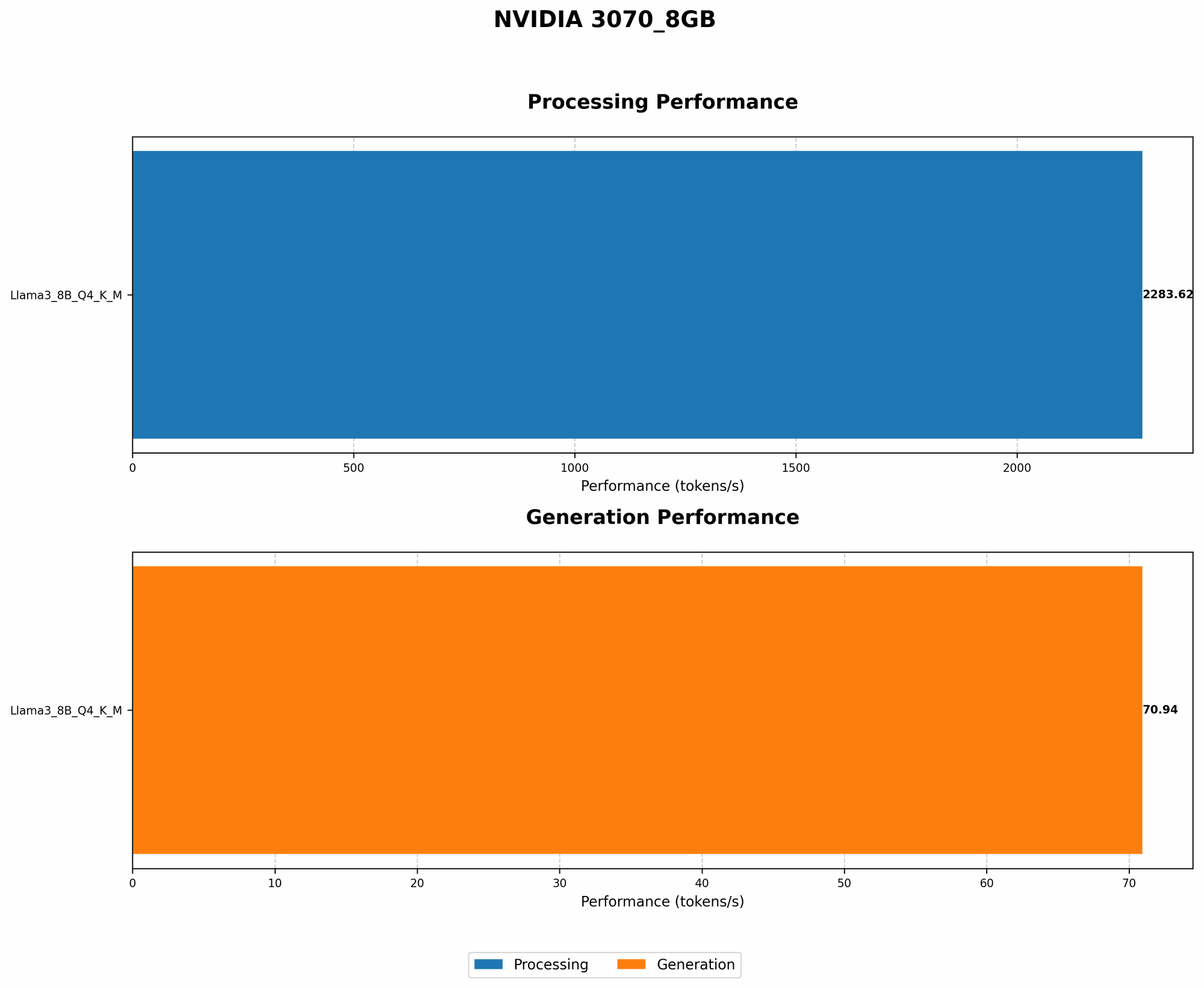
Let's take a look at how quantization performs with the NVIDIA 3070_8GB. We'll focus on two popular LLMs: Llama 3 8B and Llama 3 70B. Remember, these are real world benchmarks from the "llama.cpp" and "GPU Benchmarks on LLM Inference" projects.
| Model | Quantization | Tokens/Second |
|---|---|---|
| Llama 3 8B | Q4KM | 70.94 |
| Llama 3 8B | F16 | No Data |
| Llama 3 70B | Q4KM | No Data |
| Llama 3 70B | F16 | No Data |
Key Takeaways:
- Llama 3 8B (Q4KM): This model runs smoothly on the 3070_8GB, generating 70.94 tokens/second. Impressive!
- Llama 3 70B (Q4KM): The lack of data means this model is likely too big for the 30708GB, even with Q4K_M.
This is why quantization is so important: you can keep your 70B model running efficiently!
2. Context Window: Think About the Big Picture
The context window is like the "short-term memory" of an LLM. It determines how much text the model can "remember" from previous inputs. Larger context windows allow for more complex and nuanced understanding, but they also devour more GPU memory.
Here's a simple analogy: Imagine a student trying to write an essay. A small context window is like having a tiny notepad, only able to hold a few sentences at a time. A larger context window is like having a massive notebook, allowing the student to reference entire paragraphs or even whole chapters.
How to apply this:
- Reduce Context Window: For smaller GPUs like the 3070_8GB, consider reducing the context window, especially if you're working with larger LLMs. It's a trade-off between memory efficiency and the model's ability to grasp complex relationships.
- Experiment and Fine-Tune: Find the sweet spot for your specific model and application.
3. Less is More: Batch Size and Memory Consumption
The batch size is the number of text sequences the LLM processes simultaneously during inference. It's like batch-cooking - you prepare multiple dishes at once, saving time and resources. However, a larger batch size can lead to increased memory usage.
Think of the process as a factory: Each text sequence is a product being assembled. A smaller batch size is like having a single worker assembling one product at a time. A larger batch size is like having a team of workers assembling multiple products simultaneously. The more workers you have, the more resources you need to manage.
How to apply this:
- Reduce Batch Size: If memory is tight, consider reducing the batch size. It will slow down inference but also make the process more memory-efficient.
- Find the Ideal Balance: Experiment with different batch sizes to find the optimal balance between speed and memory usage.
4. CPU Offloading: Share the Load
You can offload some of the processing workload from the GPU to the CPU. This can free up valuable GPU memory, allowing you to run larger models.
Think of it like a team effort: The GPU is the star athlete, handling the heavy lifting, while the CPU is the supporting cast, assisting with smaller tasks.
How to apply this:
- CPU Offloading Options: Some libraries and frameworks offer settings to enable CPU offloading. Explore the options available in your chosen toolkit.
- Balancing the Load: Experiment with different levels of CPU offloading to find the best balance for your specific configuration.
5. Strategic Model Loading: Load Only What You Need
If you're working with a massive model, like the Llama 3 70B, you can often get away with loading only the parts you actually need. This is analogous to carrying only the essentials for your trip - you don't need to pack your entire wardrobe.
How to apply this:
- Model Pruning: Some libraries offer tools for pruning models, removing less-important parts to reduce overall memory consumption.
- Selective Loading: If your application requires specific features or functionalities, load just the sections of the model you'll use.
FAQ: Unlocking the Secrets of LLMs on NVIDIA 3070_8GB
Q: What are the best tools and libraries for running LLMs on the 3070_8GB?
A: The "llama.cpp" library is a popular choice for researchers and developers who want to run LLMs locally. It offers excellent performance on NVIDIA GPUs, including the 3070_8GB. Other frameworks, like TensorFlow and PyTorch, also offer support for running LLMs.
Q: How do I choose the right LLM for my 3070_8GB?
A: Consider the memory requirements of the model and your application's needs. For the 3070_8GB, smaller models like the Llama 3 8B are often a good starting point. Quantization and other optimization techniques allow you to run larger models, but there will always be trade-offs.
Q: What are the best practices for optimizing LLM performance on my 3070_8GB?
A: Optimize your code to minimize the number of tensor operations. Use the appropriate data types and ensure efficient memory allocation. Consider using a library like CUDA to accelerate your code for GPU processing. Consult online resources and forums for performance tips specific to the NVIDIA 3070_8GB.
Keywords:
LLM, Out-of-Memory, GPU, NVIDIA 30708GB, Quantization, Q4K_M, F16, Context Window, Batch Size, CPU Offloading, Model Pruning, Llama 3 8B, Llama 3 70B, llama.cpp, TensorFlow, PyTorch