5 Tips to Maximize Llama3 8B Performance on NVIDIA RTX 6000 Ada 48GB

Introduction
The world of large language models (LLMs) is exploding with exciting new developments, and Llama3, developed by Meta AI, is making waves. This powerful model, especially the 8B parameter version, is attracting the attention of developers who are eager to integrate its capabilities into their applications. But to harness the full potential of Llama3, you need the right combination of hardware and optimization techniques.
This article dives deep into maximizing the performance of Llama3 8B on the NVIDIA RTX6000Ada_48GB, a powerful GPU designed for demanding AI workloads. We'll analyze benchmark results, explore the impact of different quantization levels, and provide practical tips to speed up your Llama3 8B deployments.
Performance Analysis: Token Generation Speed Benchmarks
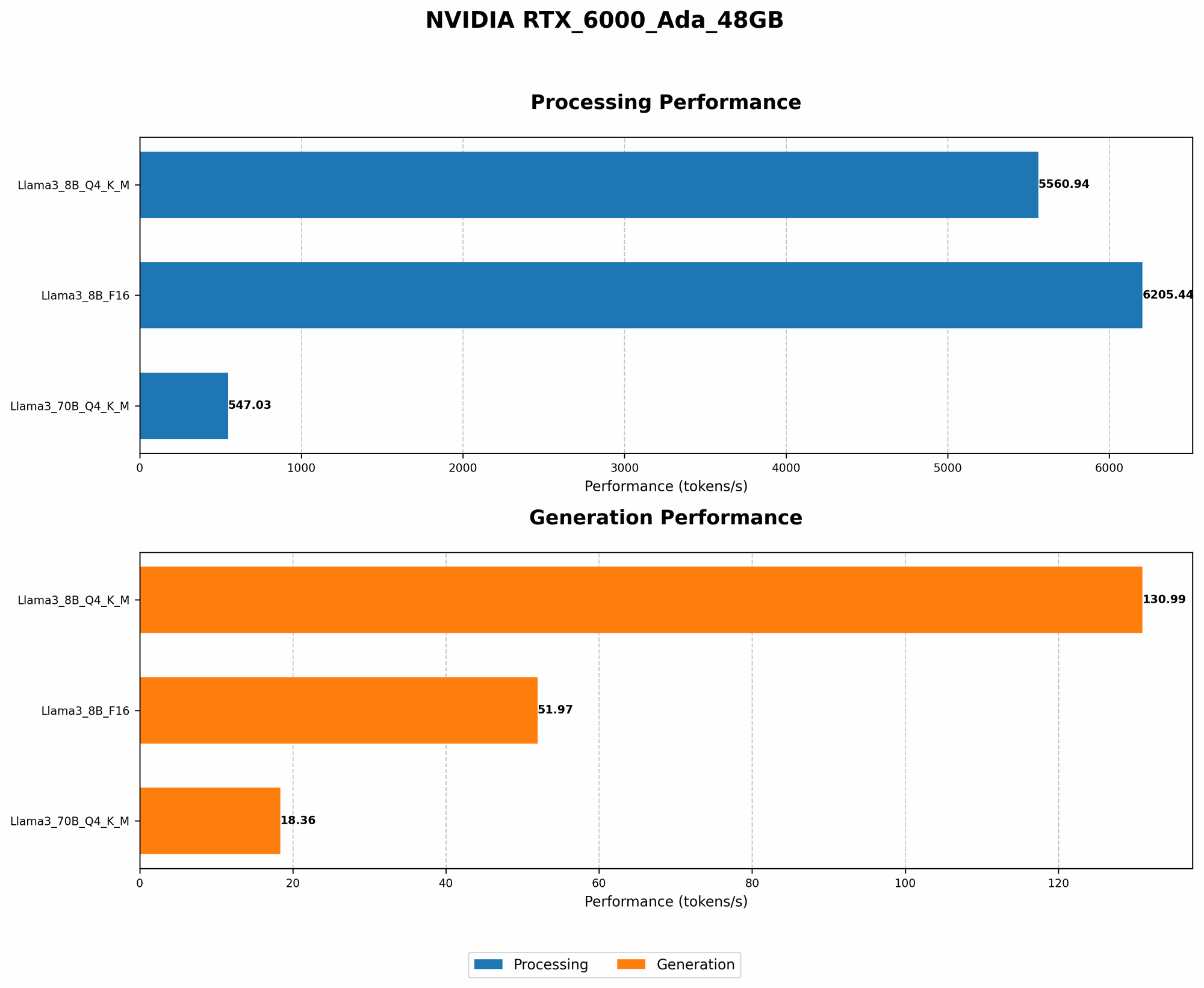
Token Generation Speed Benchmarks: Llama3 8B on RTX6000Ada_48GB
Let's kick things off by examining the heart of LLM performance - token generation speed. This is the rate at which the model produces text, and it directly impacts the user experience. The table below showcases the token generation speeds of Llama3 8B on the RTX6000Ada_48GB, measured in tokens per second (tokens/s).
| Model & Quantization | Token Generation Speed (tokens/s) |
|---|---|
| Llama3 8B Q4KM | 130.99 |
| Llama3 8B F16 | 51.97 |
Key Takeaways:
- Quantization Matters: The Q4KM quantization strategy, which represents a trade-off between precision and size, delivers significantly faster token generation speeds compared to F16.
- F16 is Faster than you Think: Many developers assume F16 quantization is significantly slower. While true for some models and devices, this data shows it still delivers decent performance.
Think of it this way: Imagine your LLM as a chef whipping up a delicious text-based dish. Quantization is like choosing different quality ingredients - some might be faster to cook with but less flavorful, while others are more complex but deliver a richer experience. Finding the sweet spot depends on your specific needs and resources.
Performance Analysis: Model and Device Comparison
Comparing Llama3 8B and 70B Performance on RTX6000Ada_48GB
Looking at a single model is great, but what about comparing different versions of the same LLM on the same hardware? Let's see how Llama3 8B stacks up against its bigger brother, Llama3 70B.
Important Note: While we have data for the 8B model, there's no available data for Llama3 70B with F16 quantization on the RTX6000Ada_48GB.
| Model & Quantization | Token Generation Speed (tokens/s) | Processing Speed (tokens/s) |
|---|---|---|
| Llama3 8B Q4KM | 130.99 | 5560.94 |
| Llama3 70B Q4KM | 18.36 | 547.03 |
Observations:
- Size Matters: The smaller 8B model clearly outperforms the 70B model in both token generation and processing speed. This is expected due to the reduced computational demands of a smaller model.
- Scaling Challenges: This highlights a key challenge in LLM deployment - the trade-off between model size and performance. Larger models typically have better accuracy but come at the cost of speed and resource consumption.
Analogy: Think of it like comparing a sleek sports car (8B model) with a luxurious limousine (70B model). The sports car might be quicker on the track, while the limousine is more spacious and comfortable. Which one is better depends on your journey and priorities.
Practical Recommendations: Use Cases and Workarounds
1. Quantization is your Friend: Embrace Q4KM
Based on the benchmarks, the Q4KM quantization strategy should be your go-to choice for Llama3 8B on the RTX6000Ada_48GB for faster token generation. It achieves a considerable speed boost while maintaining a decent level of precision.
Remember: Although F16 may be faster than you think, Q4KM is still the champion of speed in this context.
2. Consider Model Size: 8B is your Speed Demon
The 8B version of Llama3 is the clear winner in terms of performance on the RTX6000Ada_48GB. Its smaller size enables quicker processing and token generation compared to the 70B model. If you're prioritizing speed, the 8B version is the way to go.
Don't be afraid to choose: Think of model size like picking the right tool for the job. If you need a hammer, don't grab a wrench. If speed is paramount, the 8B model is your hammer.
3. Leverage GPU Memory: No More Memory Errors
The RTX6000Ada_48GB has a massive 48GB of GDDR6 memory, which is more than enough to accommodate Llama3 8B without exceeding your memory limits. This is a significant advantage compared to GPUs with lower memory capacities.
Think of it this way: Imagine your LLM as a hungry monster that needs to be fed with data. The GPU memory is like a generous buffet, providing the model with ample space to hold all the information it needs. Large models need big buffets!
4. Explore Open Source Tools: Optimize Your Code
Llama.cpp, an open-source C++ library, provides a robust framework for running LLMs locally. It's highly optimized for GPU acceleration and offers features for quantization and other performance tweaks.
Learn from the community: Experiment with Llama.cpp and explore the open-source community for tips and tricks to optimize your code.
5. Be Patient: LLM Technology is Evolving
The world of LLMs is rapidly evolving. New models, like Llama3, are constantly being released, and hardware advancements are happening at an astonishing rate. If today's benchmark results don't meet your needs, stay informed about new developments and be prepared to adapt your approach.
Don't get discouraged: It's a marathon, not a sprint. Stay curious, keep experimenting, and embrace the exciting possibilities that LLM technology offers.
FAQ
What is Quantization?
Quantization is a method used to reduce the size of LLMs by representing the model's weights (the numbers that define the model) with fewer bits. This reduces storage space and processing requirements.
Why Use Quantization?
Quantization offers several benefits:
- Smaller Model Size: This allows you to deploy LLMs on devices with limited memory.
- Faster Inference: Reduced model size generally leads to faster computations.
- Lower Memory Footprint: Less memory is required to load and execute the model.
What is Llama.cpp?
Llama.cpp is an open-source C++ library developed by Georgi Gerganov. It's designed for local LLM execution and provides efficient GPU acceleration.
How Can I Get Started with Llama3 8B?
- Install Llama.cpp: Refer to the Llama.cpp GitHub repository for detailed installation instructions.
- Download Llama3 8B: Find the model weights available from Meta AI.
- Experiment with Quantization: Try Q4KM to see the performance benefits.
- Optimize Your Code: Use Llama.cpp's tools to streamline your LLM implementation.
Keywords
Large language models, Llama3, 8B, NVIDIA RTX6000Ada48GB, GPU, token generation speed, quantization, Q4K_M, F16, performance, optimization, benchmarks, llama.cpp, local deployment.