5 Tips to Maximize Llama3 8B Performance on NVIDIA A100 PCIe 80GB

Introduction
In the fast-paced world of Artificial Intelligence (AI), Large Language Models (LLMs) have emerged as game-changers, revolutionizing how we interact with technology. LLMs, like the popular Llama 3 series, are capable of understanding and generating human-like text, translating languages, writing different kinds of creative content, and answering your questions in an informative way. But harnessing the full potential of these models requires careful optimization, especially when running them locally on powerful hardware like the NVIDIA A100PCIe80GB.
This article will take you on a deep dive into maximizing the performance of Llama3 8B on this beast of a GPU. We'll explore crucial performance factors, identify potential bottlenecks, and provide practical tips to unlock the true speed and efficiency of your local LLM setup. Buckle up, because this journey is going to be exciting!
Performance Analysis: Token Generation Speed Benchmarks
Token Generation Speed Benchmarks: Llama3 8B on A100PCIe80GB
Let's start with the bread and butter of LLM performance: token generation speed. This metric measures how quickly your model can process text, producing new tokens (words or sub-words) that form the output. Higher token generation speed means faster responses and more efficient processing, which is crucial for a seamless user experience.
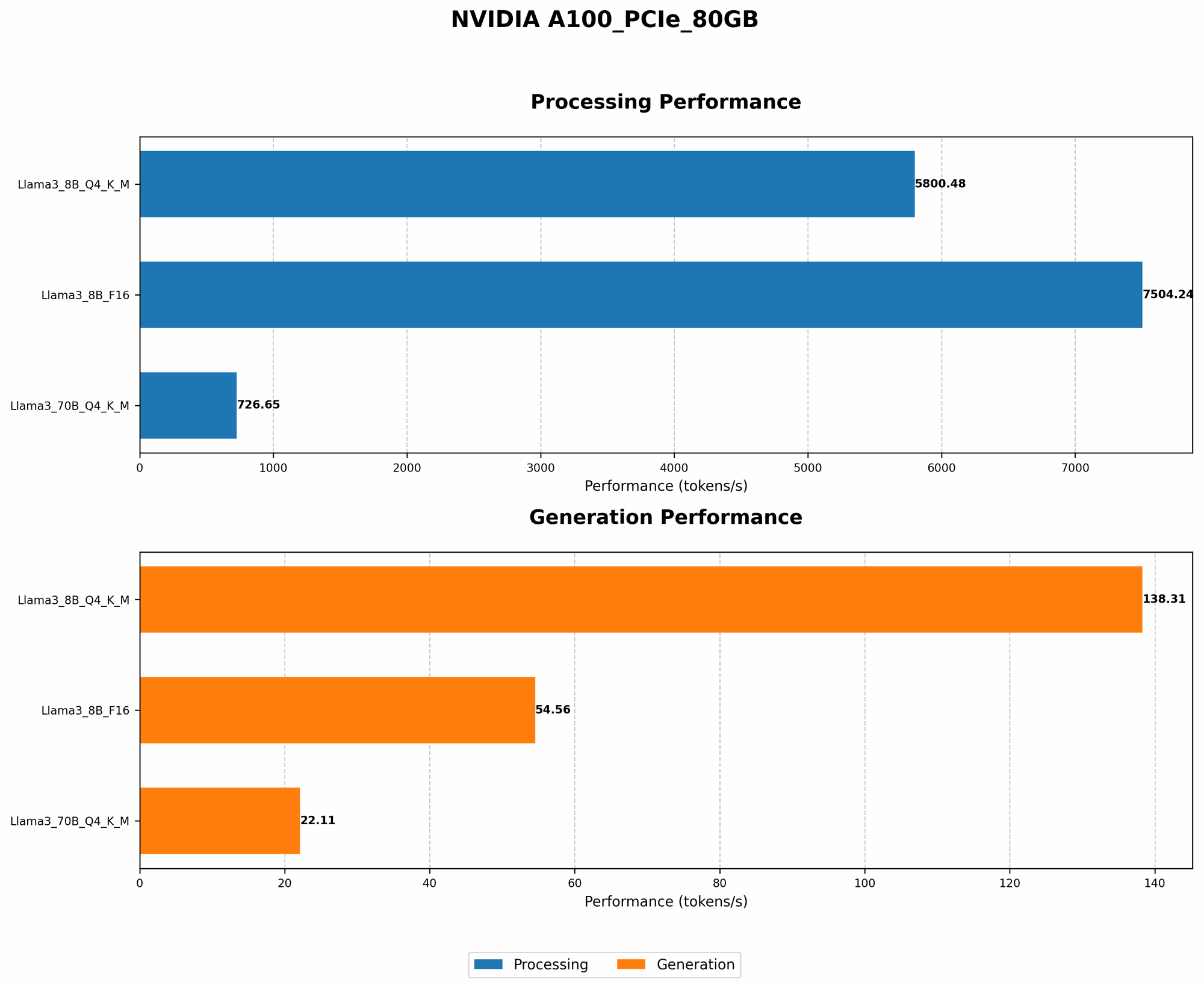
The following table shows the token generation speed of Llama3 8B on the A100PCIe80GB, measured in tokens per second (tokens/s). We've included both 4-bit quantized (Q4KM) and 16-bit floating-point (F16) models.
| Model | Tokens/s (Q4KM) | Tokens/s (F16) |
|---|---|---|
| Llama3 8B | 138.31 | 54.56 |
| Llama3 70B (Q4KM only) | 22.11 |
As you can see, the 4-bit quantized Llama3 8B model delivers significantly higher token generation speeds (138.31 tokens/s) compared to the 16-bit floating-point model (54.56 tokens/s). This is because quantization, a technique that reduces the precision of model weights, allows the model to run faster and more efficiently on the GPU.
Think of it like this: Quantization is like using a smaller map to navigate a city. While it lacks the detailed information of a larger map, it's much easier to carry around and use for quick orientation. Similarly, quantized models sacrifice some accuracy for a noticeable boost in speed.
Performance Analysis: Model and Device Comparison
Model and Device Comparison: Quantization and Performance
To understand the impact of quantization on different model sizes, let’s compare Llama3 8B and Llama3 70B.
The 70B model is significantly larger than the 8B model, containing a much greater number of parameters. This size difference directly affects the performance, especially when running on the same GPU.
As shown in the table above, the 70B model's token generation speed is significantly lower than the 8B model, even with quantization. This is due to the increased computational demands of a larger model, causing it to be more resource-intensive.
Quantization is a powerful tool that allows developers to optimize these large models for faster performance. By carefully selecting the quantization method and balancing accuracy with speed, you can choose the right setup for your application.
Practical Recommendations: Use Cases and Workarounds
Use Cases for Llama3 8B on A100PCIe80GB: Choosing the Right Model for the Job
So, how can you use this performance data to make informed decisions about your project? Consider these use cases:
- Interactive Applications: For tasks that require quick and responsive interactions, like chatbots or real-time translation, the Q4KM Llama3 8B model is a strong choice. Its high token generation speed ensures a snappy and engaging user experience. Think of it like a fast-paced game where every millisecond matters.
- Content Generation: If you need to generate large amounts of text, like articles or blog posts, the Q4KM Llama3 70B model, despite its slower speed, could be a better choice. Its larger size allows for greater complexity and accuracy in the generated content. It's like choosing a professional writer for complex and lengthy projects.
- Experimentation & Research: If you're exploring different LLM models or experimenting with different configurations, the 8B model provides a great starting point due to its faster performance. It's like a test track for fine-tuning your model.
Optimizing Llama3 8B Performance: Tips for the Win
Tips for Maximizing Performance: Fine-Tuning Your Setup
- Quantization: If you find performance to be a bottleneck, consider using quantization. This technique can significantly reduce the memory footprint and improve the speed of your model. However, quantization can also reduce the accuracy of your model, so it's important to experiment and find the right balance for your application.
- Batch Size: Increasing the batch size can improve performance by reducing the overhead of processing individual tokens. However, increasing the batch size too much can lead to memory issues, so it's important to strike the right balance.
- GPU Configuration: Experiment with different GPU settings, such as the number of CUDA cores and the amount of memory allocated to the model. By optimizing these settings, you can improve the performance of your model.
- Software & Libraries: Ensure you are using the latest versions of the software and libraries necessary for your LLM model to function optimally. These updates often come with performance improvements and bug fixes that can significantly impact the performance of your setup.
- Hardware: If performance is crucial for your application, consider investing in more powerful hardware. For example, upgrading to an NVIDIA A100 Tensor Core GPU can significantly improve the speed of your LLM model.
Conclusion
Mastering the art of local LLM performance is about finding the perfect balance between speed and accuracy. This article has equipped you with the knowledge and practical tips to optimize your Llama3 8B model on the NVIDIA A100PCIe80GB. Remember, the journey of LLM optimization is an ongoing process – keep experimenting, learning, and fine-tuning to unlock the full potential of these incredible technologies. And who knows, maybe one day you'll be the one setting new benchmark records!
FAQ
What is the difference between Llama3 8B and Llama3 70B?
The key difference is the number of parameters. Llama3 8B has 8 billion parameters, while Llama3 70B has 70 billion parameters, meaning it's significantly larger and more complex. The larger model can potentially generate more complex and accurate outputs but requires more processing power and memory.
What is quantization?
Quantization is a technique used to reduce the precision of numbers in a model's weights. It's like simplifying a complex equation by using smaller numbers. This can lead to a significant reduction in memory consumption and faster processing speeds, but it can also impact the accuracy of the model.
Can I run Llama3 8B on my laptop?
It's possible, but it depends on your laptop's specifications. LLMs require significant processing power and memory, so you'll likely need a powerful machine with a dedicated GPU to run them smoothly.
What other local LLM models are available?
There are several other popular local LLM models, including GPT-Neo, Jurassic-1 Jumbo, and others. You can explore these models and find the best fit for your specific requirements.
Keywords
LLM, Llama3, 8B, NVIDIA A100PCIe80GB, Performance, Token Generation Speed, Quantization, F16, Q4KM, GPU, Local, Optimization, Application, Use Case, Content Generation, Interactive Applications, Recommendation, Tip, Experimentation, Research, Batch Size, Hardware, Software, Libraries