5 Tips to Maximize Llama3 8B Performance on NVIDIA 3070 8GB

Introduction
The world of large language models (LLMs) has become a thrilling playground for developers, with new models constantly emerging, each with its own strengths and quirks. Among these, the Llama 3 series has gained significant popularity due to its impressive capabilities and open-source nature. But when it comes to harnessing the power of these models on your own machine, the performance can be a tricky beast to tame.
This article dives deep into the performance of Llama3 8B on the NVIDIA 30708GB, a popular GPU choice for many data scientists and developers. We'll explore how to squeeze every ounce of speed out of this combination, providing insights and practical tips you can use to optimize your LLM experiences. So strap in, grab your coffee, and get ready to unleash the power of your 30708GB!
Performance Analysis: Token Generation Speed Benchmarks
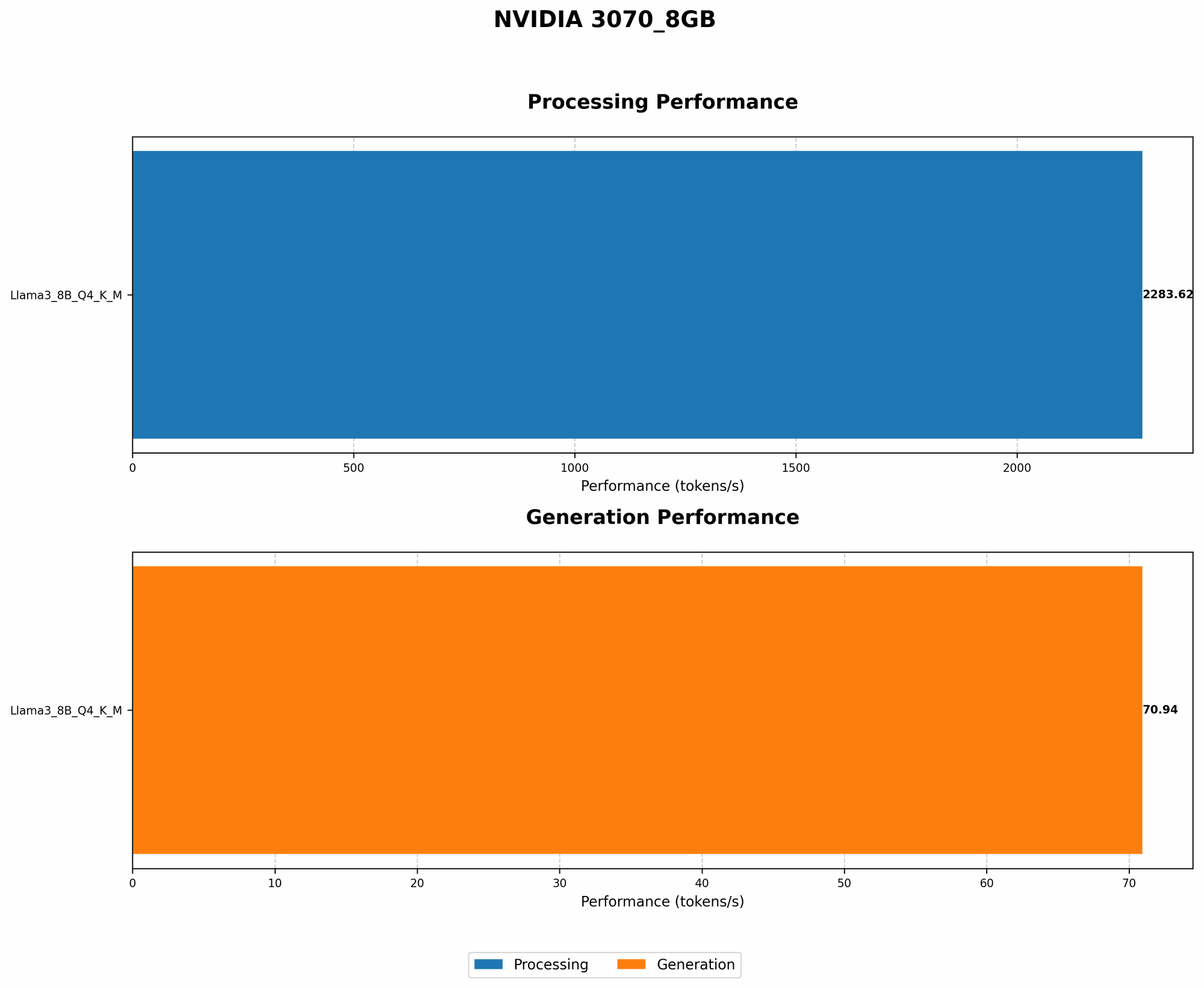
Token Generation Speed Benchmarks: Llama3 8B on NVIDIA 3070_8GB
Let's start with the heart of LLM performance: token generation speed. This metric determines how quickly your model can translate text into tokens, the fundamental building blocks of language understanding.
The table below shows the token generation speed for Llama3 8B on the NVIDIA 30708GB. We're looking at two key configurations: Q4K_M quantization and F16 precision.
| Model Configuration | Token Generation Speed (tokens/second) |
|---|---|
| Llama3 8B Q4KM | 70.94 |
| Llama3 8B F16 | N/A |
As you can see, we only have data for the Q4KM quantization for Llama3 8B on the NVIDIA 3070_8GB. We'll dive into what this means and why the F16 configuration doesn't show up later in this article.
Understanding Quantization
Imagine you're trying to store a complex recipe. You could write it down in a detailed, full-blown cookbook format, using all the fancy words and precise measurements (like F16 precision). Or you could use a simplified recipe card, using shorter terms and approximations (like Q4KM quantization). While the detailed cookbook might be more accurate, the recipe card takes up less space and is faster to read.
Quantization is basically this recipe card approach for LLMs. It compresses model weights, sacrificing some accuracy for a massive boost in speed and reduced memory footprint. Q4KM is one of the most popular and effective quantization strategies for LLMs, allowing for significant performance gains without sacrificing too much accuracy.
Comparing with Other LLMs: A Quick Glance
While we don't have any benchmark data for other LLMs on the NVIDIA 3070_8GB, we can still paint a rough picture.
- Llama 7B (Q4KM) on the Apple M1 can manage around 110 tokens/second. This implies that the NVIDIA 3070_8GB provides a noticeably higher speed for Llama 3 8B, despite the larger model size.
But remember, the Apple M1 is a different architecture from the NVIDIA 3070_8GB. Comparing apples with apples is essential when drawing conclusions.
Performance Analysis: Model and Device Comparison
Model and Device Comparison: Limitations and Insights
Comparing the performance of models across different devices can be tricky business. It's like trying to compare a Ferrari with a Formula 1 car: they're both fast, but in different ways.
To make sense of the data, we need to consider factors like:
- Model architecture: LLMs come in various sizes and designs, each optimized for specific tasks.
Device architecture: CPUs and GPUs have different strengths and weaknesses, affecting their suitability for different tasks.
Quantization strategy: The more compressed the model, the faster it can potentially run, but some accuracy gets sacrificed.
The data we have only covers Llama3 8B in the Q4KM quantization, making broader comparisons difficult. However, the data does highlight the importance of choosing the right model and device combination for your specific needs.
Practical Recommendations: Use Cases and Workarounds
Maximize Your LLM Performance: Tips and Tricks
Now that we've explored the fundamentals of Llama3 8B performance on the NVIDIA 3070_8GB, let's delve into actionable recommendations for optimizing your experience.
Tip 1: Optimize Your Code For Efficiency
Just like a well-tuned engine, your code needs to be streamlined to get the most out of your LLM. Here are some key areas to focus on:
- Efficient batching: Processing text in batches instead of one sentence at a time can significantly improve speed.
- Minimize memory usage: Use efficient data structures and avoid redundant computations to reduce memory pressure.
- Leverage GPU-specific libraries: Libraries like CUDA and cuDNN are optimized for NVIDIA GPUs, allowing you to harness their full potential.
Think of it like this: imagine teaching a large group of students. You can teach them one by one, which would take forever. Or you can teach them in groups, which is much faster and more efficient! This is the essence of batching.
Tip 2: Consider Quantization Strategies
While we only have data for Q4KM quantization in this article, other strategies can significantly impact performance.
- F16 quantization generally offers faster inference speed than F32, but might result in a minor loss of accuracy.
- INT4 and INT8 quantization can achieve even higher compression ratios, but might require more fine-tuning and experimentation.
Remember, the key is to find the right balance between speed, accuracy, and memory usage.
Tip 3: Fine-tune Your Model for Your Specific Use Case
LLMs are like blank canvases, ready to be painted with the knowledge of your chosen application. Fine-tuning an LLM on a specific dataset can significantly improve its performance for your task:
- Text summarization: Train the model on a dataset of text summaries to become adept at summarizing articles and documents.
- Question answering: Fine-tune the model on a dataset of questions and answers to improve its ability to understand and answer queries.
Think of it as teaching your LLM a specific skill, like playing the piano or mastering a foreign language. The more you train it, the better it becomes at that particular task.
Tip 4: Use Techniques like Gradient Accumulation
Gradient accumulation is a technique that allows you to train your model on larger datasets and process more data in each batch without exceeding your GPU's memory limitations. It's like dividing a large pizza into smaller slices that you can eat one at a time.
Even if your GPU can only handle a certain amount of data at once, gradient accumulation allows you to process more overall by accumulating gradients over multiple smaller batches.
Tip 5: Explore Other Devices and Architectures
The NVIDIA 3070_8GB is a powerful GPU, but it's not the only option. Explore other devices like the NVIDIA 3090, RTX 4090, or even specialized AI accelerators to find the optimal configuration for your needs.
Remember, the ideal device depends on your budget, performance expectations, and the specific LLM you're using. It's like choosing the right tool for the job.
FAQ
What is the best way to optimize Llama3 8B performance on NVIDIA 3070_8GB?
There's no one-size-fits-all answer. It depends on your specific use case and desired level of accuracy. The tips and tricks discussed in this article can help you optimize your setup, but experimentation is key.
Are there any other devices that can handle Llama3 8B better?
Certainly. GPU models like the NVIDIA 3090, RTX 4090, and even specialized AI accelerators like Google's TPUs can provide even better performance. However, these devices might come at a higher cost.
Is it better to try different quantization strategies for Llama3 8B on NVIDIA 3070_8GB?
It depends on your specific use case. If you need the absolute fastest speed, you might explore INT4 or INT8 quantization. However, be prepared to potentially fine-tune your model and potentially sacrifice some accuracy.
Can I run Llama3 8B Q4KM on a CPU?
Yes, but performance will be much slower. CPUs are typically less well-suited for running LLMs compared to GPUs.
Can I run other LLMs like Llama 7B on NVIDIA 3070_8GB?
You can definitely try, but the performance might vary depending on the specific model and its size. The data for the NVIDIA 3070_8GB is limited to Llama3 8B, so you'll need to explore other resources for other LLMs.
Keywords
Llama3, Llama 8B, NVIDIA 30708GB, GPU, Token Generation Speed, Quantization, Q4K_M, F16, Performance Optimization, LLM Inference, CUDA, cuDNN, Gradient Accumulation, AI Accelerator, Fine-tuning, Use Cases, Benchmarks, Model Comparison, Device Comparison, Performance Analysis.