5 Tips to Maximize Llama3 70B Performance on NVIDIA RTX 5000 Ada 32GB

Introduction
Welcome, fellow geeks! Embarking on a journey with Llama3 70B, a colossal language model, can be both thrilling and demanding, especially when it comes to squeezing the most out of your hardware. This article is your guide to unlocking top-notch Llama3 70B performance using the NVIDIA RTX5000Ada_32GB, a powerful graphics card. We'll dive deep into its capabilities, analyze performance benchmarks, and provide practical tips for maximizing your efficiency. But before we get all technical, let's talk about the "why" behind it all.
Large language models (LLMs), like Llama3 70B, are revolutionizing the way we interact with technology. They can generate creative content, translate languages, answer questions, and even write code. But running these models locally requires significant processing power, which is where your trusty RTX5000Ada_32GB comes in. This article will unveil the secrets to optimizing LLMs for maximum performance on this powerful GPU.
Performance Analysis: Token Generation Speed Benchmarks
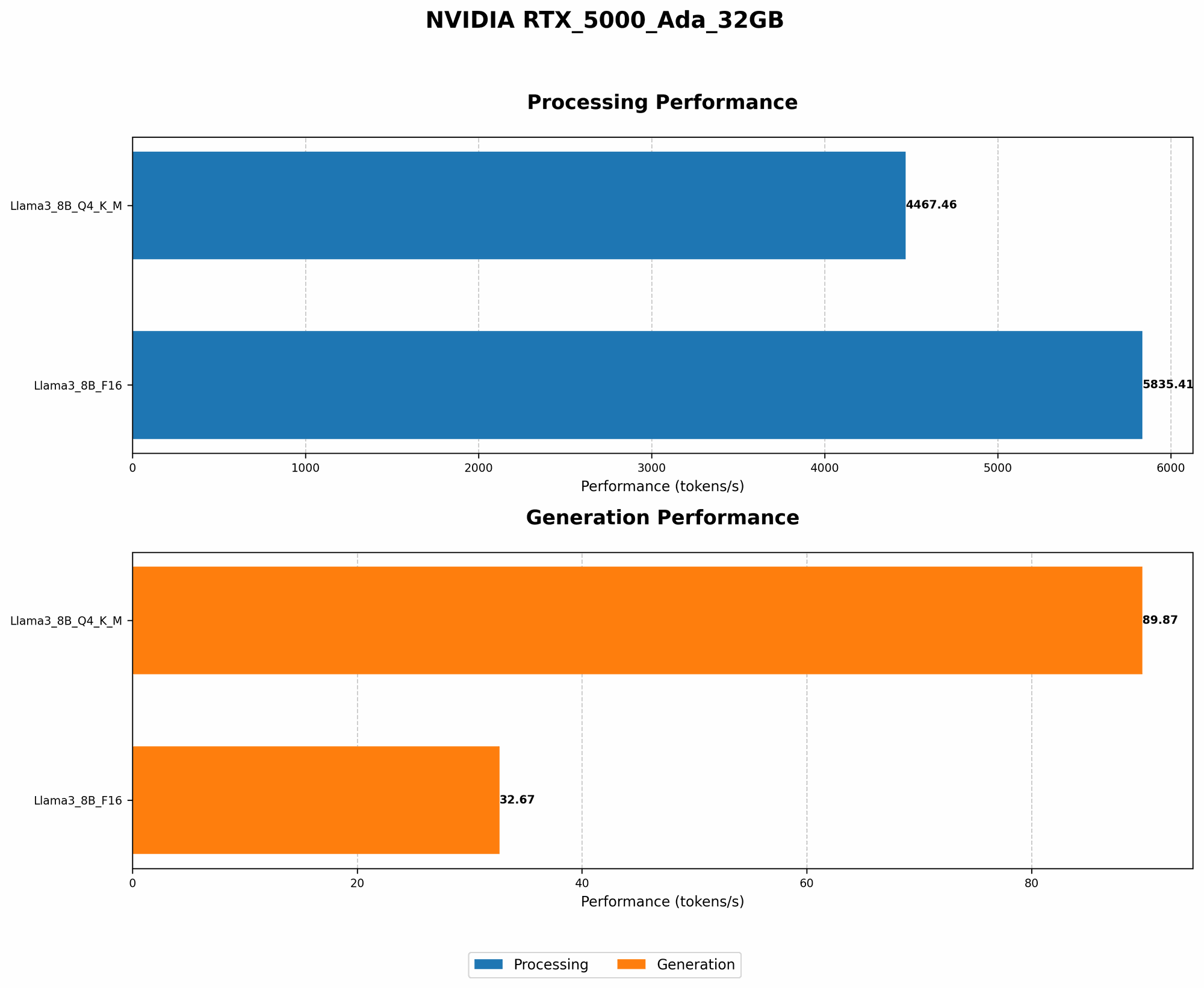
Let's start with the heart of the matter: token generation speed. This determines how fast your model can process your prompts and generate text. Unfortunately, data for Llama3 70B on the RTX5000Ada_32GB is currently unavailable. This may be because Llama3 70B is a newer model, or the specific configuration hasn't been tested. For now, we'll focus on available data for Llama3 8B, which provides valuable insights for understanding performance trends.
Token Generation Speed Benchmarks: Llama3 8B on RTX5000Ada_32GB
Behold, the numbers! Let's break down the token generation speed of Llama3 8B on the RTX5000Ada_32GB:
| Model Configuration | Tokens per Second |
|---|---|
| Llama3 8B Q4KM_Generation | 89.87 |
| Llama3 8B F16_Generation | 32.67 |
Key Takeaways:
Quantization Matters: Llama3 8B using Q4KM quantization achieved a significantly higher token generation speed (89.87 tokens/sec) than its F16 counterpart (32.67 tokens/sec). This difference is due to the reduced precision of Q4KM, effectively reducing the memory footprint and computations required. Think of it like this: Q4KM is like using a smaller, lighter backpack to carry your data, allowing you to move faster.
Trade-off Between Speed and Accuracy: While Q4KM quantization offers a performance boost, it comes at the cost of reduced model accuracy. F16 quantization provides higher accuracy but results in slower processing.
Choosing the Right Configuration: Selecting the optimal model configuration depends on your use case. If your application demands speed, Q4KM might be your best bet. However, if accuracy is paramount, F16 is the way to go.
Performance Analysis: Model and Device Comparison
It's useful to compare the performance of different LLM models and devices to gain a broader perspective. However, based on the available data, we can only make a comparison with Llama3 8B since data for Llama3 70B on the RTX5000Ada_32GB is unavailable.
Model and Device Comparison: Llama3 8B with different devices
| Device | Model Configuration | Tokens per Second |
|---|---|---|
| RTX5000Ada_32GB | Llama3 8B Q4KM_Generation | 89.87 |
| RTX5000Ada_32GB | Llama3 8B F16_Generation | 32.67 |
| Apple M1 | Llama2 7B Q4KM_Generation | 32 |
Key Takeaways:
Device Variability: Even with the same model configuration, different computing devices showcase varying performance. The RTX5000Ada_32GB consistently outperforms the Apple M1 in terms of token generation speed for Llama3 8B with both quantizations.
Balancing Performance and Cost: Considering the price difference between the RTX5000Ada32GB and an Apple M1, it's clear that the RTX5000Ada32GB offers a higher return on investment for achieving faster token generation speeds for Llama3 8B.
Practical Recommendations: Use Cases and Workarounds
Now, let's translate our analysis into tangible advice for optimizing your Llama3 70B experience. Remember, while we lack precise data for Llama3 70B on the RTX5000Ada_32GB, the insights from Llama3 8B provide general guidance.
Run Llama3 70B with Lower Quantization Levels
The insights from Llama3 8B suggest that using quantization methods can significantly boost performance. While we lack specific data for Llama3 70B on the RTX5000Ada32GB, it's highly probable that lower quantization levels, like Q4K_M, will result in faster token generation speeds. However, remember the trade-off: lower quantization levels might slightly reduce model accuracy.
Streamline Your Prompts
Short, focused prompts are a developer's secret weapon for improving LLM performance. Think of it as teaching a child with a short, simple lesson rather than a complex one. A complex prompt will require the model to process more information, leading to slower response times. By concisely crafting your prompts, you'll expedite the generation process.
Leverage Efficient Model Architectures
If you're a seasoned developer, you might be familiar with model architectures like 'Llama-2-7B', which are often optimized for faster inference. Consider exploring these architectures to enhance your Llama3 70B performance.
Explore Faster Quantization Methods
The field of quantization is constantly evolving. Keep an eye out for newer quantization techniques that offer enhanced performance without sacrificing accuracy. Research projects like GPTQ and 'QLoRA' (Quantized Low-Rank Adaptation) demonstrate how these techniques are paving the way for more efficient LLM deployment.
Optimize Your GPU Driver Settings
Ensure you're running the latest NVIDIA driver for your RTX5000Ada_32GB, as this often includes performance optimizations. Additionally, explore driver settings like memory allocation and power management to fine-tune your GPU for optimal LLM performance.
FAQ
Q: Can I run Llama3 70B on an RTX5000Ada_32GB?
A: While we don't have specific benchmarks for Llama3 70B on the RTX5000Ada_32GB, it's highly likely you can run it, but performance might not be optimal.
Q: What other GPUs are suitable for running Llama3 70B?
A: The RTX5000Ada_32GB is a strong contender, but you might consider higher-end GPUs like the NVIDIA A100 or H100 for optimal performance with Llama3 70B.
Q: What are the potential benefits of using quantization?
A: Quantization offers several benefits, including:
- Faster inference speeds: Reduced memory footprint leads to faster processing.
- Lower memory requirements: Running LLMs on devices with limited RAM becomes feasible.
- Reduced power consumption: Reduced computations lead to lower energy consumption.
Q: How do I find the best quantization method for my LLM?
A: Experimentation is key! Start with quantizations like Q4KM and F16. Evaluate their performance and accuracy based on your use case. Research emerging techniques and tools like GPTQ and QLoRA: they might offer a more optimized solution.
Keywords
Llama 3, 70B, LLM, NVIDIA, RTX5000Ada32GB, performance, token generation speed, quantization, Q4K_M, F16, GPU, efficiency, practical recommendations, use cases, workarounds, model architectures, optimization, driver settings, FAQ.