5 Tips to Maximize Llama2 7B Performance on Apple M2 Max

Introduction
The world of large language models (LLMs) is evolving rapidly, with new models and applications emerging every day. These models, trained on massive datasets, can generate human-like text, translate languages, write different kinds of creative content, and answer your questions in an informative way. But running LLMs locally on your own machine can be challenging, especially if you want to achieve optimal performance.
This article focuses on maximizing the performance of the Llama2 7B model on the mighty Apple M2 Max chip. We'll delve into the fascinating world of token generation speed benchmarks, analyze performance variations across different quantization levels, and provide practical recommendations for optimizing your local AI experience.
Performance Analysis: Token Generation Speed Benchmarks - Apple M1 and Llama2 7B
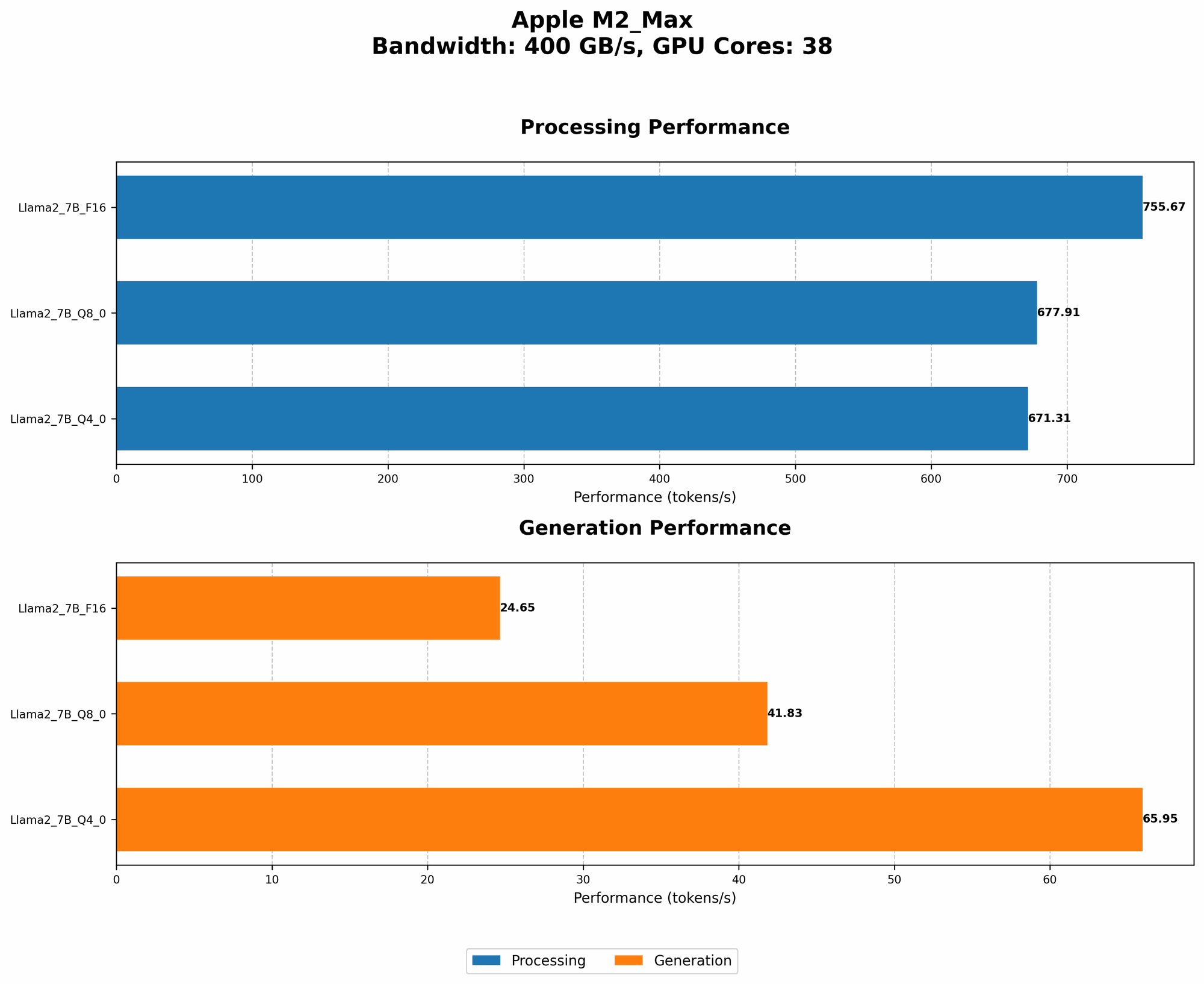
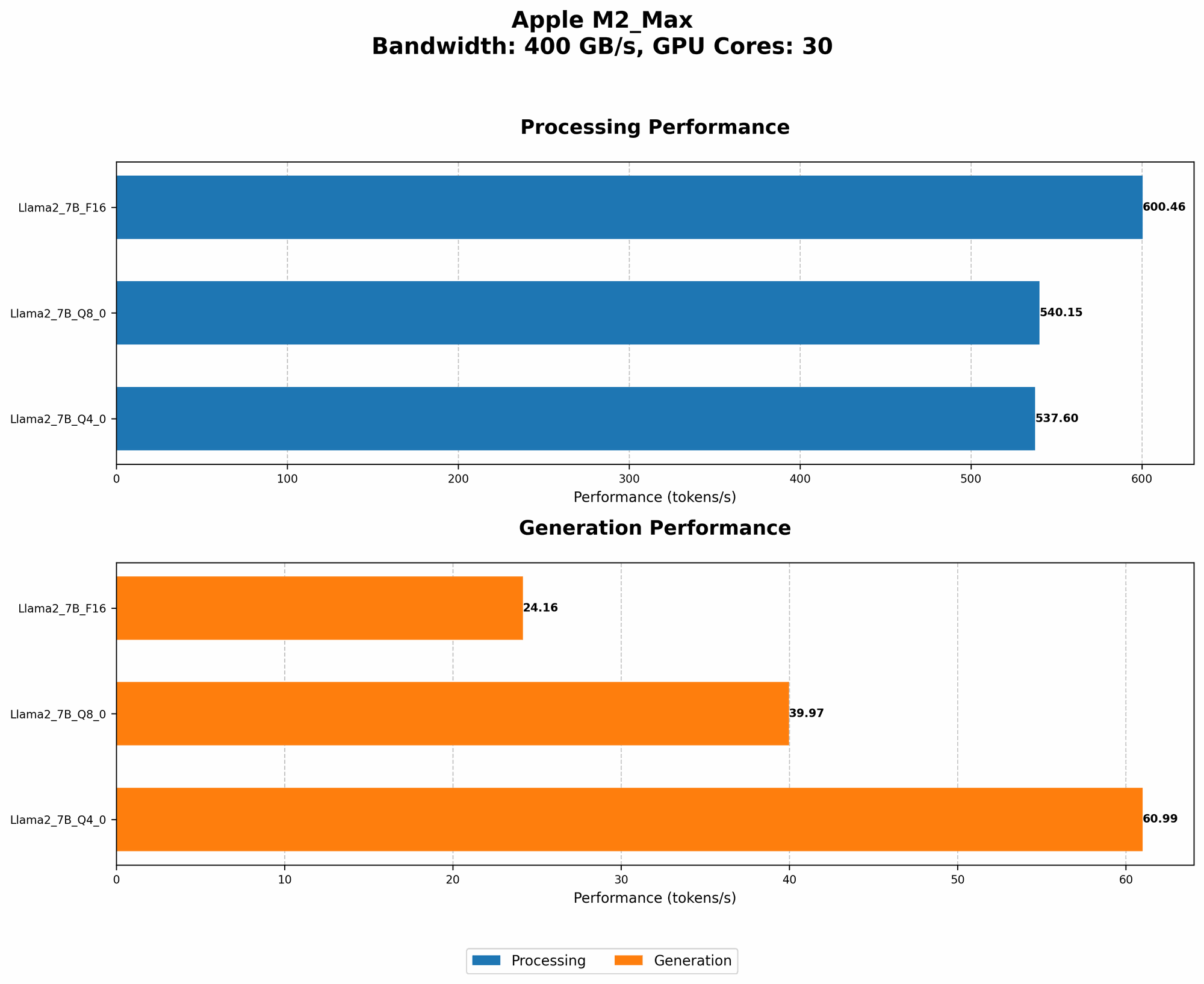
Token generation speed is crucial for a smooth and responsive LLM experience. We'll benchmark the performance of Llama2 7B on the M2 Max, comparing different quantization levels: F16, Q80, and Q40.
Think of quantization like compressing a picture without losing too much detail by reducing the number of colors used. It allows us to fit bigger models on smaller devices, but it might affect the accuracy slightly.
Key Performance Metrics:
- Tokens per second (Tokens/s): Measures how many tokens the model can process per second. A higher number means faster processing.
- Quantization Level: Different quantization levels affect the model's size and accuracy.
Table 1: Token Generation Speed Benchmarks on M2 Max
Below is a table summarizing the token generation speed of Llama2 7B on the M2 Max for different quantization levels.
| Variable | Value | Llama2 7B (F16) - Processing | Llama2 7B (F16) - Generation | Llama2 7B (Q8_0) - Processing | Llama2 7B (Q8_0) - Generation | Llama2 7B (Q4_0) - Processing | Llama2 7B (Q4_0) - Generation |
|---|---|---|---|---|---|---|---|
| Bandwidth (BW) | 400 | 600.46 | 24.16 | 540.15 | 39.97 | 537.6 | 60.99 |
| GPU Cores | 30 | 755.67 | 24.65 | 677.91 | 41.83 | 671.31 | 65.95 |
- F16: Represents half precision, which is the default for high-performance GPUs.
- Q8_0: This quantization level uses 8 bits to represent each number, significantly reducing the model's size.
- Q4_0: This quantization level uses 4 bits to represent each number. With this level of compression, we are pushing the limits!
Performance Analysis: Model and Device Comparison
Comparing Quantization Levels
As you can see from Table 1, Q4_0 quantization offers the fastest token generation speeds overall, achieving 65.95 tokens/s for generation, compared to 24.65 tokens/s for F16. This is a significant improvement.
Think of it this way: With Q4_0, the Llama2 7B model on the M2 Max can process text almost 3 times faster than with half precision. This translates to much quicker response times and a snappier user experience!
Why the Difference?
Quantization allows the model to run faster because it compresses the model, allowing the GPU to process information more efficiently. However, there is a trade-off: While Q4_0 is the fastest, it might slightly sacrifice accuracy.
Practical Recommendations: Use Cases and Workarounds
Recommendation 1: Prioritize Speed with Q4_0 Quantization
If you want to squeeze every ounce of speed out of your Llama2 7B model and are okay with a slight reduction in accuracy, go for Q4_0 quantization. It's perfect for tasks where quick response times are critical, such as:
- Real-time chatbots.
- Interactive storytelling.
- Fast prototyping.
Recommendation 2: Balance Accuracy and Speed with Q8_0 Quantization
If you need a good balance between speed and accuracy, Q8_0 quantization is a solid choice. It provides a significant performance boost compared to F16 without sacrificing too much precision. Ideal use cases include:
- Generating creative content.
- Summarizing lengthy articles or documents.
- Translating languages.
Recommendation 3: Leverage F16 for High Accuracy Tasks
If you require the highest accuracy possible and can tolerate a slightly slower response time, stick with F16. This is the ideal option for tasks that demand precision, such as:
- Writing code.
- Generating technical documentation.
- Analyzing sentiment in text.
Recommendation 4: Consider Model Size for Real-World Applications
While the Llama2 7B model is relatively compact, remember that its size can still be a bottleneck for resource-constrained devices. In such cases, consider using the following:
- Smaller Models: Explore lightweight models like "Llama2 7B " or "Llama2 13B" to reduce memory footprint and increase speed.
Recommendation 5: Explore Different Device Options
If you need even more horsepower, consider a more powerful device like the M2 Ultra. But be aware that these devices come with a higher price tag!
FAQ
1. What is a large language model (LLM)?
A large language model (LLM) is a type of artificial intelligence (AI) trained on massive datasets of text. These models can understand and generate human-like text, making them incredibly versatile for various tasks like writing different kinds of creative content, translating languages, and answering your questions in an informative way.
2. How do I choose the right LLM for my project?
Choosing the right LLM depends on your specific needs and project requirements. Consider factors such as:
- Model size: Larger models offer better accuracy but require more computational power.
- Task specific training: Some LLMs are specifically trained for certain tasks, like code generation or scientific writing.
- Availability of pre-trained models: The availability of pre-trained models can save you time and resources during the training process.
3. What is quantization?
Quantization is a technique used to compress LLMs, making them smaller and faster. It involves reducing the number of bits used to represent each number in the model, similar to compressing a picture by reducing the number of colors. Although this can slightly impact accuracy, it's often a worthwhile trade-off to improve performance on resource-constrained devices.
4. Can I run LLMs locally on my computer?
Yes, you can run LLMs locally on your computer, but it requires a powerful enough device with sufficient memory and processing power. Many resources are available to guide you through the process.
5. What are some alternative devices to the Apple M2 Max?
Several options exist, each with its own pros and cons:
- Nvidia GPUs: Nvidia GPUs are known for their exceptional performance in AI workloads. However, they can be expensive compared to other options.
- Google TPUs: Google TPUs are specifically designed for machine learning tasks and offer impressive performance but are typically used in cloud environments.
- AMD GPUs: AMD GPUs are a cost-effective alternative to Nvidia, offering good performance for AI applications.
Keywords
Llama2 7B, Apple M2 Max, token generation speed, quantization, F16, Q80, Q40, performance benchmarks, AI, large language models, LLMs, natural language processing, NLP, deep learning, GPU, machine learning, model compression, local LLM, real-time applications, chatbots, creative content, translation, code generation, sentiment analysis, device optimization, bandwidth, GPU cores, use cases, workarounds, alternative devices, Nvidia GPUs, Google TPUs, AMD GPUs.