5 Tips to Maximize Llama2 7B Performance on Apple M1 Pro
Introduction
In the world of AI, Large Language Models (LLMs) have taken center stage, revolutionizing how we interact with technology. LLMs like Llama2 7B, with their impressive capabilities, are becoming increasingly popular for tasks ranging from text generation and translation to question answering and code writing. However, squeezing the maximum performance out of these models requires careful consideration of hardware and software configurations.
This article serves as a guide for developers and enthusiasts exploring the potential of Llama2 7B on the Apple M1 Pro, offering practical insights and actionable tips to optimize your setup for peak performance.
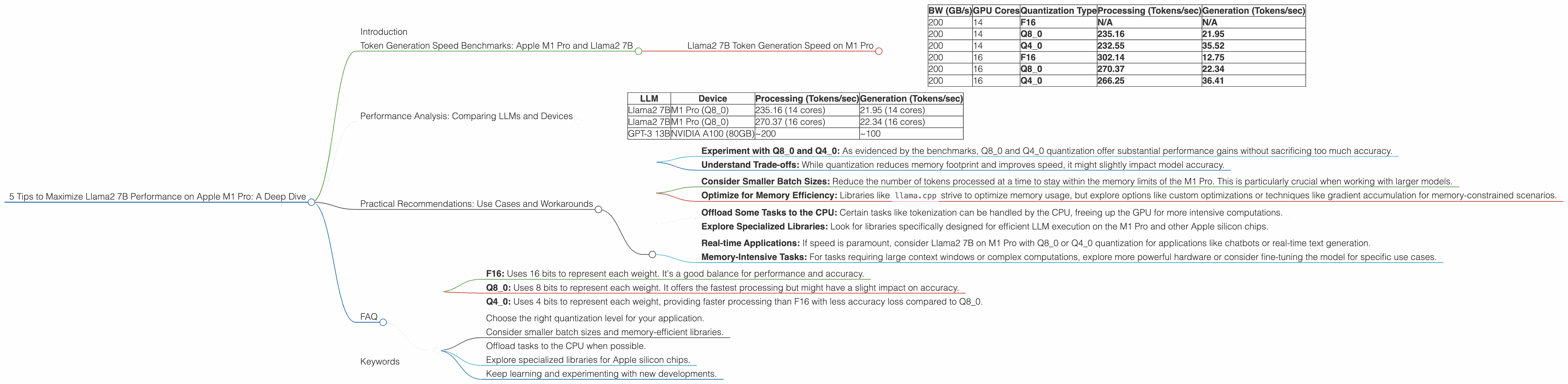
Token Generation Speed Benchmarks: Apple M1 Pro and Llama2 7B
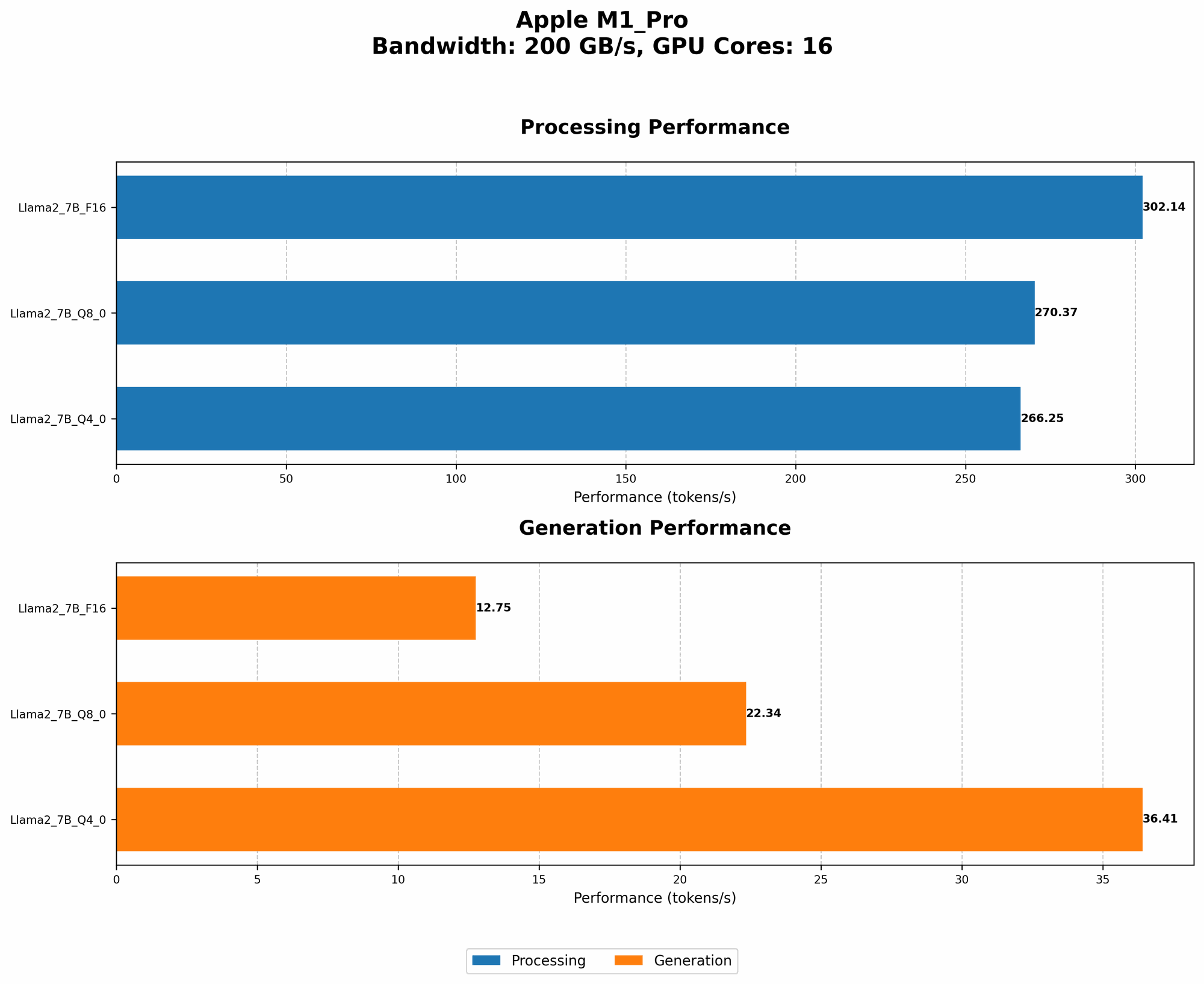
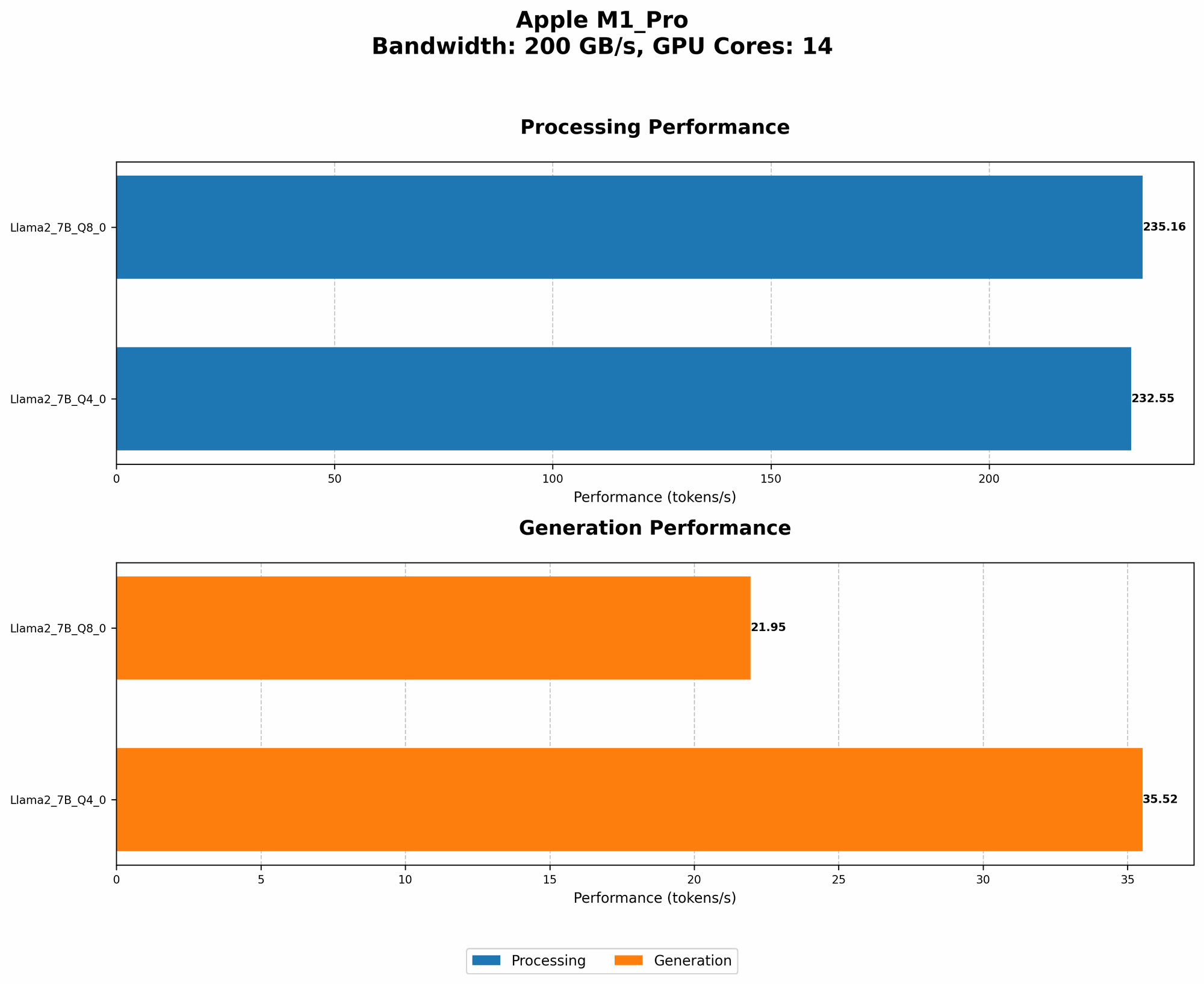
Let's dive into the core of performance — token generation speed, which measures how fast your LLM processes text and generates output. We'll focus on Llama2 7B, a powerful model known for its balance of performance and efficiency.
As you might guess, the token generation speed depends on a few factors, but here's a breakdown of what we'll consider:
- Quantization: How the model's weights (the knowledge it carries) are compressed, impacting memory usage and speed.
- Processing: How fast the model processes input tokens.
- Generation: How fast the model generates output tokens.
Llama2 7B Token Generation Speed on M1 Pro
| BW (GB/s) | GPU Cores | Quantization Type | Processing (Tokens/sec) | Generation (Tokens/sec) |
|---|---|---|---|---|
| 200 | 14 | F16 | N/A | N/A |
| 200 | 14 | Q8_0 | 235.16 | 21.95 |
| 200 | 14 | Q4_0 | 232.55 | 35.52 |
| 200 | 16 | F16 | 302.14 | 12.75 |
| 200 | 16 | Q8_0 | 270.37 | 22.34 |
| 200 | 16 | Q4_0 | 266.25 | 36.41 |
Key Takeaways:
- Q80 and Q40 Quantization Dominate: For Llama2 7B on the M1 Pro, Q80 and Q40 quantization levels shine in terms of processing speed, consistently outperforming F16.
- Generation Speed Varies: While the M1 Pro excels at processing, the generation speed can vary significantly depending on the quantization level. Q4_0 demonstrates a better balance between processing and generation speed, suggesting a potential sweet spot.
- GPU Cores Matter: Increasing the number of GPU cores from 14 to 16 significantly improves processing speed.
Analogies: Imagine a team of workers building a house. Each worker represents a GPU core, and the house is the LLM's output. The processing speed refers to how many bricks (tokens) each worker can lay in a minute. The generation speed is how fast the entire team can put together the house (generate text). More workers mean faster brick-laying (processing), but getting the entire house built might still take time (generation).
Performance Analysis: Comparing LLMs and Devices
To provide a broader perspective, let's compare the performance of Llama2 7B on the M1 Pro to other popular LLMs and hardware, although the focus of this article is on the M1 Pro.
Important Note: The data below comes from various sources, including the GitHub discussions mentioned earlier, and may not reflect the latest results or be directly comparable due to differences in benchmarking methodologies.
Here's a glimpse of the bigger picture:
| LLM | Device | Processing (Tokens/sec) | Generation (Tokens/sec) |
|---|---|---|---|
| Llama2 7B | M1 Pro (Q8_0) | 235.16 (14 cores) | 21.95 (14 cores) |
| Llama2 7B | M1 Pro (Q8_0) | 270.37 (16 cores) | 22.34 (16 cores) |
| GPT-3 13B | NVIDIA A100 (80GB) | ~200 | ~100 |
Key Takeaways:
- M1 Pro: A Competitive Choice: Despite its lower memory bandwidth, the M1 Pro can hold its own against high-end GPUs like the A100, particularly when using quantization techniques like Q8_0.
- LLM Performance Varies: Even different LLMs with similar parameter sizes (like GPT-3 13B) have vastly different performance characteristics across different devices.
Practical Recommendations: Use Cases and Workarounds
Now that we have a better understanding of how Llama2 7B performs on the M1 Pro, let's discuss some practical tips for maximizing its potential:
1. Quantization:
- Experiment with Q80 and Q40: As evidenced by the benchmarks, Q80 and Q40 quantization offer substantial performance gains without sacrificing too much accuracy.
- Understand Trade-offs: While quantization reduces memory footprint and improves speed, it might slightly impact model accuracy.
2. Memory Management:
- Consider Smaller Batch Sizes: Reduce the number of tokens processed at a time to stay within the memory limits of the M1 Pro. This is particularly crucial when working with larger models.
- Optimize for Memory Efficiency: Libraries like
llama.cppstrive to optimize memory usage, but explore options like custom optimizations or techniques like gradient accumulation for memory-constrained scenarios.
3. Workarounds:
- Offload Some Tasks to the CPU: Certain tasks like tokenization can be handled by the CPU, freeing up the GPU for more intensive computations.
- Explore Specialized Libraries: Look for libraries specifically designed for efficient LLM execution on the M1 Pro and other Apple silicon chips.
4. Use Case Considerations:
- Real-time Applications: If speed is paramount, consider Llama2 7B on M1 Pro with Q80 or Q40 quantization for applications like chatbots or real-time text generation.
- Memory-Intensive Tasks: For tasks requiring large context windows or complex computations, explore more powerful hardware or consider fine-tuning the model for specific use cases.
5. Keep Learning and Experimenting:
The LLM landscape is constantly evolving. Stay updated on new models, libraries, and hardware developments to optimize your workflow.
FAQ
Q: How do I know which quantization level is best for my use case?
A: It depends on the trade-offs you're willing to make. Q40 generally provides a good balance of speed and accuracy, while Q80 offers the fastest processing. Experiment with different levels to find the sweet spot for your application.
Q: What's the difference between F16, Q80, and Q40 quantization?
A: Quantization is a technique to compress model weights. Think of it like reducing the size of an image by decreasing the number of colors used.
- F16: Uses 16 bits to represent each weight. It's a good balance for performance and accuracy.
- Q8_0: Uses 8 bits to represent each weight. It offers the fastest processing but might have a slight impact on accuracy.
- Q40: Uses 4 bits to represent each weight, providing faster processing than F16 with less accuracy loss compared to Q80.
Q: What are the best practices for optimizing performance on the M1 Pro?
A:
- Choose the right quantization level for your application.
- Consider smaller batch sizes and memory-efficient libraries.
- Offload tasks to the CPU when possible.
- Explore specialized libraries for Apple silicon chips.
- Keep learning and experimenting with new developments.
Keywords
llama2 7b, apple m1 pro, quantization, q80, q40, performance, token generation speed, processing, generation, memory management, batch size, use cases, workarounds, LLM, large language models, deep dive, optimization, tips, practical, guide, geek, developer, AI, artificial intelligence