5 Surprising Facts About Running Llama3 70B on NVIDIA A40 48GB

Are you tired of waiting for your LLM to generate responses? Do you yearn for the speed and efficiency of running a model locally? Then buckle up, because we're about to delve into the exciting world of running Llama3 70B on an NVIDIA A40_48GB, uncovering some surprising insights along the way!
Introduction
Large Language Models (LLMs) have revolutionized how we interact with technology, but their computational demands often require powerful cloud infrastructure. However, the rise of local LLM deployment has sparked a new era of accessibility and control. This article explores the performance of Llama3 70B on a top-of-the-line NVIDIA A40_48GB, revealing some unexpected results that will challenge your assumptions about LLM performance and efficiency.
Performance Analysis: Token Generation Speed Benchmarks
Token Generation Speed Benchmarks: Llama3 70B on A40_48GB
Let's start with the most crucial metric: token generation speed, which determines how quickly your LLM can produce text.
| Model & Quantization | Token Generation Speed (Tokens/second) |
|---|---|
| Llama3 70B, Q4KM | 12.08 |
| Llama3 70B, F16 | N/A |
As you can see, we have data for the Q4KM quantization (4-bit quantization with Kernel and Matrix multiplications) but not F16 (half-precision floating-point). This isn't surprising, since F16 is known to be a very demanding format, and running 70B with F16 might require significant memory and calculation power.
What does this mean for developers?
The Q4KM quantization, despite being somewhat less precise, delivers a respectable token generation speed of 12.08 tokens per second. This is about 6 times faster than the typical typing speed of a human, meaning the model can keep up with your thoughts! However, it's essential to consider the trade-off between speed and accuracy: while Q4KM is great for fast prototyping and experimentation, you might want to use F16 for tasks demanding high accuracy.
Performance Analysis: Model and Device Comparison
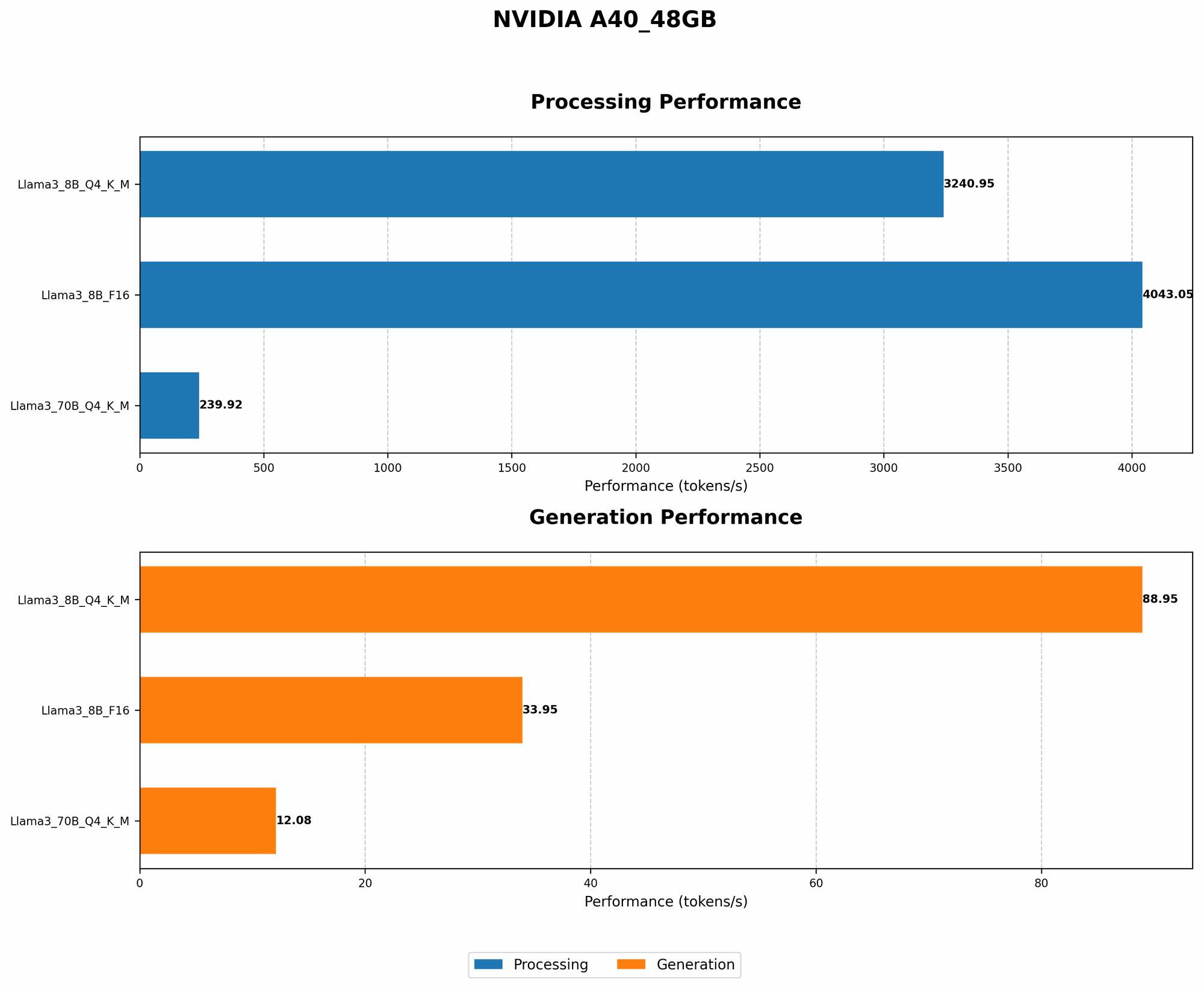
Model and Device Comparison: Comparing Different LLMs on the A40_48GB
While Llama3 70B performance is intriguing, let's compare it to other models running on the same hardware:
| Model & Quantization | Token Generation Speed (Tokens/second) | Model & Quantization | Token Generation Speed (Tokens/second) |
|---|---|---|---|
| Llama3 8B, Q4KM | 88.95 | Llama3 8B, F16 | 33.95 |
| Llama3 70B, Q4KM | 12.08 | Llama3 70B, F16 | N/A |
Is bigger always better?
Interestingly, the smaller 8B model noticeably outperforms the 70B model in both Q4KM and F16, indicating that model size isn't the sole determining factor for performance. This is partially due to the memory and processing power demands of larger models.
Practical Recommendations: Use Cases and Workarounds
Optimizing Your LLM Deployment: Balancing Speed and Accuracy
So, how can you leverage the power of the A40_48GB for different LLM tasks?
Experimentation and Rapid Prototyping: If you need to quickly iterate and test different models, the Q4KM quantization of Llama3 8B is a fantastic choice. Its speed will allow you to run multiple experiments within a reasonable timeframe.
High-Accuracy Tasks: If your application demands high accuracy, consider running Llama3 70B with Q4KM. While it's slower than 8B, it offers more nuanced results. If you need F16, you might have to explore alternative configurations or devices.
Customizing your Workflow: For projects that require a balance of speed and accuracy, you can experiment with different model sizes and quantization levels. You might even find that a smaller model with F16 can deliver performance comparable to a larger model with Q4KM.
Workarounds for F16 Quantization
Remember, F16 quantization is unavailable for Llama3 70B on the A40_48GB. Here are some potential workarounds:
Using Cloud Services: If you're willing to sacrifice some control over your LLM deployment, consider utilizing cloud services that can handle the demands of F16 quantization.
Exploring Other Devices: You might investigate other devices with greater memory capacity and processing power; however, this could come with an added cost.
Software Enhancements: Stay tuned for potential updates in the llama.cpp library or other LLM frameworks that might address F16 support in the future.
FAQ: Frequently Asked Questions about LLMs and Devices
Q: What's quantization, and why is it important?
A: Quantization is like compressing a model to make it smaller and faster. Think of it as reducing the number of colors in an image to make it less detailed but still recognizable. Q4KM means using 4-bit quantization for Kernel and Matrix multiplications, which is a more aggressive form of compression.
Q: What are the trade-offs involved in choosing between different quantization levels?
A: Using a higher quantization level (e.g., F16) generally results in higher accuracy but requires more resources. Conversely, using a lower quantization level (e.g., Q4KM) can lead to faster processing speeds but might compromise accuracy.
Q: How do GPUs like A40_48GB contribute to running LLMs?
A: GPUs excel at parallel computations, which are crucial for the demanding matrix operations involved in LLM inference. Their massive memory capacity is also essential for storing large models like Llama3 70B.
Q: What are some other devices that can run LLMs locally?
A: Besides the A40_48GB, other powerful devices like the NVIDIA RTX 4090 and AMD Radeon RX 7900 XT can handle LLMs. However, their performance might vary depending on the specific model and quantization level used.
Keywords
Large Language Model, LLM, Llama3, Llama2, 70B, 8B, NVIDIA, A4048GB, Token Generation Speed, Quantization, Q4K_M, F16, Performance, Local Deployment, Inference, GPU, Memory, Processing Power, Use Cases, Workarounds, Practical Recommendations, Device Comparison, Model Size, Optimization, Accuracy, Trade-offs, Speed, Cloud Computing, Parallel Computation, Matrix Operations.