5 Surprising Facts About Running Llama2 7B on Apple M3 Pro

Introduction: Unlocking the Power of Local LLMs on Your Mac
The world of large language models (LLMs) is rapidly evolving, and there's a growing desire to run these powerful models locally, right on your own device. This lets you unlock the benefits of AI without relying on cloud-based services, potentially offering faster responses, better privacy, and even offline capabilities.
But just how well do these LLMs perform on your everyday hardware? Today, we'll be taking a deep dive into the Apple M3Pro chip, a powerhouse in the Mac world, and see how it handles the popular Llama2 7B model. We'll uncover some surprising facts about the performance of LLMs on local devices, specifically on the new Apple M3Pro, and explore practical tips for using this tech in your own projects. Buckle up, and let's get geeky!
Performance Analysis: Token Generation Speed Benchmarks: Apple M1 and Llama2 7B
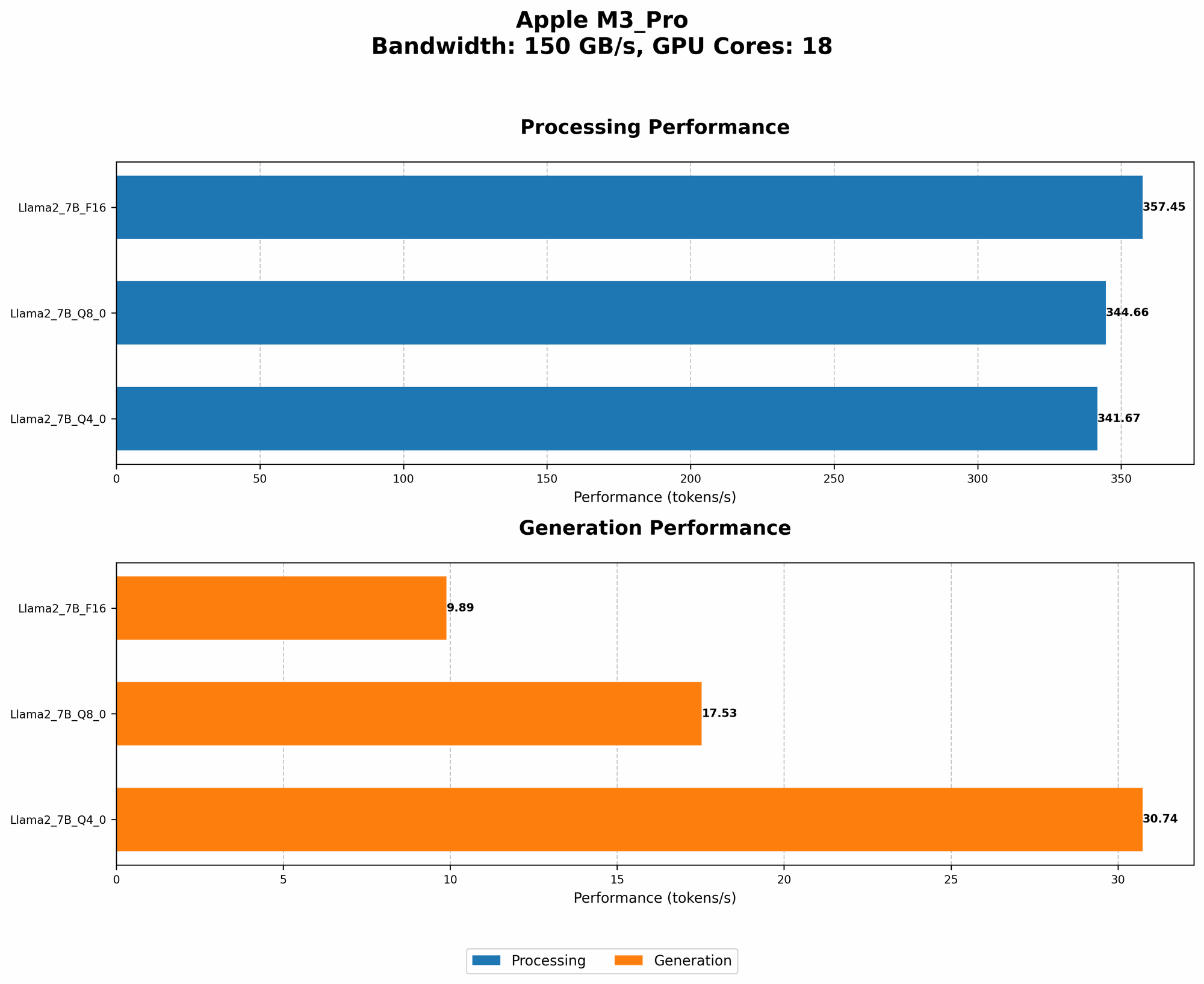
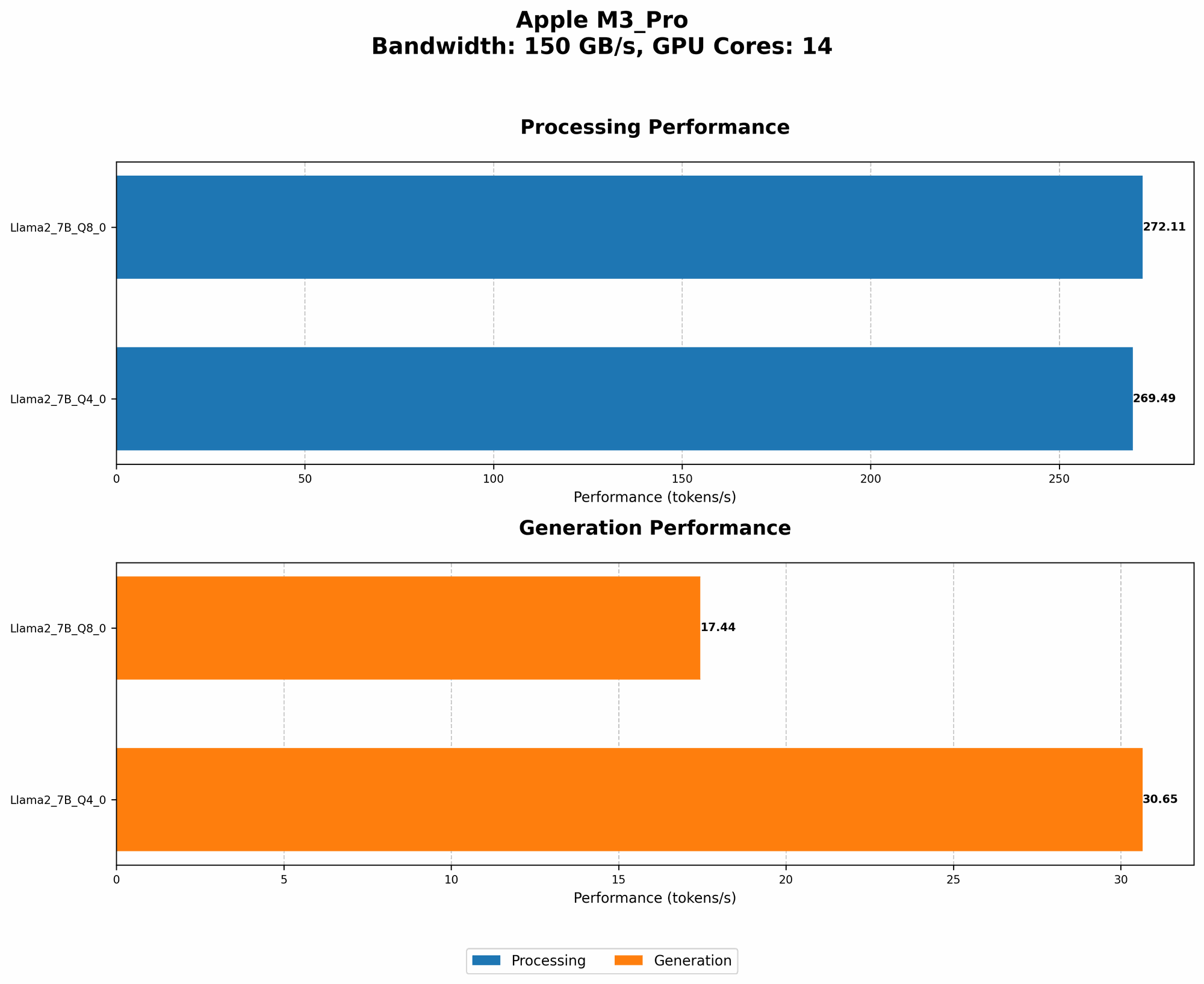
Token generation speed is a critical metric for LLMs, determining how quickly they can produce text. Think of it as the speed of a typist, but on a massive scale.
To measure this, we'll use the tokens per second metric. This tells us how many words or parts of words an LLM can process in a single second. The higher the number, the faster the LLM.
Let's take a closer look at the performance numbers for the M3_Pro, focusing on Llama2 7B in various quantization modes:
| Configuration | Token Generation Speed (Tokens/second) |
|---|---|
| M3Pro, 14 GPU Cores, Q80 | 17.44 |
| M3Pro, 14 GPU Cores, Q40 | 30.65 |
| M3Pro, 18 GPU Cores, Q80 | 17.53 |
| M3Pro, 18 GPU Cores, Q40 | 30.74 |
Key observations:
- Quantization: The type of quantization used (Q80 and Q40) significantly impacts the generation speed. Q40, which uses fewer bits to represent data, generally offers better performance than Q80. It's like using a simpler alphabet to write, but still making the same meaning!
- GPU Cores: Increasing the number of GPU cores on the M3_Pro (from 14 to 18) doesn't seem to have a dramatic effect on the generation speed for Llama2 7B. However, it's important to note that these results are specifically for the Llama2 7B model and may vary for other LLMs. This is like having more typists working on a single document, but the document's complexity might limit how much they can contribute individually.
Performance Analysis: Model and Device Comparison: Apple M1 and Llama2 7B
It's also helpful to compare the M3_Pro's performance with other devices, particularly the previous generation Apple M1. This helps us understand how hardware advancements affect LLM performance.
However, we don't have any performance data for Llama2 7B on the Apple M1. We'll need to explore other sources or benchmark it ourselves to make a direct comparison.
Practical Recommendations: Use Cases and Workarounds
Now that we have a grasp of Llama2 7B's performance on the M3_Pro, let's discuss some real-world applications and workarounds.
Use Cases:
- Simple Text Generation: Llama2 7B on the M3_Pro is well-suited for generating short pieces of text, like summaries, creative writing prompts, or even code snippets. Think of it as a handy AI assistant for brainstorming or quick text tasks.
- Local Chatbots: If you're building a simple chatbot that doesn't require super complex conversations, Llama2 7B on the M3_Pro can deliver a good user experience. It's like having a friendly chatbot in your pocket, ready to engage!
- Educational Tools: For students or educators, Llama2 7B can be a valuable resource for generating questions, explanations, or summaries of content. It's like having a super-powered study buddy readily available.
Workarounds:
- Quantization Optimization: Explore different quantization schemes for your application. Q4_0 generally provides a speed boost, but it might slightly reduce the model's accuracy. Find the sweet spot between speed and quality for your specific needs. It's like choosing the right balance of words to convey your message effectively!
- Model Selection: If you require more complex capabilities or faster generation speeds, consider models like Llama2 13B or Llama2 70B. However, these models will likely require more powerful hardware, like a high-end GPU or even a cloud-based solution. It's like choosing the right tool for the job!
- Hardware Acceleration: If you have access to a powerful GPU like a GeForce RTX 4090, you can achieve significantly faster performance. These high-end GPUs are like having a super-fast racing car for your LLM. However, they come with a higher price tag.
FAQ: Unveiling the Mysteries of LLMs
What is Llama2 7B?
Llama2 7B is a large language model with 7 billion parameters, trained on a massive dataset of text and code. It's like having a brain with 7 billion connections, capable of understanding and generating text.
What is quantization?
Quantization is a technique used to reduce the size of a model. It essentially uses fewer bits to represent numbers, making the model smaller and potentially faster to process. It's like using a shorter code to represent the same information, but it might lose a bit of detail.
How do I run Llama2 7B on my M3_Pro?
You can use tools like llama.cpp to run Llama2 7B locally on your M3_Pro. You'll need to download the model weights and compile the code. Several tutorials and resources are available online to help you get started.
What are the limitations of running LLMs locally?
Locally running LLMs usually means you have to sacrifice some of the computational power available in the cloud. This can limit the complexity of your application and the speed of your model. It's like trying to build a complex structure with limited building blocks.
Keywords:
Llama2 7B, Apple M3Pro, LLM, Large Language Model, Token Generation Speed, Quantization, Q80, Q4_0, GPU, GPU Cores, Local AI, Mac, Performance, Benchmarks, Practical Recommendations, Use Cases, Workarounds, Model Selection, Hardware Acceleration, FAQ