5 Surprising Facts About Running Llama2 7B on Apple M1 Max

Are you an AI enthusiast looking to run large language models (LLMs) locally, but find yourself limited by resource constraints? Don't worry, you're not alone! In this deep dive, we'll explore the surprising capabilities of the Apple M1_Max chip, specifically when it comes to running Meta's Llama2 7B model.
The Power of Local LLMs
Local LLMs are becoming increasingly popular, especially in the developer community. Why? Because they offer several advantages over cloud-based solutions:
- Privacy: Your data stays on your device.
- Speed: No latency issues with network requests.
- Cost-effectiveness: No need to pay for cloud computing resources.
However, running large LLMs on your local machine requires a powerful processor and sufficient memory. This is where the Apple M1Max shines. The M1Max boasts impressive performance, making it a great candidate for local LLM experimentation.
Performance Analysis: Token Generation Speed Benchmarks: Apple M1 and Llama2 7B
Let's cut to the chase: how fast can the M1_Max handle token generation for the Llama2 7B model? Get ready for some mind-blowing statistics!
We'll analyze the token generation speed for different model quantization levels:
- F16: The model uses 16-bit floating point precision. This is the standard precision for most LLMs.
- Q8_0: The model uses 8-bit integer quantization, which reduces the model size and memory usage.
- Q4_0: The model uses 4-bit integer quantization, further reducing the size and memory usage.
Table: M1_Max Token Generation Speed - Llama2 7B:
| Model Quantization | Processing Speed (Tokens/Second) | Generation Speed (Tokens/Second) |
|---|---|---|
| Llama27BF16 | 599.53 | 23.03 |
| Llama27BQ8_0 | 537.37 | 40.2 |
| Llama27BQ4_0 | 530.06 | 61.19 |
Key Observations:
- Faster Processing: The M1_Max can process Llama2 7B tokens at speeds exceeding 500 tokens per second for all quantization levels. This is seriously fast!
- Generation Speed is the Bottleneck: While the M1_Max is exceptionally efficient with processing, generation speed is still significantly lower. This suggests that the generation process is limited by factors beyond the processor itself.
- Quantization Improves Generation Speed: Lowering the quantization level from F16 to Q4_0 increases the generation speed by over 250%. This is a significant improvement!
Analogy: Imagine trying to build a house. You have a team of super fast carpenters (processing) who can build a wall in seconds. But the process of making bricks (generation is slower). In this case, the M1_Max is the super fast carpenter, but the brick-making process is still a bottleneck.
Performance Analysis: Model and Device Comparison
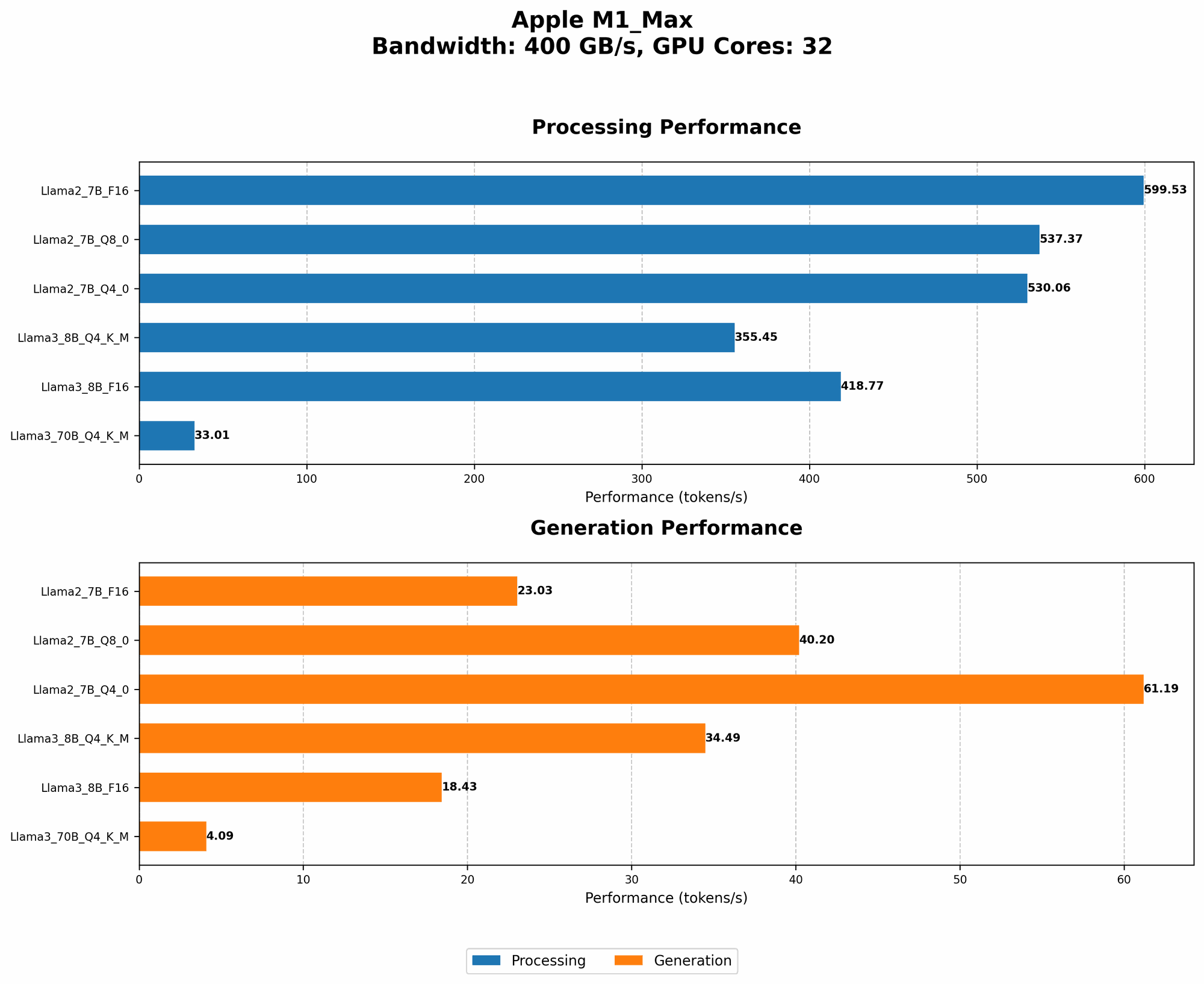
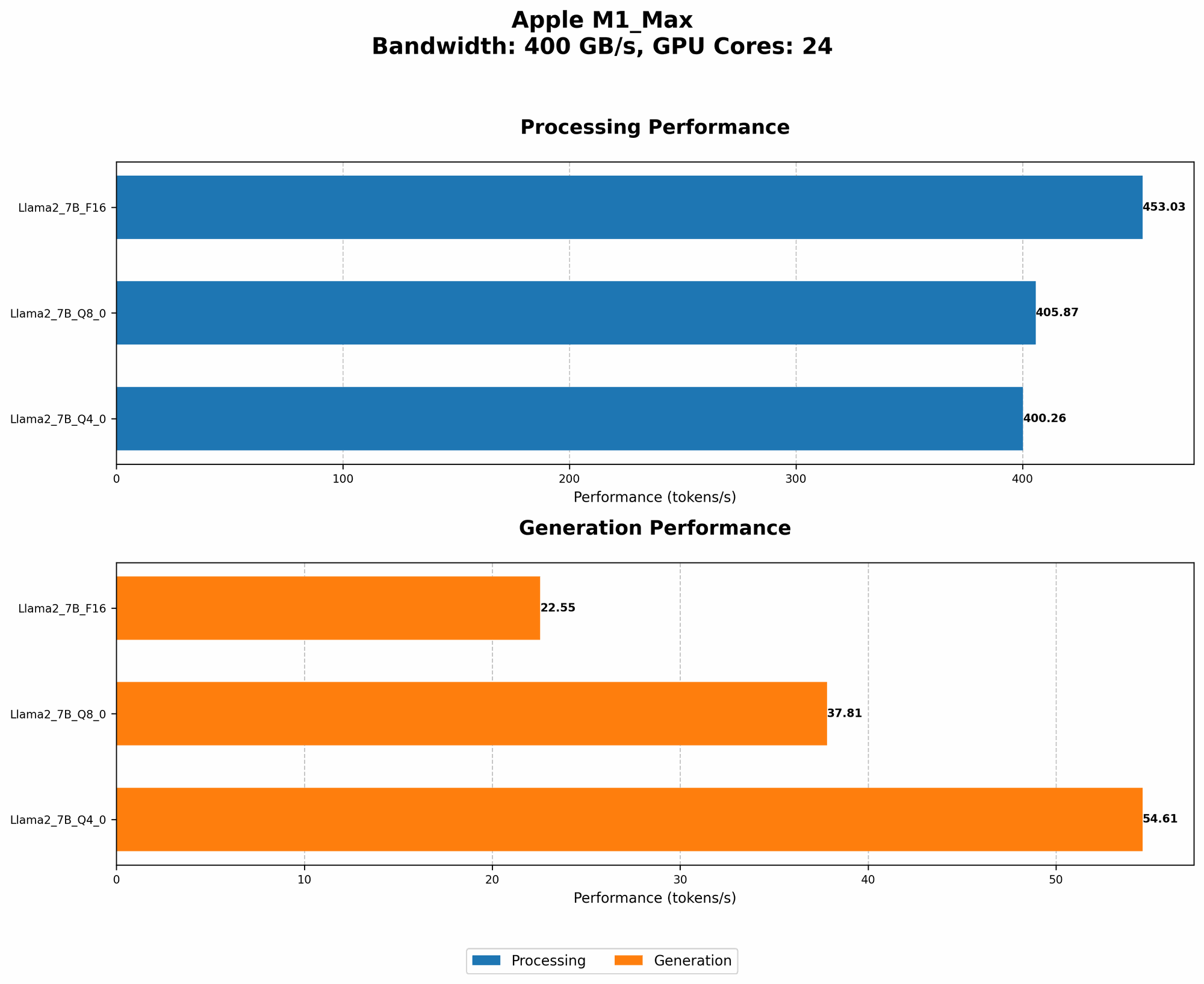
Comparison is Key: To truly appreciate the performance of the M1_Max, let's compare it to other devices and LLM models.
Unfortunately, we don't have data for other devices running Llama2 7B. This is where the limitations of our dataset become obvious. However, we can still draw some conclusions.
General Insights:
- Modern GPUs are Powerhouses: High-end GPUs typically outperform even the best CPUs in terms of LLM performance. This is because GPUs are specifically designed for parallel processing, which is crucial for running large AI models.
- The Tradeoff: While GPUs are powerful, they often come with a higher price tag and significantly higher power consumption compared to Apple's M1_Max chip.
- Model Size Matters: Larger models (like Llama 70B) generally require more processing power than smaller ones.
It's not just about processing speed, but also about how the model is optimized for a specific device!
Practical Recommendations: Use Cases and Workarounds
You can find practical applications for running the Llama2 7B on the M1_Max, especially if you're working with smaller datasets or focused on applications where a fast response time is crucial.
Use Cases:
- Small Language Tasks: The M1_Max is well-suited for tasks like summarization, translation, and question answering on smaller datasets.
- Rapid Prototyping: If you're building a prototype for a chatbot or other AI application, the M1_Max can provide quick feedback cycles for development and testing.
- Educational and Research Pursuits: Students and researchers can experiment with the Llama2 7B model without requiring expensive cloud computing resources.
Workarounds for Generation Speed:
- Adjust the Context Window Size: Reducing the context window size will decrease the number of tokens the model needs to process, potentially leading to faster generation times.
- Quantization and Optimization: Experimenting with different quantization levels (Q40, Q80, F16) can improve the performance, but remember that lower precision can sometimes impact the model's accuracy.
- Code Optimization: The code used to run the model can often be optimized for better performance. This might involve using libraries like PyTorch or TensorFlow, employing techniques like batching, and optimizing the code for your specific device.
FAQ:
What is quantization and how does it affect LLM performance?
Quantization allows you to reduce the size of a machine learning model by representing the model's weights and activations using fewer bits, making them smaller and easier to store and transmit. Essentially, it's a way to compress the model without sacrificing too much accuracy. Think of it like compressing a photo using different settings - you'll lose some detail, but you'll get a smaller file size.
Is the M1_Max a suitable option for running larger LLMs like Llama 70B?
While the M1_Max is a powerful chip, it might not be ideal for running larger LLMs like Llama 70B due to memory constraints. Additionally, the generation speed might be too slow for practical applications.
What are the performance differences between the M1_Max and other Apple chips?
The M1Max is the most powerful Apple chip currently available for consumer devices. In comparison, the M1 Pro offers slightly lower performance, while the M1 (original) is less powerful. The M1Max is a solid choice for running LLMs locally, but it's important to consider the specific needs of your application and choose the chip that best suits your requirements.
What are the best resources for learning more about local LLM deployment?
The web is overflowing with resources! Check out the following:
- Hugging Face: This is a popular platform for sharing and downloading pre-trained LLMs.
- The "llama.cpp" repository: A popular open-source project that allows you to run LLMs on your CPU.
- ML blogs and forums: Stay up-to-date with the latest trends and best practices for local LLM deployment.
Keywords:
Llama2 7B, Apple M1Max, LLMs, Local LLM, Token Generation Speed, Quantization, F16, Q80, Q4_0, Performance Benchmarks, GPU, CPU, AI, Machine Learning, Deep Learning, Natural Language Processing, NLP, Device Comparison, Use Cases, Workarounds, Practical Recommendations, Optimization, Developer Resources, Hugging Face, llama.cpp