5 RAM Optimization Techniques for LLMs on Apple M1 Max

Introduction
Running large language models (LLMs) on your Apple M1 Max can be a thrilling experience, opening doors to a world of creative possibilities. But with the ever-increasing size of these models, RAM becomes a crucial factor. Just like trying to squeeze a giant elephant into a tiny car, trying to run a massive LLM on limited RAM can lead to frustrating performance issues.
Fear not! This article equips you with 5 powerful RAM optimization techniques specifically designed for LLMs on the mighty M1 Max. We'll dive into the technical details, explore the benefits of different quantization methods, and provide practical tips for maximizing your model's efficiency.
Quantization: Shrinking the Elephant for a Smoother Ride
Quantization is a technique that helps reduce the size of your LLM model, like shrinking a giant elephant into a manageable size.
Imagine this: You have a huge Lego set, but your table is too small. Instead of building everything in full detail, you decide to use smaller bricks. You might lose some detail, but you can build a much larger structure!
That's exactly what quantization does for LLMs. It replaces large numbers with smaller, more compact ones, resulting in smaller models that occupy less RAM.
M1 Max Quantization Performance: A Deep Dive
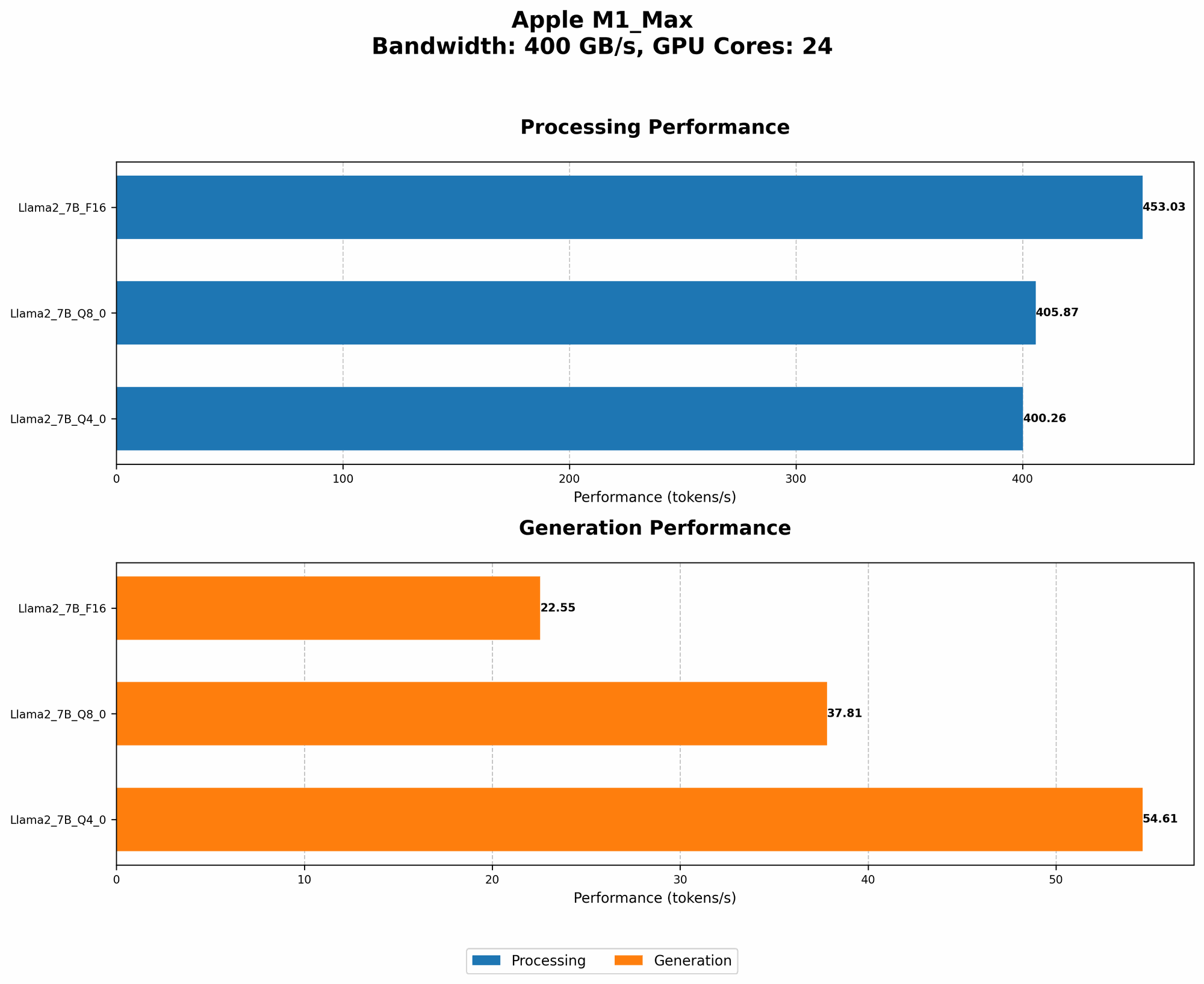
Here is how quantization affects the processing and generation speed of different LLMs on Apple M1 Max:
| Model | Processing Speed (Tokens/Second) | Generation Speed (Tokens/Second) | Quantization Level |
|---|---|---|---|
| Llama 2 7B (F16) | 453.03 | 22.55 | F16 |
| Llama 2 7B (Q8_0) | 405.87 | 37.81 | Q8_0 |
| Llama 2 7B (Q4_0) | 400.26 | 54.61 | Q4_0 |
Data source: Performance of llama.cpp on various devices (https://github.com/ggerganov/llama.cpp/discussions/4167) by ggerganov
As you can see, moving from F16 (float 16bit) to Q80 (quantized 8 bit) and Q40 (quantized 4 bit) can lead to a slight decrease in processing speed but a significant increase in generation speed.
Let's break it down:
- F16: Full precision, like using the whole Lego brick.
- Q8_0: Slightly less precise, like using a smaller lego brick.
- Q4_0: Even less precise, like using the smallest lego brick possible.
The trade-off is clear: a bit of precision is lost, but your model becomes much more RAM-friendly, leading to faster generation speeds.
The Power of Model Pruning: Getting Rid of Irrelevant Details
Model pruning is like cleaning out your closet. It gets rid of unnecessary elements, making your model leaner and meaner.
Imagine you are building a Lego spaceship. Do you really need all those tiny details in the engine room if you're just focusing on the outside?
Model pruning does the same for LLMs. It removes connections or weights that are not essential for its functionality. It's like removing those tiny lego pieces and focusing on the bigger picture. The result? A smaller model that still performs well, but uses less RAM.
3. Memory Management Techniques: Keeping Your RAM Tidy
Remember that closet analogy? Just like keeping your clothes organized, managing RAM effectively is key to smooth LLM performance.
3.1. Using swap space
Think of swap space as your garage. If your closet is full, you can store the overflow in the garage. It works the same way with RAM. When your RAM is full, the operating system can store data on your hard drive (the garage).
While this can free up RAM, it's like taking your clothes to the garage – it's slower to access. Ideally, aim for a good balance between RAM and swap space.
3.2. Using a smaller batch size
Have you ever tried to carry too many groceries at once? It's hard and inefficient. A smaller batch size works the same way for LLMs.
Instead of feeding the model a large amount of data at once, split it up into smaller chunks. It's like carrying smaller, more manageable bags.
4. Leveraging the M1 Max's GPU Power: A Turbocharge for Your LLMs
Think of the GPU as a superfast processor specifically designed for complex calculations. Just like the M1 Max's CPU handles everyday tasks, the GPU shines in handling the massive number of calculations required for LLMs.
4.1. GPU acceleration: Speeding Up Your Model
GPU acceleration works like having an extra helper for your Lego building project. While the CPU does the basic building, the GPU tackles the more computationally demanding tasks.
4.2. M1 Max GPU performance: Numbers Speak Louder Than Words
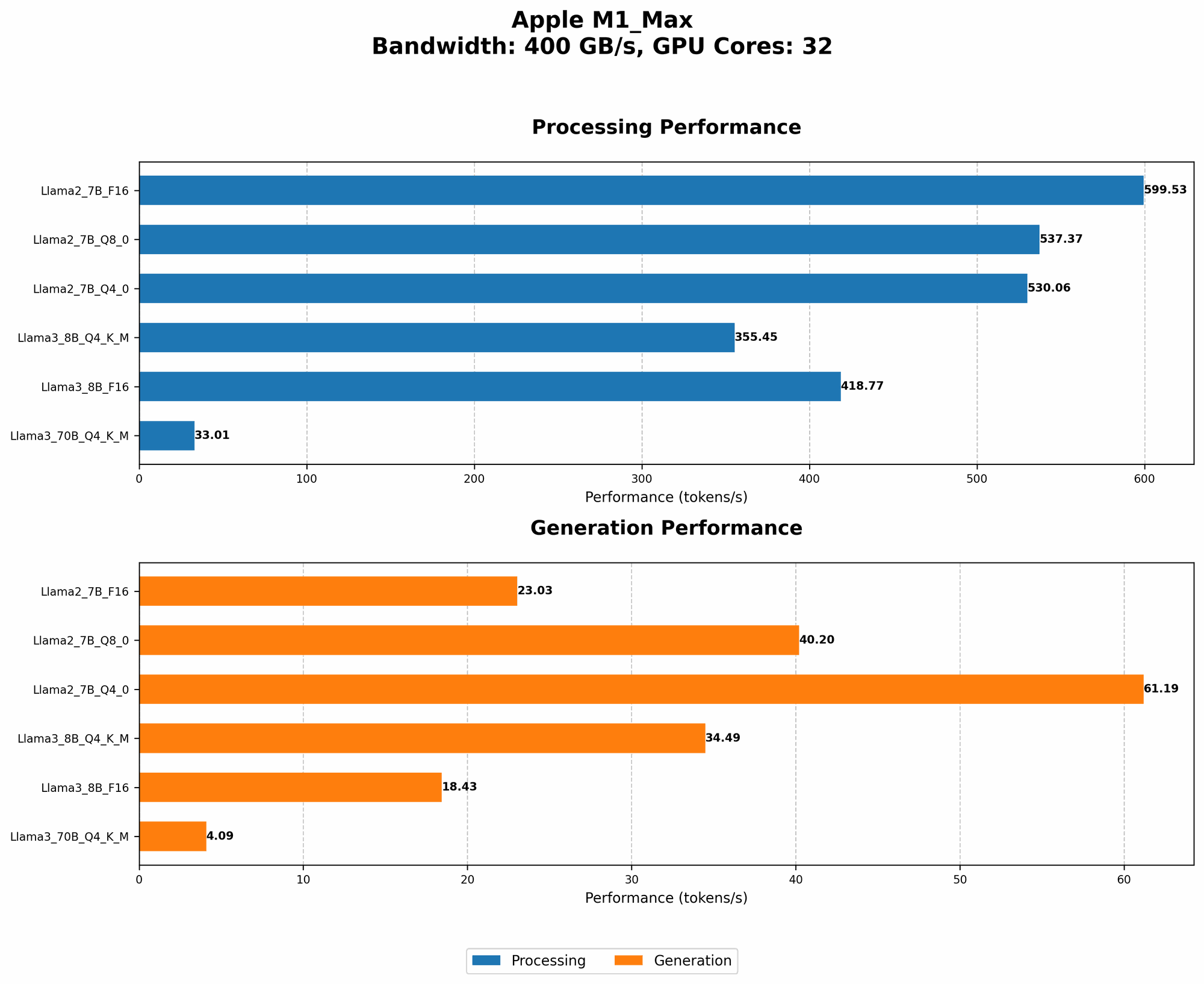
Let's see how the M1 Max's GPU impacts different LLM models:
| Model | Processing Speed (Tokens/Second) | Generation Speed (Tokens/Second) | Quantization Level | GPU Cores |
|---|---|---|---|---|
| Llama 2 7B (F16) | 453.03 | 22.55 | F16 | 24 |
| Llama 2 7B (Q8_0) | 405.87 | 37.81 | Q8_0 | 24 |
| Llama 2 7B (Q4_0) | 400.26 | 54.61 | Q4_0 | 24 |
| Llama 2 7B (F16) | 599.53 | 23.03 | F16 | 32 |
| Llama 2 7B (Q8_0) | 537.37 | 40.2 | Q8_0 | 32 |
| Llama 2 7B (Q4_0) | 530.06 | 61.19 | Q4_0 | 32 |
| Llama 3 8B (Q4KM) | 355.45 | 34.49 | Q4KM | 32 |
| Llama 3 8B (F16) | 418.77 | 18.43 | F16 | 32 |
| Llama 3 70B (Q4KM) | 33.01 | 4.09 | Q4KM | 32 |
Data source: Performance of llama.cpp on various devices (https://github.com/ggerganov/llama.cpp/discussions/4167) by ggerganov, GPU Benchmarks on LLM Inference (https://github.com/XiongjieDai/GPU-Benchmarks-on-LLM-Inference) by XiongjieDai
Take note of the following:
- F16 vs. Q80/Q40: While quantization helps save RAM, it can also slightly impact performance.
- GPU Cores: The M1 Max with 32 GPU cores generally delivers faster performance than the version with 24 cores.
- Model Size: Larger models like Llama 3 70B are much more RAM-intensive than smaller models like Llama 2 7B. This is why performance can vary significantly.
5. Disk Storage: The Foundation of Your LLM Empire
Think of disk storage as the land on which you build your Lego city. It's the foundation that holds all your models, data, and projects.
5.1. SSD vs. HDD: Speeding Up Your Model Loading
Imagine trying to build your Lego city with a box of Lego bricks stuck in a mud puddle. It's going to be a slow and frustrating process.
That's what happens with LLMs on traditional hard disk drives (HDDs). They are like that mud puddle, slow to access data.
Solid-state drives (SSDs) are much faster. They are like having your Lego bricks ready to go, right at your fingertips. Remember, the faster your SSD, the faster your LLM will load and start working.
Frequently Asked Questions (FAQ)
How much RAM do I need for LLMs on M1 Max?
The amount of RAM you need depends on the size of the LLM you want to run. Smaller models like Llama 2 7B can run comfortably with 16GB of RAM, while larger models like Llama 3 70B require at least 32GB.
Can I use M1 Max to train LLMs?
While M1 Max is excellent for running pre-trained LLMs, it is not ideal for training, especially for very large models. Training requires significantly more computing power and resources.
What are the best settings for running LLMs on M1 Max?
The optimal settings depend on the specific LLM and your application. Start with the most efficient quantization levels (Q40 or Q80) and experiment with different batch sizes to find the sweet spot for your model and RAM.
How can I make my M1 Max faster for LLMs?
- Use an SSD: Faster storage will speed up loading times.
- Enable GPU acceleration: Utilize the M1 Max's GPU power for efficient model execution.
- Optimize quantization levels: Choose the most efficient quantization level for your model.
Keywords
LLMs, Large Language Models, Apple M1 Max, RAM Optimization, Quantization, Model Pruning, Memory Management, GPU Acceleration, SSD, HDD, Batch Size, Token Speed, Processing Speed, Generation Speed