5 Power Saving Tips for 24 7 AI Operations on NVIDIA L40S 48GB

Introduction: The Quest for AI Efficiency
Running Large Language Models (LLMs) like Llama2 on your NVIDIA L40S48GB is like hosting a massive AI party. It's exciting, but energy bills can become a party pooper if you're not careful. This guide will equip you with five power-saving tips to optimize your AI operations, ensuring you can keep the AI party going without breaking the bank. We'll explore practical ways to maximize performance while minimizing energy consumption, allowing your L40S48GB to shine without overheating.
Tip 1: Quantization: Squeeze More Out of Your GPU
Imagine a 4K movie file – it's huge and requires a lot of storage space. Now, picture a compressed version, a smaller file that still delivers great visuals. Quantization works like a file compressor for your LLM models. It reduces the size of the weights (the model's brain), allowing your GPU to process information faster and consume less power.
Q4 Quantization: The Sweet Spot for Performance and Power
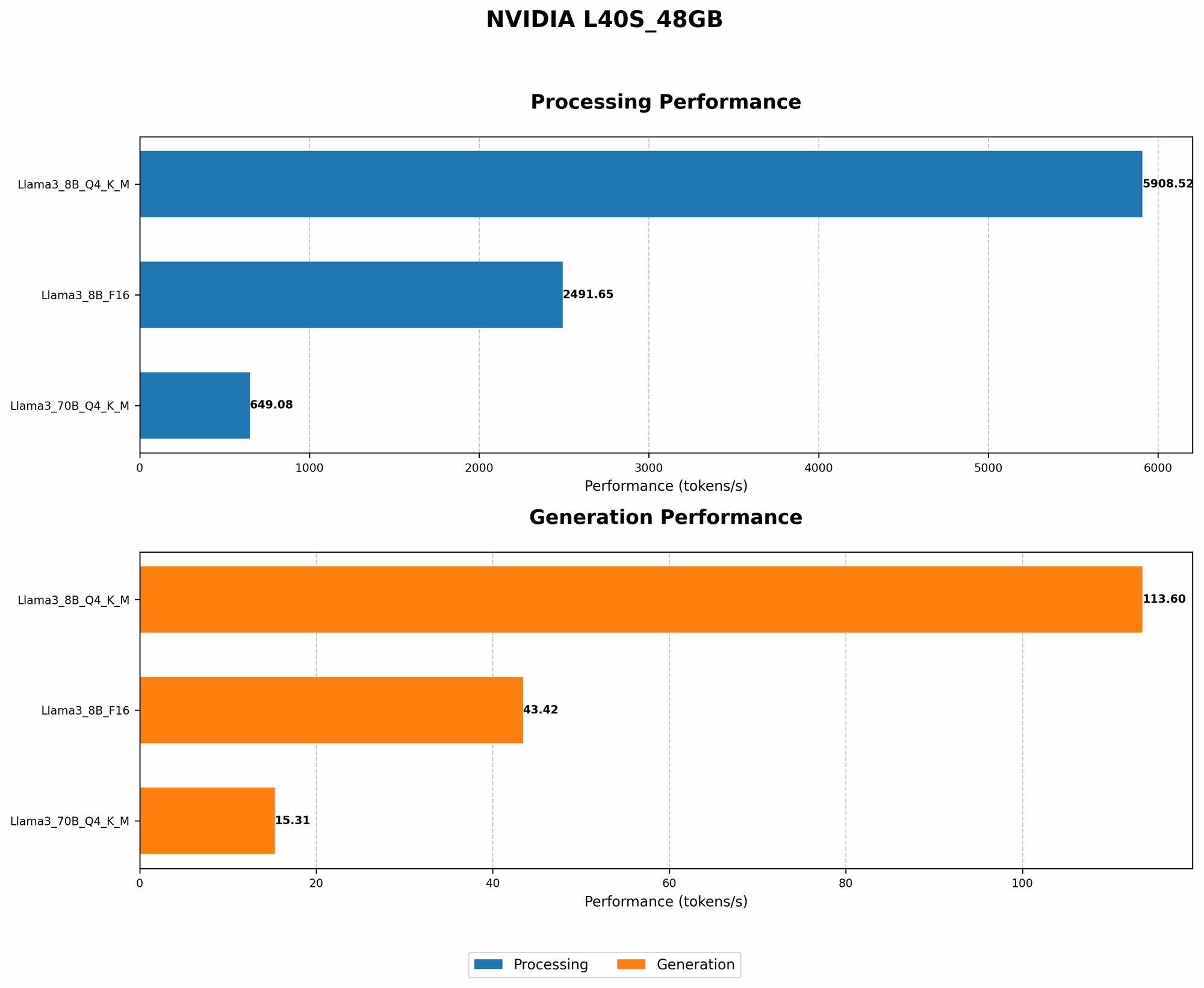
For the NVIDIA L40S_48GB, Q4 quantization offers a remarkable balance between performance and power savings. Let's take a look at the numbers for Llama 3:
| Model | Q4 Token Generation (tokens/sec) | Q4 Token Processing (tokens/sec) |
|---|---|---|
| Llama 3 8B | 113.6 | 5908.52 |
| Llama 3 70B | 15.31 | 649.08 |
As you can see, Q4 quantization significantly boosts the token generation and processing speeds, making it a clear winner for power efficiency.
Why Q4 Quantization Reigns Supreme
- Faster Processing: It's like giving your GPU a turbo boost. By representing each weight with 4 bits instead of 16 or 32, Q4 quantization makes calculations much faster.
- Reduced Memory Footprint: Think of it as a slimmed-down model that takes up less space in your GPU's memory. This frees up resources and allows you to process data more efficiently.
- Power Savings: Less processing, less power. Quantization reduces the GPU's workload, leading to lower energy consumption.
Tip 2: Embrace the Power of F16 Precision
Floating-point precision is like the number of decimal places you use for a calculation - the more decimal places, the more precise your results. But sometimes, you don't need all those decimal places. F16 precision uses 16 bits for each weight, which is a good compromise between the performance of F32 and the efficiency of Q4.
F16 Precision: A Balanced Approach
While Q4 provides the most significant power savings, F16 precision allows for a smoother transition for your LLM model. It can be a great option if you're not entirely ready for the full impact of Q4.
| Model | F16 Token Generation (tokens/sec) |
|---|---|
| Llama 3 8B | 43.42 |
As you can see, Llama 3 8B token generation with F16 precision delivers a significant speed boost compared to the default F32 precision, while consuming less power.
F16 Precision: The Middle Ground
- Performance Boost: F16 precision offers a noticeable improvement in token generation speed compared to F32.
- Reduced Memory Footprint: Like Q4, F16 reduces the memory footprint, allowing for more efficient GPU utilization.
- Less Power Consumption: F16 uses less energy than F32, striking a balance between speed and efficiency.
Tip 3: Embrace the Power of CPU for Processing
Imagine a team of engineers designing a complicated bridge. Some engineers focus on the overall structure, while others specialize in certain aspects like the foundation or the supporting beams. Similarly, your GPU can focus on generating tokens, while your CPU handles other computationally demanding tasks like pre-processing and post-processing.
Offload Processing to the CPU
When you're running your LLM on the NVIDIA L40S_48GB, you can significantly reduce power consumption by offloading tasks like text processing and generation to the CPU.
- Token Generation: Let the GPU handle token generation, where its parallel processing prowess truly shines.
- Token Processing: Harness the CPU's ability to process large amounts of text efficiently, saving energy and making the most of your hardware.
CPU Offloading: A Power-Saving Partnership
- Energy Efficiency: By distributing tasks between the CPU and GPU, energy consumption for the entire system can be reduced, allowing your LLM to operate at its peak performance without burning through your power budget.
- Flexibility: This approach allows you to leverage the strengths of both the CPU and GPU, optimizing processing for specific tasks and achieving greater efficiency overall.
Tip 4: Optimize Batch Size: Find the Sweet Spot
Batch size is like the number of guests you invite to your AI party. A big batch size means more work for your GPU, but it might also be more efficient in terms of processing time per guest.
Finding the Optimal Batch Size
The ideal batch size depends on your model, data, and hardware resources. However, for the NVIDIA L40S_48GB, experimenting with batch sizes is crucial to find the sweet spot for power efficiency.
- Smaller Batch Size: A smaller batch size might be more power-efficient for smaller models like Llama 3 8B, as it requires less GPU power.
- Larger Batch Size: For larger models like Llama 3 70B, you might find that a larger batch size can be more efficient, as the GPU can process more data in parallel.
Balancing Efficiency and Power
The key is to find the batch size that maximizes GPU utilization while minimizing power consumption. Start with a smaller batch size and gradually increase it, monitoring your energy usage and performance to determine the ideal balance.
Tip 5: Embrace the Power of Gradual Learning: Start with a Smaller Model
Imagine starting to learn a new language – it's easier to begin with basic phrases and gradually expand your vocabulary. Similarly, you can start training your LLM with a smaller model and gradually increase the size as your GPU performance and energy budget allow.
Gradual Learning: A Path to Efficiency
Instead of jumping into training a massive 70B parameter model right away, consider starting with a smaller model like Llama 3 8B.
- Reduced Power Consumption: Smaller models require less processing power, which translates to lower energy consumption.
- Fewer Resources: You can get started with fewer resources, allowing you to test your setup and refine your training process before moving on to larger models.
A Smooth Transition to Larger Models
As your GPU power increases or your budget allows, you can gradually transition to larger models like Llama 3 70B. This approach allows you to optimize your training process as you go, ensuring maximum efficiency and minimizing power usage.
Conclusion: Power Up Your AI Operations with Efficiency
By embracing these five power-saving tips, you can unlock the full potential of your NVIDIA L40S_48GB and keep your LLM running smoothly without draining your energy budget. It's like having your cake and eating it too – you can enjoy the power of AI while staying mindful of environmental responsibility. Remember, a well-optimized system is not just about performance, it's about making your AI dreams sustainable!
FAQ: Common Questions about LLM Power Efficiency
Q: Can I train multiple LLMs on the L40S_48GB simultaneously?
A: Yes, you can. The L40S_48GB is a powerful GPU with ample memory, but keep in mind that running multiple LLMs simultaneously will increase power consumption. You can experiment with different configurations to find the optimal balance between performance and energy efficiency.
Q: How much power does an NVIDIA L40S_48GB consume?
A: The power consumption of an L40S_48GB varies based on the workload it's handling. For a rough estimate, it can consume around 350-450 watts under heavy load. However, the exact numbers will depend on the specific LLM model you're running and the configuration you've chosen.
Q: Are there any other options for power-saving besides quantization and F16 precision?
A: Absolutely! You can explore techniques like model pruning, where you remove unimportant weights to reduce the model's size and energy consumption. You can also consider using hybrid approaches, combining quantization with other techniques like F16 precision for optimal results.
Q: What are the long-term benefits of building a power-efficient LLM setup?
A: Besides saving money on your energy bills, you'll be reducing your carbon footprint and contributing to a greener future. Additionally, a power-efficient setup can extend the lifetime of your hardware by reducing wear and tear.
Keywords:
LLM, Large Language Models, NVIDIA L40S_48GB, GPU, Power Efficiency, Energy Consumption, Quantization, Q4, F16 Precision, CPU Processing, Batch Size, Gradual Learning, Llama 3, Token Generation, Token Processing, AI Operations, Sustainability, Power Savings, Model Pruning, Hybrid Approaches, Carbon Footprint