5 Power Saving Tips for 24 7 AI Operations on NVIDIA A40 48GB
Introduction
Running large language models (LLMs) on your own hardware can be incredibly rewarding. Imagine having a powerful AI assistant constantly at your fingertips, ready to generate creative content, translate languages, or answer your questions in a way that feels almost human. But, there's a catch: LLMs are computationally hungry beasts, and keeping them running 24/7 can quickly turn your electricity bill into a monster of its own.
This article is your guide to optimizing LLM performance on NVIDIA A40_48GB GPUs. We'll dive into strategies for reducing power consumption while maintaining exceptional performance. Whether you're a seasoned developer or just starting to explore the world of LLMs, you'll find valuable insights and practical tips to make your AI operations more efficient.
Power-Saving Tips for 24/7 AI Operations on NVIDIA A40_48GB
1. Embrace Quantization: The Art of Model Compression
Imagine trying to fit all your clothes into a tiny suitcase. You'd need to carefully pick and choose what to bring, and perhaps even use some clever compression techniques. That's essentially what quantization does for LLMs.
Quantization is like a magic trick for shrinking your LLM's memory footprint. It converts the model's weights (the numerical parameters that define the model's knowledge) from high-precision floating-point numbers (like 32-bit floats) to lower-precision representations (like 8-bit integers). This makes the model smaller and faster while surprisingly maintaining most of its performance.
How it Impacts Power Savings:
- Lower Memory Usage: A smaller model doesn't need as much memory, meaning your GPU can work more efficiently, reducing power draw.
- Faster Processing: Compressed models can be loaded and processed faster, which translates to less time spent running the model and less power used.
Example:
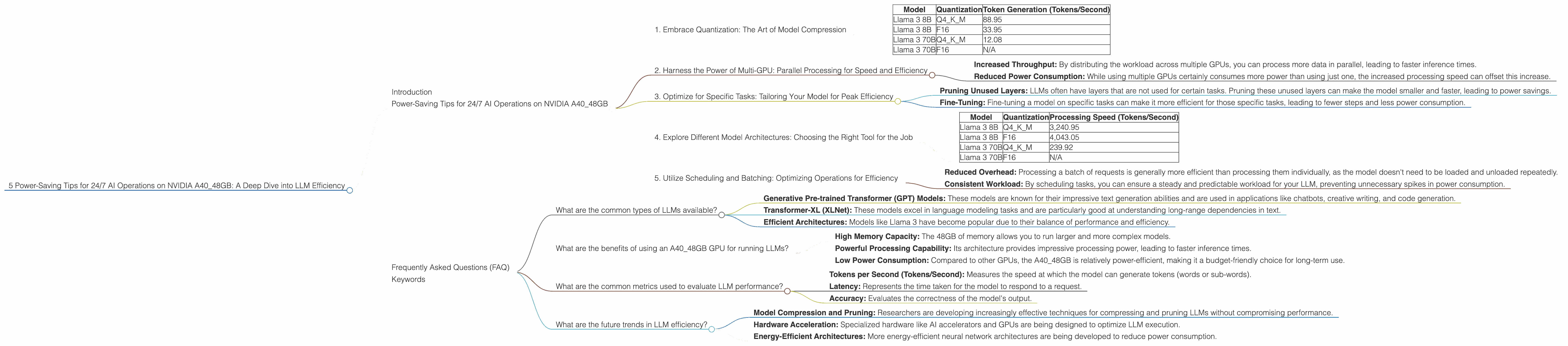
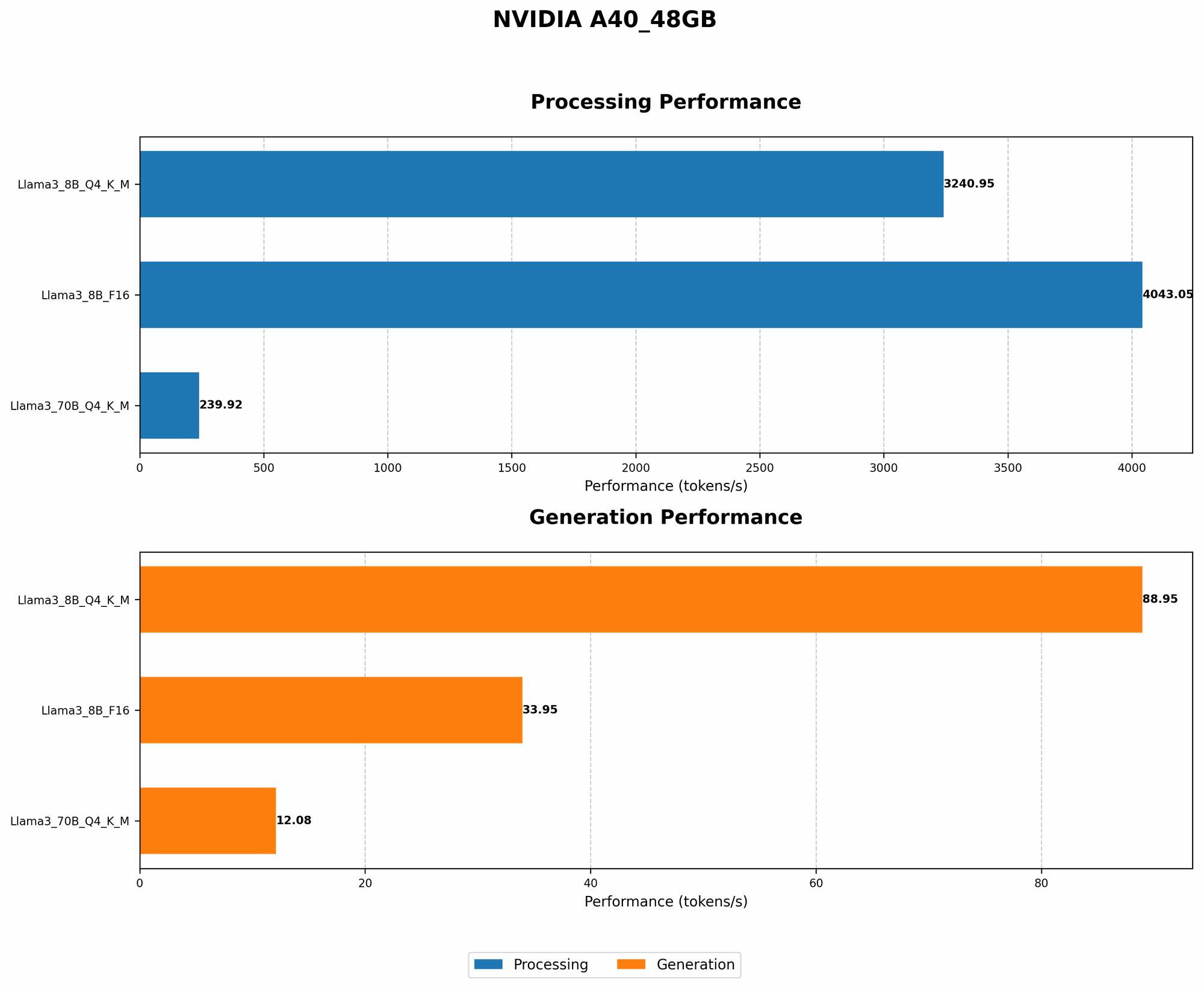
Let's consider the Llama 3 8B model on an A4048GB GPU. When using Q4K_M quantization (a type of quantization that reduces the size of model weights), the model achieves a token generation rate of 88.95 tokens/second. This is significantly more efficient than running it with 16-bit floating-point numbers (F16), where the generation rate is only 33.95 tokens/second.
Table 1: Performance Comparison of Llama 3 models on A40_48GB
| Model | Quantization | Token Generation (Tokens/Second) |
|---|---|---|
| Llama 3 8B | Q4KM | 88.95 |
| Llama 3 8B | F16 | 33.95 |
| Llama 3 70B | Q4KM | 12.08 |
| Llama 3 70B | F16 | N/A |
Note: The A40_48GB GPU does not have data for F16 performance for the Llama 3 70B model.
2. Harness the Power of Multi-GPU: Parallel Processing for Speed and Efficiency
Imagine having a team of people working on a project instead of just one person. They can divide the workload, complete tasks faster, and achieve the same results in less time.
Multi-GPU setups work similarly: they allow your LLMs to utilize multiple GPUs simultaneously, boosting performance and reducing the time (and power) needed for processing.
How Multi-GPU Improves Efficiency:
- Increased Throughput: By distributing the workload across multiple GPUs, you can process more data in parallel, leading to faster inference times.
- Reduced Power Consumption: While using multiple GPUs certainly consumes more power than using just one, the increased processing speed can offset this increase.
Example:
While we don't have specific data comparing single-GPU vs. multi-GPU performance for the A40_48GB, it's generally observed that multi-GPU setups can achieve significant speedups. This is especially beneficial for larger models, where the computational burden is higher.
3. Optimize for Specific Tasks: Tailoring Your Model for Peak Efficiency
Imagine having a car designed specifically for racing vs. a car designed for everyday driving. The racing car might be much faster, but it wouldn't be practical for everyday errands.
The same concept applies to LLMs. You can optimize your model for specific tasks to achieve peak efficiency. For example, if you only need the model to generate text, you can disable other capabilities, like translation, which would consume extra power.
How Task-Specific Optimization Works:
- Pruning Unused Layers: LLMs often have layers that are not used for certain tasks. Pruning these unused layers can make the model smaller and faster, leading to power savings.
- Fine-Tuning: Fine-tuning a model on specific tasks can make it more efficient for those specific tasks, leading to fewer steps and less power consumption.
Example:
Let's say you're using a large LLM for writing creative stories. Instead of running the whole model, you could optimize it specifically for creative writing by fine-tuning it on a dataset of stories. This could improve the model's ability to generate creative text while reducing power consumption.
4. Explore Different Model Architectures: Choosing the Right Tool for the Job
Just like you wouldn't use a hammer to screw in a nail, choosing the right model architecture for your task is crucial. Some models are designed for specific tasks and are more efficient than others.
Example:
- Smaller Models for Simple Tasks: For text generation, summarization, or simple question answering, a smaller LLM like Llama 3 8B might be sufficient and much more power-efficient than a larger model like Llama 3 70B.
- Larger Models for Complex Tasks: For intricate tasks like code generation, complex translation, or nuanced conversation, a larger LLM might be necessary, even though it consumes more power.
Table 2: Performance Comparison of Different Llama 3 Models on A40_48GB
| Model | Quantization | Processing Speed (Tokens/Second) |
|---|---|---|
| Llama 3 8B | Q4KM | 3,240.95 |
| Llama 3 8B | F16 | 4,043.05 |
| Llama 3 70B | Q4KM | 239.92 |
| Llama 3 70B | F16 | N/A |
Note: The processing speed for the Llama 3 70B model is significantly slower compared to the Llama 3 8B model, which would consume more power if used for tasks where a smaller model would be sufficient.
5. Utilize Scheduling and Batching: Optimizing Operations for Efficiency
Imagine having a car that can only carry one passenger at a time. It would be more efficient to carry multiple passengers in groups, making the most of each trip.
Similarly, batching and scheduling your LLM operations can drastically improve efficiency. Instead of running individual requests one at a time, you can group them together into batches, allowing the model to process multiple requests simultaneously.
How Batching and Scheduling Help:
- Reduced Overhead: Processing a batch of requests is generally more efficient than processing them individually, as the model doesn't need to be loaded and unloaded repeatedly.
- Consistent Workload: By scheduling tasks, you can ensure a steady and predictable workload for your LLM, preventing unnecessary spikes in power consumption.
Example:
If you're using an LLM for generating summaries of articles, you could batch multiple articles together for processing. This would reduce the number of times the model needs to be loaded and unloaded, thus saving power.
Frequently Asked Questions (FAQ)
What are the common types of LLMs available?
There are numerous types of LLMs, each with its unique strengths:
- Generative Pre-trained Transformer (GPT) Models: These models are known for their impressive text generation abilities and are used in applications like chatbots, creative writing, and code generation.
- Transformer-XL (XLNet): These models excel in language modeling tasks and are particularly good at understanding long-range dependencies in text.
- Efficient Architectures: Models like Llama 3 have become popular due to their balance of performance and efficiency.
What are the benefits of using an A40_48GB GPU for running LLMs?
The A40_48GB GPU offers significant advantages for running LLMs:
- High Memory Capacity: The 48GB of memory allows you to run larger and more complex models.
- Powerful Processing Capability: Its architecture provides impressive processing power, leading to faster inference times.
- Low Power Consumption: Compared to other GPUs, the A40_48GB is relatively power-efficient, making it a budget-friendly choice for long-term use.
What are the common metrics used to evaluate LLM performance?
Several key metrics are used to gauge LLM performance:
- Tokens per Second (Tokens/Second): Measures the speed at which the model can generate tokens (words or sub-words).
- Latency: Represents the time taken for the model to respond to a request.
- Accuracy: Evaluates the correctness of the model's output.
What are the future trends in LLM efficiency?
The field of LLM efficiency is constantly evolving:
- Model Compression and Pruning: Researchers are developing increasingly effective techniques for compressing and pruning LLMs without compromising performance.
- Hardware Acceleration: Specialized hardware like AI accelerators and GPUs are being designed to optimize LLM execution.
- Energy-Efficient Architectures: More energy-efficient neural network architectures are being developed to reduce power consumption.
Keywords
LLM, A40_48GB, NVIDIA, GPU, power saving, efficiency, quantization, multi-GPU, task specific optimization, model architecture, scheduling, batching, Llama 3, GPT, XLNet, tokens per second, latency, accuracy, future trends