5 Noise Reduction Strategies for Your NVIDIA RTX 5000 Ada 32GB Setup
Introduction: Taming the LLM Beast
The world of large language models (LLMs) is buzzing with excitement. These powerful AI systems can generate creative text, translate languages, write different kinds of creative content, and answer your questions in an informative way. But harnessing the power of LLMs on your own machine can be a tricky dance, especially if you want to push the boundaries of what's possible.
Imagine this: you are about to embark on epic journey with your NVIDIA RTX5000Ada_32GB GPU, ready to summon the mighty Llama 3 model. But as you initiate the summoning ritual, a cacophony of noise erupts - "Out of Memory!", "GPU Utilization at 99%!", "Slow response times!" It's like trying to hold a conversation with a chatty parrot while simultaneously juggling chainsaws.
Fear not, fellow LLM enthusiast, for we are here to guide you through the art of noise reduction. In this article, we'll explore five strategies that can turn your NVIDIA RTX5000Ada_32GB setup into a high-performance LLM powerhouse. We'll dive deep into the world of quantization, explore different model sizes, and unveil the secrets of optimal settings for your specific hardware. So, grab your favorite beverage (we recommend something caffeinated for this exciting journey), and let's get started!
Quantization: Making Models Smaller and Faster
What is Quantization?
Imagine you have a large, delicious, and highly detailed cake. You could try to share it with everyone, but that might be a bit overwhelming. Instead, you decide to slice it up into smaller pieces, making it more manageable to share. Quantization is like slicing up your LLM model, making it smaller and faster to work with.
Why Quantize?
- Reduced Memory Footprint: Think of quantization as a diet for your LLM model. It helps reduce the amount of memory it consumes, freeing up valuable resources.
- Faster Inference: Smaller models are generally faster to run, meaning you get those awesome LLM responses quicker.
Quantization with Llama 3 on RTX5000Ada_32GB
Our trusty NVIDIA RTX5000Ada_32GB is ready to rumble! Let's first look at the numbers and see how quantization affects the speed of Llama 3 on this powerful GPU:
| Model | Q4 Token Speed | F16 Token Speed |
|---|---|---|
| Llama 3 8B Q4 K_M Generation | 89.87 | 32.67 |
| Llama 3 8B F16 Generation | Not Available | Not Available |
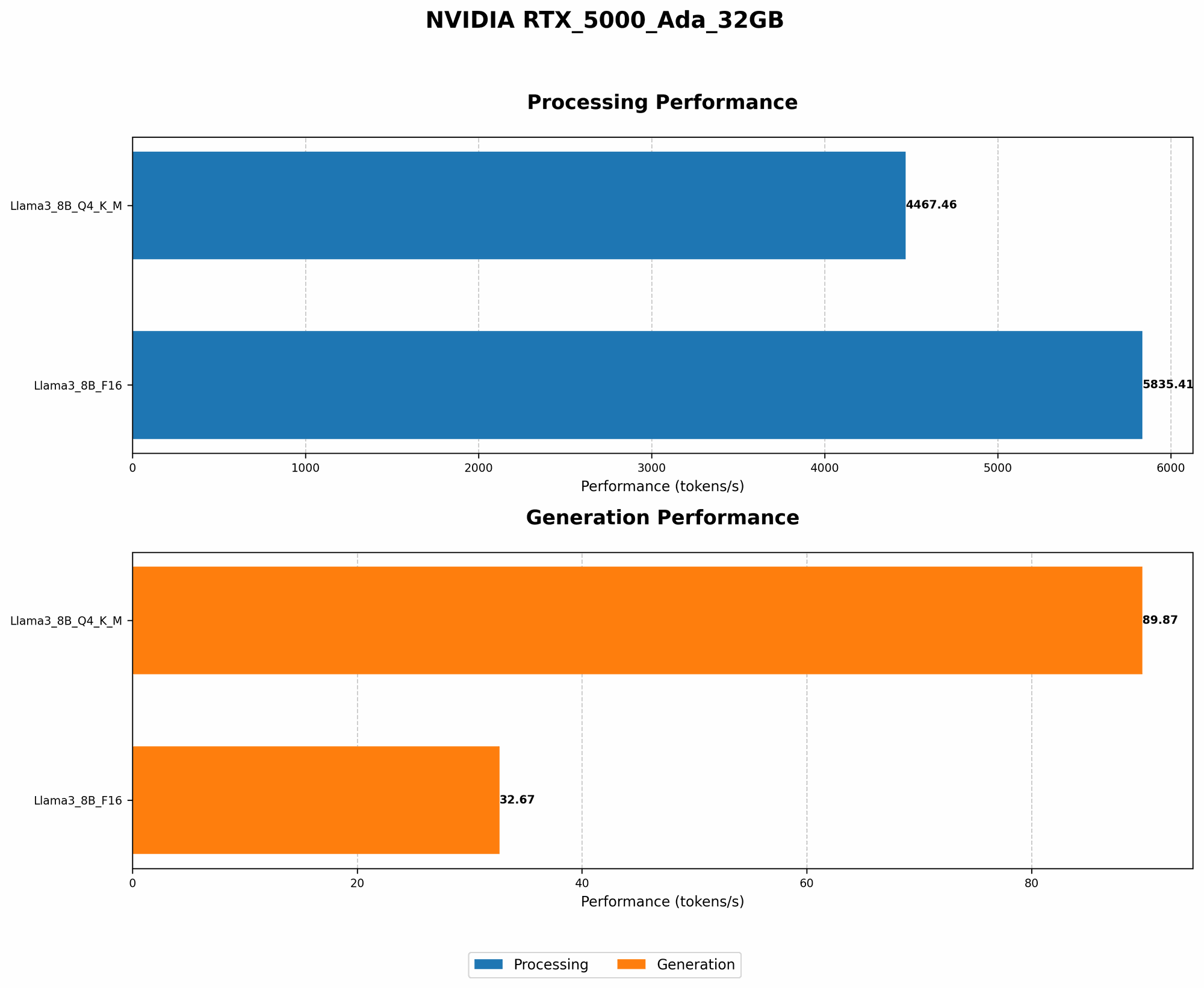
As you can see, the "Llama38BQ4KM_Generation" model runs significantly faster than the F16 version, even though it's using 4-bit precision! This is the power of quantization in action.
Note: We don't have data for the F16 generation speed of the Llama 3 8B model on the RTX5000Ada_32GB.
With a smaller memory footprint, you can run larger models or even experiment with multiple models simultaneously!
Model Size: Finding the Sweet Spot
Why Model Size Matters
LLMs come in different sizes, from the petite 7B model to the colossal 70B. The size of the model plays a crucial role in performance:
- Larger Models, More Power: Think of a larger model as a seasoned chef with a vast knowledge of culinary techniques. It can handle complex tasks and produce more sophisticated responses.
- Smaller Models, Faster Reactions: Smaller models are like a quick-witted comedian, delivering witty responses quickly. They might not have the same depth as larger models, but they are undeniably fast.
Performance on RTX5000Ada_32GB
Let's see how our RTX5000Ada_32GB handles different model sizes:
| Model | Q4 Token Speed | F16 Token Speed |
|---|---|---|
| Llama 3 8B Q4 K_M Generation | 89.87 | 32.67 |
| Llama 3 8B F16 Generation | Not Available | Not Available |
| Llama 3 70B Q4 K_M Generation | Not Available | Not Available |
| Llama 3 70B F16 Generation | Not Available | Not Available |
| Llama 3 8B Q4 K_M Processing | 4467.46 | 5835.41 |
| Llama 3 8B F16 Processing | Not Available | Not Available |
| Llama 3 70B Q4 K_M Processing | Not Available | Not Available |
| Llama 3 70B F16 Processing | Not Available | Not Available |
Unfortunately, we don't have the data for the performance of the 70B model on the RTX5000Ada_32GB.
Optimization: Fine-Tuning for Peak Performance
Understanding Memory Allocation
Think of it like arranging furniture in a room. You wouldn't try to cram a king-sized bed, a massive bookcase, and a giant dining table into a tiny studio apartment! Similarly, you need to allocate memory efficiently when running LLMs.
Optimizing Memory Settings
- Adjust Batch Size: The batch size controls how many prompts are processed simultaneously. A larger batch size can increase performance, but it might require more memory.
- Experiment with Parameters: Some settings, such as the "context size" or "max sequence length," can impact memory usage. Experiment to find the optimal values for your model and hardware.
GPU Utilization: Maximizing the Power of Your RTX5000Ada_32GB
Monitoring GPU Utilization
Think of GPU utilization like a car's engine. You want it to be working hard but not redlining all the time. High GPU utilization is generally good, but if it's consistently at 99% or above, it could indicate a bottleneck or memory pressure.
Strategies for Maximizing GPU Utilization
- Reduce Batch Size: Sometimes a smaller batch size can actually improve GPU utilization by preventing memory overload.
- Optimize Code: Efficiently written code can make a noticeable difference in GPU utilization, reducing wasted resources.
Cooling: Keeping Your RTX5000Ada_32GB Cool and Collected
Why Cooling is Crucial
Think of your GPU as a high-performance athlete. It needs to stay cool and hydrated to perform at its best. Overheating can lead to performance degradation and even damage to your hardware.
Keeping Your RTX5000Ada_32GB Cool
- Adequate Ventilation: Ensure your computer case has proper airflow to prevent heat buildup.
- Cooling Solutions: Consider using a high-quality CPU cooler and potentially adding a dedicated GPU fan to keep things cool.
FAQ: Your Burning Questions Answered
What is the best LLM model for my RTX5000Ada_32GB?
The best LLM model depends on your specific needs. If you are looking for fast, lightweight models, Llama 3 8B is a great option. If you need the power of a larger model, you might need to explore options like the 70B model with careful resource management.
How do I know if my GPU is the bottleneck?
If you see high GPU utilization but slow response times, your GPU might be the bottleneck. You can try reducing batch size, optimizing code, or even exploring other GPUs with higher memory capacity.
How can I optimize my code for better LLM performance?
There are several ways to optimize your code for LLMs.
- Use efficient data structures and algorithms.
- Consider using frameworks like PyTorch or TensorFlow, which can streamline LLM operations.
- Profile your code using tools to identify bottlenecks and areas for improvement.
Keywords:
LLM, Large Language Model, NVIDIA RTX5000Ada_32GB, Llama 3, Quantization, Q4, F16, Token Speed, Model Size, GPU Utilization, Memory Allocation, Cooling, Optimization, Performance, GPU