5 Noise Reduction Strategies for Your NVIDIA L40S 48GB Setup

Introduction
Welcome, fellow language model enthusiasts! As you delve into the world of local LLM models, you're likely seeking ways to maximize performance, especially with powerful devices like the NVIDIA L40S_48GB. This article explores five strategies for "noise reduction" - minimizing latency, improving responsiveness, and enhancing the user experience.
Imagine this scenario: You're eager to have a conversation with your very own LLM on a cool new topic. You type in your question, hit enter, and… silence. Then, a few seconds later, the LLM finally coughs up a response. Frustrating, right? This is the "noise" we're tackling – the sluggishness and delays that can dampen the fun of exploring LLMs.
By understanding and implementing these noise reduction techniques, you'll transform your NVIDIA L40S_48GB into a true LLM powerhouse!
1. Quantization: Shrinking LLMs for Speed
Think of quantization as a digital diet for LLMs. It involves converting large numerical representations (like 32-bit floating-point numbers) into smaller, more compact versions (like 8-bit integers). This reduces the amount of data processed, leading to faster inference speeds.
Quantization in Action
Imagine you have a giant library filled with books. Each book represents a piece of information in your LLM model. Quantization is like replacing those massive, hardcover books with smaller, more compact paperbacks. You can store more books (information) in the same space, making access faster.
This is where the "Q" comes in. It's short for "quantization," and it's a common technique used in LLM implementations to achieve faster performance.
For example:
- Llama 3 8B Q4KM: "Q4KM" indicates that the model has been quantized to 4-bit precision, with a special technique called "K-Means" used to further optimize the weights (the "M" stands for "Matrix").
Here's how quantization affects your L40S_48GB:
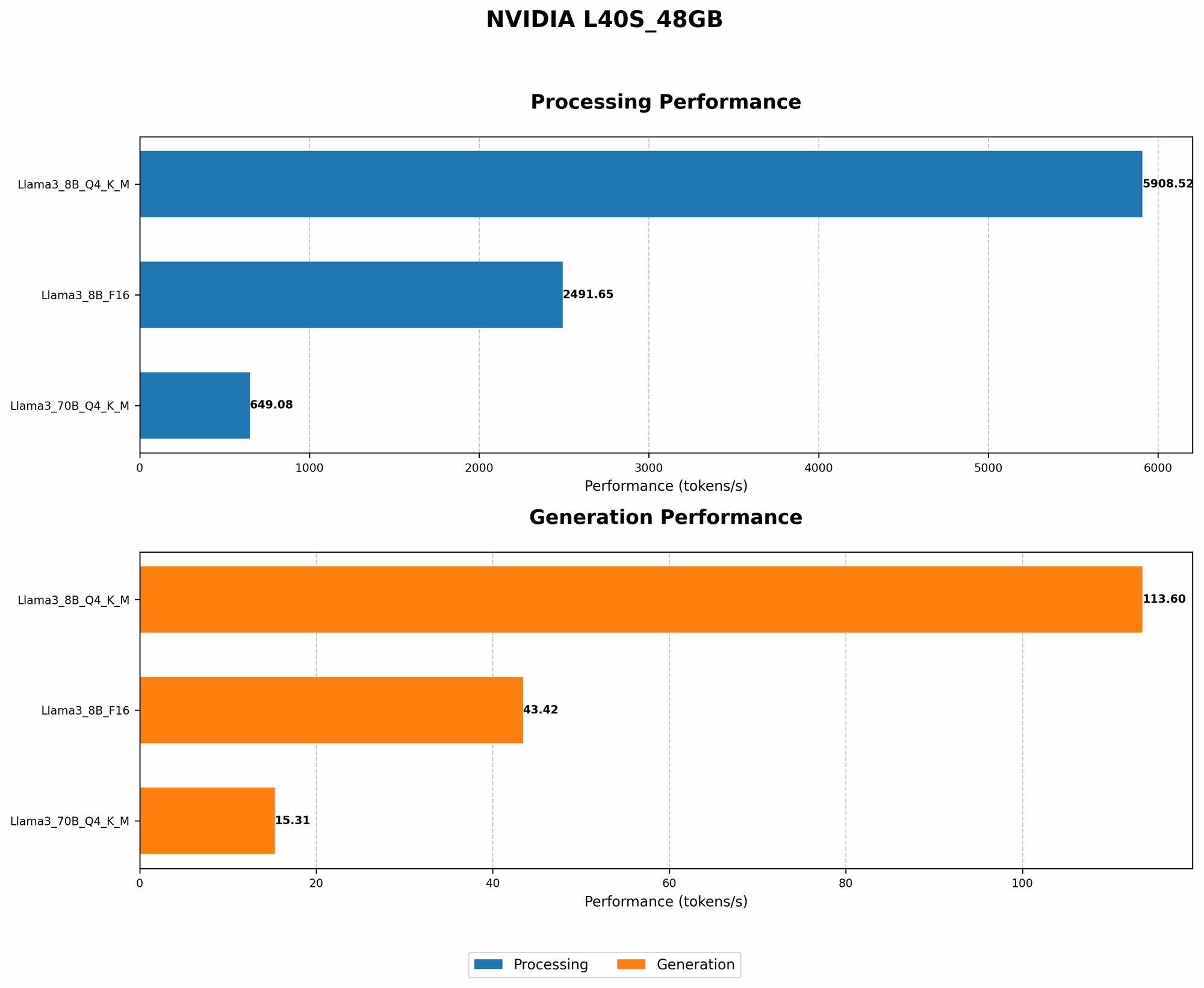
| LLM Model | Quantization | Tokens/Second (Generation) |
|---|---|---|
| Llama 3 8B | Q4KM | 113.6 |
| Llama 3 8B | F16 (No Quantization) | 43.42 |
*As you can see, using quantization significantly improves token generation speed (measured in tokens per second) on your L40S_48GB. *
2. Model Size: Finding the Sweet Spot
Sometimes, bigger isn't always better. When it comes to LLMs, larger models can offer more complex capabilities, but they also demand more resources and can be slower. Finding the right model size is important, especially for achieving optimal performance on a powerful device like your NVIDIA L40S_48GB.
Comparing Llama Models: 8B vs. 70B
Let's compare two popular Llama models:
- Llama 3 8B: This is a relatively smaller model, but it can still be powerful enough for many use cases.
- Llama 3 70B: This model is considerably larger and boasts more advanced capabilities.
Here's a comparison of their token generation performance on your L40S48GB (using Q4K_M quantization):
| LLM Model | Tokens/Second (Generation) |
|---|---|
| Llama 3 8B | 113.6 |
| Llama 3 70B | 15.31 |
As you can see, the larger Llama 3 70B model is significantly slower. This is due to the increased computational demands of processing its massive number of parameters.
While larger models might be tempting for their advanced capabilities, smaller models like Llama 3 8B can be more efficient on a powerful setup like yours – leading to a smoother experience.
3. GPU Memory Management: Avoid Memory Bottlenecks
GPU memory is like the RAM for your LLM. It's where all the model data, parameters, and intermediate results are stored. But it's a finite resource, and inefficient memory management can lead to performance bottlenecks.
Optimizing Memory Usage
Think of your LLM as a busy restaurant filled with hungry diners (tokens). The kitchen (GPU memory) needs to be organized to efficiently serve everyone their orders (process tokens) without creating a backlog.
Here are some strategies to avoid memory bottlenecks:
- Use a smaller batch size: This is like dividing the diners into smaller groups to ensure everyone gets served promptly.
- Experiment with different memory mapping techniques: This involves optimizing how information is stored in GPU memory to improve access speed.
- Utilize techniques like "gradient accumulation": Think of this as breaking down a large task into smaller steps to reduce the memory burden on the GPU.
These techniques can help you avoid memory bottlenecks and ensure your LLM runs smoothly on your NVIDIA L40S_48GB.
4. Understanding the Power of Processing
Token generation isn't the whole story. Behind the scenes, your GPU is also working tirelessly to process information. This "processing" step involves calculations and operations that are crucial for generating accurate and coherent responses.
Faster Processing, Smoother Results
Imagine you're writing a long, detailed essay. It takes time and effort not only to write each sentence (token generation) but also to think about the overall structure and flow of the essay (processing).
Here's a glimpse at the processing speed of various Llama models on your L40S48GB (using Q4K_M quantization):
| LLM Model | Tokens/Second (Processing) |
|---|---|
| Llama 3 8B | 5908.52 |
| Llama 3 70B | 649.08 |
Processing speed is expressed in "tokens per second." As you can see, the Llama 3 8B model processes tokens significantly faster than the larger Llama 3 70B model.
Optimizing processing speeds can significantly influence the overall efficiency of your LLM model.
5. Fine-Tuning: Tailoring Your LLM for Success
Fine-tuning is like giving your LLM a specialized training session to enhance its performance on specific tasks. It involves adjusting the model's parameters to achieve greater accuracy and efficiency.
### Fine-Tuning for Your Needs
Think of fine-tuning as tailoring a suit. You start with a general design (the base LLM) and then make adjustments to fit your unique needs (the specific task).
Here's how fine-tuning can benefit your LLM:
- Increased accuracy: Fine-tuning can help your LLM generate more relevant and accurate responses for your chosen domain or task.
- Improved efficiency: By focusing on specific capabilities, fine-tuning can make your LLM run faster and more efficiently on your NVIDIA L40S_48GB.
Fine-tuning is a powerful technique, but it requires specialized knowledge and resources.
FAQ
What is an LLM?
An LLM is a Large Language Model, a type of artificial intelligence that can understand and generate human-like text.
Can I run an LLM on my personal computer?
Yes! With the right software and hardware, you can run LLMs locally on your own computer.
What are the best GPUs for running LLMs?
NVIDIA GPUs like the L40S_48GB are generally considered the top choice for running LLMs due to their powerful performance and large memory capacity.
Keywords
NVIDIA L40S48GB, LLM, Large Language Model, Llama 3, Quantization, Q4K_M, Token Generation, Processing Speed, GPU Memory, Fine-Tuning, Noise Reduction, Latency, Performance Optimization, AI, Machine Learning, Deep Learning, NLP