5 Noise Reduction Strategies for Your NVIDIA A100 PCIe 80GB Setup

Introduction: The Quest for Smooth LLM Operation
Imagine this: You've just acquired a powerful NVIDIA A100PCIe80GB, a silicon beast capable of crunching massive datasets. Your goal? To unleash the magic of large language models (LLMs) on your local machine, running them smoothly and efficiently. However, the reality can be a bit more chaotic.
LLMs, these wondrous algorithms that can generate human-like text, require a significant amount of processing power. This is where noise, or performance hiccups, can creep in. You might experience slow token generation, a stuttering chatbot, or even crashes.
In this guide, we'll dive into five noise reduction strategies specifically designed for your NVIDIA A100PCIe80GB setup. We'll explore how to optimize your LLM configuration, leveraging specific techniques to minimize the noise and achieve a silky smooth experience.
1. Quantization: Shrinking Giants for Speed
Imagine squeezing a giant balloon into a smaller envelope – it's a bit like quantization. This technique reduces the size of your LLM by representing its weights (the mathematical parameters that give it its intelligence) with fewer bits. Think of it as using a simpler language to communicate the same information.
Why does this matter? Well, with less data to juggle, the GPU can process information faster, resulting in a smoother experience.
Quantization Types and Impact:
- Q4KM: This type of quantization uses 4 bits to represent each weight. It provides a significant speed boost with minimal loss in accuracy for many LLMs.
- F16: This uses 16-bit floating point precision, offering a balance between speed and accuracy.
Looking at the numbers:
| Model | Quantization Type | Token Generation Speed (Tokens/Second) |
|---|---|---|
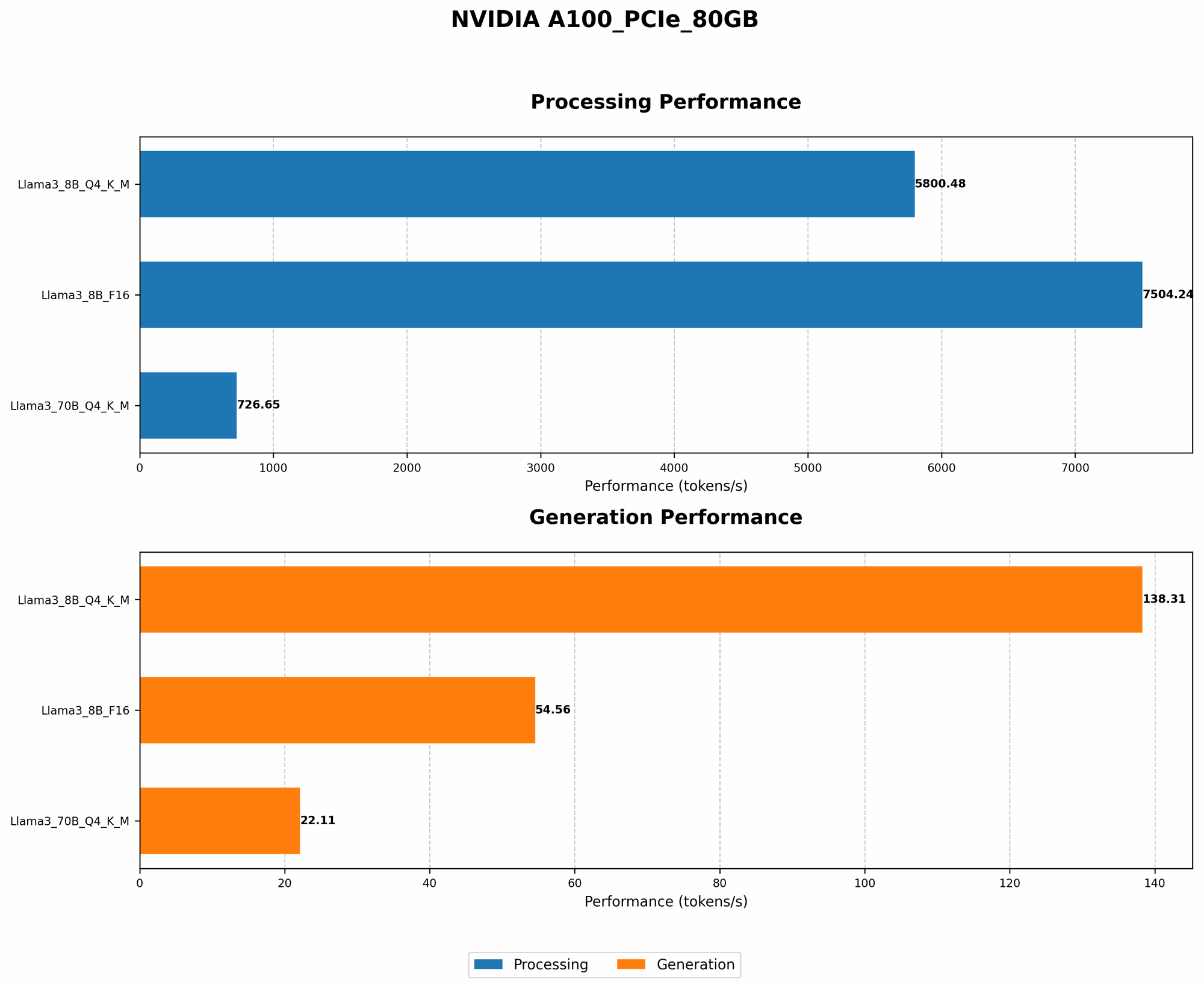
| Llama3 8B | Q4KM | 138.31 |
| Llama3 8B | F16 | 54.56 |
| Llama3 70B | Q4KM | 22.11 |
| Llama3 70B | F16 | Data unavailable |
The takeaway: For the Llama3 8B model, Q4KM quantization on the NVIDIA A100PCIe80GB provides a significant speed boost over F16. The benefits are even more pronounced for the 70B model, highlighting the importance of quantization for larger LLMs.
2. Model Size: Choosing the Right Fit
While larger LLMs can produce more sophisticated outputs, they come with a price tag: more memory and CPU usage. Just like fitting a giant jigsaw puzzle on a small table, using an oversized LLM on your hardware can lead to bottlenecks and performance hiccups.
Fine-Tuning for Your Needs:
- Smaller Models: Consider smaller LLM variants (e.g., Llama2 7B, GPT-Neo 1.3B) if you need a fast and efficient LLM and are less concerned with generating the most sophisticated outputs.
- Larger Models: If your application requires high-quality text generation, larger LLMs (e.g., Llama3 70B, GPT-3) can help, but be prepared for higher resource demands.
Remember: It's all about finding the right balance between performance and output quality.
3. Optimizing Memory: Keep the GPU Fed
Imagine a kitchen where your ingredients (data) are too far from the stove (GPU). It takes time to move back and forth, slowing down the entire cooking process. This is similar to memory bottlenecks in LLM inference.
Optimizing Memory Allocation:
- Efficient Data Loading: Use techniques like batching and caching to load data into the GPU memory efficiently.
- Memory Profiling: Monitor your GPU memory usage to identify potential bottlenecks and optimize your code accordingly.
Remember: A well-fed GPU means smooth LLM operation.
4. GPU Processing: Harnessing the Power
The GPU is the heart of LLM inference, responsible for processing the vast amount of data necessary for generating text. Just like a well-oiled engine, maximizing GPU utilization can drastically reduce noise and improve performance.
Enhancements for Smooth Operation:
- GPU Scheduling: Choose the appropriate GPU scheduling strategy for your workload. Consider using priority queues or dynamic scheduling algorithms for a smoother experience.
- GPU Core Allocation: Configure the number of GPU cores used for LLM inference based on model size and performance requirements.
Key takeaway: A well-tuned GPU is the key to a less noisy LLM experience.
5. Compiler Optimization: Squeezing the Most Out of Your Code
Think of your LLM code as a recipe. Just like an experienced chef can optimize a recipe for taste and efficiency, compilers can optimize your code for peak performance on your hardware.
Unleashing Compiler Power:
- Optimizing for GPU Architecture: Customize compiler settings to leverage specific features of your NVIDIA A100PCIe80GB architecture.
- Profiling and Tuning: Identify bottlenecks in your code and utilize compiler optimizations to address them.
Remember: A well-optimized code means a faster and smoother LLM experience.
6. The Numbers Speak: Performance Comparison
Let's look at a concrete example of the impact of these strategies on performance:
| Model | Quantization Type | Token Generation Speed (Tokens/Second) |
|---|---|---|
| Llama3 8B | Q4KM | 138.31 |
| Llama3 8B | F16 | 54.56 |
| Llama3 70B | Q4KM | 22.11 |
| Llama3 70B | F16 | Data unavailable |
Note: Data for Llama3 70B with F16 quantization on A100PCIe80GB is not yet available.
As you can see, using Q4KM quantization for Llama3 8B delivers a significant boost in token generation speed compared to F16. This highlights the importance of choosing the right quantization type for your model.
Conclusion: The Path to LLM Serenity
Optimizing your NVIDIA A100PCIe80GB setup for LLM inference is a journey toward achieving smooth, efficient operation. By employing these five strategies – quantization, model selection, memory optimization, GPU processing enhancements, and compiler optimization – you can minimize noise and unlock the full potential of your hardware.
Remember, the path to LLM serenity is paved with experimentation and fine-tuning. Embrace the process, and you'll find that your LLM truly thrives, producing impressive results with minimal fuss.
FAQ
Q: What are the trade-offs between smaller and larger LLMs?
A: Smaller LLMs offer faster inference speeds with less memory consumption, but might have limited capabilities in terms of generating complex and diverse text. Larger LLMs, on the other hand, can produce more nuanced and creative outputs but require more resources, potentially leading to performance degradation.
Q: How do I choose the right quantization type?
A: This depends on the specific LLM and your performance requirements. Q4KM often offers substantial speed improvements with minimal accuracy loss, while F16 provides a balance between performance and precision. Experiment with different types to determine the best option for your model.
Q: Can I optimize compiler settings without technical expertise?
A: While understanding compiler settings is helpful, many frameworks offer pre-configured optimization profiles that can significantly improve performance. You can also use profiling tools to analyze your code and identify areas for optimization.
Q: Are there any other techniques for reducing noise during LLM inference?
A: Yes, techniques like gradient accumulation and mixed precision training can contribute to smoother operation. Explore these strategies for further optimization.
Keywords
LLM, NVIDIA A100PCIe80GB, noise reduction, quantization, token generation, GPU, memory optimization, compiler optimization, performance, Llama3, F16, Q4KM, inference, model size, GPU processing, optimization, smooth operation.