5 Must Have Tools for AI Development on Apple M2 Ultra
Introduction
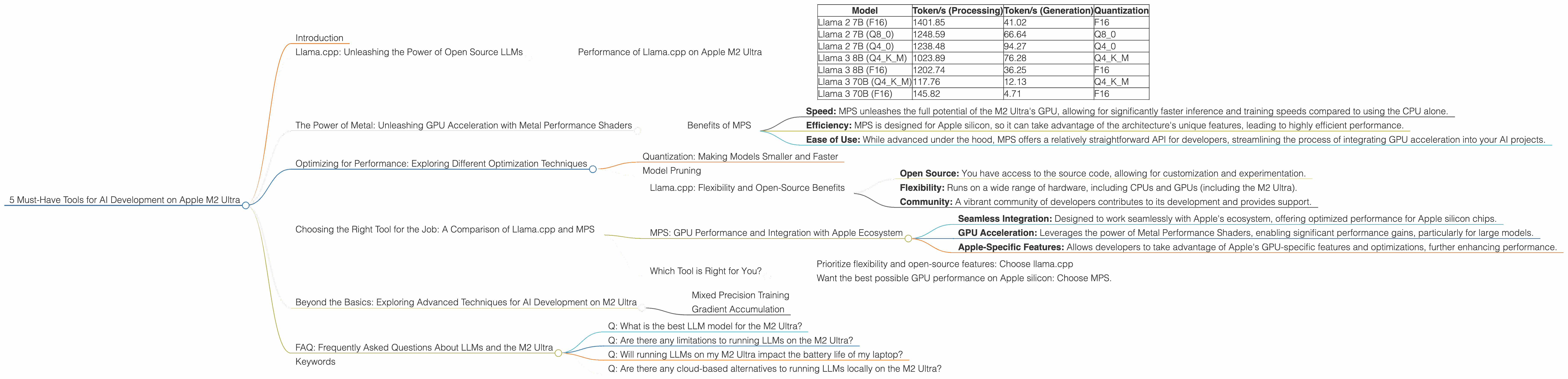
The Apple M2 Ultra is a powerhouse of a chip, known for its blistering speed and impressive performance. But how does it stack up when it comes to AI development? Especially for those keen on running large language models (LLMs) locally? Let's dive into the world of LLMs on the M2 Ultra and discover the top tools that will make your AI journey smoother than a well-oiled chatbot! Imagine your own personal AI assistant, responding to your prompts in a flash – that's the potential we're exploring here.
Llama.cpp: Unleashing the Power of Open Source LLMs
Imagine running a massive AI model on your laptop – that's the magic of llama.cpp. This open-source project lets you run models like Llama 2 and Llama 3 on diverse hardware. For the M2 Ultra, it's like having a powerful pocket-sized AI co-pilot ready to assist with everything from generating text to answering your questions.
Performance of Llama.cpp on Apple M2 Ultra
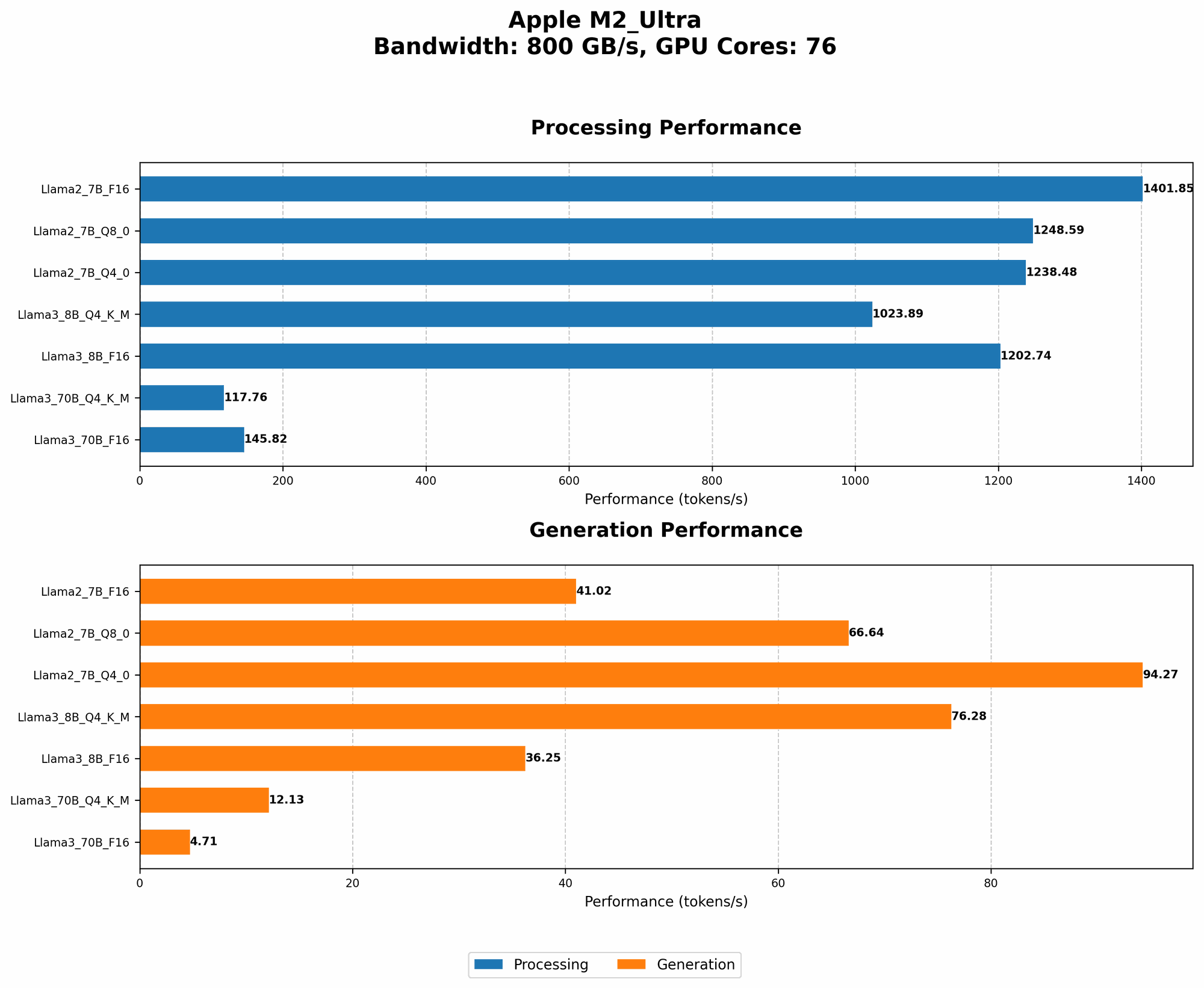
We'll use tokens/second (a measure of how many words or parts of words a model can process) to gauge the performance of various LLMs on the M2 Ultra.
| Model | Token/s (Processing) | Token/s (Generation) | Quantization |
|---|---|---|---|
| Llama 2 7B (F16) | 1401.85 | 41.02 | F16 |
| Llama 2 7B (Q8_0) | 1248.59 | 66.64 | Q8_0 |
| Llama 2 7B (Q4_0) | 1238.48 | 94.27 | Q4_0 |
| Llama 3 8B (Q4KM) | 1023.89 | 76.28 | Q4KM |
| Llama 3 8B (F16) | 1202.74 | 36.25 | F16 |
| Llama 3 70B (Q4KM) | 117.76 | 12.13 | Q4KM |
| Llama 3 70B (F16) | 145.82 | 4.71 | F16 |
Let's break it down:
- F16 and Quantization: Think of "F16" as the full-resolution model, while "Q" represents various levels of quantization. Quantization is like compressing the model, making it smaller and potentially faster.
- Processing vs. Generation: "Processing" is the speed at which the model analyzes the prompt, while "Generation" is how fast it can generate the text response.
Notice the difference in token speed between even the same size model when using different quantization levels. It's a testament to how clever techniques can optimize AI models for specific hardware.
The Power of Metal: Unleashing GPU Acceleration with Metal Performance Shaders
Metal Performance Shaders (MPS) is Apple's powerful framework for accelerating computationally intense tasks, like training and inference for LLMs. Think of it as a turbocharger for your M2 Ultra's GPU, allowing your AI models to process information even faster.
Benefits of MPS
- Speed: MPS unleashes the full potential of the M2 Ultra's GPU, allowing for significantly faster inference and training speeds compared to using the CPU alone.
- Efficiency: MPS is designed for Apple silicon, so it can take advantage of the architecture's unique features, leading to highly efficient performance.
- Ease of Use: While advanced under the hood, MPS offers a relatively straightforward API for developers, streamlining the process of integrating GPU acceleration into your AI projects.
Optimizing for Performance: Exploring Different Optimization Techniques
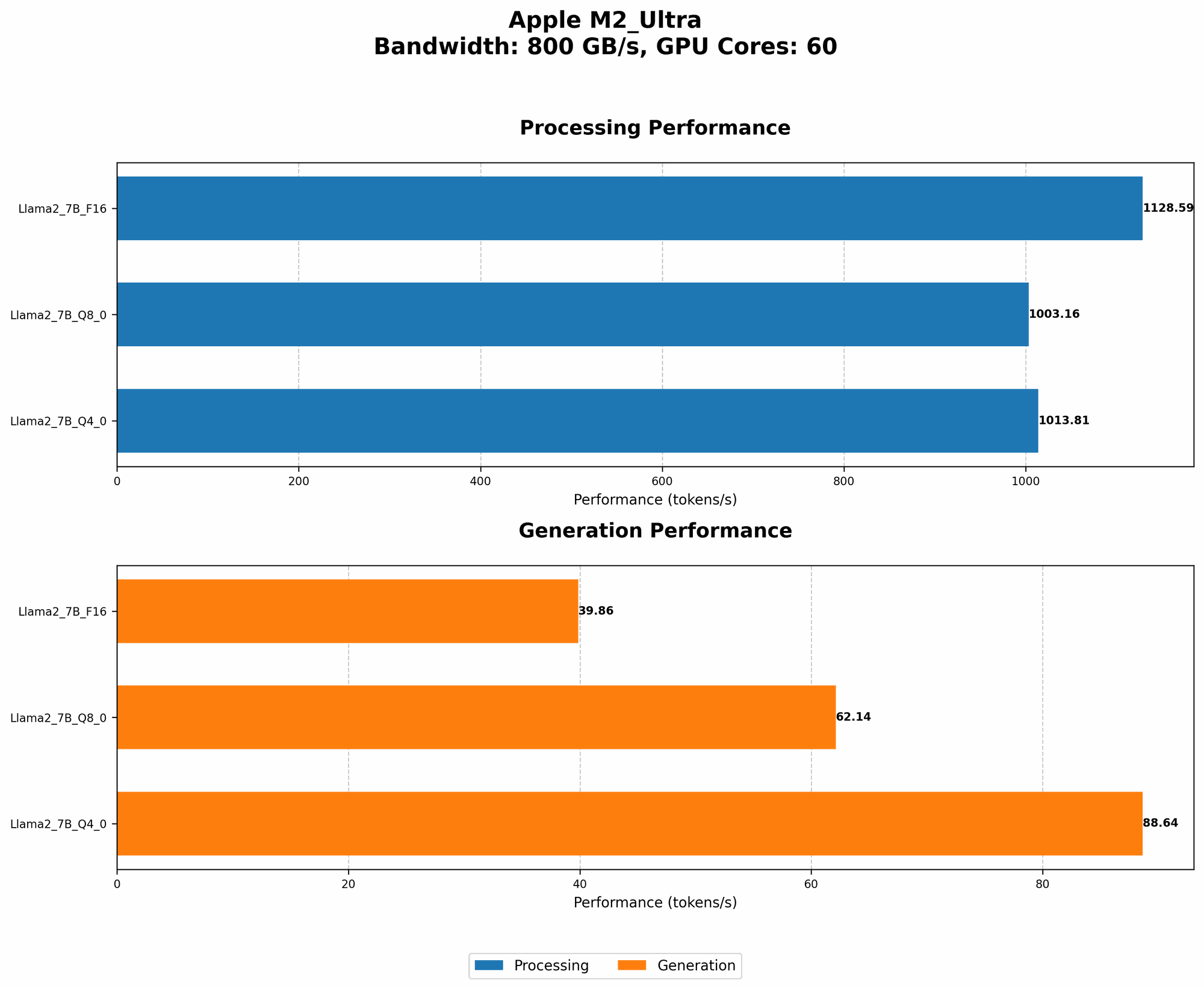
The M2 Ultra is a beast, but even beasts can be tamed for even better performance. Let's explore some common techniques used to get the most out of your AI models on the M2 Ultra.
Quantization: Making Models Smaller and Faster
We've already touched upon quantization, but let's delve a bit deeper. You can think of it as a diet for your AI models. By reducing the size of the model's weights (the information it uses to make predictions), you can make it significantly faster. However, this can come at a slight cost to accuracy.
Model Pruning
Consider this like the decluttering of your AI model. Model pruning removes unnecessary connections and weights, resulting in a smaller, faster, and potentially more efficient model. This can be particularly useful for large models like Llama 3 70B, where even a little slimming can make a big difference in performance.
Choosing the Right Tool for the Job: A Comparison of Llama.cpp and MPS
Imagine a toolbox full of specialized tools – each one optimized for a specific task. This is similar to the choice between llama.cpp and MPS for AI development.
Llama.cpp: Flexibility and Open-Source Benefits
- Open Source: You have access to the source code, allowing for customization and experimentation.
- Flexibility: Runs on a wide range of hardware, including CPUs and GPUs (including the M2 Ultra).
- Community: A vibrant community of developers contributes to its development and provides support.
MPS: GPU Performance and Integration with Apple Ecosystem
- Seamless Integration: Designed to work seamlessly with Apple's ecosystem, offering optimized performance for Apple silicon chips.
- GPU Acceleration: Leverages the power of Metal Performance Shaders, enabling significant performance gains, particularly for large models.
- Apple-Specific Features: Allows developers to take advantage of Apple's GPU-specific features and optimizations, further enhancing performance.
Which Tool is Right for You?
For developers who:
- Prioritize flexibility and open-source features: Choose llama.cpp
- Want the best possible GPU performance on Apple silicon: Choose MPS.
Beyond the Basics: Exploring Advanced Techniques for AI Development on M2 Ultra
We've covered the basics, but the world of AI development is full of exciting possibilities. Let's explore some advanced techniques that can take your AI projects to the next level on the M2 Ultra.
Mixed Precision Training
Think of this technique as using a combination of different levels of precision (like F16 and Q8_0) during training. This allows for faster training while maintaining a good balance between accuracy and performance. It's like having your AI model learn faster by adapting to different scenarios, leading to a more efficient and robust model.
Gradient Accumulation
Think of gradient accumulation as a teamwork strategy for training large models. By accumulating gradients over multiple batches of data before updating the model's weights, you can train larger models on limited memory. This is particularly useful for large models like Llama 3 70B, where the model's sheer size might otherwise overwhelm your hardware.
FAQ: Frequently Asked Questions About LLMs and the M2 Ultra
Q: What is the best LLM model for the M2 Ultra?
A: It depends on your needs! For smaller, faster-performing models, Llama 2 7B could be a great option. If you require the power of larger models, Llama 3 8B or Llama 3 70B might be better choices. You'll want to consider the trade-offs between performance, memory requirements, and the type of tasks you're looking to accomplish.
Q: Are there any limitations to running LLMs on the M2 Ultra?
A: The M2 Ultra is powerful, but it's not a magic bullet. Running extremely large models (think hundreds of billions of parameters) might still require significant resources and optimization. You might need to explore techniques like model partitioning or distributed training to handle such large models effectively.
Q: Will running LLMs on my M2 Ultra impact the battery life of my laptop?
A: Yes, running LLMs can consume a fair amount of power. You might notice a decrease in battery life when running complex AI models. This is a trade-off you'll need to consider based on your use case and the battery life of your device.
Q: Are there any cloud-based alternatives to running LLMs locally on the M2 Ultra?
A: Absolutely! Services like Google Colab, Amazon SageMaker, and Hugging Face Spaces offer cloud-based environments for working with LLMs. These cloud services can provide access to powerful GPUs and other resources that might not be available locally. However, cloud services typically come with associated costs, so it's essential to weigh the benefits against the expenses.
Keywords
LLM, Large Language Model, AI, Apple M2 Ultra, Llama 2, Llama 3, llama.cpp, Metal Performance Shaders, MPS, GPU, Token/s, Quantization, F16, Q80, Q40, Model Pruning, Mixed Precision Training, Gradient Accumulation, Performance, Optimization, AI Development, Inference, Cloud Computing, Google Colab, Amazon SageMaker, Hugging Face Spaces