5 Must Have Tools for AI Development on Apple M1 Max
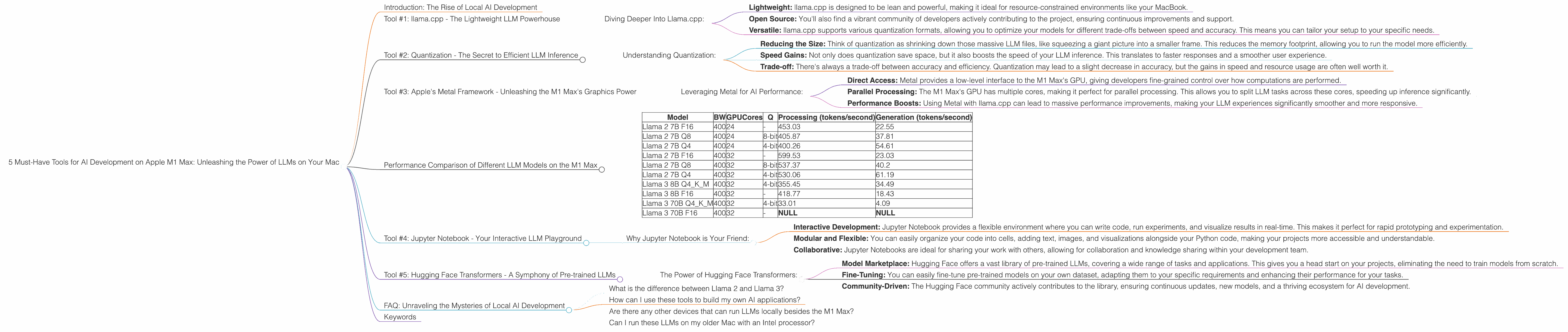
Introduction: The Rise of Local AI Development
The world of artificial intelligence is exploding, with Large Language Models (LLMs) like Llama 2 and Llama 3 changing the way we interact with technology. But these powerful models usually require access to huge computing resources, often found in the cloud. This can be expensive, slower, and potentially raise privacy concerns. Imagine if you could run these models directly on your own computer, harnessing the power of your local hardware! This is where the Apple M1 Max chip comes into play, offering an incredible platform for local AI development and exploration. In this article, we'll dive deep into five essential tools for developing and running Llama 2 and Llama 3 models on your Apple M1 Max, enabling you to experiment and build your own AI applications without breaking the bank.
Tool #1: llama.cpp - The Lightweight LLM Powerhouse
Imagine a tool so efficient it can run large language models on your laptop. This is the magic of llama.cpp, a blazing fast, open-source library that allows you to run LLMs locally, even on modest hardware. With its flexible architecture, you can easily experiment with different models and leverage the power of the M1 Max to achieve impressive results.
Diving Deeper Into Llama.cpp:
- Lightweight: llama.cpp is designed to be lean and powerful, making it ideal for resource-constrained environments like your MacBook.
- Open Source: You'll also find a vibrant community of developers actively contributing to the project, ensuring continuous improvements and support.
- Versatile: llama.cpp supports various quantization formats, allowing you to optimize your models for different trade-offs between speed and accuracy. This means you can tailor your setup to your specific needs.
Tool #2: Quantization - The Secret to Efficient LLM Inference
Quantization is like a magician's trick for LLMs. It takes those massive, memory-hungry models and compresses them without sacrificing too much accuracy. This significantly improves performance, allowing you to run LLMs smoothly on your M1 Max.
Understanding Quantization:
- Reducing the Size: Think of quantization as shrinking down those massive LLM files, like squeezing a giant picture into a smaller frame. This reduces the memory footprint, allowing you to run the model more efficiently.
- Speed Gains: Not only does quantization save space, but it also boosts the speed of your LLM inference. This translates to faster responses and a smoother user experience.
- Trade-off: There's always a trade-off between accuracy and efficiency. Quantization may lead to a slight decrease in accuracy, but the gains in speed and resource usage are often well worth it.
Tool #3: Apple's Metal Framework - Unleashing the M1 Max's Graphics Power
Apple's Metal framework is the secret weapon for developers looking to push the boundaries of graphics and computation on their Macs. Metal allows you to directly access the M1 Max's powerful GPU, enabling you to accelerate LLM inference for faster response times and a more fluid user experience.
Leveraging Metal for AI Performance:
- Direct Access: Metal provides a low-level interface to the M1 Max's GPU, giving developers fine-grained control over how computations are performed.
- Parallel Processing: The M1 Max's GPU has multiple cores, making it perfect for parallel processing. This allows you to split LLM tasks across these cores, speeding up inference significantly.
- Performance Boosts: Using Metal with llama.cpp can lead to massive performance improvements, making your LLM experiences significantly smoother and more responsive.
Performance Comparison of Different LLM Models on the M1 Max
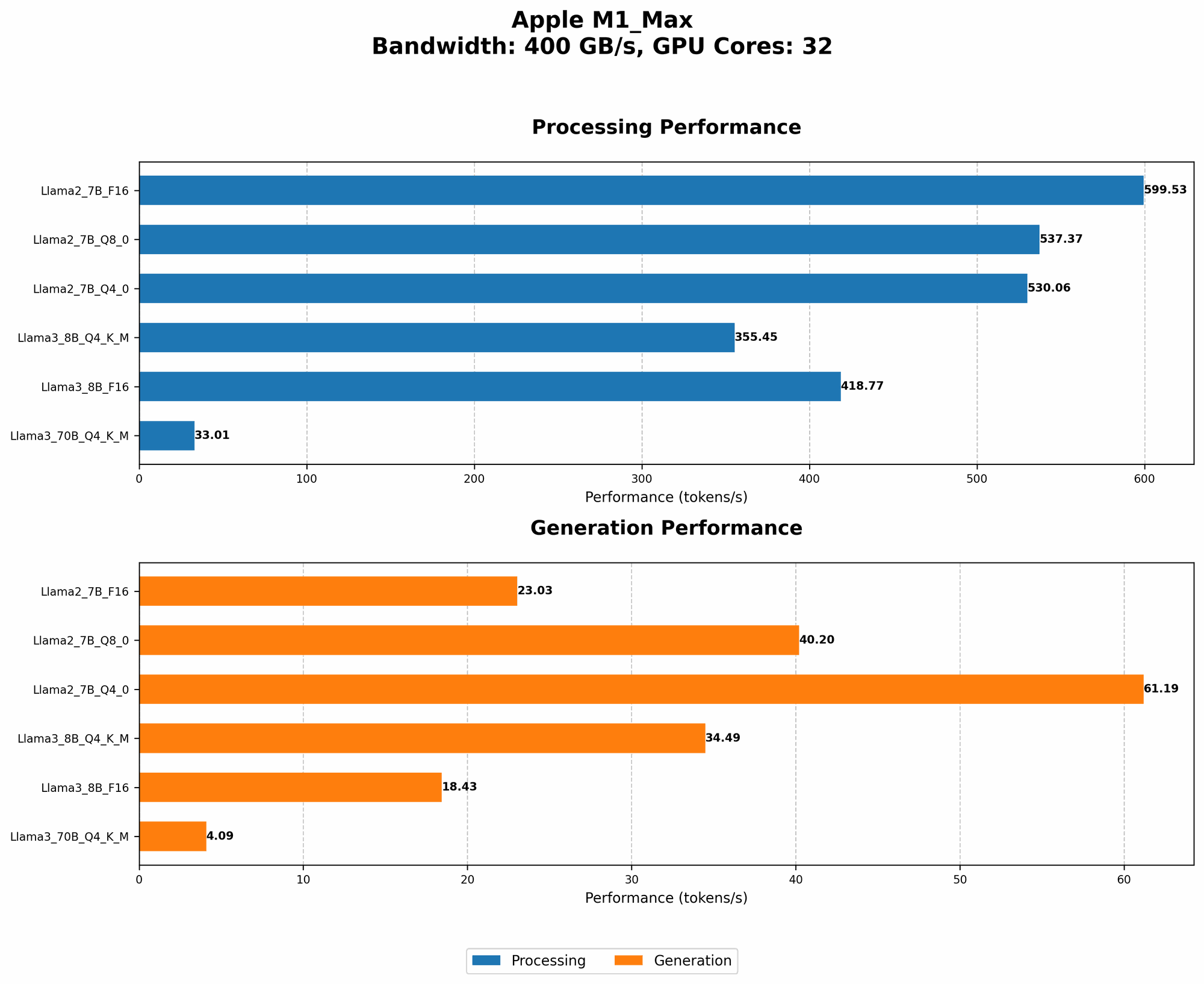
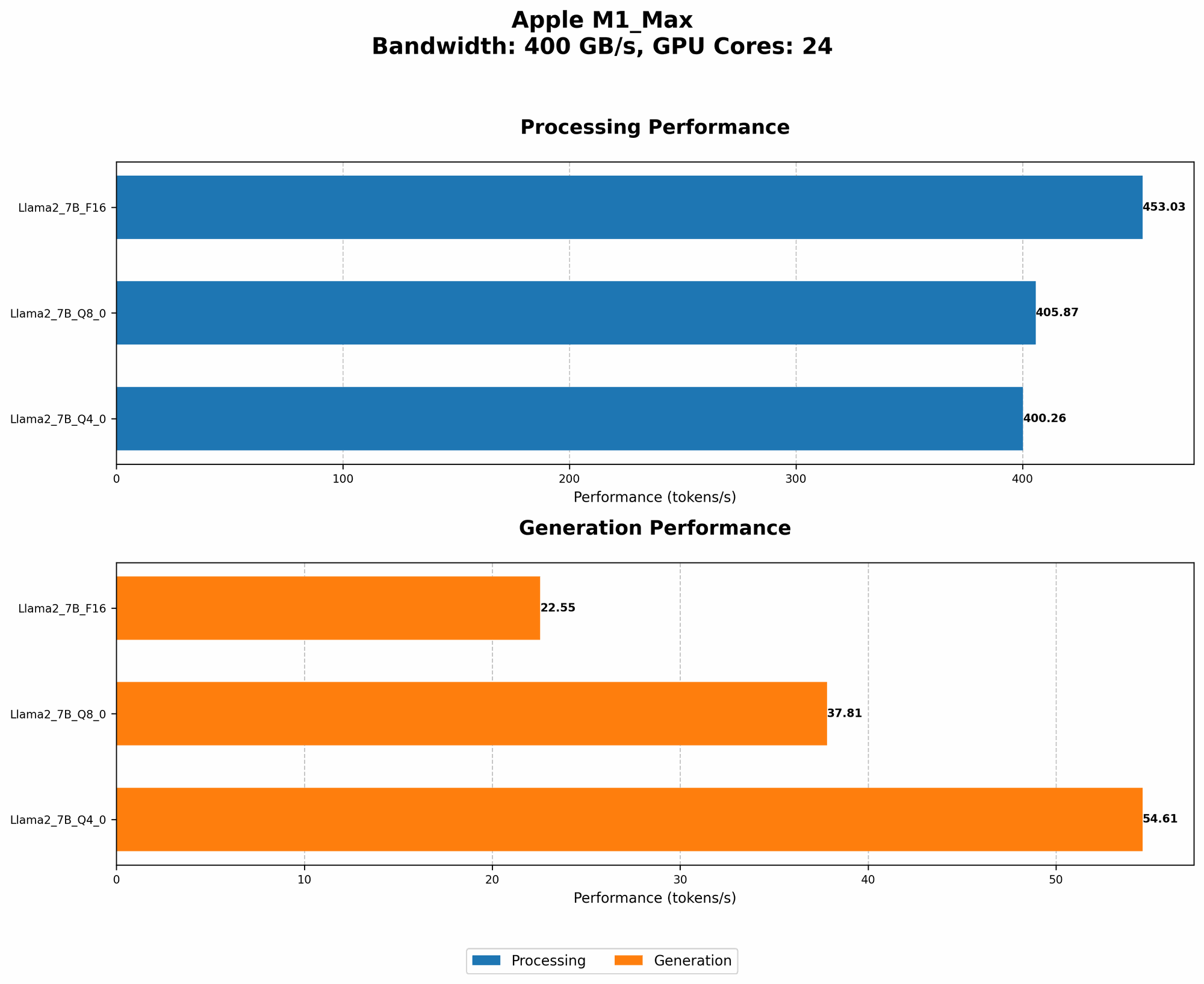
Now, let's take a look at the real numbers. We'll compare the performance of Llama 2 and Llama 3 models on the M1 Max, showcasing the power of these tools in action. The benchmark data provided is measured in tokens per second, a metric that reflects the speed of processing text.
| Model | BW | GPUCores | Q | Processing (tokens/second) | Generation (tokens/second) |
|---|---|---|---|---|---|
| Llama 2 7B F16 | 400 | 24 | - | 453.03 | 22.55 |
| Llama 2 7B Q8 | 400 | 24 | 8-bit | 405.87 | 37.81 |
| Llama 2 7B Q4 | 400 | 24 | 4-bit | 400.26 | 54.61 |
| Llama 2 7B F16 | 400 | 32 | - | 599.53 | 23.03 |
| Llama 2 7B Q8 | 400 | 32 | 8-bit | 537.37 | 40.2 |
| Llama 2 7B Q4 | 400 | 32 | 4-bit | 530.06 | 61.19 |
| Llama 3 8B Q4KM | 400 | 32 | 4-bit | 355.45 | 34.49 |
| Llama 3 8B F16 | 400 | 32 | - | 418.77 | 18.43 |
| Llama 3 70B Q4KM | 400 | 32 | 4-bit | 33.01 | 4.09 |
| Llama 3 70B F16 | 400 | 32 | - | NULL | NULL |
Key Observations:
- Quantization for Speed: Notice how the Q4 (4-bit) models significantly outperform their F16 (16-bit) counterparts in terms of token processing speed. This emphasizes the power of quantization for accelerating inference on your M1 Max.
- Bigger is Not Always Better: The Llama 3 70B model, while significantly larger, faces challenges in achieving comparable performance to smaller models like Llama 2 7B. This highlights the importance of considering the trade-offs between model size and performance for your specific use case.
- GPU Power: As you increase the number of GPU cores, the processing performance of the models significantly improves. This demonstrates the immense potential of the M1 Max's GPU for accelerating LLM workloads.
- Llama 3 70B: The lack of data for Llama 3 70B in F16 on the M1 Max highlights the challenges of running such massive models on a local device.
Tool #4: Jupyter Notebook - Your Interactive LLM Playground
Jupyter Notebook is a powerful tool that allows you to experiment with LLMs, visualize results, and share your findings. It's a great starting point for exploring the world of local AI development.
Why Jupyter Notebook is Your Friend:
- Interactive Development: Jupyter Notebook provides a flexible environment where you can write code, run experiments, and visualize results in real-time. This makes it perfect for rapid prototyping and experimentation.
- Modular and Flexible: You can easily organize your code into cells, adding text, images, and visualizations alongside your Python code, making your projects more accessible and understandable.
- Collaborative: Jupyter Notebooks are ideal for sharing your work with others, allowing for collaboration and knowledge sharing within your development team.
Tool #5: Hugging Face Transformers - A Symphony of Pre-trained LLMs
Hugging Face Transformers is a library that provides access to a vast collection of pre-trained LLM models, offering a powerful ecosystem for your AI development needs. You can leverage these models as a starting point for your projects or fine-tune them to create custom models tailored to your specific tasks.
The Power of Hugging Face Transformers:
- Model Marketplace: Hugging Face offers a vast library of pre-trained LLMs, covering a wide range of tasks and applications. This gives you a head start on your projects, eliminating the need to train models from scratch.
- Fine-Tuning: You can easily fine-tune pre-trained models on your own dataset, adapting them to your specific requirements and enhancing their performance for your tasks.
- Community-Driven: The Hugging Face community actively contributes to the library, ensuring continuous updates, new models, and a thriving ecosystem for AI development.
FAQ: Unraveling the Mysteries of Local AI Development
What is the difference between Llama 2 and Llama 3?
Llama 2 and Llama 3 are both powerful open-source large language models. Llama 2 is known for its efficiency and ease of use, while Llama 3 pushes the boundaries with its larger size and advanced capabilities.
How can I use these tools to build my own AI applications?
These tools provide a foundation for building your own AI applications. You can use llama.cpp to run LLMs on your M1 Max, quantize models for better efficiency, and leverage Hugging Face Transformers for pre-trained models or fine-tuning. Jupyter Notebook is your interactive playground for experimenting and iterating on your ideas.
Are there any other devices that can run LLMs locally besides the M1 Max?
Certainly! Other powerful devices like the M2 Max and M2 Pro can also be used for local LLM development. However, the M1 Max remains a solid choice due to its balance of performance and affordability.
Can I run these LLMs on my older Mac with an Intel processor?
While older Intel Macs can run LLMs, their performance may be significantly lower than the M1 Max. Running larger models on these devices might be challenging due to resource limitations.
Keywords
Apple M1 Max, LLM, Llama 2, Llama 3, llama.cpp, quantization, Metal, Jupyter Notebook, Hugging Face Transformers, AI development, local AI, Mac, performance, inference, token speed, GPU, bandwidth