5 Limitations of Apple M3 Pro for AI (and How to Overcome Them)

Introduction
Running large language models (LLMs) locally can be a game-changer for developers and anyone looking for speed and privacy. But, with the increasing size and complexity of LLMs, choosing the right hardware becomes crucial. The Apple M3 Pro, with its 14-core GPU and powerful processing capabilities, might seem like a perfect fit. However, there are a few limitations to consider, especially when it comes to AI workloads.
This article explores the 5 key limitations of the M3 Pro for AI and provides practical solutions to overcome them, using real-world data and benchmarks. Let's dive into the details and understand how to make the most of your M3 Pro for AI tasks!
Limitation 1: Performance Bottlenecks with F16 Precision
The M3 Pro boasts impressive performance when using FP16 (half-precision floating point) for model processing. However, the generation speed, or the rate at which the model generates text, suffers a significant dip.
M3 Pro Llama 2 7B F16 Performance Table
| Apple M3 Pro (BW) | GPU Cores | Llama 2 7B F16 Processing (Tokens/second) | Llama 2 7B F16 Generation (Tokens/second) |
|---|---|---|---|
| 150 | 14 | ||
| 150 | 18 | 357.45 | 9.89 |
As you can see, while processing Llama 2 7B with F16 precision, the model achieves a decent speed of 357.45 tokens/second, but the generation speed drops to a mere 9.89 tokens/second. In simpler terms, it takes significantly longer for the model to output the final text than to process the input.
How to Overcome This Limitation:
Quantization: Think of quantization as a diet for large language models. It reduces the size of the model by using smaller data types, like Q80 or Q40, without sacrificing too much accuracy. This improves performance, but requires careful consideration of the model's requirements.
Hardware Acceleration: Consider utilizing specialized hardware that excels in AI inference, such as the Google TPU or NVIDIA GPUs with Tensor Cores. These accelerators are specifically designed for fast matrix multiplications and other AI-related operations, offering significant speedups.
Limitation 2: Varying Performance depending on Model Size
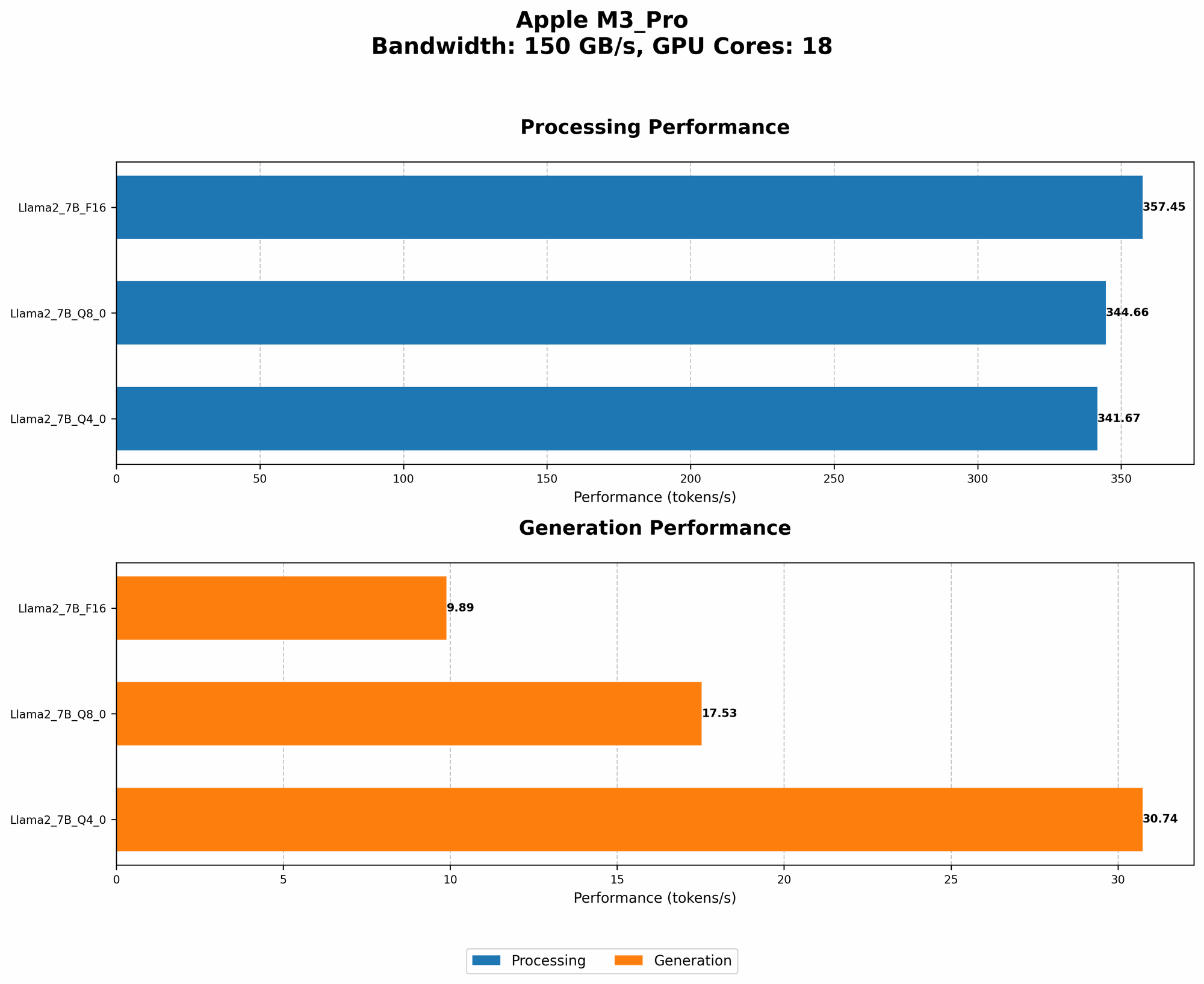
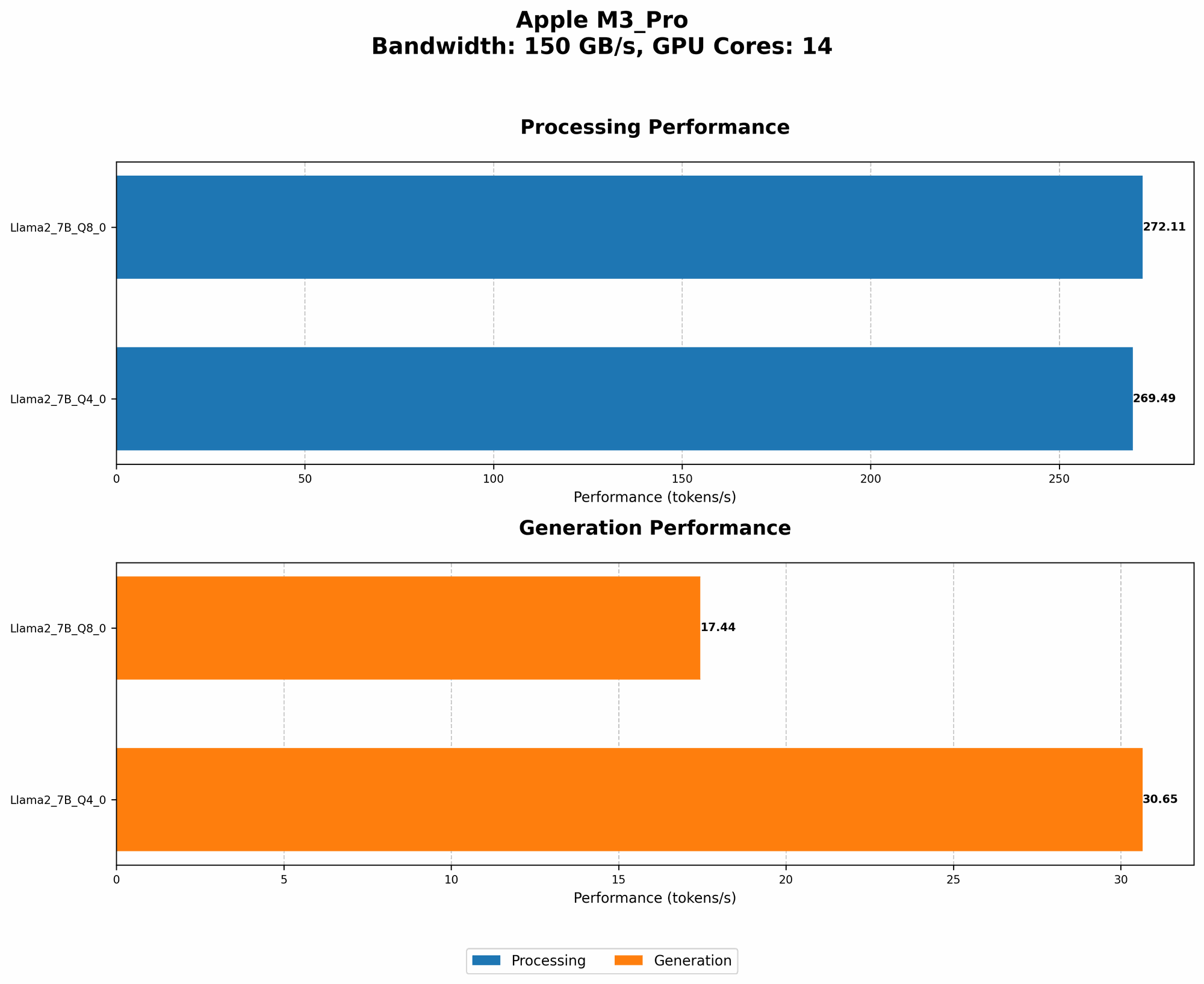
The M3 Pro's performance isn't consistent across different LLM sizes. While it may handle smaller models like Llama 2 7B well, its capabilities might be limited with larger models, depending on your chosen quantization method.
Comparison of M3 Pro and Other Devices for Llama 2 7B
| Device | Model | Processing (Tokens/second) | Generation (Tokens/second) |
|---|---|---|---|
| Apple M3 Pro (150 BW, 18 GPU Cores) | Llama 2 7B Q8_0 | 344.66 | 17.53 |
| Apple M3 Pro (150 BW, 18 GPU Cores) | Llama 2 7B Q4_0 | 341.67 | 30.74 |
How to Overcome This Limitation:
Consider Cloud Alternatives: If you need to run larger models, cloud platforms like Google Colab or Amazon SageMaker offer access to powerful GPUs and TPUs, freeing you from the hardware limitations of your local machine.
Optimize for Efficiency: Explore advanced techniques like model pruning, which removes redundant connections in the neural network, reducing its size and improving performance.
Limitation 3: Limited Generation Speed with Q8_0 Quantization
While Q8_0 quantization can significantly improve processing speed on the M3 Pro, the generation speed still falls short compared to other devices and configurations.
M3 Pro Llama 2 7B Q8_0 Performance Table
| Apple M3 Pro (BW) | GPU Cores | Llama 2 7B Q8_0 Processing (Tokens/second) | Llama 2 7B Q8_0 Generation (Tokens/second) |
|---|---|---|---|
| 150 | 14 | 272.11 | 17.44 |
| 150 | 18 | 344.66 | 17.53 |
The numbers reveal that even though the processing speed is impressive with Q8_0, the generation speed is relatively slow, hovering around 17 tokens/second. This discrepancy highlights the M3 Pro's strengths and weaknesses for different LLM tasks.
How to Overcome This Limitation:
Fine-Tuning for Speed: Experiment with fine-tuning the model specifically for speed. This involves adjusting the architecture or training parameters to prioritize generation speed over accuracy.
Consider Alternative Quantization Methods: While Q80 offers a balance between accuracy and performance, you may find that Q40, though less accurate, provides a significant boost in generation speed.
Limitation 4: Limited Memory for Larger Models
The M3 Pro's 16GB of RAM might not be enough to handle larger LLMs, even with quantization. Loading a massive model into memory can become a bottleneck, leading to performance degradation.
How to Overcome This Limitation:
Utilize External Storage: Explore using external storage solutions like SSDs or NVMe drives to load and store larger models. This effectively expands your RAM capacity.
Utilize Model Sharding: Break down the large model into smaller parts and load them into memory as needed. This technique allows you to work with models that exceed your available RAM without compromising on performance.
Limitation 5: Limited Support for Experimental LLMs
The M3 Pro might not be the ideal choice for running experimental or specialized LLMs, which might require specific hardware or software configurations.
How to Overcome This Limitation:
Use Cloud Platforms: Cloud services often provide access to a wider range of hardware and software options, making it easier to test and deploy experimental LLMs.
Stay Informed: Keep an eye on open-source communities and forums to get the latest information on hardware compatibility and software support for emerging LLMs.
FAQ
What is quantization, and how does it affect LLM performance?
Quantization is a technique that reduces the size of a language model by using smaller data types. Think of it like compressing an image file. You lose some quality, but the file becomes much smaller, allowing you to store and process it faster. The trade-off is that accuracy might slightly decrease.
Can I use a different GPU with my M3 Pro to improve AI performance?
No, the M3 Pro's integrated GPU is not replaceable. However, you can utilize external GPUs through Thunderbolt 4, which opens up more possibilities for specialized hardware like NVIDIA GPUs.
What if I need to run a model larger than Llama 2 7B?
Using external storage, leveraging model sharding, or considering cloud-based solutions are all viable options for handling larger models.
How does the M3 Pro compare to other devices for AI?
The M3 Pro provides decent performance for smaller LLMs like Llama 2 7B, especially with quantization. However, dedicated AI accelerators like TPUs or GPUs generally offer better performance for larger models and tasks requiring high-precision calculations.
Keywords
Apple M3 Pro, AI, LLM, Llama 2, Quantization, F16, Q80, Q40, Token Speed, Generation Speed, Processing Speed, Memory Limitations, Cloud Alternatives, Hardware Acceleration, External Storage, Model Sharding.