5 Limitations of Apple M1 Ultra for AI (and How to Overcome Them)

Introduction
Let's talk about the Apple M1 Ultra, a chip that's making waves in the world of creative professionals and gamers alike. But did you know that this powerful piece of silicon is also a force to be reckoned with in the exciting new world of local large language models (LLMs)? LLMs are the brains behind cutting-edge AI applications, and the M1 Ultra is a great choice for running them on your own machine.
However, even a chip as powerful as the M1 Ultra has its limitations when it comes to AI. In this article, we'll explore some of the key challenges you may face when using the M1 Ultra with LLMs, and how you can overcome these hurdles.
Apple M1 Ultra Token Speed Generation: A Deep Dive
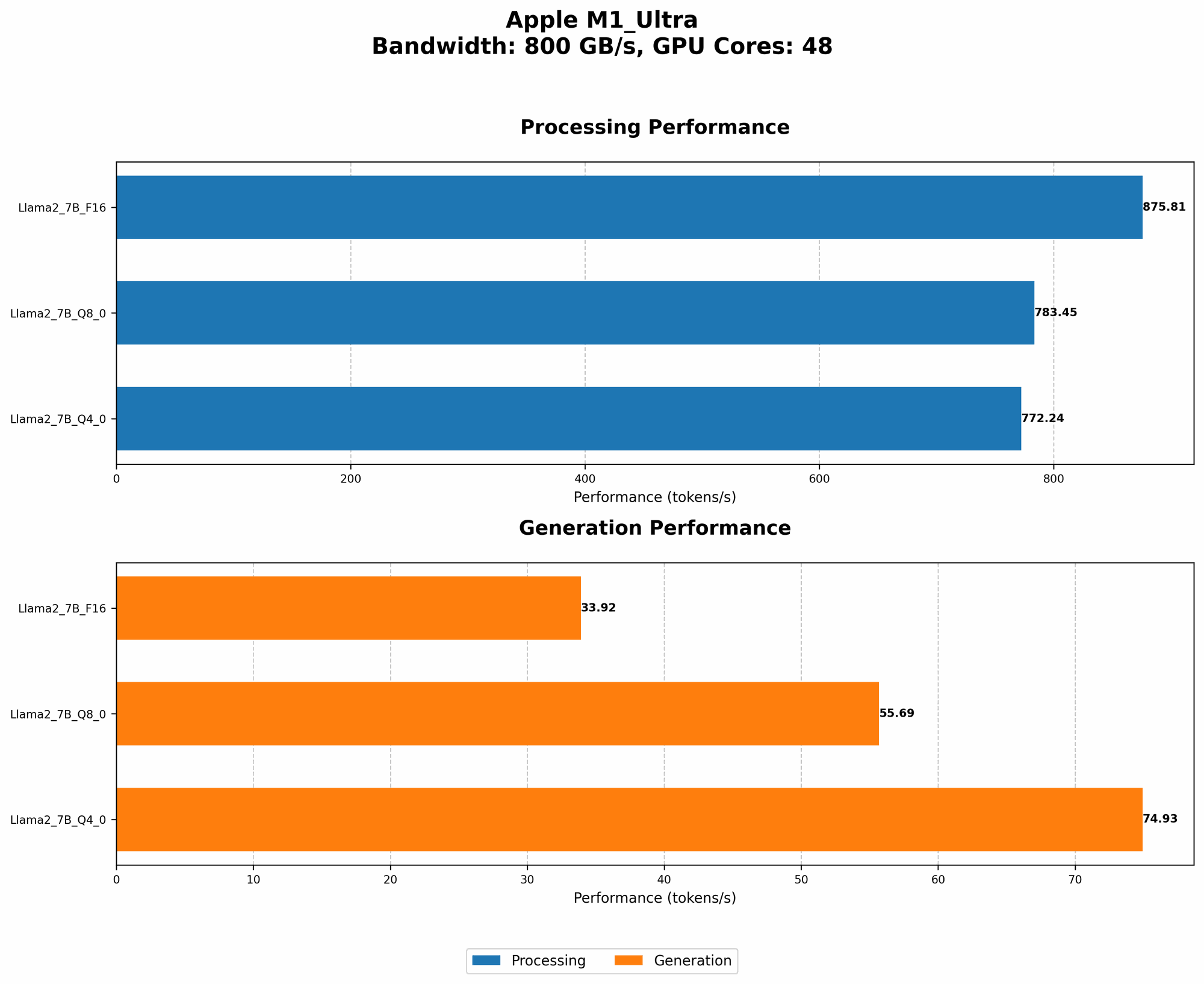
We'll use the M1 Ultra to examine the performance of different LLM models and identify areas where it might struggle. We'll focus on Llama 2 models, which are known for their efficiency and impressive performance. We'll be looking at the "tokens per second" or "token speed" numbers. Think of tokens as the building blocks of language, like the words in a sentence, and "token speed" is a measure of how quickly your M1 Ultra can process these tokens.
Comparison of M1 Ultra with Different Llama 2 Model Configurations
Here's a table summarizing the performance of different Llama 2 models on the M1 Ultra. The data represents tokens per second (tokens/second), which is a measure of how many tokens the device can process in a single second.
| Model (Llama 2) | Precision (Bits) | Processing (tokens/second) | Generation (tokens/second) |
|---|---|---|---|
| 7B | F16 | 875.81 | 33.92 |
| 7B | Q8_0 | 783.45 | 55.69 |
| 7B | Q4_0 | 772.24 | 74.93 |
Note: Unfortunately, we have no data for larger Llama 2 models (like 13B or 70B) running on the M1 Ultra. It's worth noting that while the M1 Ultra excels in processing tokens, the generation speed, which is crucial for real-time interactions and fast responses, falls behind.
Limitations of the Apple M1 Ultra for AI
Now, let's dive into the specific limitations you might encounter when using the M1 Ultra for AI tasks involving LLMs:
1. Memory Bandwidth Limits: A Bottleneck for Larger Models
The M1 Ultra boasts 800 GB/s memory bandwidth. While this is impressive, it can still be a bottleneck when running very large LLMs. Larger models, like the Llama 2 13B or 70B, require a significant amount of memory to store their parameters. If the memory bandwidth is not fast enough, the model's performance can suffer.
Think of it like a busy highway with only a few lanes. The M1 Ultra's memory bandwidth is like the number of lanes on the highway. If you have a lot of cars (data) trying to move quickly (process information), the highway can get congested, slowing everything down.
How to Overcome:
- Consider using smaller models: If you're working with a memory-intensive task, try using a smaller model that fits within the memory bandwidth constraints.
- Quantization techniques: Using techniques like quantization can reduce the memory footprint of the LLM model. Quantization essentially means reducing the number of bits used to represent each parameter in the model. Picture it as using smaller "boxes" to store your belongings - it saves space! The M1 Ultra supports various quantization levels (Q40, Q80), and you can experiment with different levels to find the best balance between memory efficiency and performance.
2. M1 Ultra's Generation Speed: A Catch-22
While the M1 Ultra is a powerhouse for processing, the generation speed, which is crucial for interactive experiences with LLMs, is not as impressive. The M1 Ultra struggles to generate tokens at a speed that provides a seamless user experience for larger models.
How to Overcome:
- Try different model configurations: Experimenting with using different model sizes and quantization levels can help improve the generation speed. You might find that a smaller model or a model with a lower quantization level provides a faster response rate, even if it sacrifices some accuracy.
- Optimize for specific tasks: If your application doesn't require real-time text generation, you can potentially use the M1 Ultra's processing power to perform pre-processing tasks, such as tokenization or embedding generation, to improve overall performance.
3. M1 Ultra's GPU Cores: Number vs. Performance
Even with its impressive 48 GPU cores, the M1 Ultra is not always the best choice for running LLMs that require high-performance GPUs. This is because the cores on the M1 Ultra may not be as powerful as the cores on dedicated GPU cards commonly used for AI acceleration.
How to Overcome:
- Consider using a dedicated GPU: If you need the highest performance for LLM inference, investing in a dedicated GPU card with more powerful cores, like a high-end NVIDIA A100 or H100, might be a better option. However, these cards are significantly more expensive than the M1 Ultra.
4. Limited Support for AI Frameworks: The "It Works, But..." Factor
While the M1 Ultra supports popular AI frameworks like PyTorch and TensorFlow, it's still a relatively new chip, and support for specific LLM libraries and optimizations might lag behind.
How to Overcome:
- Stay updated on framework support: Keep an eye on the latest releases and documentation for popular AI frameworks to see if there are any improvements for the M1 Ultra.
- Contribute to the community: If you encounter limitations, consider reporting them to the developers of the frameworks or LLM libraries to help improve support for the M1 Ultra.
5. Power Consumption Trade-offs: The Cost of Performance
The M1 Ultra is a power-hungry chip, which can be a concern for applications that rely on LLMs.
How to Overcome:
- Explore power-saving techniques: Techniques like quantization can reduce the memory footprint and processing requirements of the model, which can lead to lower power consumption.
- Consider alternative hardware: If power consumption is a major concern, you might want to explore less power-hungry options, such as other Apple chips like the M2 or M2 Pro, or even cloud-based solutions.
FAQ: Putting Your AI Questions to Rest
1. What are LLMs?
LLMs are large language models, a type of AI that excels in understanding and generating human-like text. They are trained on vast amounts of text data and can perform tasks like writing stories, translating languages, and answering questions.
2. Is the M1 Ultra good for AI?
The M1 Ultra is a powerful chip for AI tasks. It's particularly well-suited for running smaller LLMs or models with lower memory requirements. However, its limitations in terms of memory bandwidth, generation speed, and support for specific AI frameworks can pose challenges for certain applications.
Keywords:
Apple M1 Ultra, AI, LLM, Llama 2, Token Speed, Memory Bandwidth, GPU Cores, Generation Speed, Quantization, AI Frameworks, Power Consumption, Tokenization, Embedding Generation