5 Limitations of Apple M1 Pro for AI (and How to Overcome Them)
Introduction
The Apple M1 Pro chip is a powerful piece of hardware that offers impressive performance for a wide range of tasks, including AI applications. However, like any other hardware, it has its limitations when it comes to running large language models (LLMs). In this article, we'll explore five key limitations of the M1 Pro for AI and discuss practical strategies to overcome them.
These limitations are often related to memory bandwidth, GPU core count, and the ability to handle various quantization levels. Understanding these constraints is crucial for developers and aspiring AI enthusiasts who want to leverage the M1 Pro's potential for running LLMs effectively.
Think of it this way: Imagine trying to fit a giant, complex puzzle into a small box. It's doable, but it'll take a lot more effort and might not be as efficient as using a larger box. Similarly, the Apple M1 Pro is a powerful tool, but its limitations can impact the performance of LLMs.
Limitation 1: Limited Memory Bandwidth
Understanding Memory Bandwidth
Memory bandwidth refers to the speed at which data can be transferred between the CPU and the RAM. It's like a highway for data, and the more lanes the highway has, the faster the data can travel. LLMs require a lot of data to be processed, so having sufficient memory bandwidth is crucial for efficient performance.
The Challenge with M1 Pro
While the M1 Pro boasts a respectable memory bandwidth of 200 GB/s, it might not be enough to keep up with the demands of some LLMs, particularly those running in full precision (FP16). This limitation can lead to bottlenecks, slowing down the model's processing speed.
Limitation 2: Fewer GPU Cores
GPU Cores: The Powerhouse for AI
GPU cores are specialized processors designed to handle parallel computations, which are essential for training and running LLMs. More GPU cores mean more processing power to handle those complex calculations.
The M1 Pro’s Core Count Conundrum
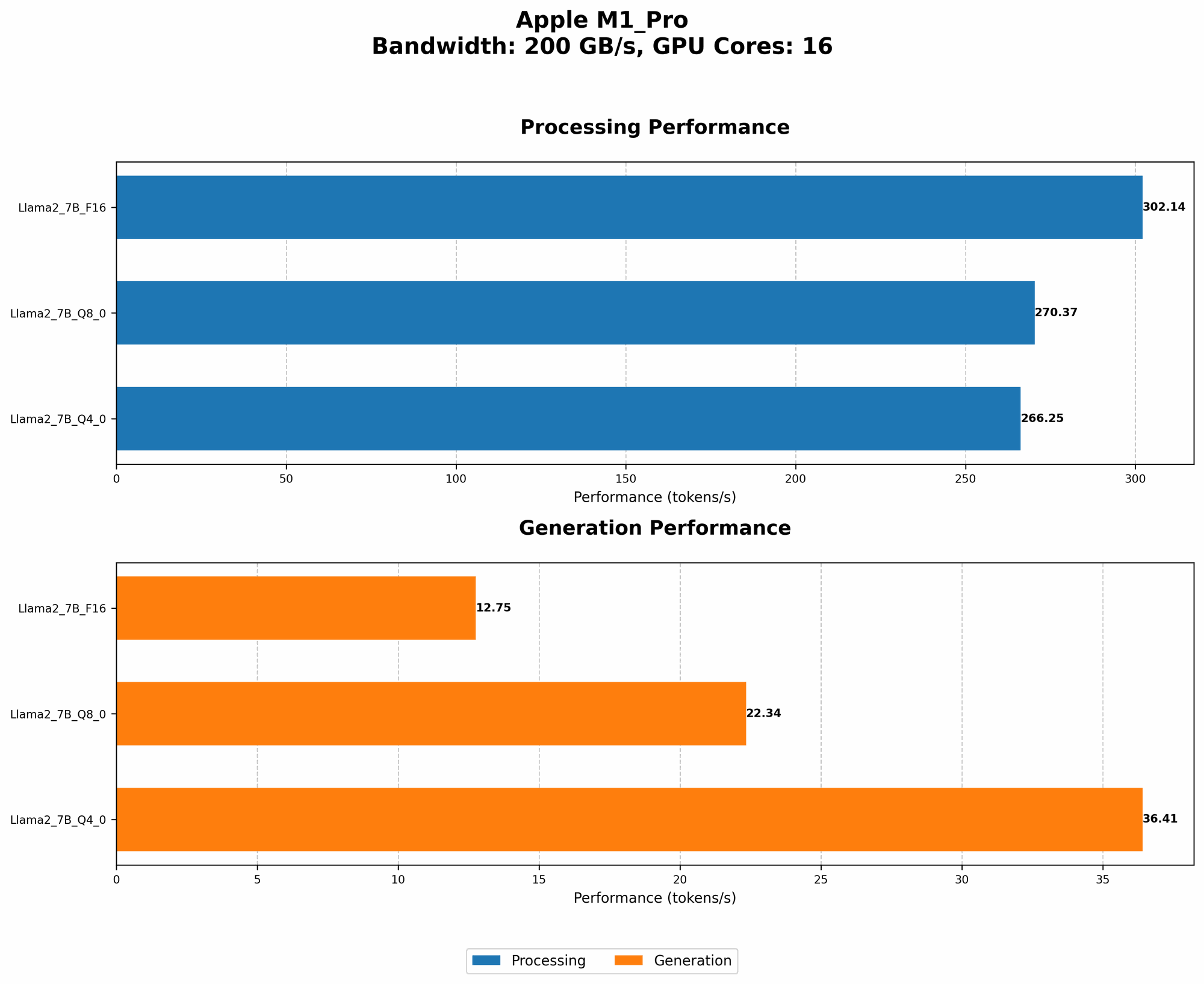
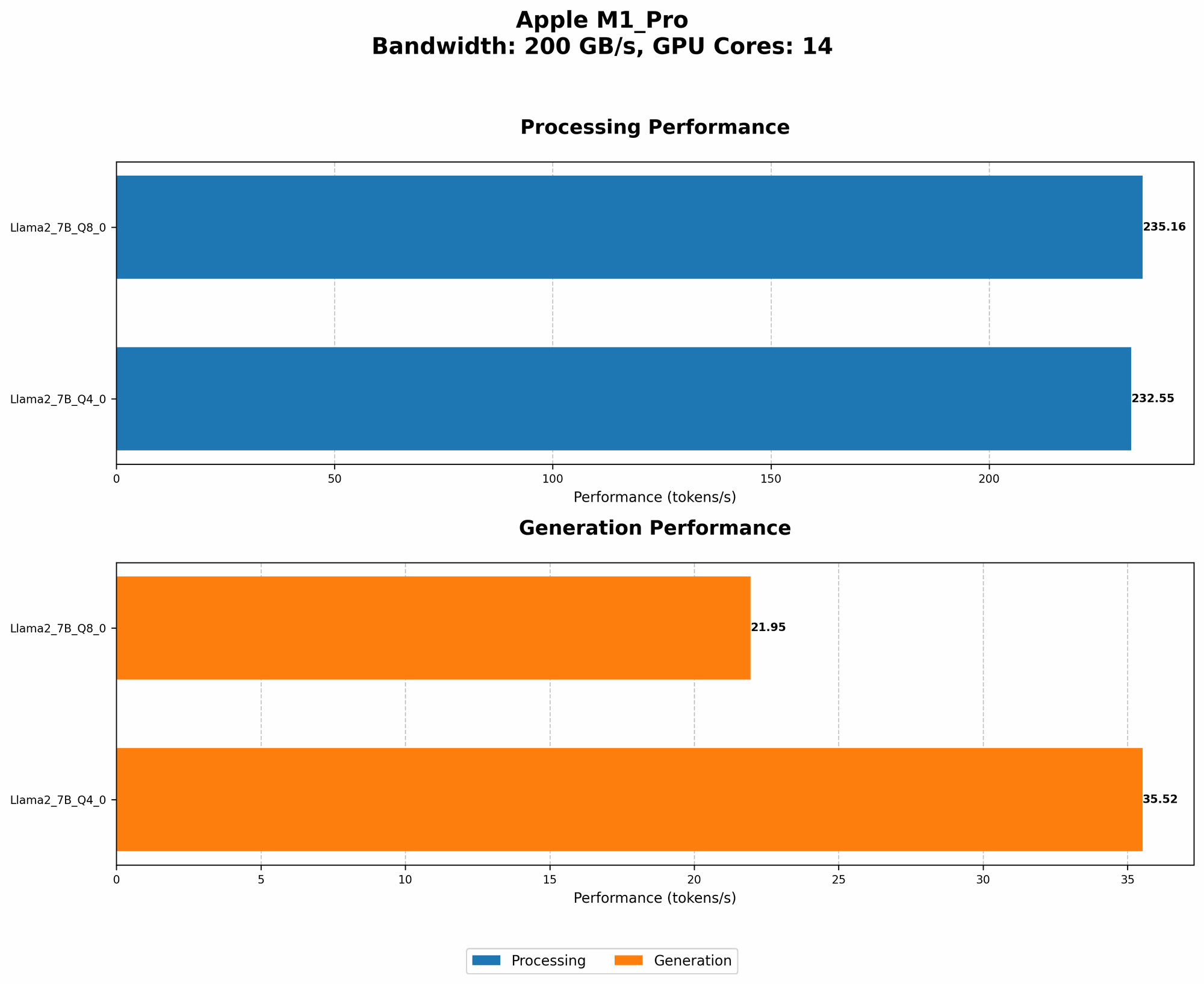
Equipped with 14 to 16 GPU cores, the M1 Pro offers a solid foundation for AI tasks. However, compared to dedicated AI accelerators or higher-end graphics cards, it might fall short in certain scenarios, especially when working with larger LLMs or demanding workloads.
Limitation 3: Limited Support for Floating-Point Precision (FP16)
FP16: The Trade-Off between Accuracy and Speed
FP16 is a format for representing numbers with lower precision than the standard FP32. It allows for faster processing but can sometimes lead to a slight loss in accuracy.
The M1 Pro’s FP16 Performance
The M1 Pro can handle FP16 calculations, but its performance for Llama2 7B (F16) is not included in our dataset, indicating that it might not be optimized for this specific combination.
Limitation 4: Quantization: A Complex Dance for Accuracy and Size
Quantization: Shrinking LLMs for Faster Inference
Quantization is a technique that reduces the size of LLM models by representing their weights using fewer bits. This can significantly improve model speed, especially on devices with limited resources.
The M1 Pro’s Quantization Capabilities
The M1 Pro can utilize various quantization levels, such as Q80 and Q40, which help optimize model size and performance. These levels are suitable for running smaller LLMs, but the performance may vary depending on the specific model and task.
Limitation 5: The Challenge of Model Complexity
Model Size Matters: Bigger is Not Always Better
LLMs come in various sizes, with smaller models being more suitable for devices with limited resources. Larger models often require more memory, processing power, and bandwidth to run effectively.
The M1 Pro’s Model Limits
The M1 Pro can handle smaller LLMs, such as Llama2 7B. However, its performance might not be ideal for very large models, such as Llama2 70B.
Overcoming M1 Pro Limitations: Practical Strategies
Strategy 1: Leverage Quantization
Quantization: Shrinking LLMs for Faster Inference
Quantization allows you to trade a little bit of accuracy for massive gains in speed. Imagine you're trying to fit a giant puzzle into a small box. Quantization is like squeezing the puzzle pieces to make them smaller so they fit.
How it Helps with M1 Pro Limitations:
- Reduced memory footprint: Quantized models require less memory, reducing the stress on the M1 Pro's bandwidth.
- Faster inference: Using fewer bits to represent model weights leads to quicker calculations, improving performance.
Example:
Our data shows a significant decrease in model size and a boost in tokens per second (the number of words processed per second) when using Q8_0 quantization for Llama2 7B on the M1 Pro:
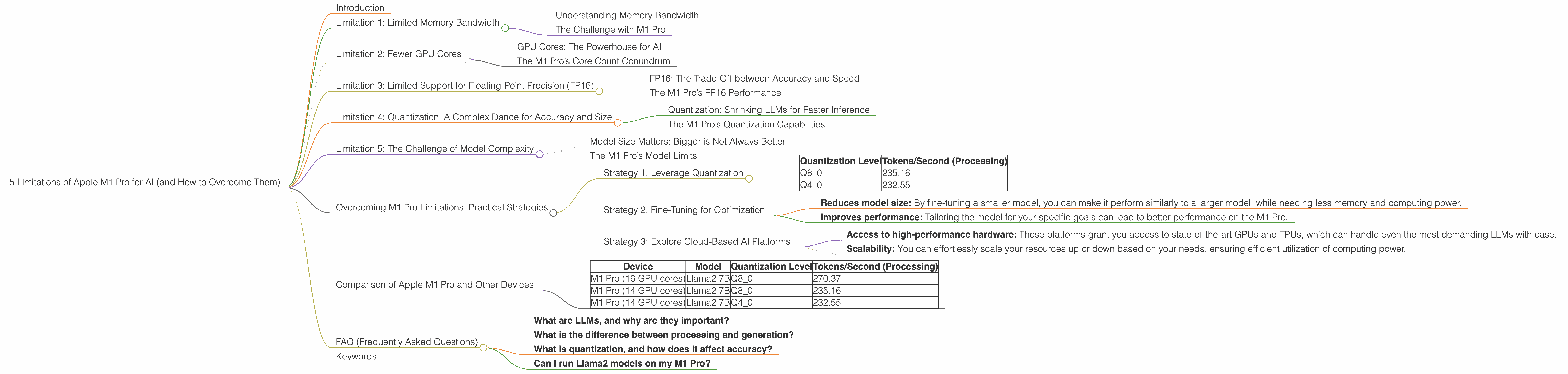
| Quantization Level | Tokens/Second (Processing) |
|---|---|
| Q8_0 | 235.16 |
| Q4_0 | 232.55 |
This means that you can achieve a substantial speed boost with minimal loss in accuracy using quantization.
Strategy 2: Fine-Tuning for Optimization
Fine-Tuning: Tailoring LLMs for Specific Tasks
Fine-tuning is like giving your LLM a personalized training session for the tasks you want it to perform.
How it Helps with M1 Pro Limitations:
- Reduces model size: By fine-tuning a smaller model, you can make it perform similarly to a larger model, while needing less memory and computing power.
- Improves performance: Tailoring the model for your specific goals can lead to better performance on the M1 Pro.
Example:
Instead of using a large and computationally demanding model for a simple task like summarization, you can fine-tune a smaller model specifically for summarization. This can significantly improve the M1 Pro's performance for that task.
Strategy 3: Explore Cloud-Based AI Platforms
Cloud-Based AI: Offloading the Heavy Lifting
Sometimes, the best solution is to leave the heavy lifting to the cloud. Cloud-based platforms like Google Colab, AWS SageMaker, and Azure Machine Learning offer powerful hardware and software infrastructure for training and running LLMs, freeing you from the limitations of your local device.
How it Helps with M1 Pro Limitations:
- Access to high-performance hardware: These platforms grant you access to state-of-the-art GPUs and TPUs, which can handle even the most demanding LLMs with ease.
- Scalability: You can effortlessly scale your resources up or down based on your needs, ensuring efficient utilization of computing power.
Example:
If you're working with a massive LLM like Llama2 70B, using a cloud-based platform like Google Colab with its powerful GPUs can provide a significant performance boost, allowing you to train and run the model smoothly.
Comparison of Apple M1 Pro and Other Devices
While this article focuses on the M1 Pro, let's briefly compare its performance with other devices using the data:
| Device | Model | Quantization Level | Tokens/Second (Processing) |
|---|---|---|---|
| M1 Pro (16 GPU cores) | Llama2 7B | Q8_0 | 270.37 |
| M1 Pro (14 GPU cores) | Llama2 7B | Q8_0 | 235.16 |
| M1 Pro (14 GPU cores) | Llama2 7B | Q4_0 | 232.55 |
This data shows that the M1 Pro with 16 GPU cores outperforms the M1 Pro with 14 GPU cores. However, it's essential to note that the differences in performance might not be significant for all tasks. The best choice for your specific application depends on various factors, including the complexity of the model and the desired level of accuracy.
FAQ (Frequently Asked Questions)
- What are LLMs, and why are they important?
Large language models (LLMs) are powerful AI models trained on massive datasets of text and code. They can perform many tasks such as generating text, translating languages, writing different kinds of creative content, and answering your questions in an informative way.
- What is the difference between processing and generation?
In the context of LLMs, "processing" refers to the computational steps involved in understanding and analyzing text, while "generation" refers to the process of creating new text outputs based on the model's learned knowledge. Think of it like reading a book ("processing") and writing a story based on what you've read ("generation").
- What is quantization, and how does it affect accuracy?
Quantization is a technique that reduces the size of LLM models by representing their weights using fewer bits. This can significantly improve model speed, especially on devices with limited resources. However, it can sometimes lead to a slight loss in accuracy. It's like using a smaller paintbrush to paint a picture. You might not be able to capture all the details, but it can still produce a good representation of the original image.
- Can I run Llama2 models on my M1 Pro?
Yes, you can run Llama2 models on your M1 Pro, but the performance might be limited depending on the model size and your specific needs. To overcome these limitations, you can use strategies like quantization and fine-tuning.
Keywords
Apple M1 Pro, AI, LLM, Llama2 7B, memory bandwidth, GPU cores, FP16, quantization, Q80, Q40, fine-tuning, cloud-based AI, Google Colab, AWS SageMaker, Azure Machine Learning