5 Key Factors to Consider When Choosing Between NVIDIA 4090 24GB and NVIDIA 3090 24GB x2 for AI

Introduction
The world of Large Language Models (LLMs) is exploding, and running these behemoths locally is becoming increasingly popular for developers and enthusiasts. But with a plethora of hardware options available, choosing the right setup can be a daunting task. Two popular contenders are NVIDIA's 4090 24GB and the 3090 24GB x2 configuration. This article will dive deep into the performance differences between these two setups, helping you find the perfect fit for your AI projects.
Performance Analysis: Comparing NVIDIA 4090 24GB and NVIDIA 3090 24GB x2 for LLM Processing
Choosing between a single NVIDIA 4090 24GB and two NVIDIA 3090 24GB cards can feel like weighing the pros and cons of a Ferrari versus a pair of vintage muscle cars. Both setups can get you where you need to go (handling LLMs), but they each have their unique strengths and weaknesses.
Token Speed Generation When Running Llama 3 8B
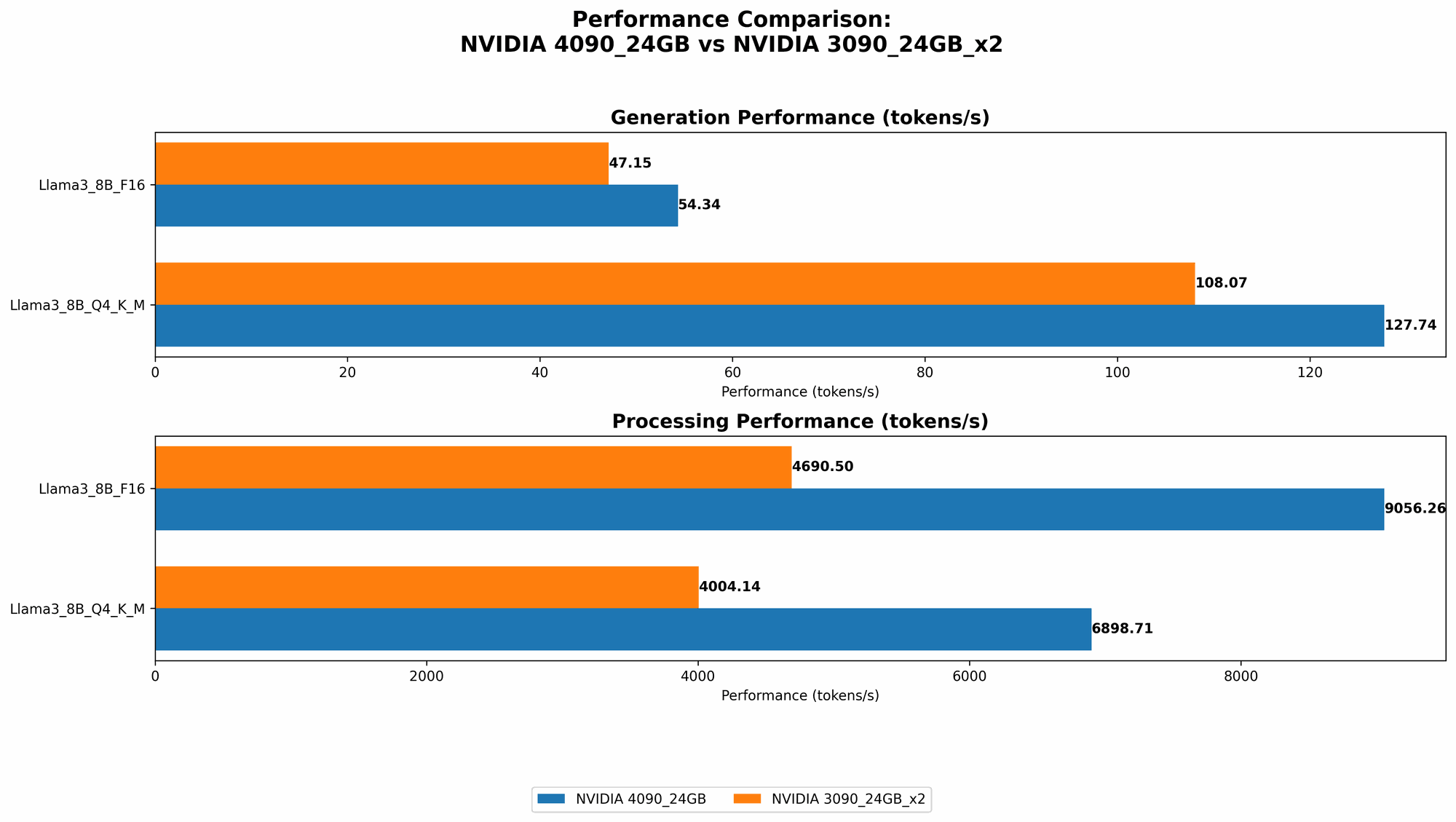
The 4090 24GB reigns supreme in the token generation department for the Llama 3 8B model. It's the faster beast when using both 4-bit quantization (Q4) and 16-bit floating-point (F16) precision. * Let's break it down: * With Q4, the 4090 24GB achieves an astonishing 127.74 tokens per second, compared to the 3090 24GB x2 combo at 108.07 tokens per second. The 4090 is 18% faster. * When using F16, the 4090 still comes out on top at 54.34 tokens per second, while the 3090 x2 produces 47.15 tokens per second. This translates to about a 15% performance lead for the 4090.
Think of it like this: If you are training a model to write poetry, the 4090 is the Shakespeare of the GPU world, churning out beautiful lines at a faster pace.
Token Speed Generation When Running Llama 3 70B
The 70B Llama 3 model paints a different picture. With a larger model, the 3090 24GB x2 configuration manages to squeeze out a better performance score - but only when using Q4.
- With Q4, the 3090 24GB x2 delivers 16.29 tokens per second. Unfortunately, there are no benchmarks for the 4090 24GB under these conditions.
- The 4090 24GB and the 3090 24GB x2 do not have performance benchmarks for the F16 configuration.
This means that when dealing with very large models like the 70B Llama 3, the 3090 x2 configuration can be a more suitable option, especially if you prioritize Q4 for speed.
Processing Speed Analysis: Comparing Token Processing with Different Precisions
Let's look at the processing side of LLMs. This pertains to how fast the GPU can crunch the numbers to understand and interpret the data for text generation. Here's a quick breakdown:
Llama 3 8B - Q4 and F16
- The 4090 24GB again demonstrates its prowess with a processing speed of 6898.71 tokens per second when using Q4. This is about 72% faster than the 3090 24GB x2 configuration, which clocked in at 4004.14 tokens per second.
- The 4090 24GB also surpasses the 3090 24GB x2 in the F16 scenario, processing at 9056.26 tokens per second compared to 4690.5 tokens per second. The 4090 is nearly 93% faster!
Llama 3 70B - Q4
- Although the 4090 24GB performance is unknown here, the 3090 24GB x2 manages a respectable processing speed of 393.89 tokens per second.
Choosing the Right GPU: Practical Recommendations
Here's the bottom line:
- For smaller models like the 8B Llama 3: The 4090 24GB is the clear winner, offering significantly faster token generation and processing speeds, regardless of the precision used.
- For larger models like the 70B Llama 3: The 3090 24GB x2 configuration seems to have the edge when using Q4 precision, but lacks performance data for F16. This might necessitate more experimentation and research.
Factors to Consider for Your AI Projects
While the performance data helps us compare the hardware, several factors heavily influence the perfect device choice.
1. Model Size and Complexity
As we saw with the Llama 3 models, both 8B and 70B, the performance can shift based on model size. Larger models require more resources (memory, processing power), and the 4090 24GB might struggle to keep up with very large models, especially when using F16 precision.
2. Precision and Quantization Techniques
Quantization is a technique where you reduce the precision of the model's weights, allowing for faster inference and reduced memory usage. Q4, Q8, and F16 are popular quantization techniques, each with its own tradeoffs.
* Q4 takes up less memory but might sacrifice accuracy. F16 offers better accuracy but requires more memory.
Think of it like this: If you are working with a budget airline, you might be willing to sacrifice some comfort for a cheaper ticket. Similarly, using Q4 may be more attractive if you prioritize speed and memory efficiency, while F16 might be preferred if you prioritize accuracy.
3. Power Consumption and Cost
The 4090 24GB might have a higher power consumption than the 3090 24GB x2 setup, ultimately impacting your electricity bill. Consider the cost of both the hardware and the running costs associated with your setup.
4. Cooling and Noise
Multiple GPUs can pose a challenge in terms of cooling and noise levels. While powerful, ensuring proper cooling can be crucial for optimal performance and longevity.
5. Software and Frameworks
The compatibility of your chosen GPU with the software and AI frameworks you plan to use is essential. Do some research to ensure that your chosen setup works smoothly with your preferred tools.
FAQs
1. How do I choose the best GPU for my LLM project?
Answer: The best GPU for your project depends on the specific requirements. Consider the model size, the desired accuracy, performance tradeoffs between different precision levels, and the overall cost of the setup (including power consumption).
2. What are the best practices for setting up and managing my AI hardware?
Answer: It's crucial to ensure proper cooling, monitor your system's temperature, and choose a suitable power supply. Stay up-to-date with the latest drivers and software updates for your GPU.
3. Is it better to run my LLM on the cloud or locally?
Answer: Running your LLM locally provides more control and potentially lower costs (especially for small to medium-sized models). However, cloud-based solutions offer scalability and convenience, especially for larger models and complex projects.
Keywords
NVIDIA 4090 24GB, NVIDIA 3090 24GB x2, LLM, Large Language Model, AI, Machine Learning, Deep Learning, Token Generation, Processing Speed, Quantization, Q4, F16, Llama 3, 8B, 70B, Performance Comparison, GPU, Hardware, Power Consumption, Cost, Cooling, Software, Framework, Cloud Computing, Local Inference