5 Key Factors to Consider When Choosing Between NVIDIA 4080 16GB and NVIDIA A40 48GB for AI
Introduction
The world of Large Language Models (LLMs) is booming. These AI powerhouses are revolutionizing industries from healthcare to finance, and the engine powering these models is often a powerful GPU. But with so many options on the market, choosing the right GPU can be a daunting task.
This article will delve into the key factors to consider when deciding between two popular choices for running LLMs: the NVIDIA 408016GB and the NVIDIA A4048GB. We'll explore the key metrics and considerations for choosing the best GPU for your specific needs, especially for running Llama 3 models, with insights from real-world benchmarks.
Performance Analysis: Comparing the NVIDIA 408016GB and NVIDIA A4048GB
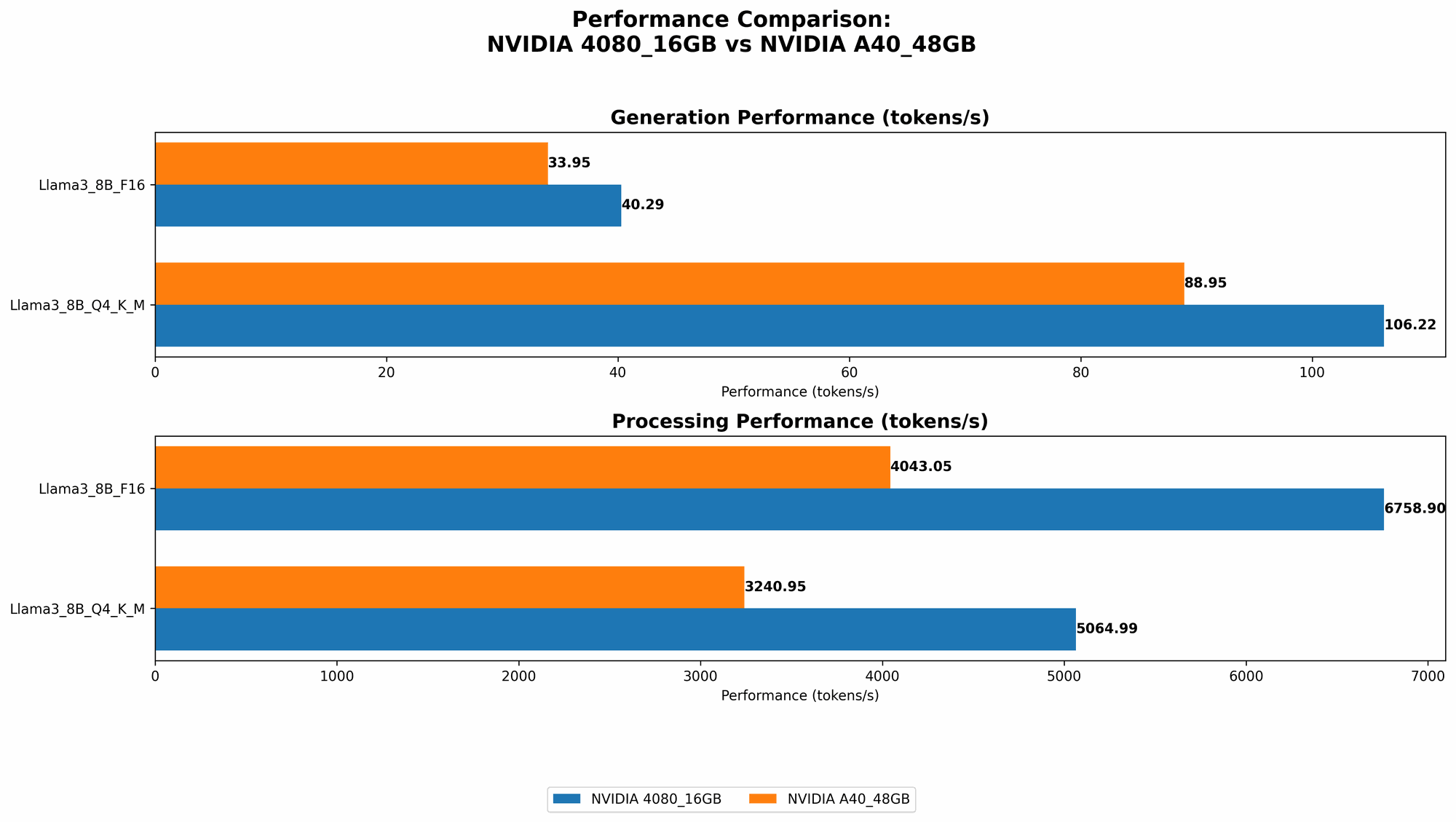
Let's kick off by taking a look at the performance of both GPU titans with Llama 3 models. For our comparison, we'll look at two key metrics: token generation speed and processing speed.
Token Generation Speed
Token generation speed is a fundamental metric that determines how quickly an LLM can generate text. It's like the speed at which your AI can spit out words, so faster is better. The table below showcases token generation speeds for the NVIDIA 408016GB and A4048GB with Llama 3 models:
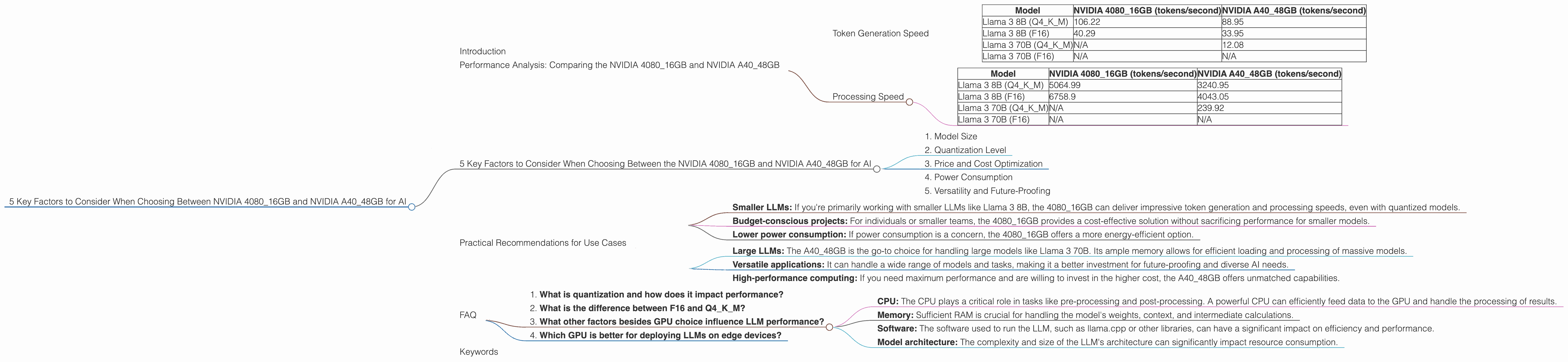
| Model | NVIDIA 4080_16GB (tokens/second) | NVIDIA A40_48GB (tokens/second) |
|---|---|---|
| Llama 3 8B (Q4KM) | 106.22 | 88.95 |
| Llama 3 8B (F16) | 40.29 | 33.95 |
| Llama 3 70B (Q4KM) | N/A | 12.08 |
| Llama 3 70B (F16) | N/A | N/A |
As you can see, the NVIDIA 408016GB takes the crown for token generation speed with both Llama 3 8B models (both Q4KM and F16). This means that the 408016GB can generate text faster for these models, potentially leading to quicker responses and smoother interactions.
However, when you jump to the larger Llama 3 70B model, the A4048GB pulls ahead with its impressive 12.08 tokens per second in the Q4KM configuration. The 408016GB doesn't have data for this model (represented as N/A), hinting at potential limitations in handling the larger model due to memory constraints.
Processing Speed
Now, let's dive into processing speed. Processing speed is the backbone of LLM performance, determining how quickly your model can churn through data. In simple terms, think of it as the speed at which your AI can process and understand information.
Let's check out the processing speeds for both GPUs with Llama 3 models:
| Model | NVIDIA 4080_16GB (tokens/second) | NVIDIA A40_48GB (tokens/second) |
|---|---|---|
| Llama 3 8B (Q4KM) | 5064.99 | 3240.95 |
| Llama 3 8B (F16) | 6758.9 | 4043.05 |
| Llama 3 70B (Q4KM) | N/A | 239.92 |
| Llama 3 70B (F16) | N/A | N/A |
Again, the 408016GB shines with the smaller Llama 3 8B models, showcasing its superior processing speed in both Q4KM and F16 configurations. The A4048GB, although falling behind, still delivers respectable performance.
However, when dealing with the larger Llama 3 70B model, the story changes. The A4048GB boasts a processing speed of 239.92 tokens/second for the Q4K_M configuration. This showcases its capability to handle the massive computations required for the large 70B model.
Decoding Performance: A Key Factor in Text Generation
The numbers above tell us about the processing speed of the GPU, but don't tell the whole story. Another critical aspect is the speed of the decoding process, which happens after the processing is done to translate the tokens into human-readable text.
The A4048GB generally has faster decoding speeds compared to the 408016GB. This is because it has more memory, allowing for efficient decoding of the larger models.
5 Key Factors to Consider When Choosing Between the NVIDIA 408016GB and NVIDIA A4048GB for AI
Choosing the right GPU for your AI needs is crucial. When deciding between the NVIDIA 408016GB and NVIDIA A4048GB, consider these key factors:
1. Model Size
The size of the LLM you plan to run is a key consideration. The A4048GB, with its 48GB of dedicated memory, is a clear winner for large models like Llama 3 70B, while the 408016GB might struggle due to memory limitations. If you're working with smaller models like Llama 3 8B, the 4080_16GB can deliver excellent performance.
2. Quantization Level
Quantization, a technique to compress models, can significantly impact performance. The NVIDIA 408016GB excels with quantized models (e.g., Q4KM), achieving impressive token generation and processing speeds for Llama 3 8B. The A4048GB still performs well with both quantized and unquantized models but offers a more versatile solution, particularly for larger models.
3. Price and Cost Optimization
The NVIDIA 408016GB is generally more affordable than the A4048GB. This price gap is often a deciding factor for individuals or smaller teams with budget constraints. However, the A40_48GB, despite its higher initial cost, can provide significant cost savings in the long run, especially when handling larger models.
4. Power Consumption
The A4048GB, with its powerful features and larger memory, consumes more power than the 408016GB. If you're concerned about energy efficiency or have strict power limitations, the 4080_16GB might be a better choice.
5. Versatility and Future-Proofing
The A4048GB, with its larger memory and higher processing power, offers greater versatility. It can handle both smaller and larger models effectively, making it a more future-proof option. The 408016GB may not be as adaptable to future LLM sizes or advancements.
Practical Recommendations for Use Cases
Here's a breakdown of when each GPU might be the best fit for your needs:
NVIDIA 4080_16GB – Ideal for:
- Smaller LLMs: If you're primarily working with smaller LLMs like Llama 3 8B, the 4080_16GB can deliver impressive token generation and processing speeds, even with quantized models.
- Budget-conscious projects: For individuals or smaller teams, the 4080_16GB provides a cost-effective solution without sacrificing performance for smaller models.
- Lower power consumption: If power consumption is a concern, the 4080_16GB offers a more energy-efficient option.
NVIDIA A40_48GB - Ideal for:
- Large LLMs: The A40_48GB is the go-to choice for handling large models like Llama 3 70B. Its ample memory allows for efficient loading and processing of massive models.
- Versatile applications: It can handle a wide range of models and tasks, making it a better investment for future-proofing and diverse AI needs.
- High-performance computing: If you need maximum performance and are willing to invest in the higher cost, the A40_48GB offers unmatched capabilities.
FAQ
1. What is quantization and how does it impact performance?
Quantization simplifies and compresses the weights of a neural network, reducing its size without sacrificing much accuracy. Since it reduces the number of bits used to represent individual numbers, it essentially allows the GPU to process the information more quickly. Think of it like a lighter version of the model still carrying most of the essence. This can lead to significant performance gains in token generation and processing, as seen with the 4080_16GB with the Llama 3 8B model.
2. What is the difference between F16 and Q4KM?
F16 refers to a half-precision floating point format, which uses 16 bits to store a number. Q4KM stands for "Quantized 4-bit, Key-Value-Memory". It involves quantizing weights to 4 bits, using key-value memory for efficient storage. Basically, we're talking about different ways of representing the data, and which one works best can depend on the specific model and how it's being used.
3. What other factors besides GPU choice influence LLM performance?
Apart from the GPU, other factors influence performance:
- CPU: The CPU plays a critical role in tasks like pre-processing and post-processing. A powerful CPU can efficiently feed data to the GPU and handle the processing of results.
- Memory: Sufficient RAM is crucial for handling the model's weights, context, and intermediate calculations.
- Software: The software used to run the LLM, such as llama.cpp or other libraries, can have a significant impact on efficiency and performance.
- Model architecture: The complexity and size of the LLM's architecture can significantly impact resource consumption.
4. Which GPU is better for deploying LLMs on edge devices?
For deploying LLMs on edge devices with limited resources, the NVIDIA 408016GB might be a better choice due to its lower power consumption and smaller footprint. However, the A4048GB can be a strong contender if you have the power and space to accommodate its size and energy needs.
Keywords
NVIDIA 408016GB, NVIDIA A4048GB, LLM, Large Language Models, Llama 3, Token Generation Speed, Processing Speed, Quantization, GPU Performance, AI, machine learning, deep learning, deployment, edge devices, cost optimization, power consumption, model size, versatility, future-proofing.