5 Key Factors to Consider When Choosing Between NVIDIA 3070 8GB and NVIDIA A40 48GB for AI

Introduction
Running large language models (LLMs) locally is becoming increasingly popular. From researchers exploring new model architectures to developers building AI-powered applications, having the ability to tinker with LLMs directly on your own hardware offers control, agility, and valuable insights. However, choosing the right hardware setup can be a daunting task, especially when considering the vast array of GPUs available.
This guide will delve into the world of LLMs and compare two popular contenders: the NVIDIA GeForce RTX 3070 8GB and the NVIDIA A40 48GB. We'll examine their strengths and weaknesses when running various LLMs, providing you with the information you need to make an informed decision based on your specific needs and budget.
Think of it as a friendly guide to help you navigate the world of LLMs and choose your perfect hardware companion!
Understanding LLMs and the Role of GPUs
Let's start by taking a quick trip down memory lane. LLMs are powerful AI models that are trained on massive amounts of text data. This training process lets them understand and generate human-like text. Examples include GPT-3, LaMDA, and Bard, but there are many, many more.
Now, why GPUs? We can think of a GPU as a super-fast calculator specifically designed for parallel processing. Imagine having thousands of tiny calculators working together to solve complex problems in a blink of an eye. This is exactly what GPUs excel at, making them perfect for the intensive computations required by LLMs.
Performance Analysis: NVIDIA 30708GB vs. NVIDIA A4048GB
We'll focus on Llama 3 models, comparing both GPUs' performance on different model sizes and precision levels. We'll use the following terminology:
- Q4KM: Refers to a specific quantization scheme used to reduce the model's memory footprint while maintaining accuracy. Quantization is like compressing the model, making it smaller and faster to run.
- F16: Represents a 16-bit floating point precision format that is often used in AI models.
- Generation: This represents the time it takes to generate a specific number of tokens (words or characters) by the LLM.
- Processing: Indicates the time it takes for the LLM to process a specific number of tokens.
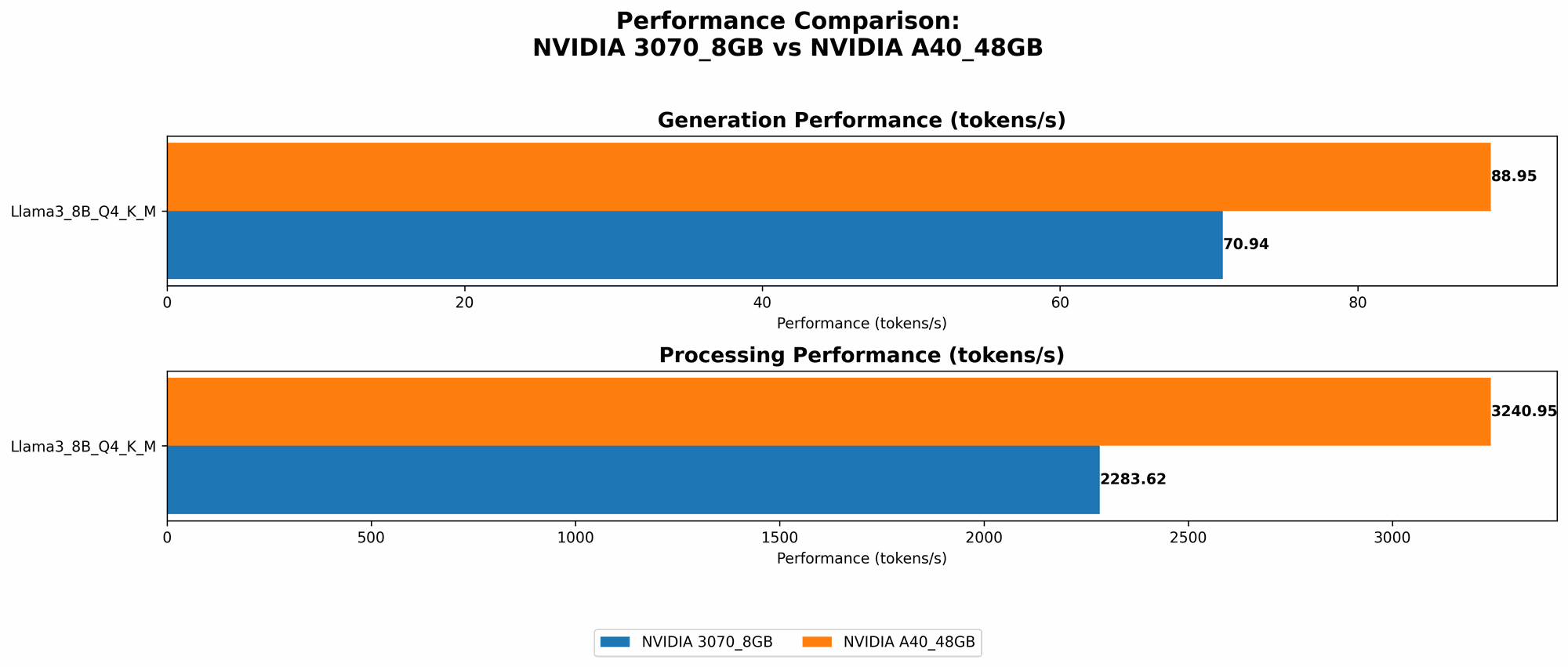
Comparison of NVIDIA 30708GB and NVIDIA A4048GB for Llama 3 8B:
Here's a table summarizing the major performance differences between the devices:
| Metric | NVIDIA 3070_8GB | NVIDIA A40_48GB |
|---|---|---|
| Llama 3 8B Q4KM Generation (Tokens/Second) | 70.94 | 88.95 |
| Llama 3 8B F16 Generation (Tokens/Second) | - | 33.95 |
| Llama 3 8B Q4KM Processing (Tokens/Second) | 2283.62 | 3240.95 |
| Llama 3 8B F16 Processing (Tokens/Second) | - | 4043.05 |
Observations:
- The A40 significantly outperforms the 3070 in terms of both generation and processing speed. This is due to its more powerful compute capabilities and larger memory.
- The A40 can run Llama 3 8B in both Q4KM and F16 precision, while the 3070 can only handle Q4KM. The increased memory of the A40 allows it to accommodate larger models and higher precision levels.
Comparison of NVIDIA 30708GB and NVIDIA A4048GB for Llama 3 70B:
It is important to note that there is no data available for the 3070 8GB when running Llama 3 70B. This means that the 3070 may not be able to run this larger model, likely due to memory constraints. However, the A40 handles it with ease.
| Metric | NVIDIA 3070_8GB | NVIDIA A40_48GB |
|---|---|---|
| Llama 3 70B Q4KM Generation (Tokens/Second) | - | 12.08 |
| Llama 3 70B F16 Generation (Tokens/Second) | - | - |
| Llama 3 70B Q4KM Processing (Tokens/Second) | - | 239.92 |
| Llama 3 70B F16 Processing (Tokens/Second) | - | - |
Observations:
- The A40 can handle Llama 3 70B in Q4KM precision, demonstrating its ability to run larger models.
- The A40's performance is significantly slower when running the 70B model compared to the 8B, indicating a trade-off between model size and speed.
- The lack of data for the 3070 suggests that it may not be suitable for running this larger model, likely due to its limited memory.
Key Factors to Consider When Choosing Between NVIDIA 30708GB and NVIDIA A4048GB
1. Model Size and Precision:
- For smaller models (8B and below), both GPUs can provide decent performance and can be suitable depending on your budget.
- For larger models (70B and above), the A40 is the clear winner thanks to its significantly larger memory capacity. However, you need to be prepared to pay a premium for this performance.
2. Budget:
- The NVIDIA 3070 8GB is a more budget-friendly option, making it attractive for individuals or small teams.
- The A40 is a high-end, enterprise-grade GPU that comes with a hefty price tag. This is the optimal choice for organizations with the resources to invest in state-of-the-art AI infrastructure.
2. Power Consumption:
- The A40 has much higher power consumption than the 3070. This might be a significant factor if you're concerned about energy costs or have limitations on your power supply.
3. Availability:
- NVIDIA 3070 8GB is readily available in the market and can be purchased from various vendors.
- The A40 is primarily targeted at enterprise customers and may require special ordering or contracts.
4. Use Cases:
- The 3070 8GB is a good choice for running smaller models for personal use or experimenting with AI applications.
- The A40 is ideal for organizations working on larger models, real-time AI applications, or research projects that require high-performance computing.
Practical Recommendations:
- If you're just starting out with LLMs and have a limited budget, the 3070 8GB can be a great entry point. This device allows you to explore smaller models and gain valuable hands-on experience.
- For serious AI development or research, the A40 is the go-to choice, even though it comes with a higher price tag.
- Consider your project's long-term goals: If you anticipate working with larger models in the future, the A40 might be the better investment in the long run.
FAQs:
Q: Can I use a non-NVIDIA GPU for running LLMs?
A: While NVIDIA GPUs dominate the field, other manufacturers like AMD and Intel are also making strides in AI hardware. You can check out their offerings and explore benchmarks for their GPUs to see how they compare to NVIDIA.
Q: What are some other factors to consider when choosing a GPU for LLM inference?
A: You should also consider factors like the GPU's memory bandwidth, compute power, and software compatibility. Different GPUs have different strengths and weaknesses, so it's important to do your research and carefully consider your specific needs.
Q: What are some alternatives to the NVIDIA 3070 and A40?
A: If you're looking for a powerful GPU that's more budget-friendly than the A40, Nvidia's GeForce RTX 40 series offers a great balance of performance and price. You can also explore AMD's Radeon RX 7000 series or Intel's Arc GPUs.
Q: How do I install and run an LLM on my GPU?
A: You can use tools like llama.cpp, a popular open-source implementation of LLMs, or libraries such as PyTorch or TensorFlow to run models on your GPU. These tools provide frameworks and libraries that simplify the process of loading, running, and interacting with LLMs.
Q: What about cloud-based solutions for running LLMs?
A: Cloud providers like Google Cloud, Amazon Web Services (AWS), and Microsoft Azure offer powerful cloud-based GPUs (TPUs, A100s) that can handle even the most demanding LLMs. This can be an attractive option for developers who need access to high-performance hardware without the need for large upfront investments.
Keywords:
NVIDIA 3070, NVIDIA A40, LLM, AI, Machine Learning, Deep Learning, GPU, Token Generation, Performance, Budget, Llama 3, Quantization, Memory, Power Consumption, Cloud Computing