5 Key Factors to Consider When Choosing Between Apple M1 Ultra 800gb 48cores and NVIDIA A100 PCIe 80GB for AI
Introduction
The world of Large Language Models (LLMs) is buzzing with excitement, and everyone wants a piece of the AI pie. These powerful models can generate human-like text, translate languages, write different kinds of creative content, and answer your questions in an informative way. But running these LLMs locally can be a real challenge, requiring specialized hardware capable of handling the massive computational workload.
This article dives deep into the exciting world of LLM hardware, comparing two powerful contenders: the Apple M1 Ultra 800GB 48-core and the NVIDIA A100 PCIe 80GB. We'll explore the key factors you need to consider when choosing between these giants for your AI projects.
Comparison of Apple M1 Ultra and NVIDIA A100
Let's dive into the key factors that influence your decision between these two powerful devices:
1. LLM Model Compatibility and Performance
The first and most crucial factor is LLM model compatibility and performance. Each device shines in different areas, impacting your choice depending on the size and type of LLM you're working with.
Understanding Model Sizes:
- 7B Model: Imagine it as a small, agile sprinter. It's fast and efficient for basic tasks.
- 70B Model: Think of this as a marathon runner. It's powerful but needs more resources and time to operate effectively.
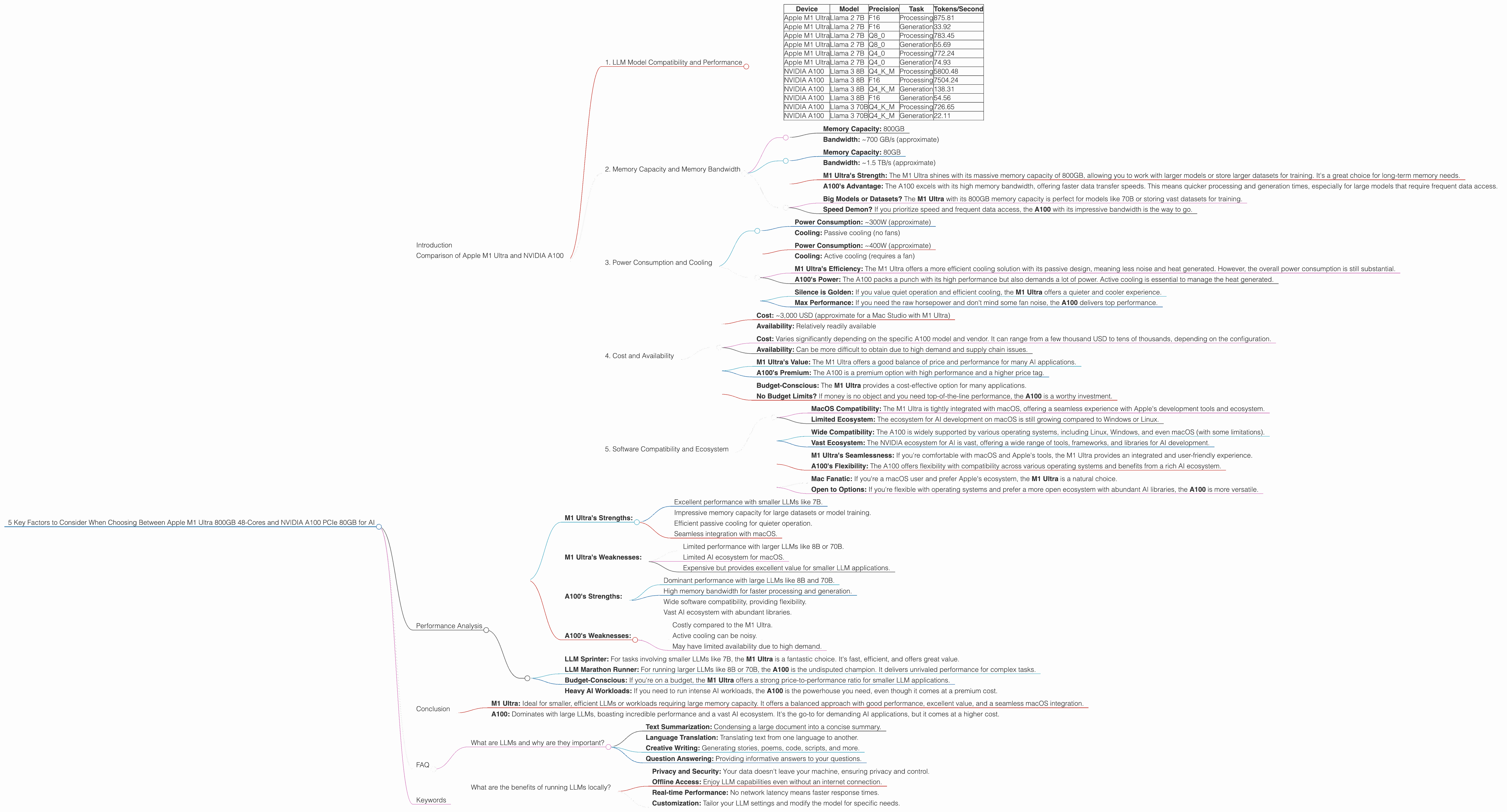
Here's a breakdown of model performance based on the data provided:
| Device | Model | Precision | Task | Tokens/Second |
|---|---|---|---|---|
| Apple M1 Ultra | Llama 2 7B | F16 | Processing | 875.81 |
| Apple M1 Ultra | Llama 2 7B | F16 | Generation | 33.92 |
| Apple M1 Ultra | Llama 2 7B | Q8_0 | Processing | 783.45 |
| Apple M1 Ultra | Llama 2 7B | Q8_0 | Generation | 55.69 |
| Apple M1 Ultra | Llama 2 7B | Q4_0 | Processing | 772.24 |
| Apple M1 Ultra | Llama 2 7B | Q4_0 | Generation | 74.93 |
| NVIDIA A100 | Llama 3 8B | Q4KM | Processing | 5800.48 |
| NVIDIA A100 | Llama 3 8B | F16 | Processing | 7504.24 |
| NVIDIA A100 | Llama 3 8B | Q4KM | Generation | 138.31 |
| NVIDIA A100 | Llama 3 8B | F16 | Generation | 54.56 |
| NVIDIA A100 | Llama 3 70B | Q4KM | Processing | 726.65 |
| NVIDIA A100 | Llama 3 70B | Q4KM | Generation | 22.11 |
Key Observations:
- M1 Ultra Reigns with 7B Models: As you can see, the Apple M1 Ultra excels with the Llama 2 7B model, demonstrating fast speeds for both processing and generation, particularly with Q4_0 quantization. It's a fantastic choice for smaller, more efficient models.
- A100 Dominates Larger Models: The NVIDIA A100 is a powerhouse when it comes to larger models like Llama 3 8B and 70B. It delivers significantly higher token speeds, especially for processing tasks.
- Quantization Matters: Notice the impact of quantization on processing and generation speeds. Quantization is a technique that reduces the size of an AI model, making it faster and more efficient.
Choosing the Right Device:
If you're focused on smaller LLMs like 7B for quick tasks, the M1 Ultra is a winner. But if you're working with 8B or 70B models and need the horsepower to handle complex tasks, the A100 takes the crown.
2. Memory Capacity and Memory Bandwidth
Memory is the brain of your AI system. It's where your LLM stores information and processes data. Both the M1 Ultra and A100 have substantial memory capacity, but their strengths differ:
Apple M1 Ultra:
- Memory Capacity: 800GB
- Bandwidth: ~700 GB/s (approximate)
NVIDIA A100:
- Memory Capacity: 80GB
- Bandwidth: ~1.5 TB/s (approximate)
What it means for you:
- M1 Ultra's Strength: The M1 Ultra shines with its massive memory capacity of 800GB, allowing you to work with larger models or store larger datasets for training. It's a great choice for long-term memory needs.
- A100's Advantage: The A100 excels with its high memory bandwidth, offering faster data transfer speeds. This means quicker processing and generation times, especially for large models that require frequent data access.
Choosing the Right Device:
- Big Models or Datasets? The M1 Ultra with its 800GB memory capacity is perfect for models like 70B or storing vast datasets for training.
- Speed Demon? If you prioritize speed and frequent data access, the A100 with its impressive bandwidth is the way to go.
3. Power Consumption and Cooling
Power consumption is an important factor, especially when running complex AI models that demand a lot of juice.
Apple M1 Ultra:
- Power Consumption: ~300W (approximate)
- Cooling: Passive cooling (no fans)
NVIDIA A100:
- Power Consumption: ~400W (approximate)
- Cooling: Active cooling (requires a fan)
What it means for you:
- M1 Ultra's Efficiency: The M1 Ultra offers a more efficient cooling solution with its passive design, meaning less noise and heat generated. However, the overall power consumption is still substantial.
- A100's Power: The A100 packs a punch with its high performance but also demands a lot of power. Active cooling is essential to manage the heat generated.
Choosing the Right Device:
- Silence is Golden: If you value quiet operation and efficient cooling, the M1 Ultra offers a quieter and cooler experience.
- Max Performance: If you need the raw horsepower and don't mind some fan noise, the A100 delivers top performance.
4. Cost and Availability
The cost of these hardware behemoths is an important consideration for your budget.
Apple M1 Ultra:
- Cost: ~3,000 USD (approximate for a Mac Studio with M1 Ultra)
- Availability: Relatively readily available
NVIDIA A100:
- Cost: Varies significantly depending on the specific A100 model and vendor. It can range from a few thousand USD to tens of thousands, depending on the configuration.
- Availability: Can be more difficult to obtain due to high demand and supply chain issues.
What it means for you:
- M1 Ultra's Value: The M1 Ultra offers a good balance of price and performance for many AI applications.
- A100's Premium: The A100 is a premium option with high performance and a higher price tag.
Choosing the Right Device:
- Budget-Conscious: The M1 Ultra provides a cost-effective option for many applications.
- No Budget Limits? If money is no object and you need top-of-the-line performance, the A100 is a worthy investment.
5. Software Compatibility and Ecosystem
It's not just about the hardware; software compatibility and ecosystem play a crucial role.
Apple M1 Ultra:
- MacOS Compatibility: The M1 Ultra is tightly integrated with macOS, offering a seamless experience with Apple's development tools and ecosystem.
- Limited Ecosystem: The ecosystem for AI development on macOS is still growing compared to Windows or Linux.
NVIDIA A100:
- Wide Compatibility: The A100 is widely supported by various operating systems, including Linux, Windows, and even macOS (with some limitations).
- Vast Ecosystem: The NVIDIA ecosystem for AI is vast, offering a wide range of tools, frameworks, and libraries for AI development.
What it means for you:
- M1 Ultra's Seamlessness: If you're comfortable with macOS and Apple's tools, the M1 Ultra provides an integrated and user-friendly experience.
- A100's Flexibility: The A100 offers flexibility with compatibility across various operating systems and benefits from a rich AI ecosystem.
Choosing the Right Device:
- Mac Fanatic: If you're a macOS user and prefer Apple's ecosystem, the M1 Ultra is a natural choice.
- Open to Options: If you're flexible with operating systems and prefer a more open ecosystem with abundant AI libraries, the A100 is more versatile.
Performance Analysis
Let's dive deeper into the numbers and understand the real-world implications of these choices:
- M1 Ultra's Strengths:
- Excellent performance with smaller LLMs like 7B.
- Impressive memory capacity for large datasets or model training.
- Efficient passive cooling for quieter operation.
- Seamless integration with macOS.
- M1 Ultra's Weaknesses:
- Limited performance with larger LLMs like 8B or 70B.
- Limited AI ecosystem for macOS.
- Expensive but provides excellent value for smaller LLM applications.
- A100's Strengths:
- Dominant performance with large LLMs like 8B and 70B.
- High memory bandwidth for faster processing and generation.
- Wide software compatibility, providing flexibility.
- Vast AI ecosystem with abundant libraries.
- A100's Weaknesses:
- Costly compared to the M1 Ultra.
- Active cooling can be noisy.
- May have limited availability due to high demand.
Practical Recommendations:
- LLM Sprinter: For tasks involving smaller LLMs like 7B, the M1 Ultra is a fantastic choice. It's fast, efficient, and offers great value.
- LLM Marathon Runner: For running larger LLMs like 8B or 70B, the A100 is the undisputed champion. It delivers unrivaled performance for complex tasks.
- Budget-Conscious: If you're on a budget, the M1 Ultra offers a strong price-to-performance ratio for smaller LLM applications.
- Heavy AI Workloads: If you need to run intense AI workloads, the A100 is the powerhouse you need, even though it comes at a premium cost.
Conclusion
The Apple M1 Ultra 800GB 48-core and NVIDIA A100 PCIe 80GB are both exceptional devices for running LLM models. The choice ultimately depends on your specific needs and priorities.
- M1 Ultra: Ideal for smaller, efficient LLMs or workloads requiring large memory capacity. It offers a balanced approach with good performance, excellent value, and a seamless macOS integration.
- A100: Dominates with large LLMs, boasting incredible performance and a vast AI ecosystem. It's the go-to for demanding AI applications, but it comes at a higher cost.
Remember to carefully consider your LLM requirements, budget, and desired ecosystem when making your decision. Happy AI adventures!
FAQ
What are LLMs and why are they important?
LLMs are Large Language Models, essentially AI programs trained on massive datasets of text and code. They can comprehend and generate human-like text, making them incredibly versatile for various tasks such as:
- Text Summarization: Condensing a large document into a concise summary.
- Language Translation: Translating text from one language to another.
- Creative Writing: Generating stories, poems, code, scripts, and more.
- Question Answering: Providing informative answers to your questions.
LLMs are revolutionizing how we interact with technology, opening up new possibilities for communication, automation, and creativity.
What are the benefits of running LLMs locally?
While cloud services offer excellent LLM access, running them locally provides several advantages:
- Privacy and Security: Your data doesn't leave your machine, ensuring privacy and control.
- Offline Access: Enjoy LLM capabilities even without an internet connection.
- Real-time Performance: No network latency means faster response times.
- Customization: Tailor your LLM settings and modify the model for specific needs.
Keywords
Apple M1 Ultra, NVIDIA A100, LLM, Large Language Model, Llama 7B, Llama 70B, Llama 3, Token Speed, Performance, GPU, Memory, Bandwidth, Power Consumption, Cooling, Cost, Availability, Software Compatibility, Ecosystem, AI, Machine Learning, Deep Learning, Developer, geek, AI Hardware, AI Development