5 Key Factors to Consider When Choosing Between Apple M1 Ultra 800gb 48cores and Apple M2 100gb 10cores for AI
Introduction
The world of artificial intelligence (AI) is rapidly evolving, and large language models (LLMs) are at the forefront of this revolution. LLMs are powerful AI systems capable of generating human-quality text, translating languages, writing different kinds of creative content, and answering your questions in an informative way, but running them locally can be a challenge.
You need a powerful machine to handle the heavy lifting. Thankfully, Apple's M1 and M2 chips are designed for this very purpose! But choosing the right chip for your needs can be a bit tricky.
This article dives deep into the differences between the Apple M1 Ultra 800GB 48-core and the Apple M2 100GB 10-core chips, specifically focusing on their performance when running LLMs. By understanding these key differences, you can make an informed decision about which chip is right for you.
Let's go! 🚀
Comparison of Apple M1 Ultra and Apple M2 Performance for LLMs
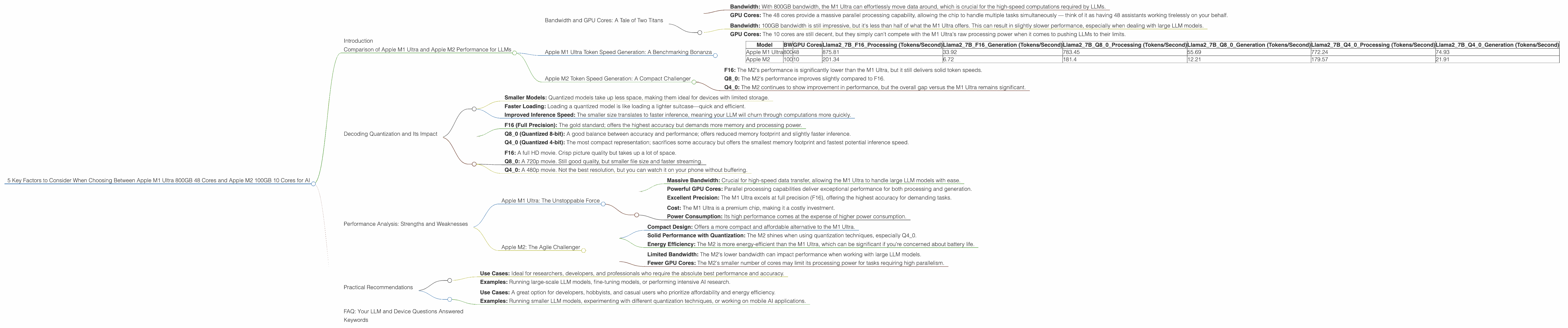
Bandwidth and GPU Cores: A Tale of Two Titans
The Apple M1 Ultra is a powerhouse, boasting a whopping 800GB of bandwidth and 48 GPU cores. Think of it as a cheetah—fast, agile, and ready to pounce on any challenging task. Meanwhile, the Apple M2 chip has a smaller footprint, with 100GB of bandwidth and 10 GPU cores. It's like a nimble fox, smaller but still capable of impressive feats.
Let's break down the implications of these differences:
M1 Ultra:
- Bandwidth: With 800GB bandwidth, the M1 Ultra can effortlessly move data around, which is crucial for the high-speed computations required by LLMs.
- GPU Cores: The 48 cores provide a massive parallel processing capability, allowing the chip to handle multiple tasks simultaneously — think of it as having 48 assistants working tirelessly on your behalf.
M2:
- Bandwidth: 100GB bandwidth is still impressive, but it's less than half of what the M1 Ultra offers. This can result in slightly slower performance, especially when dealing with large LLM models.
- GPU Cores: The 10 cores are still decent, but they simply can't compete with the M1 Ultra's raw processing power when it comes to pushing LLMs to their limits.
Now, let's quantify these differences with some real-world LLM performance data!
Apple M1 Ultra Token Speed Generation: A Benchmarking Bonanza
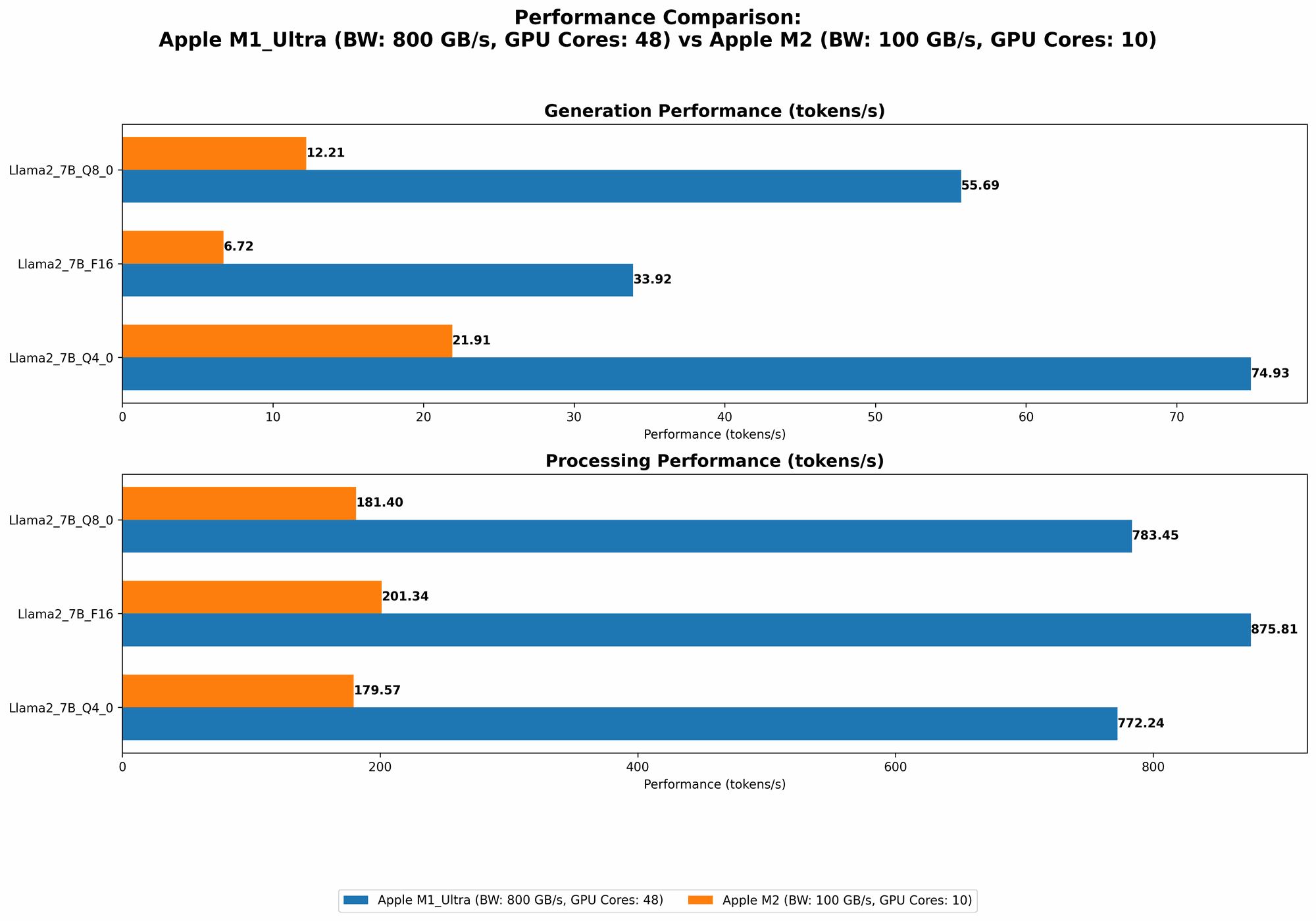
Our test subject is none other than the Llama 2 7B LLM. We'll be looking at its performance across different quantization levels (F16, Q80, Q40) for both processing and generation tasks.
| Model | BW | GPU Cores | Llama27BF16_Processing (Tokens/Second) | Llama27BF16_Generation (Tokens/Second) | Llama27BQ80Processing (Tokens/Second) | Llama27BQ80Generation (Tokens/Second) | Llama27BQ40Processing (Tokens/Second) | Llama27BQ40Generation (Tokens/Second) |
|---|---|---|---|---|---|---|---|---|
| Apple M1 Ultra | 800 | 48 | 875.81 | 33.92 | 783.45 | 55.69 | 772.24 | 74.93 |
| Apple M2 | 100 | 10 | 201.34 | 6.72 | 181.4 | 12.21 | 179.57 | 21.91 |
Observations:
- F16: The M1 Ultra crushes the M2 in both processing and generation, generating almost 5 times more tokens per second for processing and over 5 times for generation.
- Q8_0: The M1 Ultra still dominates, but the gap has narrowed slightly. Processing performance is roughly 4.3 times higher for the M1 Ultra, while generation is over 4.5 times higher.
- Q4_0: The M1 Ultra maintains its lead for processing performance, generating nearly 4.3 times more tokens per second. However, in generation, the M1 Ultra has a slightly more considerable advantage, generating around 3.4 times more tokens per second.
Key Takeaway: The M1 Ultra consistently outperforms the M2 in both processing and generation speed. This is especially pronounced at higher precision levels like F16.
Apple M2 Token Speed Generation: A Compact Challenger
While the M2 might not be as bulky or boast the same raw power as the M1 Ultra, it still holds its own in the LLM arena. It's more budget-friendly and certainly not a slouch.
Observations:
- F16: The M2's performance is significantly lower than the M1 Ultra, but it still delivers solid token speeds.
- Q8_0: The M2's performance improves slightly compared to F16.
- Q4_0: The M2 continues to show improvement in performance, but the overall gap versus the M1 Ultra remains significant.
Key Takeaway: The M2 might not have the same horsepower as the M1 Ultra, but it still delivers respectable performance, especially when using quantization techniques like Q80 and Q40. This makes it a more affordable option for users who may not require absolute top performance.
Decoding Quantization and Its Impact
Quantization is a clever technique that reduces the memory footprint of LLM models without sacrificing too much accuracy (think of it like a diet for LLMs!). It essentially replaces the full-precision floating-point numbers (F16) with smaller, more compact representations (Q80, Q40).
Here's why quantization is a game-changer:
- Smaller Models: Quantized models take up less space, making them ideal for devices with limited storage.
- Faster Loading: Loading a quantized model is like loading a lighter suitcase—quick and efficient.
- Improved Inference Speed: The smaller size translates to faster inference, meaning your LLM will churn through computations more quickly.
How quantization affects performance:
- F16 (Full Precision): The gold standard; offers the highest accuracy but demands more memory and processing power.
- Q8_0 (Quantized 8-bit): A good balance between accuracy and performance; offers reduced memory footprint and slightly faster inference.
- Q4_0 (Quantized 4-bit): The most compact representation; sacrifices some accuracy but offers the smallest memory footprint and fastest potential inference speed.
Think of it like this:
- F16: A full HD movie. Crisp picture quality but takes up a lot of space.
- Q8_0: A 720p movie. Still good quality, but smaller file size and faster streaming.
- Q4_0: A 480p movie. Not the best resolution, but you can watch it on your phone without buffering.
The Bottom Line: Quantization is a powerful tool for optimizing LLM performance, especially when working with resource-constrained devices like the M2.
Performance Analysis: Strengths and Weaknesses
Apple M1 Ultra: The Unstoppable Force
Strengths:
- Massive Bandwidth: Crucial for high-speed data transfer, allowing the M1 Ultra to handle large LLM models with ease.
- Powerful GPU Cores: Parallel processing capabilities deliver exceptional performance for both processing and generation.
- Excellent Precision: The M1 Ultra excels at full precision (F16), offering the highest accuracy for demanding tasks.
Weaknesses:
- Cost: The M1 Ultra is a premium chip, making it a costly investment.
- Power Consumption: Its high performance comes at the expense of higher power consumption.
Apple M2: The Agile Challenger
Strengths:
- Compact Design: Offers a more compact and affordable alternative to the M1 Ultra.
- Solid Performance with Quantization: The M2 shines when using quantization techniques, especially Q4_0.
- Energy Efficiency: The M2 is more energy-efficient than the M1 Ultra, which can be significant if you're concerned about battery life.
Weaknesses:
- Limited Bandwidth: The M2's lower bandwidth can impact performance when working with large LLM models.
- Fewer GPU Cores: The M2's smaller number of cores may limit its processing power for tasks requiring high parallelism.
Practical Recommendations
Apple M1 Ultra:
- Use Cases: Ideal for researchers, developers, and professionals who require the absolute best performance and accuracy.
- Examples: Running large-scale LLM models, fine-tuning models, or performing intensive AI research.
Apple M2:
- Use Cases: A great option for developers, hobbyists, and casual users who prioritize affordability and energy efficiency.
- Examples: Running smaller LLM models, experimenting with different quantization techniques, or working on mobile AI applications.
FAQ: Your LLM and Device Questions Answered
1. What are LLMs, and why should I care?
LLMs are like super-intelligent robots that can understand and generate human-like text. They can be used for a wide range of tasks, including writing code, translating languages, summarizing articles, and even creating art! So, if you're interested in exploring the world of AI, LLMs are a fantastic place to start.
2. What is quantization, and how does it affect LLM performance?
Think of quantization as a diet for LLMs. It takes these large, complex models and compresses them without sacrificing too much accuracy. This results in smaller, faster, and more efficient models, perfect for devices with limited resources.
3. Which chip should I choose: M1 Ultra or M2?
The M1 Ultra is the top dog, offering the best performance for those who need maximum power. But the M2 is a more affordable and energy-efficient alternative, making it a great choice for many users.
4. Do I need a powerful computer to run LLMs?
The more powerful your computer, the better your LLM experience. But even a mid-range device can handle smaller LLMs, and you can always use quantization techniques to optimize performance.
5. Can I run an LLM on my phone?
Yes, you can! LLMs are becoming increasingly accessible on mobile devices. Companies like Google and Apple are developing specialized chips and software frameworks to make this possible.
6. Are there any other options besides Apple M1 Ultra and M2?
Absolutely! There are many other powerful chips designed for AI, such as NVIDIA GPUs, Intel CPUs, and even Google TPUs. Explore your options and choose the best fit for your needs and budget.
7. Are there any alternatives to using a local computer for running LLMs?
You can also access LLMs through cloud services like Google Colab, Amazon SageMaker, and Azure Machine Learning. This allows you to leverage powerful cloud infrastructure without the need for a high-end computer.
Keywords
Apple M1 Ultra, Apple M2, LLM, large language model, AI, artificial intelligence, performance, token speed, generation, processing, bandwidth, GPU cores, quantization, F16, Q80, Q40, accuracy, efficiency, cost, power consumption, practical recommendations, use cases, FAQ, cloud services